
You finish the client work, update your task list, answer messages, and move the project forward. Then Friday comes, and you have another job waiting: reconstruct the entire week so you can explain what happened. If you want to know how to write a status report without creating hours of extra admin, the answer is not to start with a blank document. Start with the project information you already have.
That distinction matters for freelancers who are already stretched thin. Asana’s 2023 Anatomy of Work research found that knowledge workers spent 58% of their day on “work about work,” meaning coordination rather than the skilled work they were hired to do. The same research found that workers estimated better processes could save them 4.9 hours every week.
Your weekly report should not become more work about work. The task list should supply the raw information. Your job is to decide what matters, translate it into language the client understands, and make the project’s current position clear.
A useful status report answers four basic questions: what was completed, what is still moving, what happens next, and whether anything is waiting on a decision, input, or action.
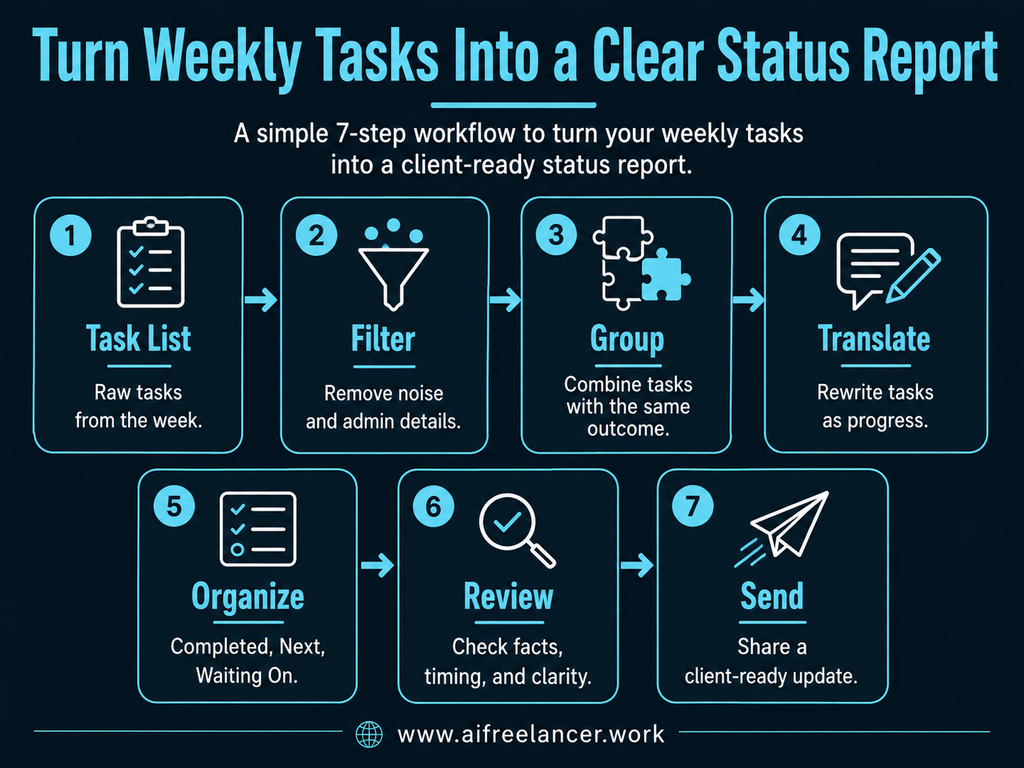
The basic process is simple:
Task list → filter → group → translate → organize → review → send
Everything I’ve shared here—and more—is in my book, available on Amazon. Click the link if you’re ready to take the next step.
How to Write a Status Report Clients Can Understand
Clients rarely need a diary of everything you did during the week. They need enough information to understand where the project stands and whether anything requires their attention. That sounds obvious until you look at a typical task list.
A perfectly organized project board may contain notes such as “revise H1,” “check citations,” “update wireframe,” and “send V2.” Those labels make sense to you because you know the project. The client may see nothing more than a collection of chores.
What a Client Status Report Should Accomplish
A client status report should give someone a useful picture of the project without requiring them to open your task manager, review old emails, or ask you what happens next.
Depending on the project, that may mean summarizing progress during the reporting period, completed deliverables or milestones, current work, upcoming priorities, blockers or risks, timeline or scope changes, and any decisions or input you need from the client.
The Project Management Institute has long emphasized this distinction. Its guidance on effective status reporting recommends focusing on accomplishments, risks, issues, and information stakeholders need rather than simply recounting week-to-week activity.
Before adding a completed task, ask:
What changed for the project because this task was completed?
A deliverable is ready for review. A decision was resolved. The project moved into another phase. A potential delay appeared. The client now needs to approve something. If nothing meaningful changed, the task may not deserve space in the report.
Status Report vs. Task List
A task list records work. A status report explains what that work means.
Suppose your task manager says:
Revised homepage headline.
That accurately records the task, but it leaves the client wondering what happened next. A more useful client update might say:
Updated the homepage headline based on Tuesday’s feedback. The revised copy is ready for review.
The task is still there, but now it carries context, an outcome, and a next step.
How to Write a Status Report From Your Task List
The hardest part often happens before you write a single sentence. A week’s worth of project activity may be scattered across a project-management tool, email, chat, documents, and your calendar.
Do not rebuild the project’s entire history. You only need the information from the week you are reporting on.
Step 1: Gather This Week’s Project Activity
Start with your main source of truth, whether that is your task manager, project board, spreadsheet, or another system. Check other sources only when something there changed the project.
Sort what you find into four temporary categories:
- completed
- in progress
- waiting or blocked
- upcoming
You are not writing the report yet. You are creating a clean pool of information from which to build it. This matters because communication already consumes a large share of working time.
Microsoft’s Work Trend Index found that the average employee in its Microsoft 365 data spent 57% of working time communicating through meetings, email, and chat, compared with 43% creating in documents, spreadsheets, and presentations.
A repeatable reporting process should reduce the amount of time you spend moving information between those places. If repetitive admin is showing up elsewhere in your work too, building simple systems around the tasks you repeat can reduce more of that manual coordination.
Step 2: Remove Task-Level Noise
Once you have the week’s activity, remove details that help you manage your own work but do not help the client understand the project.
That usually means cutting tiny subtasks, internal reminders, duplicate entries, administrative actions, technical notes the client does not need, and routine steps that did not materially change the project.
For example, “uploaded file,” “shared link,” and “sent notification” may all appear in your activity history. If the important fact is that the draft was delivered for review, report that once.
Use a second question:
Would the client understand the project’s status differently if this detail disappeared?
The first question helps you decide whether the work matters. This one helps you decide whether the detail deserves space in the update.
Step 3: Group Related Tasks Before You Rewrite Them
You may have four, five, or ten individual tasks that all contributed to one result. Reporting each one separately makes a normal week look unnecessarily complicated.
Suppose your task list contains:
- researched three competitors
- reviewed keyword data
- identified content gaps
- created article recommendations
Those tasks all led to the same result: the research phase produced a clear content direction. At this stage, you are only deciding which tasks belong together. Group tasks when they contribute to the same result, not simply because they occurred on the same project.
Do not combine unrelated work just to make the report shorter. If the tasks produced different outcomes, they may deserve separate treatment.
Turn Tasks Into Progress the Client Can See
Once you have removed the noise and grouped related tasks, you can start writing the actual client update.
How to Write a Status Report Without Dumping Every Task
A simple way to rewrite task information is:
Task + result + why it matters
Ask three questions:
- What did I do?
- What changed?
- Does the client need to know why it matters?
Instead of:
Sent draft.
write:
Completed the first draft and sent it for review. Feedback can now be incorporated before final delivery.
You do not always need to spell out all three parts. If the result already makes the significance obvious, stop there. Adding another sentence just to explain why the client should care can make a concise status update feel padded.
For example:
Completed the landing page draft and sent it for review.
That sentence already tells the client what changed and what happens next.
The report does not need to make ordinary work sound dramatic. It simply needs to explain what changed.
Turn Several Small Tasks Into One Meaningful Result
Once you know which tasks belong together, rewrite the group as one client-facing result. For the research example above, you could write:
Completed the competitive content review and identified the primary keyword and content opportunities for the article.
This is particularly useful when your work involves many small steps. Research, editing, design revisions, technical setup, and quality checks can generate long task lists, even when the client really needs to know only about one resulting deliverable or decision.
Connect the Result to a Project Milestone
Individual tasks become more useful when the client can see how they affect the broader project.
Compare:
Finished five tasks this week.
with:
Research and outlining are complete, so the project is ready to move into drafting.
The second version gives the client a sense of project progress, completion status, and what happens next.
See the Full Task-To-Report Transformation
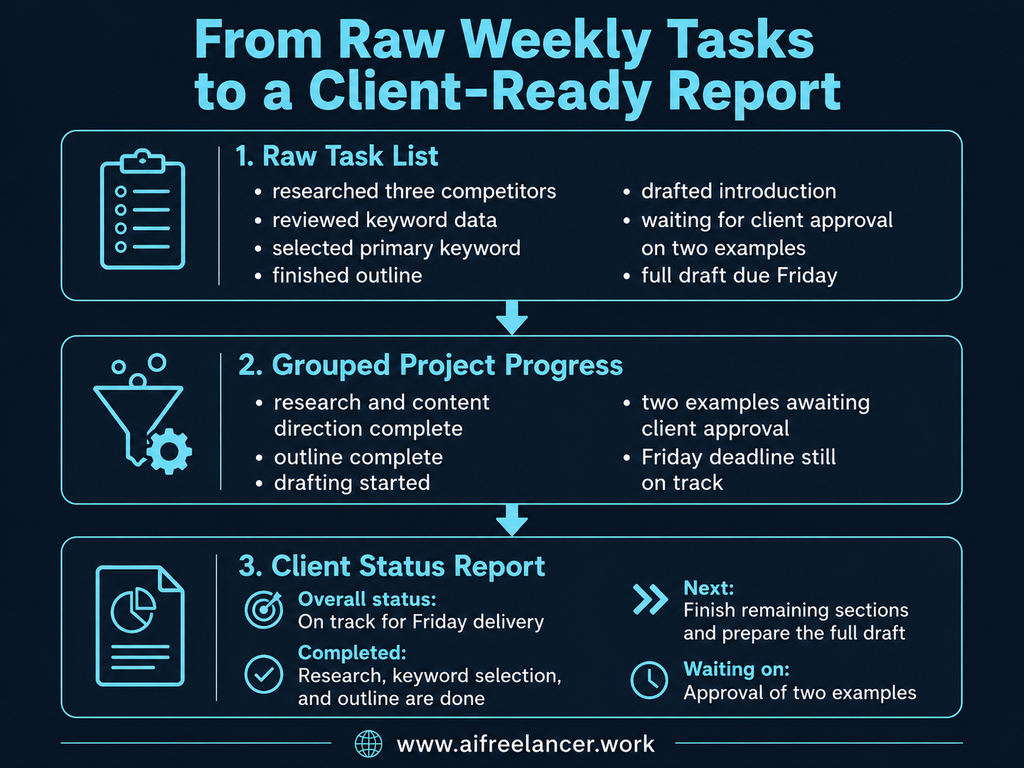
Imagine this is your raw task list for the week:
- researched three competitors
- reviewed keyword data
- selected primary keyword
- finished outline
- drafted introduction
- waiting for client approval on two examples
- full draft due Friday
After filtering and grouping, you might reduce that to:
- research and content direction complete
- outline complete
- drafting started
- two examples awaiting client approval
- Friday deadline still on track
The final client status report could read:
Overall status: The project remains on track for Friday delivery.
Completed: Research, keyword selection, and outlining are complete, and drafting has started.
Next: I’ll complete the remaining sections and prepare the full draft for review.
Waiting on: Approval of the two proposed examples. If approval comes by Wednesday, the Friday deadline remains unchanged.
The raw task list contained seven items. The client only needed four pieces of information.
How to Write a Status Report for Incomplete Work and Blockers
A project does not stop being reportable because nothing crossed the finish line this week. Research may still be underway, a draft may be half finished, or you may be waiting for approval before you can continue. The mistake is treating everything unfinished as simply “in progress.”
How to Write a Status Report From Incomplete Work
Avoid vague updates such as:
Still working on the article.
Instead, describe the current position:
The first three sections are drafted. The remaining sections are scheduled for completion next week.
The reader can now see that work has moved forward and knows what remains.
You may also have a week when very little is technically “completed.” Perhaps most of your time went into research, revisions, approvals, or resolving a difficult issue. Do not invent accomplishments to make the report look busy. Explain the genuine movement.
For example:
This week focused on validating the research and resolving conflicting source data before drafting begins. The research review is almost complete, and drafting remains scheduled to start Monday.
That is more informative than padding the report with minor tasks.
Turn Unfinished Tasks Into Clear Next Steps
The next step should tell the client where the project is going, not merely repeat the name of your next task.
Instead of:
Next: write conclusion.
write:
Next, I’ll complete the remaining sections and prepare the full draft for review.
A good weekly project update should create continuity between this reporting period and the next one.
Tell the Client When Something Is Blocking Progress
A blocker means the work cannot continue. A dependency means progress relies on another input or event. A risk could affect the project but has not stopped it yet. You usually do not need a project-management lecture to explain any of them. You need to tell the client what the issue means.
Instead of:
Waiting for feedback.
write:
I need approval on the homepage direction before I can finalize the remaining copy.
If timing matters, say so:
Final page layout is waiting on the product images. If they arrive by Wednesday, Friday delivery remains on schedule.
Neither update blames anyone. Both make clear what is needed and what happens if the input arrives on time.
A new task is not automatically a scope change. Flag it when it falls outside the agreed deliverable, revision allowance, timeline, or fee and changes what you agreed to produce or when you agreed to deliver it.
How to Write a Status Report That Stays Short
Once you know how much happened during the week, the temptation is to include all of it. That usually produces the opposite of clarity.
A status report is not valuable because it is comprehensive. It is valuable because the reader can quickly understand what matters.
How to Write a Status Report Clients Will Actually Read
A simple information hierarchy works for many freelance projects: overall status first, then meaningful progress, next steps, and finally blockers or decisions. For shorter routine updates, you can simplify this further with a three-part format that shows what is done, what comes next, and what is blocked.
If too many important things happened, prioritize them by consequence. Client action or decisions come first, followed by timeline or scope changes, major deliverable or milestone progress, and routine progress.
When your draft contains too much information, cut administrative activity first. Then summarize routine work. Preserve major deliverable progress, anything affecting the timeline or scope, and anything requiring client action.
Atlassian similarly recommends keeping status reports brief, clear, and direct while covering areas such as achievements, blockers, action items, scope, and timeline.
Put the Most Important Information First
A client who reads only the beginning of the report should still understand the current situation. A short opening can answer whether the project is on track, what changed this week, and whether the client needs to do anything.
For example:
The project remains on schedule. Research and outlining were completed this week, and drafting begins Monday. No client action is needed at this stage.
Giving clients this kind of visibility consistently can also reduce unnecessary “just checking in” messages because they already know where the project stands and when to expect the next update.
Use AI to Draft and Review the Report Faster
You do not need a large collection of tools to make that work. The next step is building a small workflow stack that handles the essentials without adding more complexity.
Give AI a Clean List of What Happened This Week
Do not ask an AI tool to guess what happened from a pile of unrelated conversations.
Give it organized information such as:
- completed
- in progress
- upcoming
- blocked
- client actions needed
You can then ask it to group related tasks, remove repetition, and rewrite task-level language into a concise client status report.
If the project contains confidential information, be careful about what you paste into an AI tool. Check the tool’s data-handling settings and your agreement with the client before sharing sensitive project details, proprietary material, or personal information.
Use AI to Rewrite the Task List
Suppose your raw task data says:
- revised intro
- fixed citations
- added two examples
- waiting for client’s screenshot
- draft due Friday
AI could help turn that into:
This week, I revised the article introduction, verified the citations, and added two practical examples. The draft remains on track for Friday, pending the screenshot needed for the final section.
That saves rewriting time without asking the tool to decide whether the project is actually on track.
Check the Report Before You Send It
Before sending, verify that completed items are genuinely complete, deadlines are correct, blockers are current, client requests are represented correctly, and no progress has been exaggerated.
Then skim the report as if you were the client. Can you tell what was accomplished, what is happening now, whether anything affects the deadline, and whether you need to take action?
If those answers are obvious, the report is probably doing its job.
What Is Included in a Status Report?
A status report usually includes the project’s current position, meaningful progress since the previous update, work still in progress, upcoming tasks or milestones, and any blockers, risks, decisions, or actions that need attention. For freelance client work, you may not need formal sections for budget or resources unless they are relevant to the project.
How Do You Write a Status Report?
Start by gathering current project information, remove task-level details that do not matter to the reader, group related activities, and rewrite the remaining work in terms of results and project progress. Then add next steps, blockers, required client actions, and a short overall status before reviewing the report for accuracy.
What Do You Mean by a Status Report?
A status report is a periodic update explaining where a project currently stands. It gives clients or other stakeholders a concise view of progress, current work, upcoming priorities, and anything that could affect delivery.
What Are the Three Types of Status Reports?
There is no universal set of exactly three types. Status reports are commonly grouped by cadence, such as daily, weekly, monthly, or quarterly, or by their purpose and audience.
How Do I Write a Daily Status Report?
A daily status report should be even shorter than a weekly report. Focus on what changed that day, what remains in progress, what comes next, and whether anything is blocked. Avoid repeating routine tasks unless they materially affected the project.
Final Thoughts
Learning how to write a status report becomes much easier when you stop treating reporting as a separate project. Most of the raw information already exists in your task list, project board, calendar, and client communication.
A simple weekly routine is enough:
Collect → Categorize → Convert → Check → Send
Collect the week’s relevant activity. Categorize what is completed, active, upcoming, or blocked. Convert task-level information into results. Check the facts and make sure the client knows what happens next. Then send the update through the channel you have agreed to use.
The task manager tells you what happened. The status report tells the client what it means.
If you want more practical systems for using AI to simplify freelance writing, workflows, and client work, explore my books on Amazon.
Sources
- Asana — Anatomy of Work Global Index 2023 — https://asana.com/press/releases/pr/asana-anatomy-of-work-global-index-2023-smart-collaboration-and-clear-goals-integral-to-creating-positive-business-opportunities/5957f2bd-2a85-4ea1-93ed-6c507b478954
- Microsoft — Will AI Fix Work? — https://www.microsoft.com/en-us/worklab/work-trend-index/will-ai-fix-work
- Project Management Institute — Anatomy of a Highly Effective Status Report — https://www.pmi.org/learning/library/2019/04/07/15/03/anatomy-highly-effective-status-report-2198
- Atlassian — How to Write a Project Status Report — https://www.atlassian.com/blog/teamwork/how-to-write-a-project-status-report

Florence De Borja is a freelance writer, content strategist, and author with 14+ years of writing experience and a 15-year background in IT and software development. She creates clear, practical content on AI, SaaS, business, digital marketing, real estate, and wellness, with a focus on helping freelancers use AI to work calmer and scale smarter. On her blog, AI Freelancer, she shares systems, workflows, and AI-powered strategies for building a sustainable solo business.