
You automate one task to save time. Then you add another app to connect it, another dashboard to watch it, and another reminder to check whether everything ran correctly. Before long, small business automation is creating the very thing it was supposed to remove: more work to manage.
This is especially frustrating when you already have email, a calendar, project software, documents, spreadsheets, and AI tools. You do not necessarily need another platform. You need the smallest system that actually works
If you want to step back and look at the broader approach, building simpler automation systems for freelance work starts with the same principle: remove recurring coordination before adding more technology.
I call that a minimum viable automation stack: the smallest system that can reliably handle one useful workflow. You start with one recurring problem, use tools you already have where possible, automate the predictable parts, and keep human judgment where it matters.
It also helps to distinguish three levels. Task automation handles one action automatically. Workflow automation connects several steps. An automation system is the broader setup of tools, information, rules, and checkpoints that support those workflows. If you want to go deeper into that middle layer, my guide to AI workflow automation explains when simple and complex workflows make sense.
Everything I’ve shared here—and more—is in my book, available on Amazon. Click the link if you’re ready to take the next step.
Small Business Automation Should Remove Work, Not Add More
A useful automation should leave you with less work to manage once it is running. If you are spending Monday morning fixing what your automation did over the weekend, the problem may be the system rather than the amount of automation.
Why Automation Becomes Another Form of Busywork
Small businesses already use a surprising amount of technology. The U.S. Chamber of Commerce reported in 2025 that 58% of small businesses use four or more technology platforms, while nearly all use at least one.
That does not mean four tools are too many. It means every additional platform comes with a cost. You have another login, another data source, another set of settings, and another place to check when something does not happen as expected.
That is also why it helps to recognize when too many tools start creating more work instead of assuming another app will solve the problem.
An automation project can easily get out of hand. You start with a five-minute manual task and end up building a system involving a form, spreadsheet, AI tool, connector, project manager, and notification app. The automation may run correctly, but you now have several moving parts supporting something you used to handle in minutes.
Start With Repetitive Tasks, Not Automation Tools
Tool shopping feels productive because it gives you something concrete to compare. But the more useful starting question is: What do I keep doing manually that follows roughly the same pattern every time?
Look for recurring work such as:
- copying information between apps
- creating routine tasks
- sending reminders
- updating project records
- preparing recurring reports
- sorting incoming information
These are strong candidates because the rules are usually visible. You can describe what triggers the task, what normally happens next, and what a correct result looks like.
When Small Business Automation Is Actually Worth Doing
Not every annoying task deserves a workflow. Before automating something, look at three practical factors: frequency, friction, and predictability.
Frequency asks how often the work occurs. Friction considers the time, interruptions, context switching, and mental energy involved. Predictability asks whether the steps stay similar from one occurrence to the next.
Consider two tasks. One takes five minutes but happens fifteen times a week and follows almost the same steps each time. Another takes forty-five minutes but happens once a month and changes depending on the client. The shorter, frequent, predictable task is often the better first choice because it removes more recurring friction with less complexity.
The payoff is also broader than saved minutes. According to an August 2026 small-business survey summarized by the U.S. Chamber of Commerce, 24% of U.S. small businesses said AI had shortened their workdays, compared with 12% who said it had made them longer. That is a useful standard for automation in general: the technology should reduce the work surrounding your real work, not stretch the day further.
What Is a Minimum Viable Automation System?
“Start small” is common automation advice. The harder question is what small actually looks like once you need the system to work reliably.
Small Business Automation Needs Only a Few Core Parts
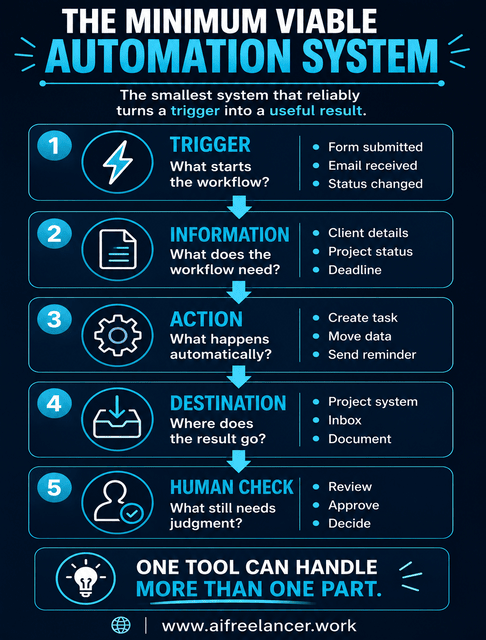
A minimum viable automation system is the smallest combination of tools and steps that can take one recurring process from a trigger to a useful result reliably:
Trigger → Information → Action → Destination → Human Check
Suppose someone submits an inquiry through your website. The inquiry starts the process. Their details provide the information. Your system creates a follow-up task. That task appears in the project system you already use. You then review the inquiry and decide how to respond.
That is already a functioning automation system. Those five components do not need five separate apps.
A minimum viable system also needs a clear boundary. In the inquiry example, the workflow might end when the follow-up task is created. It does not automatically need to continue through lead qualification, proposal creation, onboarding, invoicing, and follow-up.
Trigger and Information: What Starts the Workflow and Feeds It
The trigger is the event that starts the automation. It could be a form submission, an incoming email, a changed project status, a new file, or a recurring schedule.
The next issue is information. Automation gets unreliable quickly when inputs are scattered. Imagine automating a weekly client update when project status lives partly in your inbox, partly in notes, partly in chat, and partly in a task manager.
A source of truth matters because the workflow needs one dependable place to find current information. For a client update, that might mean one project record containing the current status, next milestone, deadline, and blockers. If the workflow has to pull status, feedback, and scope changes from several places, the automation inherits the same confusion you already have manually.
Action and Destination: What Happens and Where the Result Goes
The action is what you want the system to do. It might copy data, categorize an inquiry, create a task, generate a summary, or draft an update.
The result also needs a useful destination. A task should appear where you manage tasks. A draft should land somewhere you will review it. A reminder should reach you where you actually pay attention.
If the next step is completely known, use rule-based automation. AI becomes useful when the workflow needs to work with language or meaning, such as summarizing meeting notes, classifying an inquiry, extracting deadlines, or drafting a client update.
The U.S. Chamber of Commerce found that 58% of small businesses reported using generative AI in 2025, up from 40% in 2024 and 23% in 2023. The practical question is where AI actually earns a place in the workflow.
Human Review: What Should Stay Under Your Control
Some work is easy to automate but unwise to automate completely. Client-facing messages, strategic choices, financial commitments, nuanced writing, unusual requests, and decisions with meaningful consequences deserve a human checkpoint.
Automate coordination before automating judgment.
For example, let automation gather project changes and prepare a client-update draft. You still decide whether the update is accurate and ready to send.
Exceptions can stay human too. If most inquiries follow the same pattern but a smaller number involve unusual requirements or existing-client issues, automate the normal path and send the unusual cases to yourself.
McKinsey similarly notes that many current AI applications work best with human involvement where expertise and judgment remain important.
Recovery: What Happens When the Automation Fails
A first automation should not only work when everything goes right. You should also know what to do when it does not.
Recovery means knowing something failed, having a manual fallback, and making sure the failure does not trigger bad later steps. A failed reminder is inconvenient. An automation that sends the wrong client message or creates duplicate invoices is more serious.
For a low-risk first automation, recovery should be straightforward. You notice the problem, finish the task manually, and fix the workflow later.
Build Small Business Automation Around One Painful Workflow
Your best first automation is probably not the most impressive one you could build. It is the recurring process you are tired of touching manually.
Map the Workflow Before Automating It
Before connecting anything, write down what currently happens:
Trigger → Step → Step → Decision → Output
Suppose a new client accepts a proposal. You create a project folder, add the deadline to your calendar, create tasks, save the brief, and send an onboarding message.
Mapping makes the handoffs visible. If you copy the same project name, client name, deadline, and brief information into several places every time, you have found repetitive coordination work.
Don’t Automate a Broken Process
Once you can see the workflow, simplify it before automating it. Suppose a website form sends client details to your email. You copy them into a spreadsheet and later into project software. You could automate both transfers.
But first ask whether you need the spreadsheet at all. If the project system can hold the information you actually use, deleting one destination may save more work than automating the unnecessary middle step.
The same logic applies to other process problems. Remove duplicate entry, clarify ownership, eliminate unnecessary approvals, and standardize naming or statuses before building automation around them.
Know When Not to Automate
Even after you simplify a process, some work is still a poor automation candidate. Think twice when the work is:
- rare
- highly variable
- dependent on nuanced judgment
- emotionally sensitive
- difficult to reverse
- quicker to do manually than to maintain automatically
For a freelancer, personally replying to an unusual client concern may take ten minutes and still be the better option.
What Small Business Automation Looks Like in Practice
Automation can sound more complicated in theory than it looks in actual work. A useful system may remove only two or three manual steps.
Example 1: Client Inquiry to Organized Follow-up
Before automation, a prospect completes your website form. You receive an email, copy their details somewhere, create a reminder, and then decide whether to reply.
A lean workflow could look like this:
Website form → client details stored → follow-up task created → you review the inquiry
The automation removes the repeated coordination around recording details and remembering to follow up while keeping qualification and communication human.
Example 2: Meeting Notes to Action Items
Meetings often create a second round of work after the call ends. You reread the notes, identify decisions, extract next steps, create tasks, and update the project.
Meeting notes → AI summary → tasks created → you review priorities
AI adds value here because the workflow needs to interpret language. You still check that the AI understood the decisions correctly before treating the tasks as final.
Example 3: Project Progress to Client Update
A recurring client update is another good candidate:
Project data → changes gathered → update drafted → you approve
Instead of reconstructing the week from memory, the system starts from current project information. You review the draft, add context if necessary, and send it.
Small Business Automation Tools: Choose Functions Before Brands
Once you know what the workflow needs to do, tool selection becomes much easier. Instead of starting with product comparisons, start with the functions the workflow requires. The same approach makes it easier to decide how many tools your workflow really needs instead of building a stack around features you may never use.
What Your Small Business Automation Tools Actually Need to Do
Most systems need some combination of these functions:
- capture information
- store information
- detect a trigger
- move data
- interpret or generate information
- notify someone
- create an output
Before adding a tool, check whether it fits the software and process you already use, whether you can troubleshoot it yourself, and whether the subscription and upkeep are worth the time saved.
Privacy matters too. If a connected tool can access client briefs, financial information, customer records, or confidential documents, check what information it stores and what permissions you are granting. The National Institute of Standards and Technology’s AI Risk Management Framework provides a useful reference for thinking about reliability, privacy, security, and transparency.
Use Built-in Automation Before Adding Another Platform
Look at the software you already pay for. Your email platform may have rules and filters. Your calendar may generate reminders. Your project manager may create recurring tasks or change statuses automatically.
Using native features has one major advantage: fewer connections to maintain. Only add a dedicated automation platform when the gap is clear.
When an Automation Platform Becomes Necessary
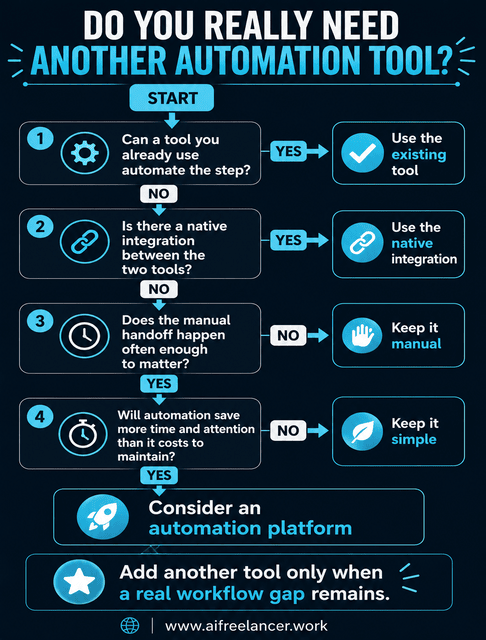
A connector such as Zapier, Make, n8n, or a similar platform becomes useful when important applications cannot communicate directly or when repeated manual handoffs remain between them.
The deciding question is whether the additional connection removes enough manual work to justify its setup, cost, and maintenance.
How to Know When Your Automation Stack Is Too Complicated
A workflow with more moving parts has more places to check when something stops working. Complexity can be useful, but only when those extra pieces are solving a real problem.
Warning Signs of Automation Overload
Your system may have grown too far when:
- you cannot explain the workflow simply
- you regularly troubleshoot failed runs
- several tools perform overlapping jobs
- you are unsure which system holds the current information
- small process changes break several automations
Small Business Automation Should Reduce Cognitive Load Too
Time saved is not the only return. A good system can also reduce the things you have to remember, the statuses you need to check, the amount of context switching in your day, and the repetitive decisions you keep making.
Saving five minutes is not much of a win if the automation leaves you wondering whether the information synced correctly.
Count the Full Cost of Automation
A useful automation has costs beyond the monthly subscription. Setup takes time. Running may involve software or usage fees. Maintenance means fixing integrations and updating rules when your process changes.
Imagine one workflow saves twenty minutes per week but requires another paid subscription and frequent troubleshooting. A simpler built-in automation might save only ten minutes per week but require almost no maintenance. The second may create more actual value because it costs less money and attention to keep running.
When to Expand Beyond the Minimum Viable System
Once a simple automation is stable, your work will usually show you where the next useful addition belongs.
Add Another Automation When a New Bottleneck Becomes Obvious
Expansion makes sense when volume grows, or a repeated manual interruption appears. Perhaps inquiries are captured automatically, but manually creating project folders has become tedious. Perhaps project tasks are organized, but you still spend every Friday collecting statuses for client reports.
Add AI Only When the Workflow Needs Interpretation
If the next recurring slowdown involves summarizing, classifying, extracting information, drafting, or recognizing patterns, AI may be the right next layer. If the step still follows a fixed rule, ordinary automation is usually simpler.
Expand One Bottleneck at a Time
When the current system is stable, look for the next place where manual work repeatedly interrupts the flow. Building one layer at a time makes it easier to see whether each addition actually improved the way you work.
A Simple Small Business Automation Starting Framework
Choose one recurring frustration and answer five questions:
- What recurring task keeps interrupting my real work?
- What triggers it?
- Which steps happen almost the same way every time?
- Which parts still require human judgment?
- What is the fewest number of tools needed to handle the repeatable parts?
Then build only enough automation to solve that problem. Run it, fix the friction you discover, and expand only when another recurring problem becomes obvious.
If you are starting from scratch, the next step is to set up a simple workflow without overcomplicating it so you can test the process before adding another layer.
What Can I Automate in My Small Business?
Start with repetitive work that follows a predictable pattern. Common candidates include lead capture, appointment reminders, invoice follow-ups, task creation, data entry, meeting summaries, client-update preparation, and recurring reports.
How Much Does It Cost to Automate a Small Business?
The cost can range from nothing beyond software you already use to several paid subscriptions or a custom implementation. Consider setup time, software costs, maintenance, troubleshooting, and monitoring.
Which Is Better for Small Business Automation: Zapier, Make, or N8n?
There is no universal winner. Zapier is commonly chosen for straightforward integrations, Make for visual multi-step workflows, and n8n for users who want more flexibility and control.
Before choosing any of them, check whether your existing software or a native integration can solve the problem.
Do I Need Coding Knowledge to Automate My Small Business?
Not for many common workflows. No-code and low-code tools can connect applications, create triggers, move information, send notifications, and run conditional steps.
Technical skills become more important when workflows involve APIs, custom data transformations, extensive error handling, security requirements, or unusual integrations.
How Do I Know When My Automation Is Too Complicated?
Your automation may be too complicated when you spend too much time checking failures, fixing integrations, managing overlapping tools, or figuring out where the current information lives.
If maintaining the setup regularly consumes more effort than the work it replaces, simplify it.
Sources
- Ellingrud, K., Sanghvi, S., Dandona, G. S., Madgavkar, A., Chui, M., White, O., & Hasebe, P. (2023, July 26). Generative AI and the future of work in America. McKinsey Global Institute.
- National Institute of Standards and Technology. (2023, January 26). AI risk management framework. NIST
- Sullivan, T. M. (2023, February 27; updated 2026, October 31). Small business outlook: Small businesses remain resilient, expect sales and revenue to improve. U.S. Chamber of Commerce.
- U.S. Chamber of Commerce. (2025, August 18). The majority of small businesses embrace artificial intelligence
Final Thoughts
Small business automation does not need to begin with an elaborate technology stack. Your first useful system may contain only a trigger, reliable information, one automated action, a destination you already use, a human checkpoint, and a simple way to recover when something fails.
Start with the recurring piece of work you are tired of coordinating manually. Build the smallest system that removes it. Once that system runs reliably, add more only when another recurring slowdown or manual handoff makes it worthwhile.
If you want more practical systems for using AI in freelance work, writing, and business without adding unnecessary complexity, explore my books on my Amazon Author page. They go deeper into building workflows that save time while keeping you in control.

Florence De Borja is a freelance writer, content strategist, and author with 14+ years of writing experience and a 15-year background in IT and software development. She creates clear, practical content on AI, SaaS, business, digital marketing, real estate, and wellness, with a focus on helping freelancers use AI to work calmer and scale smarter. On her blog, AI Freelancer, she shares systems, workflows, and AI-powered strategies for building a sustainable solo business.