You started with ChatGPT because it saved time. Then you added a research tool, an AI editor, an image generator, an automation app, and perhaps another subscription because someone said it was a “must-have.” Suddenly, your collection of AI workflow tools needs its own workflow. That is the problem nobody mentions when recommending 10, 15, or 20 AI apps to freelancers. Every tool has a learning curve. Every subscription costs money. Every extra dashboard gives you one more place to check, maintain, update, and remember.
The answer is not to reject AI. Research suggests freelancers are already getting real value from it. In a 2025 Upwork study of 2,500 workers, including 625 freelancers, 88% of freelancers said AI had positively affected their careers. The more useful question is whether you can get those benefits without turning your toolset into another source of work.
There is no ideal number of tools for every freelancer. You need the smallest set that covers your recurring workflow problems without unnecessary overlap, switching, cost, or maintenance. This is not another list of 20 apps to try. The goal is to figure out which tools have earned a place in the way you actually work.
Everything I’ve shared here—and more—is in my book, available on Amazon. Click the link if you’re ready to take the next step.
AI Workflow Tools Should Make Freelancing Simpler
AI is supposed to remove work from your plate. If adopting it leaves you managing more subscriptions, copying information between more apps, and constantly learning new interfaces, something has gone wrong.
That risk is real. An earlier Upwork study found that 77% of surveyed employees said AI tools had increased their workload, with respondents citing extra time spent reviewing AI output, learning the tools, and dealing with higher productivity expectations. The lesson is not that AI is bad. It is that simply adding AI does not automatically produce a better way of working.
What AI Workflow Tools Should Actually Do
An AI workflow tool deserves its place if it makes a recurring part of your work noticeably easier. For a freelancer, that might mean it:
- cuts time from a task you perform regularly
- removes repeated manual steps
- makes a difficult stage of a project easier to manage
- transfers information without constant copying and pasting
- reduces unnecessary app switching
- helps you finish work with less backtracking
Not every AI product plays the same role. A general-purpose AI assistant is a tool you can use for many different jobs, such as brainstorming, summarizing, outlining, analyzing information, and drafting. A specialist AI tool is built for a narrower task, such as transcription, design, proofreading, bookkeeping, or research.
A workflow automation platform connects steps and applications so an action in one place can trigger work somewhere else. Atlassian describes AI workflow automation as combining automation with AI capabilities that can interpret information, make decisions, and perform actions within a process.
That distinction matters because you may not need one tool in every category. It also leads to the next question: what happens when the tools you add start creating more work than they remove?
When More Tools Start Creating More Work
The cost of another AI productivity tool is not just the monthly fee. You also have to learn it, decide when to use it, move information in and out of it, check its output, remember how it fits into your process, and occasionally fix whatever stops working.
Tool overlap makes this worse. You might have three apps that can summarize documents, two that rewrite text, and four that can brainstorm social posts. Having more capabilities on paper does not mean your actual freelance workflow is better. This is often when your tool stack starts creating more work instead of removing it.
This matters particularly when you are already overloaded. If your real problem is cognitive overload, adding five more choices every time you start a task is not much of a solution.
Audit Your Work Before Choosing AI Workflow Tools
The easiest way to waste money on AI is to start with the software. A better question is: Where am I actually losing time?
This workflow-first approach also matches advice from companies such as Slack and Supermetrics, which recommend identifying bottlenecks and evaluating existing processes before choosing automation tools.
Map Your Recurring Freelance Workflow
You do not need an elaborate diagram. Write down the main stages you go through again and again.
A general freelance workflow might look like:
Lead → proposal → onboarding → research → creation → review → delivery → follow-up
A freelance writer might have:
Research → outline → draft → edit → fact-check → optimize → publish
A designer, videographer, or other creative might use:
Idea → concept → production → copy/caption → distribution → repurposing
Now look at the process rather than the software. Where do you hesitate? Where do you repeat the same boring task every week? Where does a 20-minute job somehow become an hour?
Those areas are your candidates for AI assistance. For writers in particular, comparing workflow tools that actually help freelance writers makes more sense after you know which stage of the process needs help.
Find Bottlenecks Before Shopping for AI Workflow Tools
For every stage that causes trouble, ask three questions:
- Where am I repeatedly losing time?
- What work consumes more mental energy than it should?
- What work is predictable enough for AI or automation to help?
Then describe the capability you need before naming a product. Suppose research regularly consumes two hours of a writing project. Your problem is not “I need another AI app.” Your need might be faster source discovery, document analysis, or summarization.
Now check whether something you already use can do that well enough. This small change matters because it prevents your workflow from being designed around whatever software happens to be popular this month.
Before Adding AI Workflow Tools, Check for Overlap
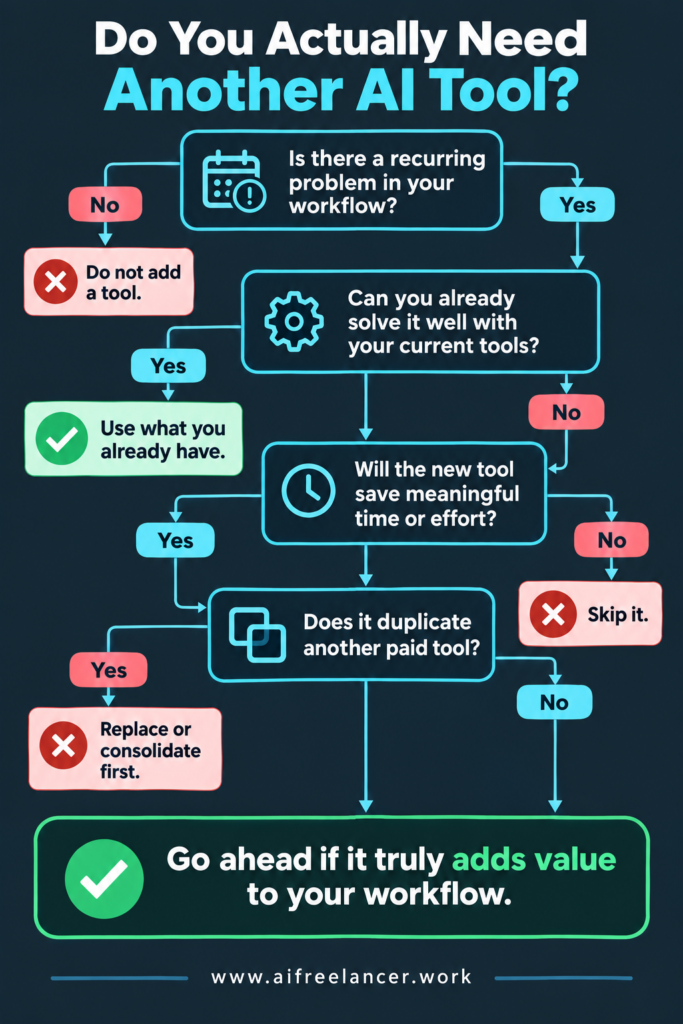
Once you know what problem you are solving, look at what you already pay for.
Ask:
- What does each current tool actually do for me?
- Which features do I genuinely use?
- Where do two or more tools perform the same job?
- Could my main AI tool handle a specialist task well enough?
- Has AI functionality been added to software I already own?
A feature gap is a reason to consider another tool. A recommendation on social media is not. This can also expose subscriptions you no longer need. If one application now handles three tasks that previously required separate tools, consolidation may save more time than another automation ever would.
Once you know where the friction is and what your existing setup already covers, you can build around the gaps instead of starting from a shopping list.
Build the Smallest Set of AI Workflow Tools That Works
If you cannot explain what a tool does for your work in one sentence, it probably does not need to stay in your setup. A lean system does not mean refusing specialist software. It means making each addition justify itself.
Microsoft’s 2026 Work Trend Index offers useful context here. Sixty-six percent of surveyed AI users said AI had enabled them to spend more time on work they considered more important, while 58% said they were producing work they could not have produced a year earlier. That is a better measure of value than the number of AI apps in your setup.
Start With One Main AI Tool
For many freelancers, one strong general-purpose AI can cover more jobs than expected. Depending on your work, you may use it for brainstorming, research assistance, outlining, drafting, summarizing, rewriting, analysis, project planning, and routine administrative help.
That does not mean one AI can do everything well. It means you should find its limits before paying for another application. For many freelancers, a lean workflow stack is a better starting point than adding separate tools for every small task
For freelancers who juggle writing, client communication, marketing, and creative work, this is particularly useful. The same main AI tool may help brainstorm a video concept in the morning, write a client email after lunch, and turn project notes into social captions later that day.
If it already handles those jobs adequately, you do not need three specialist subscriptions merely because each one markets itself as the best at one small part of the process.
Add Specialist Tools Only for Real Gaps
Specialist tools become useful when a recurring job requires something your main AI tool cannot do well enough. That might involve research and source verification, writing and editing, image or video production, transcription, project management, workflow integration, or bookkeeping and administration.
The right mix depends on your work. A freelance writer, for example, might use one main AI tool for brainstorming, outlining, and early drafts, plus a dedicated research or verification tool when accuracy demands it. An automation platform might come later, but only if repetitive admin actually warrants setting one up.
A videographer may use the same main AI tool for scripts, proposals, captions, and client communication but find a dedicated transcription or video tool indispensable. Neither setup is automatically better because they solve different kinds of work.
Use Automation Only When It Removes Repeated Steps
Workflow automation is worth considering when the same actions keep happening across different apps.
You might consider a platform such as Zapier, Make, or another workflow automation tool when:
- information is repeatedly copied between applications
- one recurring event should trigger another action
- several apps need to exchange information
- automation can remove multiple manual steps
For example, a new client inquiry could create a project record, add a task, and send information into your onboarding process. But not every repetitive task needs automation.
If something happens twice a year, takes three minutes manually, and requires an hour to automate properly, leave it alone. The same applies when you are automating around a messy process that should simply be redesigned.
Automation should remove work. It should not give you a new hobby debugging automation.
Know When Your AI Workflow Tools Are Enough
If three tools cover the work you actually do, there is no reason to build a seven-tool setup. This is where many freelancers get stuck because they stop asking whether their current system works and start asking what they are missing.
The goal now is to know when to stop adding to it.
Set a Clear Threshold Before Adding New AI Workflow Tools
Once you have identified a candidate tool, test whether it deserves to stay. Run it as a single recurring task for a short period and compare the results with your current method.
Look at how long the task takes, how much cleanup the output needs, whether the tool removes steps or simply moves them elsewhere, and whether the improvement is large enough to matter. A trial is most useful when it tests a real part of your workflow rather than an impressive demo.
If a tool costs $20 per month but eliminates hours of repetitive work, the decision may be easy. If it saves you five minutes twice a month while adding another dashboard, password, workflow, and learning curve, the calculation looks very different.
A free tool does not escape this test either. Your time is part of the cost.
Measure Time Saved, Not Features Added
AI companies sell features. Freelancers need outcomes. Instead of asking how many things an application can do, ask what changed after you adopted it.
Did research drop from 90 minutes to 40? Did you eliminate a recurring client follow-up step? Did you stop copying the same information across three apps? Did you cancel an overlapping subscription? Are drafts reaching clients faster, or are you spending less time correcting AI output?
These measures tell you whether the software is useful. The number of automations running, AI features available, or apps in your toolset tells you almost nothing.
The real cost of a tool is also bigger than the subscription price. Include the time spent setting it up, learning how to use it, maintaining integrations, correcting weak output, and moving information between apps. A cheap tool can still be expensive if it creates half an hour of extra work every day.
Review and Remove Tools You No Longer Need
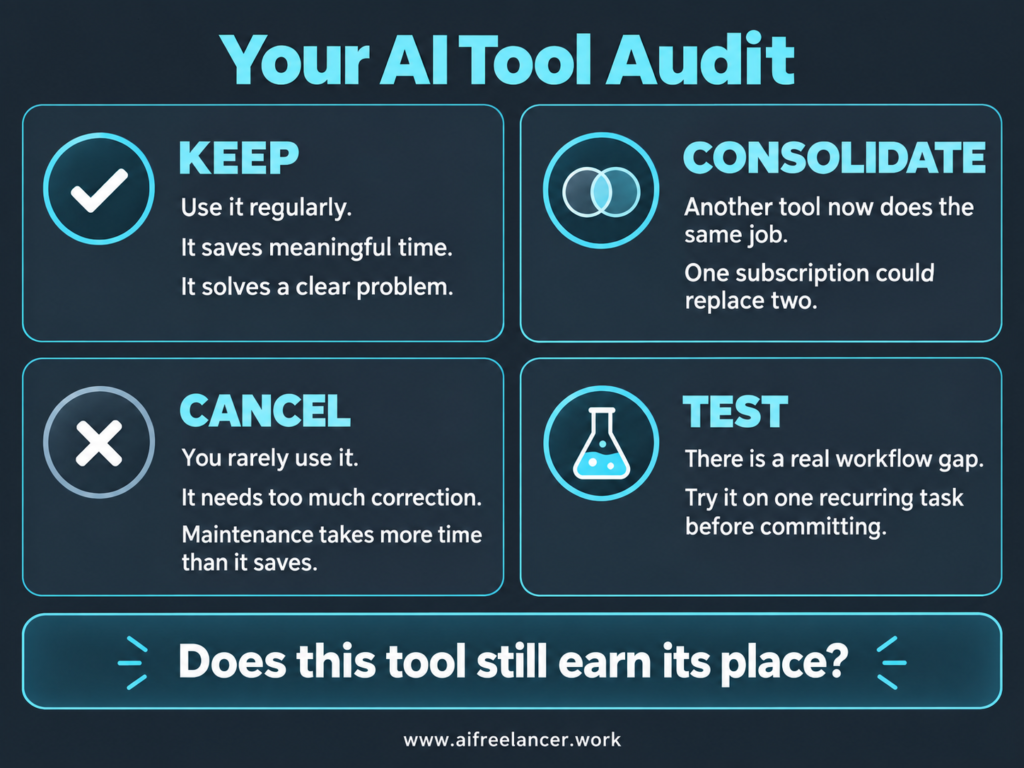
Your ideal AI setup can change. A specialist tool you needed last year may now be redundant because your main AI tool has improved. Your business may stop offering a service. A workflow you once performed every day may now happen once a month.
A tool may deserve removal when:
- You regularly forget you have it
- Another app now performs the same job
- Its output needs too much correction
- You still move information in and out manually
- Maintenance consumes more time than the tool saves
- You have barely used it for several weeks
This is why a small review every few months is useful. The purpose is not to create yet another productivity ritual. It is simply to ask, “Does this still earn its place?”
So, How Many AI Tools Does a Freelancer Need?
Most freelancers do not need a predetermined number of AI tools. Start with what already covers your essential work. For many people, that may mean one capable main AI tool plus the ordinary business software they already use. Add specialist or automation tools only when recurring problems justify them.
Three broad setups illustrate the idea:
- Lean freelancer: one main AI tool plus existing business software
- Growing freelancer: one main AI tool plus one or two specialist tools where recurring gaps exist
- Automation-heavy freelancer: main and specialist tools plus workflow automation for processes that genuinely repeat across applications
These are examples, not levels you are supposed to progress through. In practice, a handful of systems that cover most freelance work may be all you need. An automation-heavy setup is not more advanced simply because it contains more tools. If three applications cover your actual needs, do not build a seven-tool system just because you can.
What Is an AI Workflow Automation Tool?
An AI workflow automation tool combines automation with AI so a process can do more than follow simple fixed triggers. Depending on the system, AI may interpret text, classify information, summarize content, generate an output, or help decide before the workflow moves to the next step.
For freelancers, this could mean taking information from an inquiry, extracting important details, creating a task, preparing a draft response, or routing information to another application. The useful distinction is that a main AI tool helps you perform a task, while workflow automation connects actions into a repeatable process.
How Do You Automate a Workflow?
Start by mapping the workflow as it currently happens and identifying a repetitive step with a clear trigger and outcome. Automate one small part first rather than trying to rebuild your entire business around automation.
For example, if every completed client intake form requires you to create the same project tasks manually, that process may be a good candidate. Test the workflow, check for errors, and keep human review where the consequences of a mistake are significant.
What Is the Best AI Workflow Automation Tool?
There is no single best option for every freelancer. The right tool depends on your applications, technical comfort, workflow complexity, budget, and the specific process you are trying to automate.
This is also consistent with how current workflow-tool guides approach selection. Slack and Supermetrics both emphasize matching the tool to the workflow and its requirements instead of treating one platform as universally best.
What Are Examples of Workflow Automation?
Freelance workflow automation can include creating project tasks after a client signs up, moving form responses into a project-management system, generating reminders before deadlines, routing meeting notes into client files, or preparing follow-up actions after project delivery.
The best examples usually share the same characteristics: the process happens repeatedly, follows a recognizable pattern, and removes enough manual effort to justify setting it up.
Are AI Workflow Tools Suitable for Freelancers and Small Businesses?
Yes, many workflow tools are suitable for freelancers, solo businesses, and small teams, but suitability does not mean necessity. A freelancer should still consider whether the tool solves a recurring problem, integrates with existing software, and saves enough time to justify the added complexity.
Starting small is usually safer than automating everything at once. Atlassian similarly recommends beginning with focused use cases and expanding based on what actually works.
Sources
- Burlacu, G., & Monahan, K. (2025, July 9). From tools to teammates: Navigating the new human-AI relationship. Upwork Research Institute.
- Grace, F. (n.d.). AI workflow automation: How to boost operational efficiency with intelligent workflows. Atlassian. Atlassian
- Linehan, A. (2026, July 1). The 11 best AI workflow automation tools for data-minded businesses (2026). Supermetrics.
- Microsoft. (2026, May 5). Agents, human agency, and the opportunity for every organization: 2026 Work Trend Index annual report. Microsoft WorkLab.
- Monahan, K., & Burlacu, G. (2024, July 23). From burnout to balance: AI-enhanced work models for the future. Upwork Research Institute. Upwork
- Slack. (2026, April 30). 12 best AI automation tools for 2026
Final Thoughts
The danger is not that you have too few AI workflow tools. It is that the collection meant to save you time becomes another workload to manage. If your setup is working well, you should be thinking about the client project, the draft, or the creative work, not about which AI app to open next.
AI earns its place when it takes repetitive work off your plate or helps you do a recurring task better. If a tool does neither, you probably do not need it.
If you want more practical ways to use AI without letting it take over your workflow, explore my books on AI, freelance writing, productivity, and sustainable freelancing on my Amazon Author page.

Florence De Borja is a freelance writer, content strategist, and author with 14+ years of writing experience and a 15-year background in IT and software development. She creates clear, practical content on AI, SaaS, business, digital marketing, real estate, and wellness, with a focus on helping freelancers use AI to work calmer and scale smarter. On her blog, AI Freelancer, she shares systems, workflows, and AI-powered strategies for building a sustainable solo business.