
A client email lands in your inbox. You read it, create a task, copy the deadline into your project system, draft a quick reply, and then reuse that information when you send the client an update later in the week. None of those steps is difficult, but repeating them across several clients quietly consumes a large part of your day. Workflow automation can take some of those repetitive steps off your plate without turning your freelance business into a complicated tech project.
That matters because administrative work does not just cost time. It repeatedly interrupts the work clients are actually paying you to do. Microsoft’s 2025 Work Trend Index found that workers using Microsoft 365 were interrupted by a meeting, email, or chat roughly every two minutes during core working hours.
Those small interruptions add up quickly when you are working alone. Freelancers do not need to automate everything. You need to find the handful of repeated tasks that keep pulling you away from writing, designing, consulting, editing, or whatever clients actually hire you to do.
Everything I’ve shared here—and more—is in my book, available on Amazon. Click the link if you’re ready to take the next step.
Workflow Automation for Freelancers: What It Actually Means
Before adding another AI app or automation platform, it helps to understand exactly what you are trying to remove from your day.
What Workflow Automation Actually Means When You Work Alone
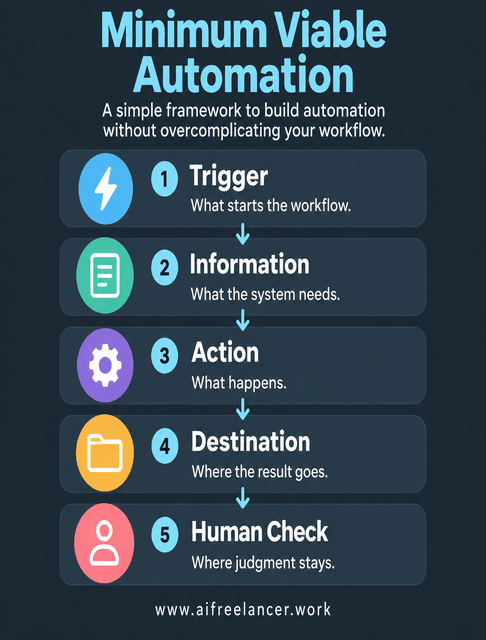
Workflow automation uses software to move a repeatable task or series of tasks forward based on a trigger and a set of rules. An email arrives, a form is submitted, a deadline is reached, or a project changes status. That event starts the next action automatically.
IBM makes an important distinction: artificial intelligence is not required for workflow automation. Rule-based logic can handle many workflows perfectly well, while AI becomes useful when the system needs to interpret, summarize, classify, or generate information.
For a freelancer, a manual workflow means you move every task or piece of information yourself. An automated workflow moves work to the next step when a predefined trigger occurs. An AI-assisted workflow goes a little further by interpreting, summarizing, classifying, or drafting information before you review it.
Some workflows use AI to understand or generate information. Others simply use task automation to move information between your existing tools. The most useful systems often combine the two. That is why simple systems for recurring freelance admin often work better than trying to automate every part of the business at once.
A simple way to think about a minimum viable automation is Trigger → Information → Action → Destination → Human Check. The workflow does not need to be elaborate. It needs a clear starting point, the information required to do the job, one useful action, somewhere for the result to go, and a human check wherever judgment matters.
A Simple Workflow Automation Test: Repeatable, Rule-Based, Reviewable
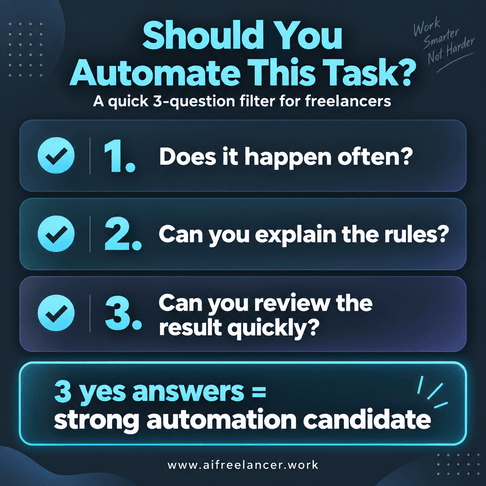
The fact that something can be automated does not make it worth automating. Before building anything, ask three questions:
- Does this task happen often?
- Can I explain the rules for handling it?
- Can I quickly check whether the result is correct?
Frequency matters because repeated tasks create enough cumulative drag to justify automation. Predictability matters because automation works best when the same kind of input usually leads to the same kind of action. Reviewability matters because even a useful automation becomes a burden if checking its output takes too long.
If the answer to all three is yes, you probably have a reasonable automation candidate. Start with tasks that happen often, follow a predictable pattern, carry little risk, and keep interrupting your day.
McKinsey estimates that current generative AI and other technologies could theoretically automate activities accounting for 60% to 70% of employees’ working time. The important word is activities. Jobs are made up of many different tasks, and some of those can be automated or assisted even when the job itself still depends heavily on human context and judgment.
For a freelancer, the better question is not “How much can I automate?” It is “Which few tasks are worth handing over?” A lean automation stack built around the workflows you actually use is usually more useful than collecting tools simply because they can automate something.
The 4 Workflow Automation Systems Freelancers Actually Need
You can automate dozens of things. That does not mean you should. A useful freelance automation earns its place by removing work you repeatedly do anyway.
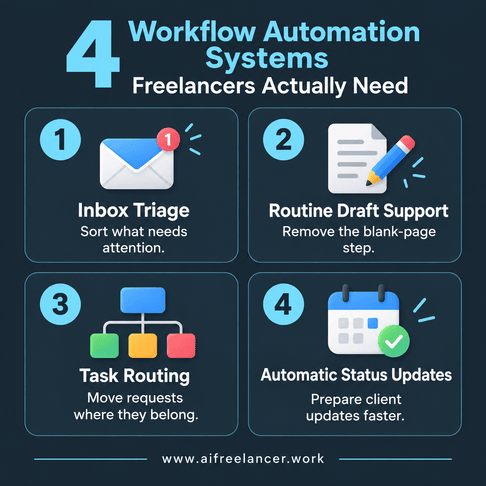
Workflow Automation #1: Triage Your Inbox Before It Hijacks Your Day
Your inbox can look harmless because each message takes only a few minutes. The real problem is that every email asks you to make a small decision: Is this urgent? Is it a revision? Do I need to reply? Should this become a task?
An email automation system can classify incoming messages, identify action items, summarize long threads, and flag messages that deserve attention first. A new email might be classified as a revision request, inquiry, invoice, urgent issue, or informational message before you even open it.
You still review sensitive, unusual, or high-stakes messages. Inbox management is a good place to automate sorting, not relationships. Your email still exists, but it stops dictating the order of your day.
Workflow Automation #2: Use AI Drafting Support for Routine Communication
Not every client message deserves a fresh composition session. Acknowledging a revision request, confirming receipt of files, following up on an overdue approval, or preparing the first version of a proposal can involve predictable language.
This is where AI drafting works better as part of a content workflow than as a substitute for your communication. A routine revision request can trigger a sequence like this: the message arrives, the system pulls the relevant project context, AI prepares a first-pass acknowledgment, and you review the tone, scope, and client-specific details before sending it.
The point is not to automate your voice. It is to remove the blank-page step from routine replies.
Workflow Automation #3: Route Tasks Where They Need to Go
A surprisingly large amount of freelance admin consists of moving information. A client sends a revision request, and you copy it into a task manager, add the project name, paste the deadline, and move it to the right queue.
Task routing can remove most of that transfer work. A client email can become a project task, an approved proposal can trigger an onboarding checklist, and a revision request can move into an editing queue automatically.
Atlassian describes workflow automation in similar terms: triggers and rules can automatically assign tasks, route information, and update status without requiring someone to perform every step manually.
For a solo freelancer, that means less copying, pasting, and remembering where information belongs.
Workflow Automation #4: Turn Project Activity Into Automatic Status Updates
Client updates often involve gathering information you already have. You check what has been completed, what is waiting for approval, which deadline comes next, and whether there are any open questions.
A reporting workflow can collect completed tasks, upcoming deadlines, outstanding items, revision status, and next steps. AI can then turn that information into a first-pass client update.
You still review the draft because context matters. But you no longer have to begin each update by opening several apps and reconstructing what happened.
Workflow Automation Still Needs Human Judgment
A good automation removes repetitive work. A bad one removes judgment where judgment is exactly what the client is paying for.
Keep Judgment-Heavy Work Manual
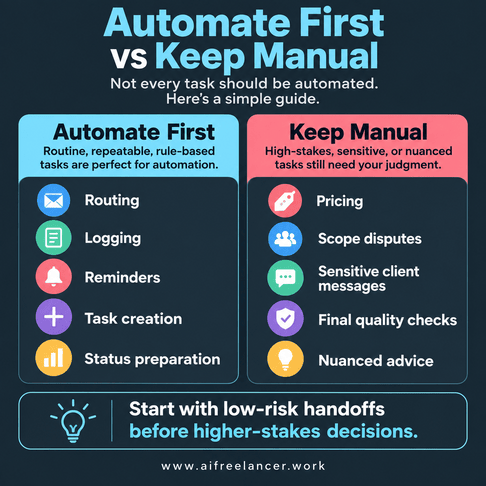
Some tasks look automatable until you consider what happens when the system gets them wrong. Final editorial decisions, sensitive client conversations, pricing, difficult negotiations, nuanced professional advice, and final quality approval should generally stay under direct human control.
A task is also a poor automation candidate when:
- every case requires different judgment
- mistakes would be expensive or damaging
- the task happens too rarely to justify the setup
- the process changes frequently
For example, automatically acknowledging a routine revision request is usually low risk. Automatically replying to a client who is disputing scope, pricing, or a missed deadline is very different because the wording can affect the relationship and possibly the contract itself.
A useful rule is to automate routing, logging, reminders, task creation, and other low-risk handoffs before automating higher-stakes decisions or client-facing actions. It gives you useful time savings without asking software to make decisions it should not be making yet.
Workflow Automation Should Save More Time Than It Takes to Maintain
Automations are not free just because software runs them. You spend time setting them up, rules need updating, integrations sometimes break, AI output still needs checking, and subscriptions accumulate. Understanding why automations stop working after the initial setup matters just as much as knowing how to build them.
If a five-minute manual task happens twice a year, building a sophisticated automated process around it makes little sense. If reviewing an AI-generated output takes longer than creating the original yourself, the automation is not saving you anything.
A workflow that saves meaningful time several times a week is usually more promising than one that saves only a few minutes once a month. The time saved should clearly outweigh the effort needed to keep the workflow running.
The best systems tend to become boring. They should handle predictable work without demanding much attention from you.
Start Small With Workflow Automation
Pick one task you are already tired of doing manually and automate that first.
Choose Your First Workflow
Look at your own week and ask which repeated task causes the most annoyance. It may be inbox sorting, routine client replies, task capture, or client status reporting.
Use the earlier three-question test to choose your first workflow. If revision emails repeatedly interrupt your work, start there. If client status reports eat an hour every Friday, that may be the better candidate.
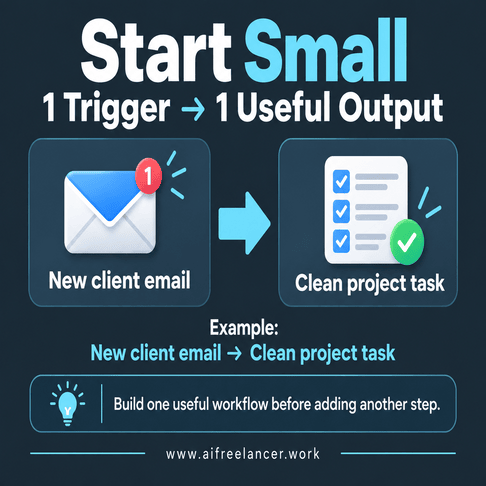
For the first version, use another simple rule: one trigger, one useful output. A new client email might do nothing more than create a clean task with the relevant project details. Once that works reliably, you can decide whether another step would actually improve the workflow. This kind of one-workflow-at-a-time setup is easier to test and maintain than building several connected automations at once.
One functioning workflow is more useful than six half-built automations.
Measure What Actually Changes
Once the workflow is running, compare your old process with the new one.
Look for:
- minutes saved each time the task occurs
- fewer manual steps
- fewer missed tasks or follow-ups
- fewer switches between apps
- fewer errors or forgotten actions
Time saved and mistakes avoided are particularly useful measures. But there is another useful test: do you think about the task less?
A good automation should reduce checking and remembering, not just shave minutes from a process. Saving five minutes means less if you now spend the day wondering whether the automation worked correctly.
If you no longer have to remember to copy a client request into your project board or check whether you sent the weekly update, the system is doing what you built it to do.
What Is Workflow Automation?
Workflow automation uses software to move a repeatable series of tasks forward automatically when a defined event occurs. The system follows rules or conditions to perform actions such as creating tasks, routing information, sending notifications, updating records, or preparing reports.
AI can be part of an automated workflow, but it is not required. Rule-based automation works well for predictable actions, while AI is useful when the workflow needs to interpret language, classify information, summarize content, or generate a draft.
What Are Examples of Workflow Automation?
Common examples include routing incoming requests, creating tasks from emails, sending follow-up reminders, preparing recurring reports, updating project statuses, and moving information between apps.
For a freelancer, a simple example is turning a client revision email into a project task automatically. An AI-assisted version could also summarize the requested changes before adding them to the task.
What Are the Benefits of Workflow Automation?
The main benefits are less manual work, fewer repetitive steps, more consistent processes, and fewer opportunities to forget something.
For freelancers, the biggest benefit is often not speed alone. Removing small recurring tasks can make it easier to stay focused on client work instead of repeatedly switching between writing, email, project management, and admin.
What Tasks Should Freelancers Automate First?
Start with tasks that happen frequently, follow predictable rules, carry relatively little risk, and are easy to review. Common starting points include inbox classification, task creation, routine reminders, standard client replies, and recurring status reports.
What Is the Difference Between Workflow Automation and AI Automation?
Workflow automation moves work through a predefined process using triggers, rules, and actions. AI automation adds capabilities such as understanding language, generating text, classifying information, summarizing content, or making limited decisions based on context.
A workflow can therefore be automated without AI, AI-assisted without being fully automated, or combine both. For freelancers, that combination is often the most practical.
Sources
- Atlassian. (n.d.). What is workflow automation and how to get started. Atlassian
- IBM. (n.d.). What is workflow automation?. IBM Think.
- McKinsey & Company. (2023, June 14). The economic potential of generative AI: The next productivity frontier. McKinsey
- Microsoft. (2025, April 23). 2025: The year the Frontier Firm is born. Microsoft WorkLab.
Final Thoughts
Workflow automation is useful when it removes work you should not have to keep doing by hand. If a system saves you from sorting the same emails, copying the same task details, or rebuilding the same client update every week, it is earning its place. If it requires constant checking, fixing, or explaining, it probably is not.
You do not need to automate your whole freelance business. Start with one repeated annoyance, make it work reliably, and then decide whether the next bottleneck deserves the same treatment. That approach is also at the heart of Better With a Bot: use AI for the repeatable parts, while keeping client judgment, final decisions, and quality control with you.
If you want more practical ways to use AI without turning your freelance business into a maze of tools and automations, explore my books on AI, freelancing, writing, productivity, and sustainable work on my Amazon Author page.

Florence De Borja is a freelance writer, content strategist, and author with 14+ years of writing experience and a 15-year background in IT and software development. She creates clear, practical content on AI, SaaS, business, digital marketing, real estate, and wellness, with a focus on helping freelancers use AI to work calmer and scale smarter. On her blog, AI Freelancer, she shares systems, workflows, and AI-powered strategies for building a sustainable solo business.