

You’re writing more than ever, yet it still feels like you’re falling behind. Deadlines stack up, drafts take longer than they should, and editing drains more energy than the writing itself. You try new tools, hoping they’ll help, but AI apps for writers often add more tabs, steps, and decisions.
That’s where most writers get stuck.
AI apps for writers are not supposed to complicate your process. They are supposed to help you turn scattered notes, client briefs, or voice memos into a usable draft without getting stuck in the middle. When they work, you spend less time figuring out what to do next and more time finishing the piece.
According to research published by the National Bureau of Economic Research, participants using AI tools completed writing tasks significantly faster while also improving output quality. That speed matters most in the early stages, when rough input has to become something you can actually shape and improve.
Everything I’ve shared here—and more—is in my book, available on Amazon. Click the link if you’re ready to take the next step.
Best AI Apps for Writers (Quick Picks)
If you just want to get started without overthinking it, these are the most useful AI apps for writers right now. Each one solves a specific part of the writing process.
- ChatGPT – best for drafting and ideation
- Jasper – best for long-form and marketing content
- Grammarly – best for quick editing and clarity
- ProWritingAid – best for deeper editing and style control
- Notion AI – best for writing + organization in one workspace
- Canva Magic Write – best for combining content with visuals
Here’s how they actually differ in practice.
ChatGPT works best when you’re starting with messy input. If you have a rough client brief, scattered notes, or a voice memo, it can quickly turn those into a workable outline or draft. However, it’s less reliable when you expect polished, final-ready writing without revision. This makes it a strong starting point for writers who need flexibility, rapid idea expansion, or help getting unstuck, but a weaker choice if you prefer a tightly guided workflow from the start.
Jasper performs best when you already have a clear direction. Designed for structured content like blog posts and marketing copy, it works well when consistency matters across longer pieces. However, it can feel restrictive if you prefer a more flexible drafting process. This makes it a better fit for writers producing client work, conversion-focused content, or repeatable brand materials where structure matters more than exploration.
Grammarly is useful for fast clarity checks. It helps tighten sentences and catch awkward phrasing, but overuse can flatten your tone if you accept every suggestion without review. It works best as a finishing layer, not as a substitute for editing judgment.
ProWritingAid is better suited for deeper editing. It gives more detailed feedback on style and readability, though it requires more time to use effectively. It is a stronger choice for writers working on long-form pieces, essays, or book chapters where rhythm, repetition, and sentence variety matter.
Notion AI works best when your writing process is tied to notes, research, or planning. It keeps everything in one place, but it is not as strong as specialized tools for drafting or editing. It is most useful for writers who think while organizing, collect ideas constantly, or want research and drafting to live in the same workspace.
Canva Magic Write is useful when your writing connects directly to visual content, such as social posts or presentations. It is less essential for pure long-form writing but helpful for creators working across formats. For most writers, it is optional. For multi-platform creators, it can be a practical shortcut.
A quick list is useful, but a strong tool still has to prove itself once real work begins. That is where many apps lose their appeal.
AI Apps for Writers: What Makes an App Worth Using?
Most AI tools look impressive at first. They generate text, suggest edits, and promise speed. But after a few days, they quietly disappear from your workflow.
The difference comes down to whether the tool holds up in real writing conditions.
Why Most AI Tools Fail Real Writing Workflows
Many tools are built to demonstrate capability, not to support daily writing work. They show what AI can do, but they do not align with how writing actually happens from brief to final draft. Some introduce unnecessary steps, while others interrupt your flow by requiring too much setup or switching. When a tool breaks your momentum, it becomes another task instead of a solution.
A popular app can still be the wrong app if it asks you to work around its limitations every time you write. Writers often mistake impressive output for real usefulness, but usefulness shows up in repetition. If a tool consistently helps you start faster, revise more cleanly, or repurpose content without friction, it earns its place. If it only feels exciting on day one, it usually fades out by week two.
What Writers Actually Need From AI Apps to Produce Consistently
The most useful tools handle one clear task well. They help you move forward when your process slows down, whether that is starting a draft, refining a section, or reshaping content for another format.
- Faster drafting without quality loss
- Simpler systems that do not create extra work
- Support for consistent output without burnout
What matters is not how many features a tool has, but whether it helps you move from rough material to finished work with less effort.
Research from McKinsey & Company shows that generative AI can automate a significant share of tasks involving content processing, including drafting and summarizing. The real benefit is not just speed. It has less to manage mentally while you work.
Once you know what makes an app worth keeping, the next question becomes more practical: where exactly does each type of tool fit in the writing process?
Best AI Apps for Writers by Use Case (Not Just Features)
Most articles simply list tools. What matters more is when you would actually use them during real writing work.
AI Apps for Writers That Speed up Drafting and Ideation
Getting started is where a lot of time disappears. A drafting tool helps you move from loose material to a workable structure. That might mean turning a messy brief into an outline or expanding bullet points into a first draft you can refine.
A freelance writer handling multiple projects can use a drafting tool to turn several client briefs into structured drafts in a single session. Instead of spending time figuring out how to begin each piece, they move directly into shaping the content.
This is also where many authority-driven writers benefit. If you already know your subject well but struggle to turn expertise into publishable content, a drafting tool helps convert insights into a usable structure. It does not replace your thinking. It gives that thinking a faster path onto the page.
Editing and Rewriting Tools That Preserve Your Voice
Editing is often where time expands without notice. The right tool helps you tighten writing without rewriting entire sections.
For example, a consultant writing a weekly article can use an editing tool to shorten long explanations and improve clarity. Instead of revisiting every paragraph, they focus on sections that need adjustment, which reduces the number of full rewrites.
The tradeoff here is important. Fast editing tools catch surface issues quickly, but deeper editing tools are better when a draft needs structural polish or more deliberate refinement. The wrong choice can leave you with cleaner sentences but a weaker overall piece.
Content Repurposing and Multi-Platform Publishing Tools
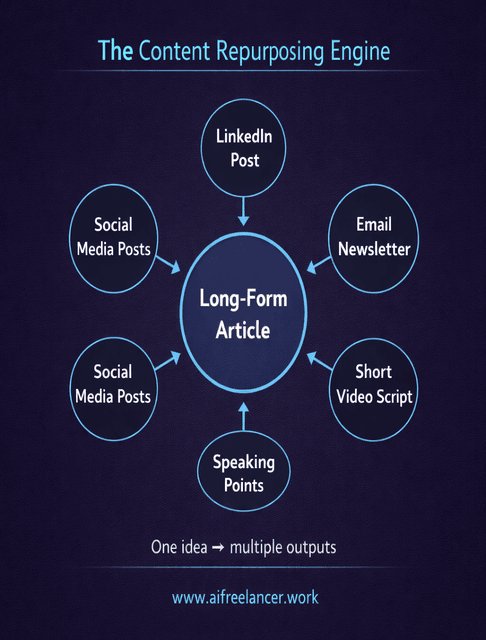
A single piece of content can support multiple outputs. Repurposing tools helps you reshape existing material instead of recreating it.
A creator publishing regularly can take one article and turn it into a LinkedIn post, an email summary, and a short script. This reduces the need to generate new ideas constantly while still maintaining visibility.
According to the Content Marketing Institute, creating content consistently and at scale remains one of the biggest challenges for marketers. Repurposing helps address that without increasing workload.
For authority builders, this matters even more. One strong article should not stay trapped in one format. It can become a newsletter, a speaking outline, a short post, or the start of a larger body of thought leadership.
AI Writing Assistants That Combine Multiple Functions for Simpler Workflows
Some writers prefer to work within one environment rather than switching between tools. An all-in-one assistant can support drafting, rewriting, and restructuring in the same space. While it may not offer the depth of specialized tools, it helps maintain momentum by reducing interruptions.
This kind of tool is often the best entry point for writers who want simplicity first. It becomes less ideal when your workflow matures, and you need stronger control at specific stages, especially in editing or long-form development.
Knowing where tools fit is only half the decision. The next step is choosing a setup that helps without turning into another system to manage.
How to Choose AI Apps for Writers Without Overcomplicating Your Stack
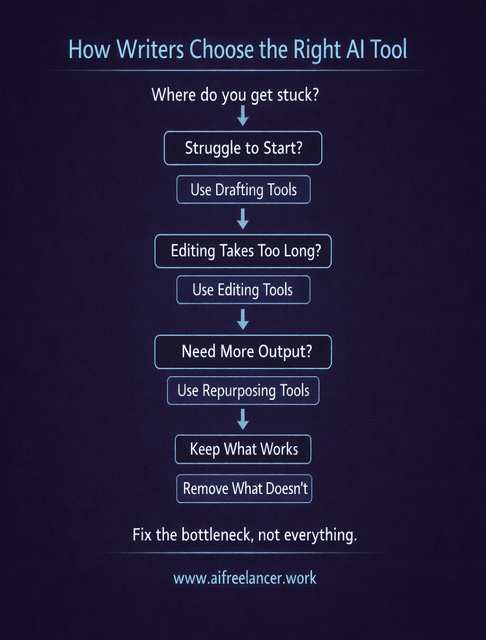
Before adding anything new, the goal is to narrow your options to a small set that fits how you already work. This is where many writers either simplify their process or make it harder to manage.
Match Tools to Your Writing Workflow, Not Trends
Start by identifying where your process slows down. If drafting takes too long, focus on tools that help you start faster. If editing is the bottleneck, choose something that improves clarity and reduces rewriting. The strongest setup addresses specific problems instead of trying to optimize everything at once.
A common mistake is choosing tools based on what other people recommend without checking whether those tools solve your actual problem. A creator who needs repurposing support will not benefit much from a deep editing tool. A writer stuck at the blank page will not get much value from a publishing tool. The fit has to be practical, not aspirational.
A Simple Decision Framework for Choosing AI Apps for Writers
Choose one tool that directly addresses your biggest bottleneck and use it in real work for a short period. Evaluate whether it reduces time, improves output, or makes your process easier to repeat. If it does, keep it. If not, remove it.
For example, if you regularly spend hours turning notes into a draft, test a drafting tool across several projects. If it consistently speeds up that step, it becomes part of your workflow.
What matters most here is not whether the tool is impressive. It is whether you keep reaching for it when deadlines are real, and energy is limited. Reliable tools survive normal workdays. Everything else becomes clutter.
When One Strong App Is Better Than a Full AI Stack
Using more tools often leads to more switching and more complexity. A single reliable tool can be more effective than several tools used inconsistently. Expanding your setup only makes sense when your current approach reaches a clear limit.
Once that choice is made, the benefits become much easier to see. The value of AI shows up less in individual features and more in how smoothly the work moves from one stage to the next.
AI Apps for Writers in Action: Simple Workflows That Save Time
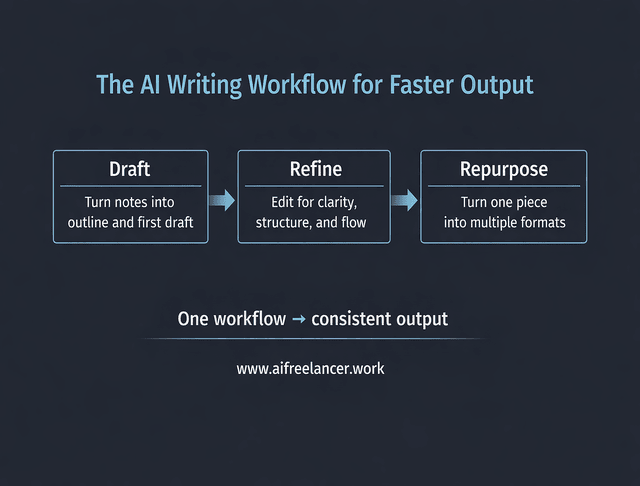
Once the right apps are in place, the real benefit shows up in how your work moves from start to finish.
A 3-Step Writing Workflow Using AI Apps for Writers
A freelance writer working from a client brief can follow a simple sequence:
- Turn raw notes into an outline and draft
- Refine clarity and structure in one editing pass
- Repurpose the final piece into additional content
This approach reduces the number of separate sessions needed to complete a piece of work.
In practice, that might look like this: a client sends a loose brief on Monday morning with a few talking points and a couple of links. Instead of spending the first hour organizing the material, the writer uses a drafting app to build a clean outline and rough draft. From there, an editing tool helps tighten weak sections and smooth transitions. Once the article is approved, the same piece becomes a shorter email version and a social post without reopening the project from scratch.
From One Idea to Multiple Content Formats
A consultant can take one core idea and develop it into multiple formats. A single article can become a short post highlighting one insight, an email summarizing the main point, and a script for a short video. The message stays consistent while the format adapts to different platforms.
This matters because consistency rarely fails at the idea stage. It usually fails at the conversion stage, when one good idea has to be reshaped for different channels. AI tools can handle that reshaping faster, which makes follow-through much more realistic.
How a Small App Stack Supports Consistent Content Output
Consistency becomes easier when the process is easier to repeat. With fewer decisions at each stage, writers are more likely to complete and publish their work regularly. Drafting begins faster, editing finishes more efficiently, and repurposing becomes part of the routine instead of an extra task.
For a writer juggling client deadlines, personal content, and marketing tasks, repeatability matters more than any single feature. A small app stack does not just save time on one article. It makes it easier to keep producing week after week without rebuilding the process every time.
This is where the real advantage appears. The best setup does not just help you write one piece faster. It helps you keep going without wasting energy re-deciding how the work should happen.
Final Thoughts: AI Apps for Writers Should Simplify, Not Complicate
The goal is to remove the parts of writing that slow you down or interrupt your focus.
The best AI apps for writers help you turn rough inputs into usable drafts, refine your work more efficiently, and extend the value of what you create. They support your process instead of reshaping it.
Choose tools that earn their place through consistent use. A small, reliable setup will always outperform a complex one that is difficult to maintain.
If you want a complete system for using AI apps for writers without losing your voice, explore my Amazon Author page and find practical resources you can apply to your writing right away.
Frequently Asked Questions About AI Apps for Writers
The best AI apps depend on where your writing slows down. Drafting, editing, and repurposing are different problems, so the right tool depends on the stage you need help with. If starting is difficult, tools like ChatGPT help turn rough notes into structured drafts, while Grammarly or ProWritingAid improve clarity when editing takes too long. If you want more output from one piece, repurposing tools can turn an article into posts, emails, or scripts. The simplest way to choose is to match the tool to the task—the best option is the one that improves your slowest stage, not the one with the most features.
Yes, when used as part of a workflow. AI tools help you move from brief to draft faster, shorten editing time, and reuse content across deliverables. This makes it easier to handle more work without increasing hours, or to free up time for higher-value tasks like planning and client work. The key is to use AI for repetitive tasks while you stay in control of structure, tone, and final quality.
No. AI can generate and rewrite text, but it does not fully understand context, audience, or intent. It can help you produce drafts and refine sections, but it cannot decide what matters or how a message should be shaped. That still comes from you. AI speeds up execution, while judgment and final quality remain human.
Start with your bottleneck. Identify where your process slows down, then choose a tool that directly addresses that stage. Test one tool in real work and see if it saves time or improves output. Keep it if it does, and remove it if it does not. The goal is to find a tool that fits your workflow, not to collect more features.
Yes, as long as you treat the output as a draft. AI can produce vague or incorrect content, so review for accuracy, clarity, and tone before publishing. Used this way, AI supports your work while you stay in control of the final result.

Florence De Borja is a freelance writer, content strategist, and author with 14+ years of writing experience and a 15-year background in IT and software development. She creates clear, practical content on AI, SaaS, business, digital marketing, real estate, and wellness, with a focus on helping freelancers use AI to work calmer and scale smarter. On her blog, AI Freelancer, she shares systems, workflows, and AI-powered strategies for building a sustainable solo business.

