

You didn’t go freelance so you could spend your evenings chasing invoices, rebuilding task lists, or digging through five email threads to find “the latest version.” You went solo for freedom and control—but the business side keeps pulling you back into chaos. This is where AI business tools stop being buzzwords and start acting as quiet support staff.
Used well, these tools take over the repetitive, admin-heavy parts of your day. You can then focus on writing, thinking, and leading. A recent U.S. Chamber of Commerce report on small businesses and technology shows that in many U.S. states, around half or more of small businesses already use an AI platform in their operations, not just for marketing but also for day-to-day workflows.
If you see yourself in any of these:
- A mid-career freelance writer drowning in client work and admin
- A content-strapped founder trying to write landing pages at 2 a.m.
- A structure-seeking writer who craves calm, repeatable workflows
- An overachiever on the edge who can feel burnout creeping up,
this guide is for you. We’ll walk through how to use AI for invoicing, project management, time tracking, collaboration, and file organization—at a genuinely beginner-friendly level. No complex automations, no pressure to build a “20-tool stack.” Just practical systems that help your business run more smoothly.
Everything I’ve shared here—and more—is in my book, available on Amazon. Click the link if you’re ready to take the next step.
Stabilize Your Cashflow With AI Business Tools
Unstable cash flow creates constant background stress. When invoices go out late, reminders never get sent. You’re tracking who paid in a notebook, money becomes one more source of anxiety instead of stability.
AI Business Tools for Invoicing and Payments
AI-powered invoicing tools act like a smarter, more attentive spreadsheet. Instead of rebuilding every invoice from scratch, you create a few simple templates that the tool fills in for you. A good AI invoicing tool for freelancers lets you store client details and reuse line items for common services. It allows you to apply standard payment terms without having to think about them each time.
For the Overloaded Producer, this means you don’t spend a full afternoon “catching up on invoices” at the end of the month. For the content-strapped founder, it means billing doesn’t depend on finding the last bit of energy at midnight. You open the tool, pick a template such as “Blog Package” or “30k Book Project,” confirm the dates and amount, and send. The AI helps with formatting, calculations, and sometimes even suggests wording. Work on retainers or subscription-style offers. You can often set up recurring invoices to go out automatically every month or quarter. You don’t have to rebuild anything.
Many invoicing tools also connect directly to payment methods such as bank transfers, PayPal, or Stripe. Clients can click a button to pay, and the invoice is marked as settled without you manually updating a spreadsheet.
Automated Payment Reminders and Late-Fee Rules
Following up on unpaid invoices is emotionally heavy work. You worry about sounding pushy, so you delay sending reminders, which makes you more stressed. Automating this removes the emotional friction.
Most modern invoicing platforms include automated payment reminders. You decide the schedule for these reminders. For example, a few days before the due date, on the due date itself. Then, again a week later if the invoice still hasn’t been paid. You write one polite reminder message in your own voice, and the system quietly sends it on schedule.
For the Structure-Seeker, this turns “I hope they remember to pay” into a predictable process. For the Overachiever on the Edge, it means fewer awkward conversations and fewer late-night “Did I follow up with that client?” worries. You can also decide whether late fees fit your boundaries and local norms. Then, let the tool apply them consistently instead of negotiating every time.
Beginner AI Invoicing Tools and Simple Cashflow Dashboards
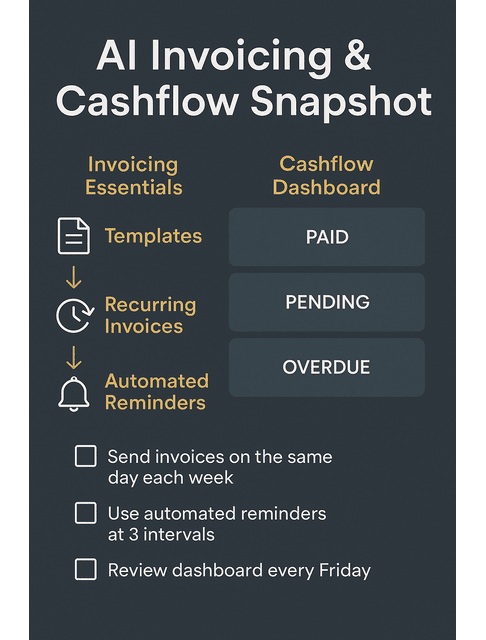
Many AI tools for small businesses now bundle invoicing and simple cash flow views. You don’t have to understand accounting in full to benefit. A clean dashboard that shows what you’ve already paid, what’s pending, and what’s overdue helps you make better decisions. One review of accounting software adoption found that small businesses can save 10–15 hours per week on tasks like invoicing and expense tracking. That automated payment reminders can help them get paid up to 50% faster. It’s exactly the kind of leverage busy freelancers and founders need.
You can build a simple weekly ritual around this. Set aside 10 or 15 minutes once a week to open your invoicing dashboard, . Then, review what has come in, what is outstanding, and what needs attention. That small habit keeps money from turning into another unresolved task in the back of your mind.
For the Overloaded Producer and Overachiever, this clarity alone reduces stress. You stop carrying “I should check my invoices” in your head all week and trust your system instead.
Stay on Top of Client Work Using AI Business Tools
Most freelancers don’t burn out from one big project. They burn out from too many partly managed projects, each with shifting deadlines and scattered notes. The work itself is fine; the mental juggling is what exhausts you.
Task Triage, AI Business Tools, and Realistic Daily Plans
Task triage is simply deciding what truly needs to happen today, what can wait until later in the week, and what can move to a future block. AI-powered task tools make this much easier by turning messy inputs into structured lists.
You can paste a long client email, a brief, or your own notes into an AI project tool and ask it to extract tasks. It might produce a list like “Outline article,” “Draft first version,” “Add examples,” “Final edit,” and “Prepare social captions.” From there, you assign due dates and decide which tasks belong in Today, This Week, and Later.
For the Overloaded Producer, this replaces the constant “What should I do first?” loop with a realistic plan. For the content-strapped founder, it turns fuzzy goals like “fix the website copy” into discrete steps you can schedule in small, doable chunks.
AI Project Management Tools for Busy Freelancers
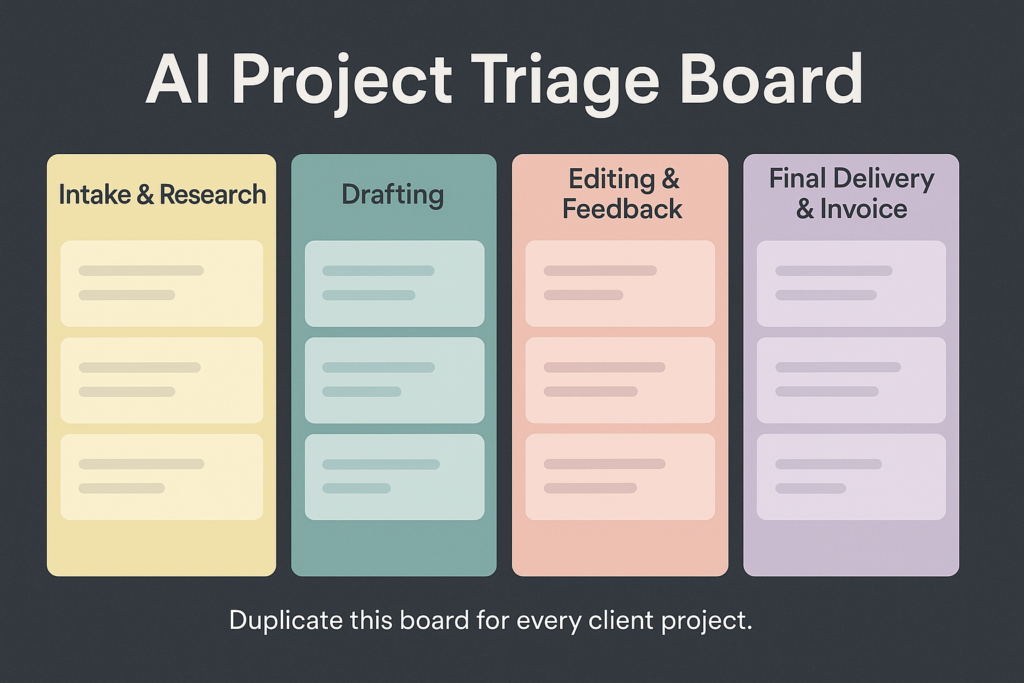
You do not need an enterprise-grade project system to get relief. A simple board that shows tasks moving from “To Do” to “Doing” to “Done,” plus a bit of AI assistance, is often enough. Many AI project management tools help you keep track of what’s due when. They can surface upcoming deadlines so you don’t have to hold everything in your head.
A beginner-friendly setup might use a basic board with columns such as Intake and Research, Drafting, Editing and Feedback, and Final Delivery and Invoice. When a new project arrives, you add a card. Then, ask the AI within the tool to generate a task list, and assign due dates. The tool can then nudge you as deadlines approach and keep everything in one place.
This approach helps consultants, coaches, and founders manage multiple content initiatives simultaneously. It also reassures Structure-Seekers who want to see all their work laid out in a clean, visual format. For example, an Overloaded Producer with a monthly blog retainer could have one card per article that moves through each column—from intake and research to drafting, edits, delivery, and finally invoicing—so nothing falls through the cracks. If you work with a VA, designer, or other collaborator, you can assign tasks on the same board . Everyone knows who owns what and when it’s due, rather than chasing updates via email.
Turning Repeat Work Into Reusable Checklists and SOPs
If you run the same type of project more than a couple of times, turning it into a checklist saves hours over the course of a year. AI is excellent at helping you create these.
You can feed it past emails, old briefs, or your memory of how a project went. Then, ask it to map out the steps as a process. You then refine that list into an SOP (standard operating procedure) or checklist for “Monthly Blog Package,” “New Client Onboarding,” or “Book Drafting Workflow.”
For the Structure-Seeker, this brings a sense of calm and predictability. For the Overachiever on the Edge, it pulls decisions out of your head and into a repeatable system, which reduces cognitive load. The next time you sign a similar project, you duplicate the checklist and start, instead of reinventing the process.
Protect Your Time With AI Business Tools and Focus Systems
People often treat time tracking as a way to squeeze more productivity out of themselves. Here, use it instead to protect your energy and notice patterns before you burn out.
Choosing AI Time Tracking Tools You’ll Actually Use
A good AI time tracking tool should feel light, not intrusive. Ideally, it lets you start a timer with a single click and label it with a client or project. Then, view simple reports afterward. Some tools offer smart suggestions based on the apps or sites you use. They can help when you forget to start a timer.
You can keep things very simple by tracking a few broad categories: Client Work, Admin, Marketing, and Recovery. Over a week or two, you will see how your time actually flows. The Overachiever may discover that there is almost no time left in the Recovery category. This is a clear sign that something needs to change. The Overloaded Producer may realize that one client quietly absorbs far more hours than they pay for. Over time, those insights can guide you to adjust your pricing and refine your scope. They can help you say no to work that consistently drains time without matching revenue.
The point is not to obsess over every minute. It is to give you enough information to make sane decisions about your schedule, pricing, and capacity.
Reducing Digital Noise With Focus Apps and Blockers
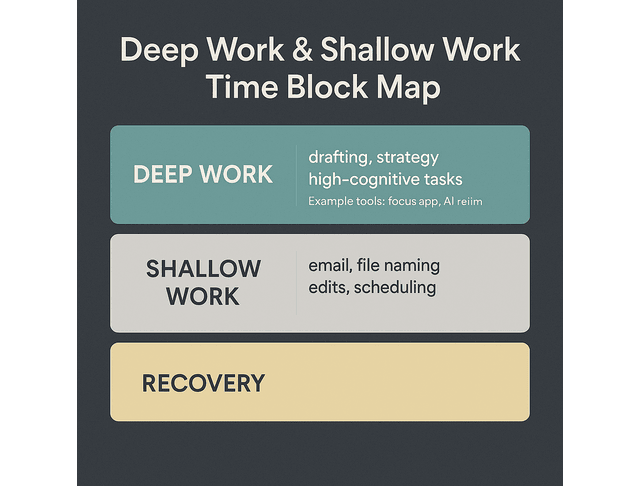
Deep work is hard when your browser is one click away from social media, your email pings constantly, and every app wants your attention. Focus tools and productivity apps let you create quiet windows in your day without relying solely on willpower.
A simple starting point is to create one deep-work block and one shallow-work block. During the deep block, you use a focus app to block distracting websites, mute non-essential notifications, and protect that time for drafting, strategy, or book development. During the shallow block, you handle email, file naming, minor edits, and scheduling.
For the content-strapped founder, these protected blocks may be the only way to move important content projects forward. For the multi-hat creative who designs, films, and edits, focus tools prevent everything from blending into one long stretch of unfocused multitasking. It also helps to schedule short breaks and recovery blocks between these sessions. Your brain now has time to reset instead of running at full speed from morning to night.
Time Boundaries, Energy Management, and Smart AI Business Tools
AI reminders and calendars become powerful when you use them to enforce limits instead of simply stacking more commitments into your week. You can set a daily cap on client work hours, block out non-negotiable deep work sessions, and let your calendar remind you when it is time to stop.
Pairing this with basic awareness of your energy pattern makes a big difference. You can schedule heavy cognitive tasks for your strongest hours and keep lighter functions for times when you are naturally more tired. Over time, this rhythm helps the Overachiever on the Edge and the Overloaded Producer avoid the habit of pushing hard every hour of every day.
The tools will not set boundaries for you, but they can uphold the ones you choose.
Organize Collaboration and Files With AI Business Tools
Scattered files, missing attachments, and “which version is this?” moments might seem minor, but they chip away at your focus. Organizing your digital workspace with AI-supported tools removes a surprising amount of friction.
Cloud Document Management and Shared Client Folders
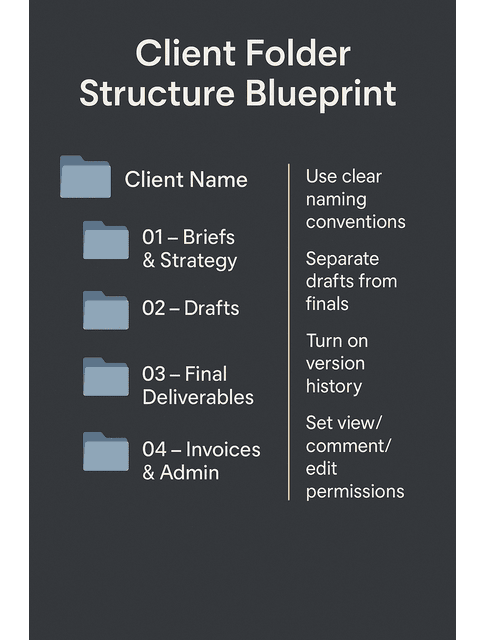
Cloud document management and collaborative document management platforms let you store your work online, access it from any device, and share specific files or folders with clients and collaborators. Instead of emailing attachments back and forth, you can keep everything in one shared space.
A straightforward structure might use one top-level folder per client. Then, divide it into subfolders for briefs, strategy, drafts, final deliverables, and invoices or admin documents. When a new project starts, you create the structure once and reuse it.
For founders and consultants who work with designers, writers, or developers, this keeps each project organized from the start. For the Structure-Seeker, opening a well-organized folder tree reduces the sense of chaos that comes from hunting through old emails. You can also link these shared folders inside communication tools like Slack or Microsoft Teams, creating one channel or space per client so conversations, files, and links all live in predictable places instead of being scattered.
Version Control, Backups, and Disaster-Proof Files
“Version control” sounds technical, but in practice, it is about naming files clearly, tracking changes, and having a way to revert if something breaks. Many cloud document tools now include built-in version history and autosave, which means you can see older drafts and restore them if needed.
Small, steady habits make a big difference. Keep your drafts separate from your final files, stick to clear naming conventions, and turn on automatic backups to a cloud service or an external drive. Set permissions with intention—choose who can view, comment, or edit—so collaborators have the access they need without risking your master files. When you know your manuscript, SOPs, and client work are protected, it’s much easier to settle into the work in front of you.
This kind of safety net is especially valuable for the Overachiever on the Edge, who might be pushing through long days and could easily make a mistake, and for the DIY author who has poured months into a manuscript.
Connecting Your AI Operations Stack Into One Simple Workflow
You do not need everything perfectly integrated on day one. The goal is to choose a small set of AI business tools that cover key areas—money, tasks, time, and files—and then link them just enough to keep workflows flowing smoothly.
A freelance writer might combine an AI-enhanced project board, a cloud-doc workspace for drafts, a simple AI invoicing tools setup, and a lightweight time tracker. A content-strapped founder might pair a collaborative document hub with a project board that their team shares and a billing system that handles retainers and one-off projects.
As you grow more comfortable, you can connect tools more deeply. Still, it is almost always better to use a few tools consistently than to bounce between ten different apps you never fully adopt.
Final Thoughts: Let AI Business Tools Carry More of the Weight
You do not need to transform your entire business overnight, and you definitely do not need to become a tech specialist. What you need is for the operational side of your solo business to stop draining so much energy.
Focus on the part of your business that hurts the most right now. If cash flow feels shaky, start by tightening your invoicing system and using automated payment reminders when your workload feels scattered, lean on AI-supported task triage and a simple AI-powered project management board to get everything in order. If your days blur together, use an AI-powered time-tracking tool alongside a focus app to create clearer rhythms. And if your files are a mess, build a simple folder structure in the cloud and layer on a basic cloud document management system so everything has a home.
For the Overloaded Producer, the content-strapped founder, the Structure-Seeker, and the Overachiever on the Edge, the real promise of AI business tools is not just productivity. It is protection. These tools create buffers around your time, your focus, and your income so that you can keep doing the work only you can do—writing, thinking, advising, leading—without running yourself into the ground. On a larger scale, research from McKinsey suggests that generative AI could unlock around $6.1–$7.9 trillion in economic value annually. Organizations automate and augment everyday knowledge work. It’s proof that the same forces reshaping large companies can quietly support solo businesses, too.
Let the tools handle the repeatable tasks. Let your systems hold the weight. You get to keep your brain for the work that actually matters.
Next Steps: Get Support for Your AI Operations
Ready to set up your operations without guessing?
Download the Freelancers’ AI Operations Starter Kit. It’s a free, simple set of checklists, prompts, and templates. It can help you build invoicing, project, time, and file systems that actually work.
Want deeper systems you can use across your entire freelance business?
Explore my books on Amazon and see how writers and creators are using AI to work faster and protect their energy.
Frequently Asked Questions About AI Business Tools for Freelancers
An AI business tool is software that uses artificial intelligence to automate or streamline tasks such as invoicing, task management, scheduling, and reporting. It reduces repetitive manual work, allowing you to focus more on client work and creative thinking.
Common AI tools for small businesses and freelancers include smart invoicing platforms, scheduling assistants, AI project management tools, time-tracking apps, and basic chatbots. These tools often add simple analytics so you can see which projects, clients, or tasks take the most time or generate the most revenue.
You can’t run a healthy business on AI alone because good judgment, communication, and expertise still have to come from you. However, AI can handle many operational tasks, such as reminders, updates, and report. This way, you can spend more time on strategy and client relationships.
The best starting point depends on where you feel the most friction. Still, many freelancers see quick wins with either invoicing or project management. If you struggle with billing, choose an invoicing tool with automated payment reminders; if deadlines and tasks feel chaotic, start with a simple board powered by AI project management tools.
Many reputable AI business tools use encryption, access controls, and compliance standards to protect your information, but security is never automatic. Treat them like any other cloud platform: choose established providers, read the privacy policy, enable two-factor authentication, and avoid sharing more data than necessary.

Florence De Borja is a freelance writer, content strategist, and author with 14+ years of writing experience and a 15-year background in IT and software development. She creates clear, practical content on AI, SaaS, business, digital marketing, real estate, and wellness, with a focus on helping freelancers use AI to work calmer and scale smarter. On her blog, AI Freelancer, she shares systems, workflows, and AI-powered strategies for building a sustainable solo business.

