
You sit down to write an article, but the client’s latest instructions are buried in email. Another project’s deadline is in your task manager, and a revision request is waiting in chat. Before you write a single paragraph, you have three applications open and several details to reconcile.
The best workflow tools can help you get that administrative work under control. Some organize assignments, others connect applications, and AI agents can help interpret information and prepare actions that would otherwise require manual coordination. The challenge is choosing software that solves your actual problems without creating another system you have to maintain.
Everything I’ve shared here—and more—is in my book, available on Amazon. Click the link if you’re ready to take the next step.
Best Workflow Tools at a Glance
Not every workflow tool does the same job. Project managers organize assignments, automation platforms move information between applications, and AI-agent platforms can handle selected tasks that require interpretation and decision-making.
For freelance writers, Trello is a strong starting point for simple task tracking, Zapier for straightforward integrations, and Make for more involved automation. The other applications become attractive when you need deeper project organization, technical customization, or supervised AI-agent execution.
| Tool | Best for | Starting cost | Main limitation |
| Trello | Visual assignment tracking | Free; Standard $5/user/month | Complex projects may need more structure |
| ClickUp | Detailed client project management | Free; Core $9/user/month | More configuration to learn |
| Notion | Briefs, research, and project databases | Free; Plus $10/member/month | Flexible setup requires maintenance |
| Zapier | Connecting everyday applications | Free; Professional from $19.99/month | Usage-based charges can grow |
| Make | Visual, conditional automations | Free; Core from $12/month | Complex scenarios require troubleshooting |
| n8n | Custom workflows and agent orchestration | Self-hosted Community edition; Cloud from €20/month | Greater technical responsibility |
| AI by Zapier (successor to standalone Zapier Agents) | Connected AI-agent tasks | Professional from $19.99/month | Agentic actions consume plan tasks |
| Make AI Agents | Agents within structured automations | Uses Make plans and credits | AI usage can increase credit consumption |
| CodeWords | Building automations and agents through conversation | Free; Pro $39/month | Credits and workflow-run limits |
Pricing and features checked November 9, 2026. Paid prices reflect advertised starting rates, generally with annual billing where applicable. Make’s Core example is based on 10,000 monthly credits. Prices use the providers’ listed currencies, and some services charge separately for AI usage or connected models. AI by Zapier’s agentic capabilities are available through eligible paid Zapier plans. See the official pricing pages linked below.
Zapier and AI by Zapier appear separately because they serve different workflow needs, but you don’t necessarily need two subscriptions to use them.
You might choose Trello instead of ClickUp, but use Zapier alongside either. Likewise, a conventional automation and an AI agent can serve different purposes within the same freelance workflow.
What Makes a Workflow Tool Worth Using?
A subscription can look inexpensive until you discover that it cannot connect to the application holding your client briefs. Another tool might offer advanced automation but require more time to configure than the tasks it replaces. Before comparing products, consider how each one fits the actual work you need to manage.
Task Visibility, Integrations, and Ease of Use
Can you see this week’s deadlines, find the latest brief, and identify which assignments are awaiting approval? A good task management system makes those details accessible without forcing you to reconstruct the project history.
Before connecting applications, choose one dependable location for your project records. If different deadlines appear in Trello, your calendar, and email, automation may simply spread the inconsistency. Check that your software supports the integrations you need without creating more manual work. This is easier when you have an organized AI-assisted writing workflow that establishes where information belongs before tools begin exchanging it.
Microsoft’s 2025 Work Trend Index report on the infinite workday reported that the top 20% of Microsoft 365 users by notification volume received an average of 275 meeting, email, or chat notifications per day, illustrating how fragmented digital work can become. The finding comes from workplace telemetry, not a study of freelancers, but it highlights why reducing unnecessary application switching matters.
AI Capabilities, Reliability, and Human Oversight
An AI-powered feature is not necessarily an AI agent. A tool that summarizes a project description provides useful assistance, while an agent-capable system goes further by interpreting information, choosing among permitted actions, and interacting with connected applications.
Before granting access, check the tool’s permissions, approval settings, execution records, and error notifications. Client confidentiality also matters. Don’t send unpublished manuscripts or confidential briefs to an AI service without the necessary authorization and appropriate data safeguards.
Cost and Ongoing Maintenance
A low subscription price doesn’t guarantee an inexpensive workflow. Some services charge by user, while others bill for automation tasks, operations, agent activities, or AI credits. You may also need to pay for connected applications, model access, or hosting.
The recommendations below consider documented capabilities, pricing, integrations, setup requirements, and relevance to freelance writing. They are based on product documentation and practical comparisons, not a claim that every application was independently tested.
These criteria become especially important when comparing conventional automation with AI agents. Both can reduce manual work, but they handle instructions and make decisions differently.
How Do AI Agents Differ From Traditional Automation?
Imagine receiving a new article brief containing several requirements and an unclear deadline. A conventional automation can create a task when the email arrives, but it needs predefined rules to decide what information to record. An AI agent can be configured to interpret the brief, identify missing information, and propose appropriate next steps.
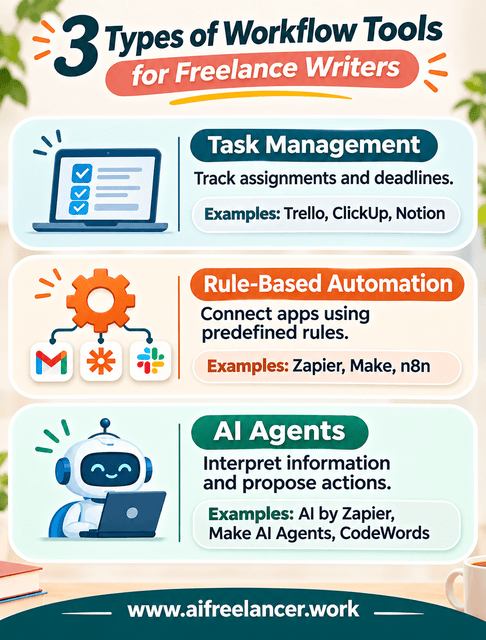
The distinction comes down to three functions:
- Task management: You record an assignment and update its progress.
- Rule-based automation: A trigger starts a predefined action, such as creating a task or sending a reminder.
- AI-agent execution: The system interprets information and selects permitted actions within its assigned boundaries.
Not every task needs an agent. A recurring deadline reminder is usually better handled through a calendar or conventional automation. Predictable administrative processes are often easier to maintain when they follow clear rules rather than requiring AI decision-making.
Agents are valuable when information requires interpretation, but they still need supervision. Stanford’s 2026 AI Index reported that a leading AI model achieved 66.3% accuracy on OSWorld, a benchmark evaluating computer-use tasks. The finding doesn’t measure the tools reviewed here, but it shows why agent-generated results still need verification.
Which Workflow Tools Work Best for Freelance Writers?
Your biggest workflow problem should determine which software category you investigate first. Project managers help you track assignments and deadlines, automation platforms connect repetitive tasks, and AI agents can assist when information requires interpretation. Comparing tools within those categories makes it easier to identify a practical starting point.
Trello, ClickUp, and Notion for Managing Client Work
Managing five clients becomes difficult when each has different deadlines, revision procedures, and document locations. A project manager should make those differences easier to handle. Trello, ClickUp, and Notion approach the problem differently, so your choice depends on how much structure your assignments require.
Trello: Best for straightforward assignment tracking
With a visual board, you can organize assignments using Trello’s lists and cards. You might create columns for New Assignments, Research, Drafting, Editing, Client Review, and Completed. Each assignment becomes a card containing its deadline, checklist, and relevant links.
This arrangement makes it easy to see which articles are moving forward and which require attention. Trello also includes built-in automation, so recurring actions and some status changes can be handled without another platform. Its free plan includes up to 10 boards per workspace and 250 automation command runs monthly, while Standard starts at $5 per user monthly with annual billing.
Trello becomes less attractive when you need complex dependencies, detailed reporting, or extensive relationships between project records. You can extend it, but those additions may weaken the simplicity that made it appealing. For writers who mainly want to track assignments and revisions, its straightforward structure remains an advantage.
ClickUp: Best for complicated recurring client projects
ClickUp provides more detailed project management through tasks, subtasks, custom fields, calendars, and additional project views. Suppose you produce four articles monthly for each of several clients. ClickUp can help you organize recurring assignments, track production stages, and maintain client-specific project information.
Its Free Forever plan includes unlimited tasks but restricts storage and certain advanced features. The Core plan currently starts at $9 per user monthly, billed annually, and includes more extensive organization and automation allowances. ClickUp also offers AI capabilities, but some features consume separate credits, so check the applicable plan before assuming advanced AI assistance is included.
You’ll spend more time setting it up. If you only need to identify your next assignment, maintaining custom fields, dashboards, and multiple project views may create unnecessary work. ClickUp makes more sense when your client projects have enough moving parts to benefit from that additional control.
Notion: Best for keeping research, briefs, and assignments together
Notion combines documents, databases, and project organization. For research-heavy assignments, this can be particularly useful. A client project page might contain the brief, target audience, keyword research, references, content calendar, and related tasks.
Instead of switching between separate notes and task lists, you can connect information within a shared workspace. Notion’s free plan supports individual organization and databases, while Plus starts at $10 per member monthly with annual billing. Its more advanced agent capabilities are associated with higher plans, including Business.
You’ll need to build a structure that works for your assignments. That structure must also remain usable as your client workload changes. If you enjoy organizing research and project information together, the setup effort may be worthwhile, but it can be excessive when all you need is a deadline tracker.
Which should you choose?
Think about what happens after you create an assignment. Do you simply move it through production stages, manage dependent tasks and approvals, or connect it to extensive research? Those requirements should guide your choice of project manager.
Consider a more specific comparison. You have five articles due across three clients, with two awaiting approval and one requiring additional research. With Trello, you could place the five assignments on a board, move their cards through production stages, and use due dates to track delivery. ClickUp lets you organize the same assignments by client, add custom fields for approval status, and create dependent subtasks for research and revisions. Meanwhile, Notion allows you to build an assignments database linked to client pages, research notes, and briefs.
All three approaches can organize the work, but they demand different amounts of setup. Trello prioritizes visual progress, ClickUp provides more structured task control, and Notion connects assignments with supporting information. For a writer juggling five straightforward articles, a Trello board may be enough. If those articles involve multiple dependencies or extensive research records, the additional structure in ClickUp or Notion may justify the effort.
Zapier, Make, and n8n for Workflow Automation
Project management keeps assignments visible, but it doesn’t necessarily eliminate repetitive data entry. Workflow automation becomes useful when you repeatedly transfer information between those assignments and other applications. Understanding simple systems for automating freelance operations helps you identify which recurring tasks are suitable for automation before choosing a platform.
For example, submitting a completed article might require changing its project status, recording the delivery date, and preparing a client notification. A suitable automation can handle some of those predictable actions.
Zapier: Best for straightforward app connections
Zapier is a practical starting point when you want one application to respond to an event in another. You could create a workflow that detects a new intake form submission and adds an assignment to your project manager. Another might update a task when a particular event occurs in a connected application.
Its free plan currently includes 100 tasks monthly and supports two-step Zaps. Professional starts at $19.99 monthly with annual billing and adds multistep automation, webhooks (automatic notifications sent between applications when an event occurs), and other features. Zapier is a reasonable first choice when the applications you already use are supported, and the process follows a predictable sequence.
However, task usage can become difficult to estimate when workflows contain several actions, AI steps, or more expensive operations. Check how the platform counts activity before automating something that runs frequently.
Make: Best for conditional workflows
Make offers a visual scenario builder with routers that send information down different workflow paths, filters, and data-handling operations. Suppose a submitted assignment needs different handling depending on its status. A completed first draft might trigger an editing task, while an approved final draft moves to delivery.
Make can express those conditions within a visual workflow. Its free plan includes 1,000 credits monthly, while Core starts at $12 monthly for 10,000 credits, with additional charges possible when usage exceeds the plan.
Choose Make when you need to route assignments through different paths or transform information before sending it to another application. Complex scenarios also take longer to test and troubleshoot because each branch introduces another possibility to examine. Its flexibility is useful when your requirements justify that maintenance.
n8n: Best for technically customizable workflows
n8n is more suitable when you need custom integrations, API connections that let applications exchange information, code-based operations, or greater control over where your workflows run. You could use it to connect applications through APIs when a standard integration cannot provide the required action. It also supports agent-related workflows and orchestration.
The self-hosted Community edition is available without a subscription fee, although hosting and maintenance remain your responsibility. Its managed Cloud Starter plan begins at €20 monthly, billed annually, for 2,500 workflow executions (individual runs of an automated process).
Unlike some platforms that charge for individual actions, n8n Cloud primarily prices workflow executions. That can be useful when a process contains many internal steps, but it doesn’t eliminate possible hosting, AI-model, or maintenance costs. For someone unfamiliar with technical configuration, n8n may require more effort than the administrative work being automated.
Which automation platform deserves your attention?
Consider the same assignment-intake process across all three platforms. A client submits a form, the system creates a project record, checks for missing information, and notifies you when clarification is required. Zapier is worth considering when supported triggers, filters, and actions can handle those steps without extensive configuration.
Make offers more control when the process needs elaborate routing, such as sending incomplete submissions to one branch and complete assignments to another while transforming several fields. Consider n8n when the intake system requires custom API requests or deployment control that would be difficult to achieve through the other platforms. All three can support conditional workflows, so the decision should reflect the actual integrations, maintenance effort, technical requirements, and billing model rather than a simplistic division between basic and advanced automation.
AI by Zapier, Make AI Agents, and CodeWords for Agent-Assisted Work
Traditional automation works well when each step is predictable. Agent-assisted systems become more relevant when the process involves interpreting client messages, identifying missing information, or selecting among approved actions.
Imagine receiving editorial feedback spread across several document comments. An agent could prepare a revision checklist, flag contradictory instructions, and place the proposed tasks in a connected project system. The important word is proposed, because your judgment remains necessary when the feedback affects scope, deadlines, client commitments, or final content.
Not every client comment should become an approved revision task. An agent might identify a request to correct a factual error, but a request for three additional article sections could change the project’s scope and deadline. The system should flag that distinction for your review rather than automatically expanding the assignment or promising delivery.
Brynjolfsson, Li, and Raymond, in research published through the National Bureau of Economic Research, found that a generative AI assistant increased productivity among customer-support workers by 14% on average, with benefits varying substantially by experience level. This wasn’t a test of workflow automation platforms or freelance writing, but it demonstrates why AI productivity claims should be evaluated against the task and user rather than accepted as universal savings.
AI by Zapier: Best for connected agent tasks
AI by Zapier brings AI reasoning, tool calls, and connected application actions into Zapier’s automation editor. For freelance work, an agentic step might examine an approved intake record, identify required project details, and prepare the next administrative actions.
Its advantage is access to Zapier’s broader integration ecosystem, including the ability to combine AI decisions with predefined triggers and actions. You can inspect tool calls and execution details through Zap history, but the workflow still needs appropriate permissions, instructions, and testing.
Zapier is migrating its standalone Agents product to AI by Zapier. The standalone product has not yet been assigned a shutdown date, but the newer approach uses your Zapier plan’s task allowance rather than a separate Agents subscription. AI by Zapier charges different task amounts depending on the model tier and number of tool calls, so one agent-assisted run may consume several tasks rather than one. For example, an Advanced-tier AI step with one tool call can consume six tasks, depending on Zapier’s current billing rules.
Make AI Agents: Best for combining AI decisions with structured automation
Make AI Agents allows users to incorporate AI decision-making into Make’s visual automation environment. Instead of creating a completely separate process, you can combine an agent’s interpretation with predefined steps. The agent might classify client feedback, while conventional automation handles how the approved result moves into a task database.
Make also provides execution visibility and options for approval checkpoints. This is especially relevant if you’re already comfortable building scenarios in Make, because you can keep predictable actions structured while allowing an agent to interpret information where necessary.
Agent execution may consume both operation credits and credits related to AI-model usage, depending on the connection and configuration. Check the credit allowances and available models on your plan before estimating costs.
CodeWords: Best for conversational workflow and agent creation
CodeWords approaches automation development differently. Its assistant, Cody, lets users describe the desired result in natural language. According to the platform’s documentation, Cody can build connected workflows, present them for review, and deploy them after authorization.
These workflows may include conventional automations or agent-assisted behavior. CodeWords itself is the development and deployment platform, not one autonomous agent. For example, you might describe a process that collects assignment details, checks for missing information, and prepares an organized project record.
Rather than constructing every step manually, you work through the requirements conversationally. That approach may appeal to freelancers who prefer explaining a process over building a visual flowchart. However, conversational development doesn’t remove the need to inspect permissions, test unusual inputs, monitor runs, and modify workflows when requirements change.
CodeWords offers a free plan with limited credits and 100 workflow runs monthly. Pro starts at $39 monthly, with credits used for building, editing, and running workflows. The relevant question is whether the easier creation process compensates for its usage limits and the ongoing effort required to verify the resulting workflows.
Which agent platform should you choose?
If your main requirement is accessing supported applications through an established integration ecosystem, consider AI by Zapier. If you already build automations in Make and want AI interpretation within those scenarios, Make AI Agents is the more natural option.
CodeWords deserves consideration when conversational workflow creation is a priority. Before choosing it, check whether the workflow it builds can connect to your project manager, restrict actions, and show you what happened during execution.
For client work, compare what happens between an agent receiving instructions and the resulting action being completed. AI by Zapier combines agentic steps with conventional Zap actions and execution history, while Make places agent decisions within scenarios that can also contain predefined routes and controls. CodeWords emphasizes creating and deploying the workflow through conversation, so you need to inspect the resulting agent’s actual permissions and execution behavior rather than assuming that natural-language setup guarantees safe operation.
Before connecting client accounts, check the platform’s approval settings, action permissions, execution history, and error alerts. An agent that can prepare a revision checklist without changing client records may be suitable for an initial trial. Permitting it to alter deadlines, send messages, or expand assignments requires stronger safeguards and explicit authorization.
When Your Existing Software Is Already Enough
Before subscribing to another application, check whether your current project manager can already perform the action you need. For example, if you only want a reminder three days before an article deadline, a recurring task or calendar notification may solve the problem.
Similarly, organizing revision requests may require a better task checklist rather than a new AI agent. Additional software is justified when it solves a recurring problem that your existing applications cannot handle adequately. Otherwise, you introduce another subscription, connection, and maintenance responsibility without necessarily reducing your workload. That is often when extra tools become a burden.
Free vs. Paid Workflow Software: What Is Worth the Cost?
A free plan can be enough for months, while a paid subscription can become expensive before it produces any meaningful benefit. The deciding factor is whether the additional features address a problem that occurs frequently enough to justify their cost.
When Free Plans and Simple Automations Are Sufficient
If you manage a modest number of assignments and occasionally transfer information between applications, free tools may provide everything you need. Trello and Notion can handle basic project organization without a paid subscription, while Zapier and Make also provide limited free automation usage.
Start by checking whether your normal workload fits the plan restrictions. A workflow that runs twice weekly has different requirements from one that processes hundreds of daily events. Your existing software may also include native automations that remove the need for a separate service. Before upgrading, consider how many applications your work really requires.
When Paid Features Justify the Expense
Paid software becomes easier to justify when you consistently need higher usage limits, advanced integrations, more project control, or agent capabilities unavailable on your current plan. The subscription fee is only part of the cost. Consider how often you’ll need to check failed runs, update integrations, reconcile duplicate information, or correct automated outputs. A tool that saves 20 minutes of manual work but requires frequent troubleshooting may deliver less value than a simpler application that saves only 10 minutes reliably.
An agent-assisted report might cost more than a conventional automation without producing a proportionate benefit. Pricing models also differ: Zapier uses tasks, Make uses credits, n8n Cloud emphasizes workflow executions, and CodeWords combines workflow-run allowances with credits.
Say you receive 20 new assignments a month. For Zapier, estimate how many billable actions each assignment requires, including any follow-up updates or notifications. With Make, estimate the credits consumed by the scenario’s operations and any AI-related steps. For n8n Cloud, determine how many workflow executions the process produces, and for CodeWords, check both workflow-run allowances and the credits used by the relevant activities.
These estimates won’t necessarily produce directly comparable per-assignment prices because each provider measures usage differently. They will, however, help you identify whether your expected workload fits a free plan or requires paid capacity. Include occasional retries and changes to the workflow rather than calculating costs only for successful executions.
Which Workflow Tools Should You Use Together?
Connecting tools makes sense when each application has a clear responsibility. For freelance writers, three configurations cover many common requirements, from basic task tracking to agent-assisted coordination.
Minimal configuration: Trello plus your existing writing software
Use Trello to track assignments while keeping research, drafting, and editing in the applications you already know. Attach a Google Docs link to each card, record its due date, and update its status as the project progresses. You don’t need a separate automation service when assignment visibility is your main concern.
Connected configuration: Notion or ClickUp plus Zapier
Use your project manager as the central record and Zapier to transfer information from a supported intake form or another connected application. For example, a new submission could create a task containing the article title, client, and deadline. This reduces repeated data entry but introduces another connection to maintain.
Agent-assisted configuration: A project manager plus a compatible automation and agent service
For assignments requiring interpretation, an agent can prepare proposed tasks from incoming information before you approve them. Conventional automation handles predictable steps, while the agent assists with less structured information. Check integration compatibility, permissions, and combined costs before adding this layer.
A Freelance Writing Workflow Using AI Agents
Suppose a client sends you a 2,000-word article brief with an unclear deadline. The client provides a keyword, target audience, brand requirements, reference links, and a deadline described only as “next Friday.”
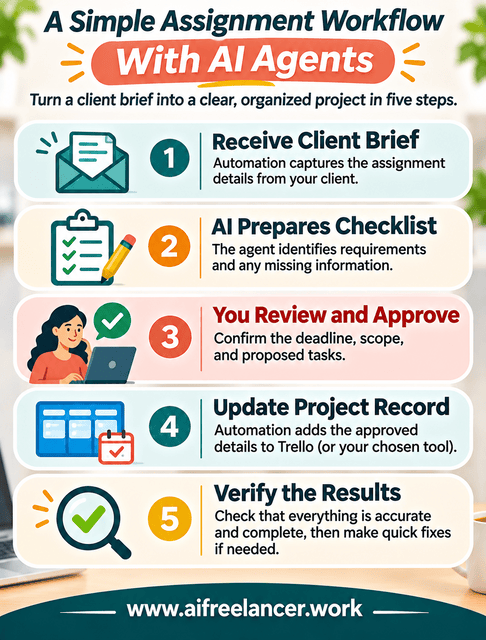
For this illustrative workflow, consider Trello, Zapier, and AI by Zapier. Trello stores the assignment, Zapier handles supported triggers and connected actions, and an AI step processes the brief’s information. The exact configuration and plan requirements would need testing before live deployment.
Receive and Organize the Client Brief
The assignment arrives through a designated intake form. A Zapier workflow detects the submission and creates a Trello card containing the article title, client, original deadline request, and a link to the brief. The actual due-date field remains unconfirmed until you approve the date.
That is conventional automation. The trigger and action are predefined, and the system doesn’t need to decide how the assignment should be interpreted. Its job is to move the relevant information into the project tracker.
Let an Agent Prepare the Next Actions
An authorized agentic step receives the permitted assignment details and prepares a task checklist. It identifies the target keyword, audience, expected length, source requirements, and requested deliverables.
It also notices that “next Friday” lacks a confirmed date or time zone. Rather than silently setting a deadline, it flags the ambiguity for clarification. The resulting checklist is a proposal, not an approved project plan.
Use fictional assignment details during initial testing, and connect actual client information only when your agreement and data-handling requirements permit it.
Review, Approve, and Monitor Execution
Before approving any updates, you review the proposed checklist and clarify the deadline. Suppose the agent’s proposal contains an incorrect date and omits the client’s required sources. You correct those details first, then approve the revised checklist. Configure the workflow so that a connected action cannot update approved project details until the required review is complete. Where supported, require approval for the relevant tool action rather than relying on a manual review that doesn’t actually prevent execution.
Once you approve the checklist, the workflow updates the Trello card with the confirmed deadline and required tasks. If the connected action fails, the workflow should preserve the original information and report the problem rather than assume the Trello card was updated successfully.
A successful execution notification doesn’t prove that the assignment was recorded correctly. Check the Trello card against the approved checklist to confirm that the deadline, client details, and required sources were recorded accurately. If something is missing or incorrect, identify the failed step and rerun only what needs updating. Before retrying, check whether the project card already exists to prevent duplicate tasks or an overwritten deadline.
After the correction, verify the final record rather than relying only on another success notification. You should be able to identify what failed, what was changed, and whether the corrected information reached the intended destination. You’ll know which task failed and how to correct it without rebuilding the entire workflow.
You remain responsible for the final brief interpretation, editorial decisions, and commitments to the client. Choosing suitable software is only one part of keeping assignments organized. You also need a reliable process for checking information and handling exceptions.
Before You Add a New Workflow Tool
Use one real administrative problem to evaluate your options. You don’t need to rebuild your entire freelance system to determine whether a new application is worthwhile.
- Identify a recurring task that takes time away from writing.
- Shortlist one or two applications capable of handling it.
- Test the workflow with realistic information, including missing details and possible errors.
- Keep the option that reduces total work without introducing unacceptable costs or reliability problems.
A successful test should leave you with accurate information, a clear record of what happened, and less manual work than before. If the new system requires constant corrections, reconsider whether a simpler solution would serve you better.
What Are the Best Workflow Tools for Freelancers?
Trello, ClickUp, and Notion are useful for managing assignments, while Zapier, Make, and n8n support workflow automation. For agent-assisted work, AI by Zapier, Make AI Agents, and CodeWords are candidates worth evaluating. The best choice depends on whether you need project visibility, connected actions, or AI-assisted interpretation.
What Is the Difference Between Workflow Automation and AI Agents?
Workflow automation follows predefined triggers and rules, such as creating a task when a form is submitted. An AI agent can interpret information and select permitted actions within its instructions. For example, automation records a new assignment, while an agent may identify missing requirements before preparing the next steps.
Which Workflow Tools Are Easiest for Beginners?
Trello is a practical starting point for visual task management, while Zapier is worth considering for simple application integrations. Notion can also work well for writers who prefer documents and databases. Begin with one task you can clearly define instead of trying to configure several connected systems immediately.
Can AI Agents Manage Freelance Projects Automatically?
AI agents can assist with intake processing, task preparation, document interpretation, and selected project updates when supported by their integrations. They should not independently approve scope changes, commit to uncertain deadlines, or send sensitive client information without appropriate authorization. Human review remains important for decisions involving client relationships and editorial responsibility.
Are Free Workflow Automation Tools Good Enough?
Free plans are often sufficient for basic task tracking and occasional automation. Trello, Zapier, Make, and several other platforms offer limited free usage. Check restrictions on executions, integrations, storage, and AI features before deciding. Upgrade when the limitations interfere with a recurring process that provides measurable practical value.
References
- Brynjolfsson, E., Li, D., & Raymond, L. (2023). Generative AI at work (Working Paper No. 31161). National Bureau of Economic Research.
- ClickUp. (2026). ClickUp pricing and plans.
- CodeWords. (2026). CodeWords: Workflow automation you describe, not build.
- CodeWords. (2026). Pricing.
- Make. (2026). Make AI Agents.
- Make. (2026). Make pricing and subscription packages.
- Microsoft. (2025). Breaking down the infinite workday.
- n8n. (2026). Plans and pricing.
- Notion. (2026). Pricing plans.
- Stanford Institute for Human-Centered Artificial Intelligence. (2026). Technical performance: The 2026 AI Index Report.
- Trello. (2026). Pricing.
- Zapier. (2026). Migrating from Agents to AI by Zapier.
- Zapier. (2026). AI by Zapier model tier pricing.
- Zapier. (2026). Plans and pricing.
Final Thoughts
The best workflow tools keep assignments visible, connect applications that genuinely need to communicate, and reduce repetitive administrative tasks. You don’t need the most advanced system. You need one that handles your work reliably without creating another layer of maintenance.
Start with a recurring problem, test one suitable solution, and introduce AI agents only where their capabilities justify the additional oversight. To explore practical ways to build agent-assisted freelance systems, visit my Amazon Author page and discover Better With a Bot: A Beginner’s Guide to AI Agents That Automate Your Freelance Workflows in Minutes.

Florence De Borja is a freelance writer, content strategist, and author with 14+ years of writing experience and a 15-year background in IT and software development. She creates clear, practical content on AI, SaaS, business, digital marketing, real estate, and wellness, with a focus on helping freelancers use AI to work calmer and scale smarter. On her blog, AI Freelancer, she shares systems, workflows, and AI-powered strategies for building a sustainable solo business.