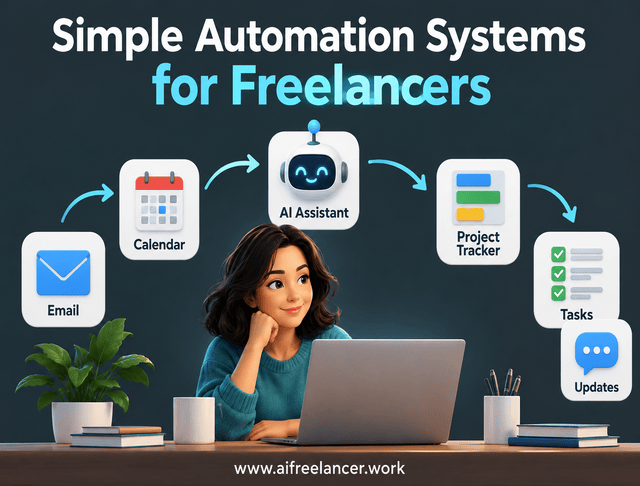
You finish a client article, but your work isn’t over. You still need to update the project tracker, notify the client, record the revision deadline, and prepare the next invoice. AI business process automation can reduce the manual work between those activities, but only if you automate the right steps.
Each administrative task may take just a few minutes. Across several clients, those minutes add up, and you spend more time managing assignments than you expected.
Microsoft’s 2025 Work Trend Index reported that the top 20% of Microsoft 365 users by notification volume received a meeting invitation, email, or chat notification every two minutes on average during core working hours. The finding does not represent all employees or freelancers, but it illustrates how fragmented work can become.
You don’t need an enterprise automation platform to address that problem. You need a few connected processes that move information where it belongs, prepare routine outputs, and leave important decisions with you.
Everything I’ve shared here—and more—is in my book, available on Amazon. Click the link if you’re ready to take the next step.
What Is AI Business Process Automation?
Automating one task can make that task faster, but it doesn’t necessarily make the rest of your business easier to manage. The bigger improvement comes when information moves between related activities without requiring you to handle every transfer.
AI business process automation uses artificial intelligence within automated workflows to complete recurring steps in a business process. For freelancers, it can help organize information, prepare client communication, update project records, and handle routine administration while keeping important decisions under human control.
How AI Changes Traditional Business Automation
Traditional automation works best when instructions are predictable. For example, a calendar can remind you about a deadline, or a form submission can create a new project record. AI becomes useful when the information isn’t so neatly organized.
A potential client might send an email containing a project description, three possible deadlines, background information, and questions about pricing. An AI assistant can extract the main requirements, separate unanswered questions from confirmed details, and prepare a summary. That doesn’t mean AI should decide which deadline you accept or what you charge.
A useful distinction is to use ordinary rules for predictable, structured actions and AI when a process needs to interpret information that those rules cannot handle reliably. Both approaches can work together without making the overall system unnecessarily complicated.
From Automating Individual Tasks to Connecting Business Processes
Imagine using AI to summarize a client inquiry. You receive a useful summary, copy the details into your project tracker, create a task list, and write an acknowledgment. You’ve automated one task, but the handoffs are still manual.
Now imagine a connected process that extracts the inquiry’s requirements, prepares a project record, identifies missing details, and drafts an acknowledgment for your approval. Once you confirm the information, the approved record becomes the starting point for the project.
The difference is not simply faster summarization. It is fewer repeated transfers between the activities required to serve the client.
That distinction matters when deciding between single-purpose systems and complex workflows. A small, independent automation may be enough for one task, while a connected process becomes useful when several activities depend on the same information.
How AI Agents Fit Into Simple Freelance Automation
AI agents attract attention because they can carry out multiple actions toward a goal. However, a freelancer who needs a reliable deadline reminder doesn’t need the same technology as a business coordinating dozens of customer requests.
Understanding the differences helps you avoid adding complexity to a process that already works. It also makes it easier to decide which activities genuinely need AI.
AI Assistants, Automated Workflows, and AI Agents
An AI assistant responds when you ask it to summarize a brief, draft a reply, or organize information. A rule-based workflow performs predefined actions when a condition is met, such as creating a project record after someone submits a form.
An AI-assisted workflow adds interpretation. It might extract requirements from an unstructured email before a rule sends the information to the correct record.
An AI agent can go further by selecting among permitted actions based on its instructions and the information available. That additional flexibility can be useful, but it also requires appropriate permissions and oversight. You also need to decide what should never be automated, particularly when an action affects client commitments or confidential information.
When an AI Agent Is More Than You Need
Suppose you send invoice reminders seven days after delivery. A scheduled reminder can handle that task without an AI agent interpreting the situation.
Adding an agent might introduce extra configuration, subscriptions, and decisions to monitor without improving the result. The better approach is to use the simplest method that completes the job reliably.
You can expand later if the process genuinely needs to handle more varied information or decisions. Until then, building your first simple automation around a predictable rule is likely to be easier to maintain than introducing an agent you don’t need.
Which Freelance Business Processes Are Worth Automating?
Not every repeated task deserves automation. Some are too infrequent to justify setup, while others depend on judgment that should remain entirely yours.
Start by looking for recurring work that interrupts paid assignments and follows a pattern you can explain. These processes are often easier to assess because you already understand what information they require and what a successful result looks like.
Look for Repetitive Tasks That Interrupt Paid Work
Think about the work you do before and after each client assignment. You may organize inquiries, update project records, prepare status reports, record meeting decisions, and check upcoming deadlines. These activities are necessary, but many rely on information you’ve already collected.
Extracting project details from recurring client inquiries and creating task records from approved briefs may be suitable starting points. You might also prepare weekly status updates from current project information or organize meeting notes into reviewable action lists.
Sending reminders based on confirmed deadlines is another possibility. Look for work that happens frequently enough to matter. A task taking five minutes every few months may not justify automation, while the same task repeated across ten weekly assignments might.
Separate Automation Candidates From Tasks Requiring Judgment
Some processes contain predictable administrative steps but still end with an important decision. AI can prepare a comparison of project requirements, but you should decide whether to accept the work.
It can organize a revision request, but you should determine whether the request falls within the agreed scope. The same distinction applies to pricing, contract terms, confidential information, and final creative decisions.
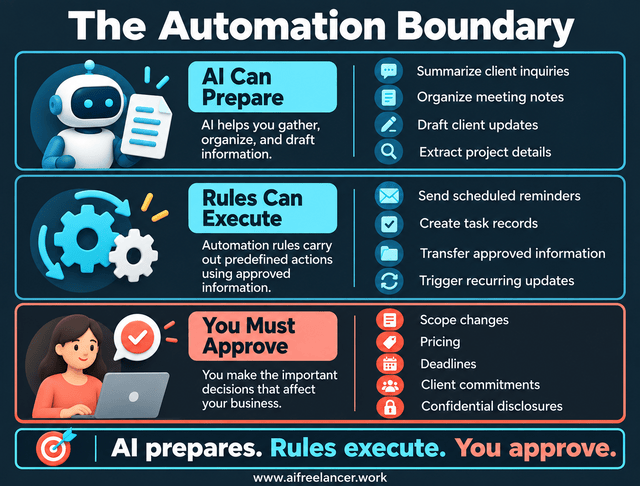
Think of this as the Automation Boundary rather than an all-or-nothing choice. AI can prepare information, predefined rules can execute approved actions, and you retain authority over decisions involving scope, money, deadlines, or client commitments. Where that boundary falls depends on the consequences of getting an action wrong, whether you can detect the mistake, and whether the action can be reversed.
Use the Four-Question Automation Test
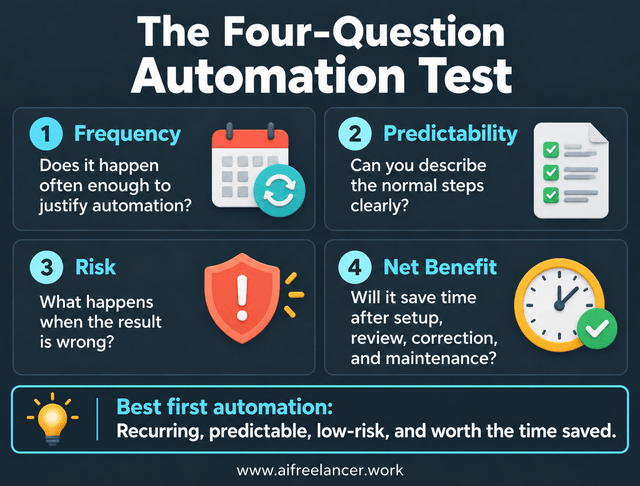
Before connecting tools, evaluate the process using four questions. The goal is to identify activities where automation is likely to remove meaningful work without introducing unnecessary risk.
- Frequency: Does it happen often enough to justify automation?
- Predictability: Can you describe the normal steps clearly?
- Risk: What happens when the result is wrong?
- Net benefit: Will it save time after setup, correction, review, and maintenance?
Consider two possibilities: preparing weekly client updates and automatically approving proposals.
Weekly updates usually draw from familiar project information. You can use AI to prepare a draft and verify the result before sending it.
Proposal approval is different. Pricing, deliverables, client requirements, and deadlines vary, and a mistake may create a commitment you cannot meet.
Preparing weekly client updates is generally the better starting point. The process is recurring, the information can be checked, and the consequences are easier to control.
The test isn’t intended to produce a universal score. It helps you make a practical decision about where automation is likely to remove meaningful work without creating unacceptable risk.
Practical AI Business Process Automation Examples for Freelancers
A freelance business is made up of related activities, not isolated tasks. The client inquiry affects the brief, the brief determines the work, and the recorded progress informs the next client update.
The following example shows how several small automations could work together. It is illustrative, not a system every freelancer must build or a claim that the author has implemented this exact configuration.
Follow a Freelance Project From Inquiry to Completion
Imagine you’re hired to write a series of four articles. The client emails the topics, target audience, preferred tone, deadlines, and source requirements. Instead of manually extracting every detail, you use AI to prepare a structured brief.
After you approve the details, a predefined workflow transfers the approved information into the project record. The approved brief becomes the reference for individual assignments.
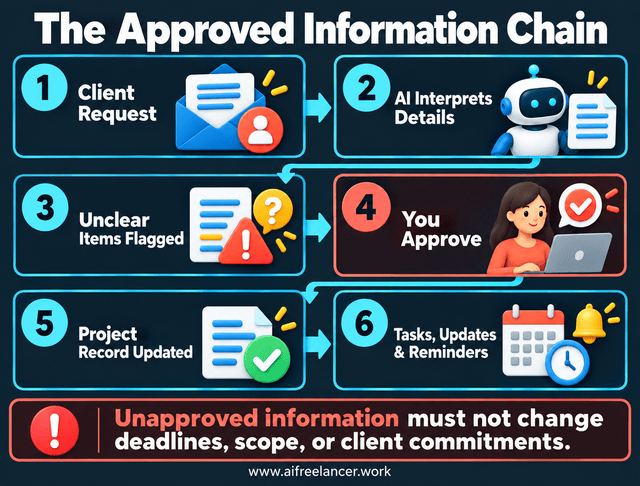
This follows the Approved Information Chain: receive the client’s request, interpret the requirements, confirm uncertain details, and distinguish approved information from pending requests. If the client omits the word count, record that requirement as unresolved rather than treating an AI-generated assumption as an approved instruction. Initial project requirements need your agreement before becoming commitments, and any subsequent changes must be mutually approved before updating the agreed scope, deadlines, or deliverables.
You then work through the project normally. Research, drafting, fact-checking, editing, and final approval remain your responsibilities. You record important milestones as they’re completed.
When the reporting date arrives, an AI-assisted workflow reads the current project information and prepares a progress update for your review. The information has moved through the project without requiring you to recreate it for every administrative task.
Now consider a complication. The client emails asking to move one deadline to Friday, but your tracker still shows Wednesday. The system shouldn’t silently overwrite the approved date.
If configured to compare new requests with the project record, the workflow can identify the discrepancy and bring it to your attention. Once you agree to the change, the confirmed deadline can be recorded.
The business outcome is not simply that an AI summary was generated. It’s that approved requirements, deadlines, responsibilities, and project progress remain accurate and available throughout the assignment.
Keep Project Information Consistent Across Your Business
A connected process needs a reliable place to find the current project information. Otherwise, automation can simply transfer outdated details from one application to another.
Suppose you finish an article and mark it complete in your tracker. The next client report can use that status without requiring you to copy it into a separate reporting document. That works only if the tracker is maintained and treated as the authoritative project record.
During a writing project, the approved brief, revision requests, and delivery instructions may exist in different emails and documents. A revision requested by email may change an instruction contained in the original brief, so the two need to be reconciled before work continues. Recording confirmed decisions in one reliable project record makes it easier to distinguish the current instructions from earlier versions.
A useful project record has three levels. Stable information covers the approved scope, deliverables, and requirements. Current status shows what’s completed, what happens next, and what is blocked. Decisions and open issues record changes that still need confirmation or have already been approved.
The goal is not to keep every detail in one application. It’s to know which record should be trusted when different files, emails, or messages contain conflicting information. A single source of truth for freelance projects makes that distinction easier to maintain.
Turn Meeting Notes Into Actionable Tasks
A client meeting can produce several pages of notes but leave you uncertain about what was actually approved. The administrative burden often begins after the meeting, when you need to distinguish comments, decisions, and assignments.
That extra processing explains why meetings feel draining even when the conversation itself was productive. Understanding notes versus summaries versus tasks helps you separate what was said, what matters, and what action was actually approved. This prevents ideas from being mistaken for assignments.
For example, a client might say that an article introduction feels too technical. AI can summarize that concern, but it shouldn’t automatically create a task to rewrite the entire article. The next action may be to confirm which section needs revision and whether the requested change affects the approved brief.
Once the decision is clear, the system can prepare an actionable record with the owner, deadline, and expected result. AI can help you summarize meetings faster and prepare action lists, while the final task should reflect what was actually agreed. A consistent process to turn meetings into action can also keep the task, owner, deadline, and expected output together.
Clear responsibilities also make it easier to reduce follow-up meetings held solely to clarify unfinished decisions. This helps prevent the same discussion from creating more administrative work after everyone has left the meeting.
Reduce Repetitive Client Communication
Client messages rarely arrive at convenient times. You may be researching a difficult topic when someone asks for a timeline, requests another revision, or wants confirmation that you received a file. Answering every notification can interrupt focused work, which explains why fast replies hurt your workflow.
Not every message requires you to stop work and prepare a complete response immediately. Some requests can be acknowledged first, with the substantive decision made after you’ve reviewed the relevant project information. Learning how to respond to clients faster without pressure can help you maintain that distinction.
Consider a client asking whether an additional revision can be included. An AI-assisted process can identify the message as a scope-related request and draft an acknowledgment. You then check the agreement before deciding whether the revision is included or needs a separate quotation.
A clear communication process also helps maintain client expectations through the 3-message system: Received, Timeline, and Scope. Those distinctions are important because acknowledgment is not the same as accepting extra work.
A predictable response window can help you set boundaries with clients without leaving them uncertain about when they’ll hear from you. It also makes it possible to stop being always-on instead of answering every notification the moment it appears.
The automation’s job is to prepare accurate information and appropriate drafts. Your job is to approve the commitment, ensuring that automated communication doesn’t create promises you haven’t agreed to fulfill.
Prepare Client Updates Without Starting From Scratch
Weekly reporting is a good example of business process automation because much of the required information already exists. Your tracker may show completed work, current assignments, upcoming tasks, and issues waiting for client approval. A single source of truth for clients helps keep the information consistent when those records feed automated updates.
AI can organize those details into a draft update. You then verify that the report reflects actual progress, particularly when a deadline or scope change has occurred.
A simple Done / Next / Blocked update system can make the information easy to understand. Clients see what has been completed, what happens next, and what is preventing further progress.
A task list records activities, but a client update needs to explain what those activities mean. Instead of reporting only that you revised the article introduction, AI can prepare an update explaining that the introduction was revised based on feedback and is ready for the next review. You still verify the wording before sending it, a distinction explored further in turning weekly tasks into a client status report.
Clients may also need progress information for colleagues or other stakeholders. A report tied to meaningful milestones and delivered on a predictable schedule can meet that need more effectively than frequent messages that simply repeat the number of hours worked. This is why creating weekly client updates automatically should focus on accurate project information rather than simply generating messages more frequently.
This kind of scheduled reporting can also help reduce “just checking in” messages because clients know when to expect meaningful information. A weekly reporting system works best when it uses existing project records rather than requiring you to reconstruct the week’s work from memory every Friday.
Automate Administrative Handoffs Without Losing Control
Other administrative activities can benefit from the same approach. A confirmed client brief can create an assignment record, an approved delivery date can generate a reminder, and a completed project can flag that an invoice needs preparing.
These handoffs often work with ordinary rules rather than advanced AI. The useful question is whether each connection eliminates repeated work. If it creates duplicate records, unnecessary notifications, or another system you must check manually, it may not be worth keeping.
Research also supports a measured view of AI-assisted productivity. In Generative AI at Work, researchers studying 5,172 customer support agents found a 15% average increase in issues resolved per hour after access to an AI assistant. The gains varied by experience level, and the study did not measure freelance business automation.
The lesson is not that every automated freelance process will become 15% faster. It is that AI’s value depends on the specific work, the people using it, and how the technology fits the process.
Build a Simple Automation System Without Tool Overload
A useful automation system doesn’t have to involve a long list of paid applications. Before subscribing to another service, look at what your current tools can already do.
You may be able to remove several manual steps without changing the applications you use every day. The objective is to simplify the work between tasks, not create another collection of tools to manage.
Start With the Tools You Already Use
Your email platform may support automatic labels and filters, while calendar features can handle recurring reminders. Project management tools often provide notifications or task templates.
Document applications can store approved briefs and project instructions. Start by identifying what information each tool already holds and which details you currently transfer manually.
Only introduce a new tool when it solves a recurring limitation that matters. One primary AI tool may support several activities, while a specialized application is worth considering only when your current setup cannot handle a recurring need reliably. A familiar application with a few useful functions may serve you better than a more advanced platform that requires ongoing maintenance. This is the principle behind a minimum viable workflow stack.
Build a Minimum Viable System Around Three Functions
A manageable automation system needs three functions. These are jobs the system performs, not three separate tools you must purchase.
First, you need information: an accurate record of project requirements, status, and responsibilities. Second, you need automation that uses rules or AI-assisted processing to perform selected recurring steps. Third, you need oversight so you can review consequential results and identify exceptions before they create problems.
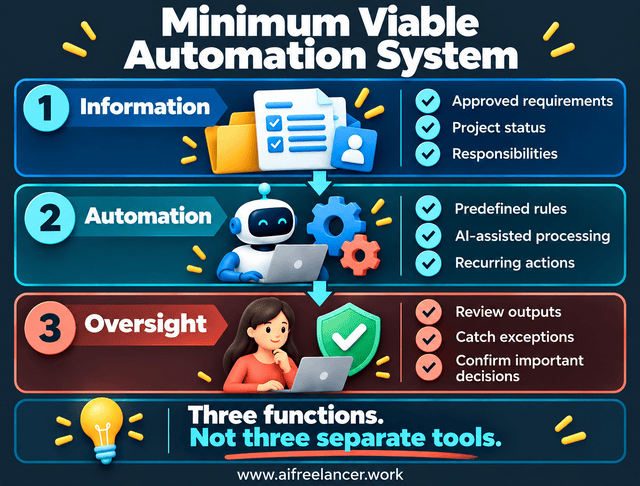
You can combine these functions, adapt them, or handle some steps manually. Identifying your essential freelance systems can help you see which functions your existing tools already cover.
In practice, your project tracker supplies the approved information, the automation prepares the update, and you check the result before it reaches the client. This connects all three functions without requiring separate applications for each one.
Connect Only What Needs to Communicate
Suppose your inbox receives client inquiries, your tracker holds project assignments, and your reporting process prepares weekly updates. Those activities may need to exchange specific information.
Your entire document library, calendar, accounting system, and email history do not necessarily need to be connected. Start with the minimum information required for the next step.
Every additional integration creates another dependency. Permissions can change, fields can be renamed, and information can be transferred incorrectly. A simple workflow setup connects only the information your processes actually need and helps you avoid unnecessary dependencies.
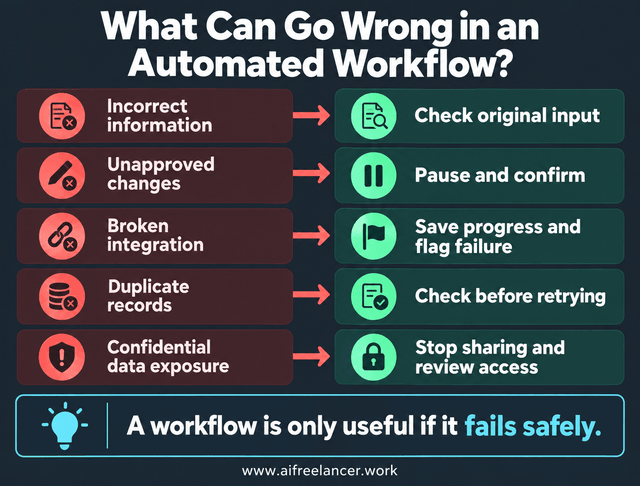
That brings us to a point often overlooked in discussions of AI-powered business processes: a workflow that runs automatically still needs safeguards. Connected tools can move incorrect information before you notice a problem.
What Can Go Wrong With AI-Powered Business Processes?
Connecting tools removes manual work, but it also allows errors to travel farther. If an AI-generated project summary contains a wrong deadline, the mistake can affect task records, reminders, and client reports.
The more important the downstream action, the more carefully you need to control what the system can do. A process that completes its steps isn’t necessarily a process that produces accurate information.
Incorrect Information and Unreliable AI Outputs
AI can misunderstand a request or turn an ambiguous comment into a definite instruction. Suppose a client writes, “We might move the launch to Friday.” An AI-generated summary could incorrectly state that Friday is the confirmed launch date.
If that summary updates the project tracker without review, the system may produce consistent reminders based on an unapproved decision. The error can then spread into later activities that rely on the tracker.
An automation needs to pass more than a technical completion check. It should complete the intended action, follow the current project instructions, and produce an output you can actually use. If it finishes successfully but works from an outdated brief, the business process has still failed.
Privacy, Permissions, and Client Confidentiality
Not every document should be uploaded to an AI service or shared between connected applications. Before automating client work, understand what data the tools receive, how that data may be stored or processed, and whether your agreement permits its use.
Routine automation may be suitable for filing approved records, sending internal reminders, and updating nonsensitive status fields. These activities generally follow predictable instructions and may not require AI interpretation.
AI-assisted work, such as summarizing requirements, organizing meeting notes, and drafting reports, should include appropriate review. Decisions involving pricing, scope changes, confidential disclosures, and final publication require explicit human approval.
These categories are not universal permissions. Client agreements, professional obligations, and applicable privacy laws may require tighter controls.
A reliable process should stop or request clarification when it encounters information or a decision outside its permitted scope. This is especially important when multiple tools can act on the same project information.
Processes That Become Harder to Maintain
Automation can become unreliable when the surrounding work changes. A client introduces a new approval process, your project tracker changes a field name, or a workflow continues using instructions that no longer match the assignment. These problems help explain why automation fails after week two.
The result may be a visible failure or a quieter problem: the system continues running but produces outdated or incomplete information.
When a workflow encounters missing information or a disconnected application, it should not silently proceed as though nothing happened. A safer process preserves the original input, identifies where the work stopped, and alerts you before an incorrect result reaches the client. This creates a recovery point where you can resume the work without starting over.
For example, if AI successfully extracts the client requirements but the project tracker is unavailable, save the extracted draft and mark the record creation as incomplete. Before retrying, check whether the project record was already created despite the reported failure. This helps prevent duplicate records, and you can complete any unfinished transfer manually.
Your existing business automations may need occasional changes as your services and client requirements evolve. Designing workflows for bad days helps ensure that routine failures do not prevent you from completing the underlying task. Instead of adding more tools, check whether the original process remains appropriate.
How to Keep Freelance Automation Useful Over Time
Automation is only valuable while it reduces more work than it creates. A system that saves time on the original task but requires frequent repairs may no longer be helping.
You don’t need a sophisticated dashboard to evaluate this. A few practical observations are usually enough to determine whether the system remains worthwhile.
How to Tell Whether Your Automation Is Actually Helping
Start by comparing the time required before and after automation. Then consider how often you need to correct the output and whether important tasks, decisions, or updates are still being overlooked.
Maintenance time matters, too. A system that saves 20 minutes on a task but requires an hour of troubleshooting every week may offer less benefit than expected.
Suppose a weekly client update previously took 45 minutes to prepare. Now an AI-assisted draft takes 10 minutes to review. That is 35 minutes saved on that update, before accounting for setup and maintenance. These are hypothetical figures, not a measured productivity claim.
The 35 minutes represents the gross benefit, not necessarily the net benefit. To measure the actual savings, subtract time spent investigating errors, correcting outputs, and maintaining the workflow. Tracking these exception costs alongside successful runs gives you a more realistic picture of whether the automation is worthwhile.
The difference matters because technology adoption does not automatically mean major time savings. In The Rapid Adoption of Generative AI, researchers reported that survey respondents’ estimated time savings from generative AI amounted to 1.4% of total work hours. The research covered U.S. adults and workers, not a sample focused on freelance automation.
That finding is a useful reminder that reported time savings may be modest when measured across all work hours, including those of nonusers. For your own automation, the decision is whether the time saved justifies the corrections, supervision, and maintenance. If it doesn’t, simplify the process or retire it.
Make Small Improvements Instead of Rebuilding Everything
When an automation becomes less useful, first identify what changed. Perhaps the client update template needs another field, a reminder uses the wrong date, or a workflow relies on information that is no longer maintained.
A small adjustment may solve the problem without replacing the entire system. Maintaining sustainable AI workflows means updating the process as your work changes rather than rebuilding it whenever an exception appears. A brief weekly automation maintenance routine can help you identify changes early without inspecting every automation constantly.
Your First Step Toward AI Business Process Automation
You don’t need to automate the entire freelance business to benefit from connected processes. Start with one recurring activity that already has a recognizable input and an outcome you can verify.
Consider extracting project requirements from incoming client inquiries. This is a useful starting point because it involves recurring information that often needs to move into a project record.
- Choose the process. Identify client inquiries as the recurring source of manual work.
- Define the information you need. List the deliverables, intended audience, deadlines, requirements, and unanswered questions.
- Remove unnecessary transfers. Avoid copying the same approved details into multiple records.
- Choose the appropriate method. Use ordinary rules for fixed fields and AI for extracting information from free-form messages.
- Use familiar tools. Check whether your inbox and project tracker can support the process.
- Review important decisions. Confirm the extracted requirements before agreeing to pricing, scope, or deadlines.
- Measure the result. Compare preparation time and correction effort with the previous manual process.
Keep the first version small enough that you can understand what happened when something goes wrong. You can then decide whether additional connections would provide enough value to justify the extra setup.
For the detailed implementation, read the Trigger → Action → Output rule. It explains how to define the trigger, action, and expected output before expanding the workflow.
Can Freelancers Automate Business Processes Without Coding?
Yes. Many business processes can be automated using built-in email rules, calendar functions, project management features, and no-code integrations. These tools can move information, generate reminders, or create records without custom programming.
AI can also help interpret unstructured information, such as a client email. However, some integrations require paid features, technical configuration, or compatible applications, so no-code does not always mean setup-free.
How Much Does AI Business Process Automation Cost for Freelancers?
The cost depends on the applications you already use and the features your process requires. Simple reminders and built-in rules may involve no additional subscription, while advanced integrations or AI services may have monthly or usage-based charges.
You should also account for setup, checking, corrections, and maintenance. A low-cost tool isn’t necessarily economical if the workflow demands frequent manual attention.
Do Freelancers Need AI Agents for Business Process Automation?
No. Most freelancers can begin with predictable rules and AI-assisted tasks rather than autonomous agents. A scheduled deadline reminder, for example, doesn’t require an agent to decide what action to take.
Agents may become useful when a process needs to interpret changing information and select among several permitted actions. Even then, important decisions should remain within clearly defined approval boundaries.
Can AI Business Process Automation Work With Existing Tools?
Often, yes. Your email, project tracker, calendar, and document applications may already support basic automations or integrations. The first step is to check what they can exchange reliably.
Not every application supports direct connections, and some capabilities require paid plans or additional services. Avoid assuming that two tools will integrate simply because both advertise AI features.
How Long Does It Take to Set Up a Simple Automation?
Setup time depends on the process, the tools involved, and the quality of the input information. A basic reminder may take only a few minutes, while a connected workflow involving AI extraction and project records can take substantially longer.
Allow time to check normal cases and unexpected inputs. A process isn’t ready simply because it runs once; it needs to produce the correct result and make problems visible.
References
- Bick, A., Blandin, A., & Deming, D. J. (2024, revised 2025). The rapid adoption of generative AI (Working Paper No. 32966). National Bureau of Economic Research.
- Brynjolfsson, E., Li, D., & Raymond, L. R. (2025). Generative AI at work. The Quarterly Journal of Economics, 140(2), 889–942.
- Microsoft. (2025, June 17). Breaking down the infinite workday. Microsoft WorkLab.
Final Thoughts
AI business process automation doesn’t require you to put your entire freelance business on autopilot. A useful first change may be as simple as ensuring that information from an approved client brief reaches the project tracker without being entered twice.
Start with one recurring process, identify the steps that genuinely benefit from AI, and keep the important decisions under your control. When that process works reliably, consider whether the next connected activity deserves automation.
You may find that a few well-designed systems remove more work than a collection of complicated tools. The goal is to spend less time managing the processes around your assignments and more time completing the work clients hired you to do.
To explore more practical approaches to AI-assisted writing, productivity, and sustainable freelance systems, browse my books on Amazon. They focus on helping you organize your work, use AI more effectively, and build a freelance business that doesn’t require constant manual attention.

Florence De Borja is a freelance writer, content strategist, and author with 14+ years of writing experience and a 15-year background in IT and software development. She creates clear, practical content on AI, SaaS, business, digital marketing, real estate, and wellness, with a focus on helping freelancers use AI to work calmer and scale smarter. On her blog, AI Freelancer, she shares systems, workflows, and AI-powered strategies for building a sustainable solo business.