
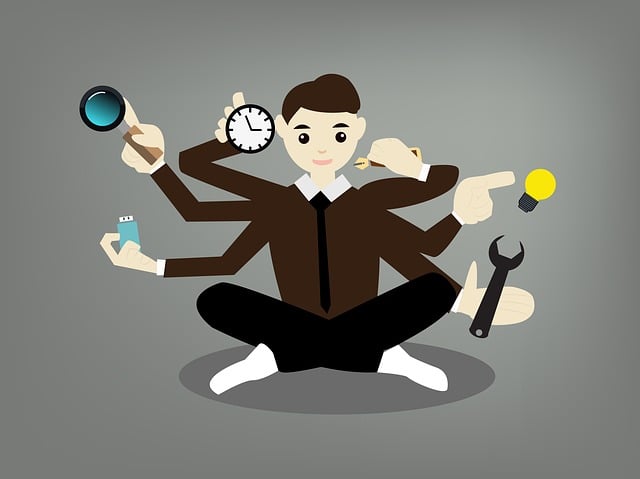
You open your laptop with a clear plan: finish the draft, send it, and move on. A few hours later, you’ve checked email twice, replied to a “quick” message that turned into three more, reorganized your notes, and skimmed your draft without actually moving it forward. If you’ve ever felt this, you’ve already experienced why productivity tools don’t work in real freelance work.
It’s not a lack of discipline or effort. The issue is everything that happens around the work—those small steps that seem necessary but quietly slow you down. Most freelancers don’t lack tools. They have too many, and instead of making work easier, those tools turn one task into several smaller ones that compete for your attention.
Everything I’ve shared here—and more—is in my book, available on Amazon. Click the link if you’re ready to take the next step.
Your Work Isn’t Slow—It’s Fragmented Across Tools
The slowdown doesn’t come from distraction alone. It comes from how your work is set up across different tools and environments. When a task is split across multiple places, you’re forced to move back and forth just to keep it going, and that movement quietly replaces focused work with coordination.
Why Productivity Tools Don’t Work When Tasks Are Fragmented
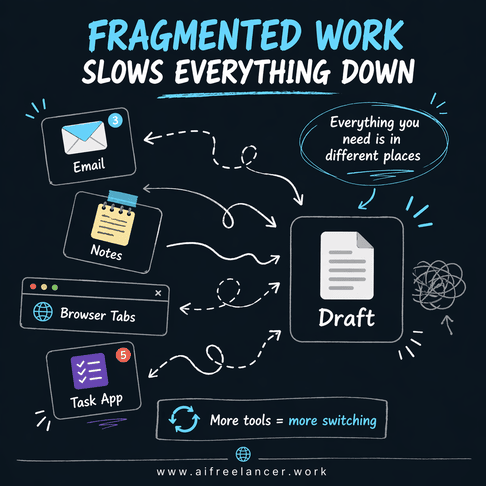
A single writing task rarely lives in one place. The brief sits in your email, your notes are in a separate document, your research is spread across tabs, and your draft exists somewhere else. Each time you need something, you leave your main task to retrieve it, and every one of those moves breaks your flow.
That interruption might seem minor, but it changes how the work unfolds. You start writing, pause to check a detail, then come back and reread what you wrote just to get back into it. When this happens repeatedly, a task that should move forward steadily turns into a stop-and-start process that drains both time and attention.
Research from the American Psychological Association shows that task switching reduces efficiency and increases mental fatigue because the brain has to reorient itself repeatedly. In freelance work, that reorientation shows up as constant rereading, retracing, and rebuilding ideas you already had just minutes earlier. This is why even a short interruption can make a simple task feel disproportionately difficult—your brain is not continuing the work; it is restarting it.
The Hidden Layer of Manual Glue Work
Before you even begin the actual task, there’s a layer of work that rarely gets counted. You copy client instructions into your notes, rewrite unclear messages into something usable, and search through past conversations to find missing details. None of this appears in the final output, but all of it takes time and attention.
This is where tools quietly create extra work. Each tool holds a piece of the task, so you end up doing the job of connecting everything before you can even start. When you return to a draft, you don’t simply continue—you pause, scan, and reconstruct your train of thought.
Over the course of a day, this “in-between” work builds up. You’re not just completing tasks—you’re repeatedly preparing to complete them, and that preparation becomes a hidden drain on your time and energy. This is exactly what’s happening behind what is manual glue work, and why it often goes unnoticed.
When Tasks Keep Expanding Instead of Moving Forward
The problem isn’t just that work is split. It’s that each tool adds something extra you didn’t plan for, and those additions slowly expand the task itself. What looks like a simple workflow on the surface becomes a chain of dependencies behind the scenes.
Why Productivity Tools Don’t Work Instead of Removing Friction
A tool might help with one part of the job, but it rarely covers everything around it. You check your task list to see what’s next, open your email to confirm details, switch to your notes to organize your thoughts, and then return to your draft. Each step feels reasonable, but together they stretch the task far beyond what it should be.
The issue becomes clearer when you look at how tasks grow. A “quick check” often leads to a follow-up message, which creates a new dependency. That dependency forces you to revisit the draft later, adding another pass through the same work. What started as a single task now includes multiple loops that were never part of the original plan.
According to the Harvard Business Review, knowledge workers switch between apps and tasks hundreds of times per day, creating measurable productivity loss. In freelance work, this is not just a distraction—it is coordination overhead, where time is spent keeping everything aligned instead of moving the task forward.
Context Switching and Restart Cost
Fragmentation explains why work is broken. Restart cost explains why it feels so difficult to continue. Each time you step away from your draft, your brain drops part of the context, and when you return, you have to rebuild it before moving forward.
This rebuilding process takes time and mental effort. You reread, retrace your logic, and try to get back into the same headspace. While each reset seems small, they accumulate across the day, quietly replacing deep work with repeated re-entry.
By the end of the day, the effort is real, but the progress feels limited. You’ve been working consistently, yet much of that time has been spent restarting tasks instead of advancing them. This is where the mismatch between effort and output begins to show.
Why Productivity Tools Don’t Work for Burned-Out Freelancers
When this pattern becomes your normal way of working, the impact goes beyond productivity. It starts to affect how the work feels and how much energy it takes to get through the day. The issue is no longer just inefficiency—it becomes a constant sense of unfinished work.
Too Many Tools, Not Enough Clarity
When your work is spread across multiple tools, it becomes harder to know where to begin. You open your laptop and hesitate, unsure whether to check email, review tasks, or continue your draft. That hesitation is not about motivation—it’s about structure.
Too many entry points create friction before the work even starts. Instead of moving directly into the task, you spend time navigating your setup. That delay makes everything feel heavier than it should and slows you down before you’ve even started. It also raises a bigger question most freelancers don’t stop to ask: how many tools do you actually need to get real work done?
The Illusion of Progress
Throughout the day, you stay active. You reply to messages, update tasks, and organize your notes. These actions feel productive because they are visible and immediate, but they don’t always move the main deliverable forward.
This creates a gap between effort and results. Hours pass, and the core task remains unfinished. Over time, that gap becomes mentally draining because you’re constantly working without the sense of completion that comes from finishing something.
A report from McKinsey & Company shows that productivity improves when workflows are streamlined, not when more tools are added. When the system is scattered, adding more tools simply creates more to manage, which increases the workload without improving output. This reinforces the same cycle: more effort, same results.
This is where burnout starts to make sense. It’s not just about having too much to do. It’s about working in a way that never gives you a clean finish, which keeps your mind in a constant state of partial attention.
Why Productivity Tools Don’t Work Without a Workflow
At this point, it becomes clear that the issue is not just the tools themselves. It’s the lack of a structured way to move work from input to output. When there’s no defined path, every task becomes reactive, and that’s what keeps resetting your progress.
Tools Without Structure Create Chaos
Without a workflow, you end up doing everything at once. You start writing before the brief is fully clear, stop to fix missing details, edit while drafting, and revisit the same work multiple times. Instead of moving forward, you keep circling back to earlier steps.
This repetition makes the work feel heavier because you’re not completing steps once—you’re revisiting them at different stages. The lack of structure turns simple tasks into ongoing loops that never fully close, which slows down progress and increases effort.
What a Simple Workflow Looks Like
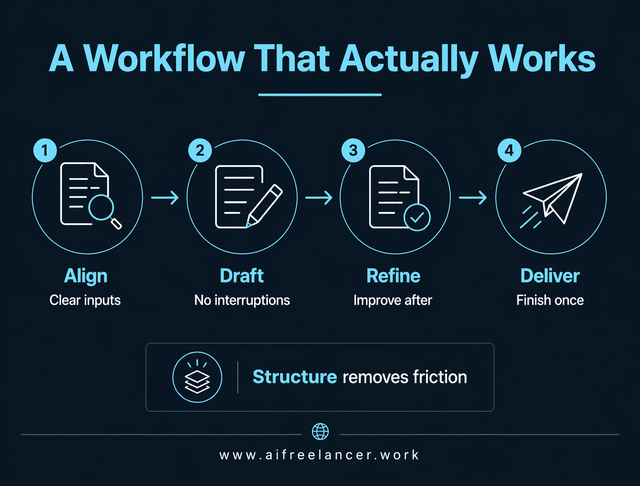
A workflow removes that loop by defining a clear sequence. Instead of mixing steps, you handle one type of work at a time, which reduces interruptions and makes progress easier to sustain.
- Align: gather inputs and turn them into a clear brief before writing
- Draft: write in one pass without stopping to check other tools
- Refine: edit after the draft is complete
- Deliver: finalize and send without reopening the same task
This structure reduces decision-making and keeps work moving in a straight line. Because each step is handled at the right time, you spend less time revisiting tasks and more time completing them. At its core, this is what a minimum viable workflow stack looks like in practice.
Replace the Tool Stack With a Workflow That Actually Works
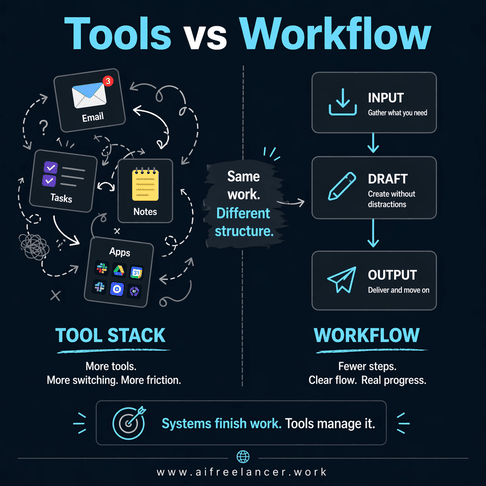
Once you shift from organizing around tools to organizing around the work itself, the entire process becomes simpler and more direct. The goal is not to remove tools completely, but to stop letting them dictate how your work moves.
From Tool Stack to Workflow System
Instead of asking what tool to open next, you follow the task from beginning to end. You start by pulling everything into one place, turning scattered inputs into a clear brief before writing. This single adjustment removes a large portion of the delays that usually appear in the middle of the task.
This shift is what turns scattered work into a system, and it’s the foundation behind a more effective AI workflow for freelancers that actually reduces friction instead of adding more layers.
Here is what that looks like in a real freelance workflow:
- A client email comes in with scattered instructions and links
- You extract the key points and turn them into a short, structured brief
- All research notes are summarized and placed under that brief
- The draft is written without leaving that working space
- Any clarifications are handled before drafting, not during
This prevents the most common slowdown: stopping mid-task to figure things out. Instead of pausing to gather missing pieces, you start with everything you need already in place. That shift alone removes a large portion of the friction most freelancers deal with every day.
From there, you move through drafting, refining, and delivery without constant switching. Each stage is completed before moving on, which reduces interruptions and prevents repeated work. The workflow becomes the structure that keeps everything moving forward.
How AI Fits Into a Workflow (Not as Another Tool)
AI becomes useful when it helps you stay inside your workflow instead of pulling you out of it. Rather than switching tools to process information, you handle those small tasks where you are, which keeps your attention on the work itself.
In practice, this means using AI at the exact points where work usually stalls:
- Turning vague instructions into a usable brief before you start
- Summarizing long research into key points, you can write from
- Drafting quick replies when clarification is needed
- Cleaning up rough sections without restarting the entire draft
Each of these removes a pause that would normally break your flow. Instead of stepping out of the task to prepare it, you keep moving forward while the preparation happens alongside the work.
How to Simplify Your Workflow Starting Today
You don’t need to rebuild everything. You just need to identify where your workflow breaks and remove those points of friction so work can move more smoothly.
Audit Your Current Tool Stack
Pay attention to where your work slows down. Notice when you leave your draft to check something, and look for steps that exist only because information is scattered. These moments reveal where your system is creating unnecessary effort.
- Notice when you leave your draft to check or update something
- Identify steps that exist only because tools are separate
- Look for repeated actions that don’t move the work forward
Collapse Tasks Into a Single Flow
The goal is to reduce how often you switch contexts during active work. When tasks stay in motion, they become easier to complete and require less effort to maintain.
- Keep research, drafting, and editing closer together
- Reduce how often you leave your main workspace
- Aim to complete tasks in one pass instead of revisiting them
Focus on Output, Not Activity
At the end of the day, productivity is measured by what’s finished. Activity can feel productive, but it doesn’t always lead to results, especially when it’s disconnected from the main task.
- Separate preparation from execution
- Track completed work instead of effort
- Remove steps that don’t contribute to the final output
Final Thoughts
If you’ve been trying to understand why productivity tools don’t work, it’s not because you’re using them incorrectly. It’s because they split your work, add extra steps, and force you to manage everything in between.
Productivity improves when you remove those extra steps. A clear workflow reduces interruptions, keeps work moving, and helps you finish tasks without constantly restarting. Once the structure is in place, the same amount of effort produces far better results.
If you want to build a system that actually supports your work—and learn how to use AI without losing control of your process—you can explore my books on my Amazon Author Page. They break down practical workflows you can apply immediately to write faster, reduce revisions, and stay focused on what matters.
Frequently Asked Questions About Why Productivity Tools Don’t Work
Productivity tools often fail freelancers because they split a single task across multiple places. The brief sits in email, research lives in tabs, notes are stored elsewhere, and the draft exists in a separate workspace. That setup creates extra steps and forces constant switching just to keep the task moving.
Productivity apps often fail to improve focus because they interrupt the way work naturally flows. Every time you switch to check a task, update a note, or respond to a message, your attention resets. When you return, you don’t continue—you rebuild
Yes, too many productivity tools can reduce productivity because they increase coordination work. Each tool introduces another place to check, another decision to make, and another step to manage before anything gets done.
A clear workflow improves productivity more than relying on tools alone. A workflow defines how work moves from start to finish, so you’re not constantly deciding what to do next or where to look for information.
Start by identifying where your work keeps breaking. Notice when you leave your draft to check email, search for missing details, update a task, or rewrite unclear instructions. These moments show where your workflow is creating extra work.

Florence De Borja is a freelance writer, content strategist, and author with 14+ years of writing experience and a 15-year background in IT and software development. She creates clear, practical content on AI, SaaS, business, digital marketing, real estate, and wellness, with a focus on helping freelancers use AI to work calmer and scale smarter. On her blog, AI Freelancer, she shares systems, workflows, and AI-powered strategies for building a sustainable solo business.

