

The real work starts after the meeting ends.
The call is over. Everyone says thank you. The screen goes quiet. Then the real problem begins: you have messy notes, half-finished thoughts, unclear action items, and that one decision you know someone made but cannot quite find in the transcript.
That is why learning how to write a meeting summary matters. A meeting summary is not just a polite recap. For consultants, founders, freelance writers, and coaches, a vague recap can turn into missed deadlines, unclear ownership, or unpaid extra work. It tells people what changed, who owns what, what happens next, and what still needs clarification.
The pressure shows up in the numbers, too. Microsoft’s Work Trend Index found that people are in 3x more Teams meetings and calls per week than they were in February 2020. The same research found that 56% of people find it hard to summarize what happens in meetings, and 55% say next steps are unclear at the end of meetings. If meetings have multiplied and people still leave unclear on next steps, the meeting summary becomes more than admin. It becomes the tool that turns meeting time back into usable work.
A good meeting summary does three things: it compresses the discussion, clarifies the decision, and protects the next step. When you use a repeatable workflow, you do not have to rebuild the whole meeting from memory. If the same post-meeting cleanup keeps draining your time, it may also help to build a small automation layer around your admin work so routine follow-ups do not depend on memory alone.
Everything I’ve shared here—and more—is in my book, available on Amazon. Click the link if you’re ready to take the next step.
What Is a Meeting Summary and Why Does It Matter?
A meeting summary should make the next step easier.
A useful meeting summary is not a smaller version of the meeting. It is a decision record. It tells people what mattered, what was agreed on, what still needs attention, and what happens next.
For a consultant, the summary becomes a decision trail. For a freelance writer, it protects the project scope. For a founder, it turns a loose discussion into task ownership. For a coach, it helps clients remember what they committed to doing.
A transcript captures what people said. A meeting summary captures what people need to act on. The more clearly you separate raw notes, usable summaries, and assigned tasks, the less likely you are to turn one meeting into three different kinds of confusion.
Meeting Summary vs. Meeting Minutes
Meeting summaries and meeting minutes are related, but they are not the same.
Meeting minutes are usually more formal. They often serve as an official record for board meetings, legal meetings, corporate updates, or formal organizational decisions. Meeting summaries are usually shorter, more practical, and easier to act on.
Adobe explains that meeting minutes can serve as the official company record of a meeting and may be useful for audits, legal disputes, accountability, and keeping people on the same page. A meeting summary, by contrast, is usually written to help people remember decisions, action items, blockers, and next steps.
Most consultants, founders, freelancers, and coaches need a practical meeting recap more often than formal minutes. They do not need every sentence. They need clarity.
Why Meeting Summaries Take So Long After the Meeting Ends
The summary does not take too long because you are bad at writing. It takes too long because you are sorting.
After a meeting, your notes may contain questions, side comments, objections, repeated ideas, small talk, and unfinished thoughts. Somewhere inside that mess are the details that matter. The real work is separating the noise from the outcome.
Harvard Business Review reported that about 70% of meetings keep employees from working and completing their tasks, while the number of meetings attended by workers rose by 13.5% during the pandemic. When meetings pile up, the summaries pile up too.
The problem gets worse when you rely on memory. You may remember the broad topic, but the details that matter are usually more specific. Who agreed to revise the proposal? Was the deadline Friday or next Monday? Did the client approve the direction or only ask to see another option?
In client calls, the detail most people forget is not the topic discussed. It is who agreed to do what.
Recording the Meeting Is Not the Same as Understanding It
A transcript records the meeting. It does not understand the meeting.
Transcripts capture words, not priorities. Notes capture fragments, not always decisions. AI tools can help, but even an automated meeting summary needs human review because the tool may not know which detail matters most to the relationship, the project, or the scope.
This is especially important if you work with clients. A small phrase like “Let’s include that too” may sound harmless during the call, but it could become a scope change later. A clear meeting recap protects both sides because it turns casual discussion into a visible agreement.
The goal is not to preserve every sentence. The goal is to clarify the next move.
The Real Reason Meeting Notes Turn Into Extra Work
Meeting notes become extra work when they mix everything.
A discussion point is not the same as a decision. A suggestion is not the same as an action item. A concern is not the same as a blocker. When these details are mixed, you spend more time untangling the meeting than summarizing it.
Without an owner, an action item becomes a shared assumption. Without a deadline, “soon” becomes another follow-up email. The fastest meeting summaries usually come from notes that already separate what happened into useful categories. That is why the best summary workflow starts before the meeting ends.
How to Write a Meeting Summary Before You Start Drafting
The fastest summary begins while the meeting is still happening.
If you wait until the call ends to organize everything, you force yourself to rebuild the meeting from memory. Instead, capture the right details before the post-meeting cleanup begins.
A clear summary should be organized by outcomes, not by the order of the conversation. Most meetings do not move in a neat, straight line. People circle back, interrupt themselves, add context, revisit old points, and change direction. If you summarize the meeting chronologically, you may end up repeating the same confusion.
Before you draft, ask what the meeting produced.
A strong meeting summary usually answers five questions:
- What was the meeting about?
- What changed after the discussion?
- What decisions were made?
- Who is responsible for what?
- What happens next?
That structure works because it serves the reader. Nobody wants to reread the entire conversation. They want to know what matters now.
Think of your notes as raw material. The cleaner the raw material, the faster the summary.
Before the Meeting: Prepare Your Summary Categories
Before the call, write one line at the top of your notes:
“By the end of this meeting, we need to decide ____.”
That sentence gives your notes a job. It also helps you listen for outcomes instead of trying to capture everything.
Then prepare simple categories:
- Meeting goal
- Key discussion points
- Decisions
- Action items
- Owners
- Due dates
- Blockers
- Open questions
- Follow-up needed
You do not need a complicated system. You only need enough structure to keep decisions from getting buried under discussion.
During the Meeting: Capture Decisions as They Happen
Do not wait until after the meeting to identify the important parts.
When someone makes a decision, mark it immediately. When someone accepts responsibility, write the name beside the task. When someone mentions a deadline, record it before the conversation moves on.
Use simple labels like:
- Decision:
- Action:
- Owner:
- Deadline:
- Question:
- Blocker:
These labels make your meeting notes easier to scan later. They also reduce the chance that you will mistake a suggestion for an agreement.
After the Meeting: Turn Notes Into a Usable Recap
After the meeting, do not start by writing polished sentences. Start by sorting.
Remove the noise first. Keep what shaped the outcome. Then turn the cleaned notes into a short recap.
Your meeting summary should be easy to skim. Use clear sections, short paragraphs, and only the details that help people move forward.
The Details You Should Never Miss
Some details are easy to forget after the meeting because they may have been mentioned quickly. Listen for them while the meeting is still happening:
- Decisions
- Action items
- Responsible person
- Due dates
- Risks or blockers
- Scope changes
- Client approvals
- Unresolved questions
- Next meeting date
These details carry the most weight because they affect follow-through.
The 10-Minute Workflow for How to Write a Meeting Summary
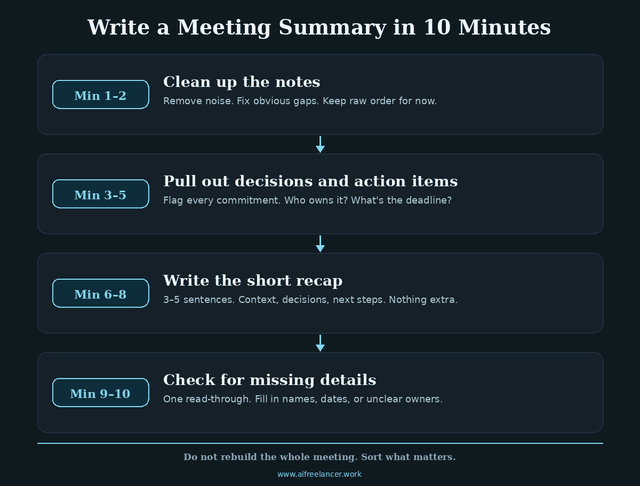
For most routine meetings, this workflow can help you produce a clean first summary in about 10 minutes.
It is not about rushing. It is about removing unnecessary decisions from the process. Instead of staring at messy notes and wondering where to start, you move through the same four steps every time.
Minute 1–2: Clean Up the Meeting Notes
Start by removing anything that does not help the reader understand the outcome.
Delete greetings, repeated comments, side conversations, filler, and unfinished thoughts that did not change the direction of the meeting. Group similar points together. Move unrelated ideas into a separate “parking lot” section if they may be useful later.
Mark has unclear details for follow-up. A note that says “deadline unclear” is better than a confident guess that confuses later.
Minutes 3–5: Pull Out Decisions and Action Items
Next, separate decisions from tasks.
A decision is what the group agreed on. An action item is what someone needs to do next. Do not mix them.
For each action item, add the owner and deadline if available. If the owner or deadline is missing, mark it clearly.
Minute 6–8: Write the Short Meeting Recap
Now write the actual meeting recap.
Start with one or two sentences that explain the purpose and outcome of the meeting. Then organize the rest into short sections. Keep the summary skimmable because busy clients and team members are more likely to act on a clear recap than a long one.
A simple structure works best:
- Meeting purpose
- Key discussion points
- Decisions made
- Action items
- Open questions
- Next steps
A vague recap can turn into another round of clarification. A clear recap shows what must happen before the next call. This is also where you can move the discussion into visible next steps instead of letting the meeting end as a pile of loose ideas.
Minute 9–10: Check for Missing Details
Before sending, review the summary for names, dates, decisions, task owners, and unclear details.
This is where human judgment matters. AI can help organize a meeting notes summary, but you still need to confirm whether the output matches what actually happened.
A good final check prevents the most common post-meeting problem: someone replying, “Wait, I thought someone else was handling that.”
What to Include Based on the Type of Meeting
Not every meeting summary should look the same.
A client call, team meeting, sales call, coaching session, and content planning meeting all require different priorities. The format may stay similar, but the details you emphasize should change.
| Meeting Type | Focus On |
| Client meeting | Scope, approvals, deliverables, follow-up deadline |
| Team meeting | Blockers, task owners, deadlines, next checkpoint |
| Sales call | Pain points, objections, buying signals, next contact |
| Coaching or consulting call | Client goal, insight, agreed action |
| Content planning meeting | Ideas, angles, assignments, publishing dates |
Client Meeting Summary
A client meeting summary should protect clarity and scope.
For freelance writers and consultants, this matters because the recap shows what changed, what was approved, and what still needs clarification. If the client asks for a new deliverable during the call, your summary should make that visible.
A strong client call recap documents what was approved, what changed, what still needs a decision, what may require a new quote, and what falls outside the original agreement. This protects the working relationship because it prevents “I thought that was included” confusion later.
If a client asks for an extra email, extra page, or extra round of edits, the summary should show whether that request is approved, pending, or out of scope.
Focus on the client concern, approved direction, scope change, deliverable, follow-up deadline, revision request, and next checkpoint.
Team Meeting Summary
A team meeting summary should make work easier to hand off.
Focus on progress updates, decisions, blockers, assigned tasks, deadlines, and the next meeting. Shared responsibility can become nobody’s responsibility if the recap does not assign ownership.
Sales Call Summary
A sales call summary should capture the buying context.
Focus on the prospect’s pain points, objections, buying signals, decision-maker concerns, follow-up task, and next contact date. If the prospect worried about the timeline or pricing, your recap should make that visible so the next message is not generic.
Coaching or Consulting Call Summary
A coaching or consulting recap should reinforce accountability.
Focus on the client goal, main insight, agreed action, accountability point, resource needed, and next session focus. The summary should help the client carry the work forward between sessions.
Content Planning Meeting Summary
A content planning summary should turn ideas into production.
Focus on content ideas, approved angles, assigned drafts, publishing dates, research needs, and repurposing opportunities. Without a clear recap, content ideas stay trapped as loose brainstorming.
Meeting Summary Template for Faster Follow-Ups
A template helps because it removes the blank page.
You do not need a different structure for every meeting. Start with one general meeting summary template, then adapt it based on the type of conversation.
Simple Meeting Summary Template
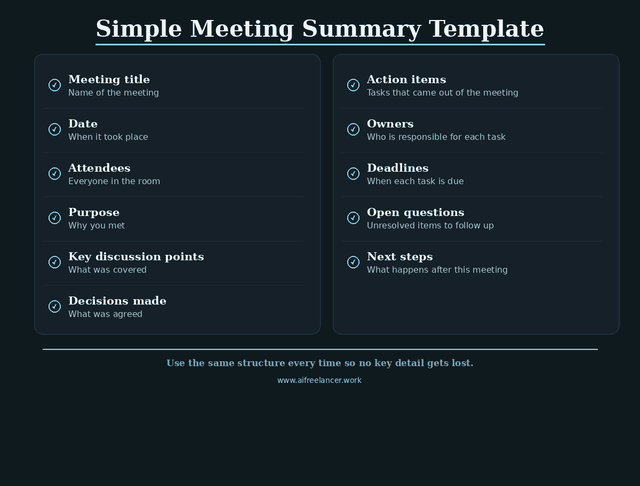
Use this structure for most business meetings:
- Meeting title:
- Date:
- Attendees:
- Purpose of the meeting:
- Key discussion points:
- Decisions made:
- Action items:
- Owners:
- Deadlines:
- Open questions:
- Next steps:
This format works because it keeps the summary focused on what people need to remember and do.
Here is a short, filled-in version:
- Meeting title: Homepage copy review
- Date: June 3
- Attendees: Sarah, client team
- Purpose of the meeting: Confirm homepage direction and next revision
- Key discussion points: Hero CTA, testimonial placement, blog page priority
- Decisions made: Homepage structure approved; testimonial section stays but moves lower
- Action items: Revise hero CTA
- Owner: Sarah
- Deadline: Friday
- Open questions: Is the extra email in scope?
- Next steps: Send revised homepage copy by Friday and confirm email scope before Tuesday check-in
This mini-template shows how little you need when the right details are captured.
How to Adapt the Meeting Summary Template
Use the table above to add the details that matter most for your meeting type.
For example, add scope changes for client calls, blockers for team meetings, objections for sales calls, accountability points for coaching calls, and publishing dates for content planning meetings.
Which Meeting Summary Template Should You Use?
Use the simplest template that captures the decision and the next step.
A general meeting summary works for routine meetings. A client meeting summary works better for freelancers, consultants, and agencies. A team meeting summary works better for internal project updates. A sales call summary works better for founders, coaches, and service providers. A content planning summary works better for writers and creators.
The best template is not the longest one. It is the one people will actually read.
Meeting Summary Example
A good example makes the process easier to see.
Here is how messy notes can turn into a weak summary or a useful client meeting recap.
Raw Meeting Notes Example
Client likes the homepage direction. Wants CTA to be stronger. The mentioned testimonial section may be lower. The blog page is not a priority yet. Need revised hero copy. Sarah said Friday works. The client asked if we could include one more email in the sequence. Not sure if included in scope. Next check-in may be Tuesday.
Weak Meeting Summary Example
We discussed the homepage, CTA, testimonial section, blog page, and email sequence. I will revise the copy and send updates soon. We will follow up next week.
This summary is too vague. It mentions topics, but it does not clarify the decision, the owner, the deadline, or the scope issue.
Better Client Meeting Summary Example
The client approved the homepage direction and requested a stronger CTA in the hero section. The testimonial section will stay on the page, but move lower. The blog page is not a priority for this round.
Sarah will revise the hero copy and send the updated draft by Friday. The client also asked about adding one more email to the nurture sequence. That item needs scope confirmation before work begins.
Next step: send the revised homepage copy by Friday and confirm whether the extra email is included in the current project scope before the Tuesday check-in.
This version works because it tells the reader what changed, what was approved, who owns the next task, what deadline matters, and what still needs clarification.
AI Prompt for How to Write a Meeting Summary Faster
AI can help you write a meeting summary faster, but it should not replace your judgment.
Tools like Zoom AI Companion can generate meeting summaries from speech-to-text data and share them through email or Zoom Chat. That can save time, especially when you have back-to-back calls. But automated summaries still need review because they may miss context, flatten nuance, or assign meaning too confidently.
A 2022 survey on meeting summarization notes that the rise of virtual communication platforms has created an overload of dialogue data, making summarizers useful for selecting important information from long meeting transcripts. That supports the value of AI meeting summary tools, but it also shows why summaries need structure: the goal is to extract what is useful, not preserve everything.
Use AI for the first pass. Use your judgment for the final version.
Copy-and-Use AI Meeting Summary Prompt
Turn these meeting notes into a clear meeting summary. Separate the output into meeting purpose, key discussion points, decisions made, action items, owners, deadlines, open questions, and next steps. Keep the summary concise. Do not invent missing details. Flag anything unclear.
This prompt works because it gives AI a structure. It also tells the tool not to guess.
Use AI for the First Pass, Not the Final Judgment
AI is useful for organizing messy notes, extracting action items, turning transcripts into sections, drafting the first version, and preparing a follow-up email.
Do not rely on AI to guess missing owners, invent deadlines, decide what the client “meant,” replace human judgment, or handle sensitive details without review.
If the meeting involved client approvals, pricing, legal issues, hiring decisions, or personal information, review the output carefully before sharing it.
How to Review an AI Meeting Summary
Read the AI-generated summary like a responsible editor.
Check names and dates. Confirm task owners. Verify decisions. Remove vague phrases. Add context that AI may have missed. Make sure the tone fits the recipient.
For example, AI might write:
“The client wants changes to the landing page.”
A better human-reviewed version would be:
“The client approved the homepage structure but requested a stronger CTA above the fold by Friday.”
The second version is clearer because it separates the approval from the request. It also includes the actual deadline.
What AI Often Misses in Meeting Summaries
AI may miss the difference between a casual comment and a decision. It may also miss tone shifts, implied approvals, sensitive client concerns, scope changes, unspoken blockers, and priority levels.
A client saying “Maybe we can add that later” is not the same as approving a new deliverable. AI may flatten both into “client requested an addition,” which can create scope confusion.
That is why your review matters. AI can sort the transcript, but you understand the relationship.
Turn the Meeting Summary Into a Follow-Up Email
A meeting summary becomes more useful when it turns into a clear follow-up email.
Many readers are not writing a summary only for themselves. They need to send it to clients, teams, or stakeholders. The email does not need to be long. It needs to be clear enough that everyone knows what happens next.
Keep the Opening Short
Start with a brief thank-you or context line.
You do not need to repeat the whole meeting. A simple opening works:
“Thanks for the call today. Here is a quick recap of what we agreed on and the next steps.”
That tells the reader what the email is for.
Put Action Items Where People Can See Them
Do not bury tasks inside long paragraphs.
Put action items in a separate section. Include the owner and deadline whenever possible. If either one is unclear, flag it instead of guessing.
This makes the email easier to act on and reduces follow-up confusion.
End With the Next Step
Close the email by making the next step obvious.
Mention the next meeting, deadline, approval needed, or clarification request. The final line should help the project move forward.
For example:
“Please confirm by Thursday whether the extra email should be added to the current scope or quoted separately.”
That is much stronger than “Let me know your thoughts.” This kind of clear recap can also cut the extra clarification calls that happen when people leave the meeting with different assumptions.
AI Prompt for Turning a Meeting Summary Into a Follow-Up Email
Once you have a clean summary, you can use AI to turn it into a client-ready or team-ready email.
Use this prompt:
Turn this meeting summary into a concise follow-up email. Keep the tone professional and clear. Start with one context line, then list decisions, action items, owners, deadlines, and open questions. Do not add details that are not in the summary.
This prompt is useful because it separates two jobs. First, you create an accurate meeting summary. Then you turn that summary into a message people can act on.
When to Pause Before Sending a Meeting Summary
A fast recap is only helpful if people can trust it.
Most routine meeting summaries should go out quickly. However, there are moments when you should pause before sending the recap.
Pause before sending if the decision was unclear, a sensitive issue was discussed, pricing or scope needs confirmation, the meeting involved disagreement, or you need to verify a deadline or owner first.
This does not mean delaying the summary for days. It means sending a better version. A message that says, “I’m confirming one scope detail before I send the full recap” is often better than sending a polished summary with the wrong assumption.
A meeting summary should reduce confusion, not spread it faster.
Common Mistakes That Make Meeting Summaries Slower
Most slow summaries are not slow because the meeting was complicated. They are slow because the notes never separate talk from decisions.
The good news is that each mistake has a simple fix.
Mistake 1: Turning the Meeting Into a Mini Transcript
A long recap is not always a better recap.
If you send a summary that reads like a mini transcript, people may skim it and miss the actual decision. Focus on what matters, not everything that was said.
Mistake 2: Leaving Out Owners and Deadlines
An action item without an owner is just a loose idea.
Every task should have a responsible person and a timeline whenever possible. If those details were not discussed, write that clearly. “Owner not confirmed” is better than pretending the task is assigned.
Mistake 3: Sending the Meeting Recap Too Late
The longer you wait, the more context disappears.
Send the meeting recap while the discussion is still fresh. For routine meetings, same-day summaries are usually best. For client calls, a timely recap also shows professionalism and control.
Mistake 4: Letting AI Invent Missing Details
AI summaries can sound polished even when they are wrong.
Ask AI to flag unclear items instead of filling gaps. Then review the summary before sharing it. This is especially important when the meeting involves commitments, deadlines, approvals, or scope changes.
Final Checklist Before You Send the Meeting Summary
Before you send the summary, check whether it helps someone act.
A meeting summary should not merely prove that the meeting happened. It should make the next move easier.
The 5-Question Test for a Clear Meeting Summary
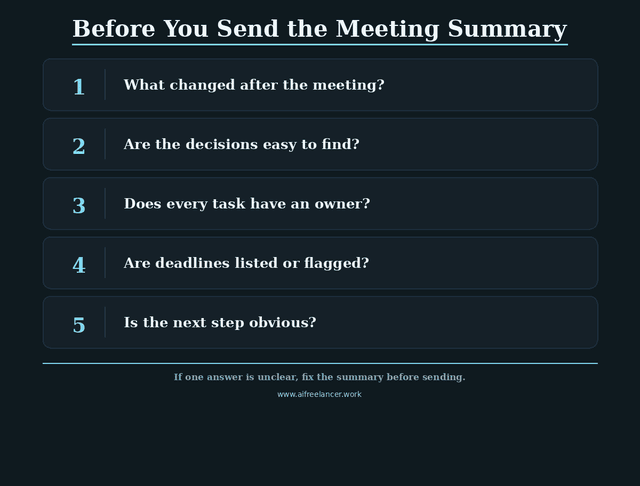
Ask these five questions before sending:
- Can someone understand what changed after the meeting?
- Are the decisions easy to find?
- Does every action item have an owner?
- Are deadlines listed or flagged as missing?
- Is the next step obvious?
If the answer is no, the summary is not ready yet.
What to Fix If the Summary Fails the Test
If the summary feels unclear, do not rewrite the whole thing. Fix the weak spots.
Add missing owners. Clarify vague decisions. Separate tasks from discussion points. Add deadlines or flag them as missing. Make the next step visible.
Small fixes can turn a vague recap into a useful decision record.
Final Review Checklist Before Sending
Use this quick checklist:
- Is the meeting purpose clear?
- Are the major decisions listed?
- Are action items separated from discussion points?
- Does each task have an owner?
- Are deadlines included?
- Are open questions listed?
- Are blockers or risks noted?
- Are links or resources included?
- Is the summary short enough to skim?
- Is anything unclear flagged instead of guessed?
This final pass protects accuracy. It also protects your time because fewer people will reply asking for clarification.
Final Thoughts
Knowing how to write a meeting summary is not just about writing cleaner notes. It is about protecting momentum after the meeting ends.
A good meeting summary helps busy professionals turn messy discussions into clear decisions, action items, and follow-ups without wasting another hour after every call. It gives clients confidence, keeps teams aligned, protects scope, and makes the next step easier to see.
If you want more practical systems for writing, content workflows, and using AI without losing your voice, explore my books on my Amazon Author page.
Frequently Asked Questions About How to Write a Meeting Summary
A meeting summary should usually be short enough to skim in one to three minutes. For most business meetings, a few short sections with bullets are enough.
A meeting summary should include the meeting purpose, key discussion points, decisions made, action items, task owners, deadlines, open questions, and next steps. For client meetings, include approvals and scope changes when relevant.
Use a repeatable structure. Separate discussion from decisions, assign owners, add deadlines, flag unclear details, and send the recap while the meeting is still fresh.
Meeting minutes are usually more formal and detailed. A meeting summary is shorter and focuses on the most important points, decisions, action items, and follow-up tasks.
Yes, AI can help write a meeting summary from notes or transcripts. However, you should review the output for accuracy, missing context, task owners, deadlines, and unclear details before sending it.
Sources
- Microsoft Work Trend Index: Will AI Fix Work?
- Harvard Business Review: Dear Manager, You’re Holding Too Many Meetings
- Adobe: What Are Meeting Minutes?
- Zoom Support: Using Meeting Summary with AI Companion

Florence De Borja is a freelance writer, content strategist, and author with 14+ years of writing experience and a 15-year background in IT and software development. She creates clear, practical content on AI, SaaS, business, digital marketing, real estate, and wellness, with a focus on helping freelancers use AI to work calmer and scale smarter. On her blog, AI Freelancer, she shares systems, workflows, and AI-powered strategies for building a sustainable solo business.

