

You finish a client call with a full page of notes, three half-decisions, two “quick” requests, and one vague comment that may or may not change the whole project. You tell yourself you will sort it out later. Then later comes, the notes look messier than you remember, and you are not sure what actually needs to happen next. That is where meeting notes action items start to break down.
The problem is not that freelancers, consultants, or coaches fail to take notes. Most take too many. The real problem is that raw notes, meeting summaries, and follow-up tasks get dumped into the same place as if they are the same thing.
They are not.
Notes capture what happened. Summaries explain what matters. Tasks define what happens next.
When you skip that middle layer, your notes become a junk drawer with deadlines hiding under old receipts. No wonder follow-up feels heavier than the meeting itself.
Everything I’ve shared here—and more—is in my book, available on Amazon. Click the link if you’re ready to take the next step.
Quick Answer
Meeting notes action items are the specific next steps that come from a meeting. The goal is to separate what was said, what matters, and what needs to happen next.
Why Meeting Notes Action Items Often Fail
The most dangerous meeting notes are not the empty ones. They are the long ones that look complete but do not tell you what to do.
This happens a lot in freelance work because client calls rarely arrive in neat categories. A client may give feedback, ask a question, mention a future idea, approve one change, reject another, and casually mention a deadline. If you write everything in one long list, the important parts blend.
That is how meeting notes action items fail. You captured the conversation, but you did not separate the layers.
The failure usually comes from three problems.
First, the capture is unclear. You wrote down what the client said, but not enough context to understand it later. “Homepage needs work” may feel obvious during the call. Two days later, it tells you almost nothing.
Second, the summary layer is skipped. You move straight from raw notes to tasks without asking, “What does this actually mean?” A client saying, “This sounds too formal,” does not automatically mean “rewrite everything.” It may mean the tone needs to feel warmer in one section.
Third, the action item is weak. A task like “fix intro” creates more work because it has no owner, deadline, context, or expected output.
This matters because meetings already take a lot of mental space. Harvard Business Review reported that executives spend nearly 23 hours a week in meetings, up from less than 10 hours in the 1960s. Even if freelancers do not sit in corporate meetings all week, the same pattern shows up in client calls, project updates, interviews, and discovery sessions. More conversation does not automatically create more clarity.
What Most People Record in Meeting Notes Action Items Workflows
Most people record whatever sounds important in the moment. That usually includes:
- Raw notes
- Quotes
- Ideas
- Questions
- Client preferences
- Decisions
- Deadlines
- Possible next steps
That is not wrong. Capture is supposed to be messy.
The mistake is treating everything you captured as equal. A client quote is not always a decision. A passing idea is not always a task. A complaint is not always an approved revision.
For example, a client saying, “I wonder if we should make this more founder-led,” may be an idea, not an instruction. If you turn it into a task too soon, you may do work that the client never approved.
Good meeting notes do not force clarity too early. They give you enough raw material to create clarity after the call.
Meeting Notes Action Items Start With Capture, Not Tasks
Once you stop treating every note as a task, capture becomes easier. Notes are raw capture. They record what was said, noticed, asked, or requested before you decide what matters.
This is important because many freelancers pressure themselves to organize everything during the call. That sounds efficient, but it can backfire. When you are listening, asking questions, and thinking about the project, you do not always have enough space to judge every comment correctly.
During capture, your job is to collect the information without pretending it is already organized.
A freelance writer may capture client feedback, preferred examples, phrases the client dislikes, audience details, source links, or deadline changes.
Consultants often record business goals, objections, internal roadblocks, team comments, and decisions that still need confirmation.
Coaches may note client patterns, session insights, next-step ideas, and points worth revisiting in future sessions.
The goal is not to make the notes pretty. The goal is to make them useful enough to process.
Why Meeting Notes Action Items Become Overwhelming Without Structure
Meeting notes become overwhelming when everything lands in one pile.
Client comments may contradict each other. Research notes may be copied without context. Follow-up requests can get buried inside a transcript. Revision details can also get mixed with future ideas.
This is why your brain resists opening the notes later. It knows there is work inside the work. Much of the hidden mental load behind client calls comes from having to untangle decisions, context, and next steps long after the conversation ends.
Microsoft’s Work Trend Index found that the average employee spends 57% of their time communicating in meetings, email, and chat, and 43% creating in documents, spreadsheets, and presentations. It also found that 62% of survey respondents struggle with too much time spent searching for information during the workday.
That is the exact trap freelancers face on a smaller scale. The work is not only writing, advising, or creating. It is finding the decision, remembering the context, and figuring out what the client meant.
Structure protects you from that.
How Meeting Notes Action Items Depend on Strong Summaries
The summary is the step most people skip because it feels optional. It is not.
A summary is not a shorter note. It is the meaning layer between information and action.
That distinction matters because raw notes often contain noise. A client may talk for five minutes about why they dislike a landing page section, but the real meaning may be simple: the page does not explain the offer quickly enough.
Without a summary, you might create the wrong task. With a summary, you can turn messy comments into project direction.
For consultants, a strategy call can become a clear deliverable instead of a pile of interesting comments. For coaches, a session insight can become a practical follow-up plan instead of something the client forgets by next week.
Here is a simple example.
Notes:
“Client wants shorter onboarding emails.”
Summary:
“Client believes the onboarding sequence is too long and wants a simpler version.”
Task:
“Cut each onboarding email to one main idea and send revised drafts by Friday.”
The note captures the request. The summary explains the reason. The task defines the work.
That middle step prevents you from reacting too literally. It also helps you confirm meaning with the client before spending time on the wrong thing.
How a Summary Turns Into a Decision
A strong summary does not just compress the meeting. It helps you identify what was actually decided.
This is where freelancers often lose time. A client may say, “Maybe we can change the CTA,” but that is not the same as “Replace the CTA on all five emails.”
Before creating action items from meeting notes, ask:
- Was this clearly approved?
- Is this a revision, a new deliverable, or a future idea?
- Did the client name a priority?
- Is there a deadline?
- Does this need confirmation before work begins?
For example, “The client does not like the current CTA” is a note. “The client wants a softer CTA focused on replies instead of direct sales” is a summary. “Rewrite the CTA in email three and send two options by Thursday” is a task.
That is how a summary turns into a decision. It separates what was said from what was agreed.
Notes vs Summaries vs Tasks at a Glance
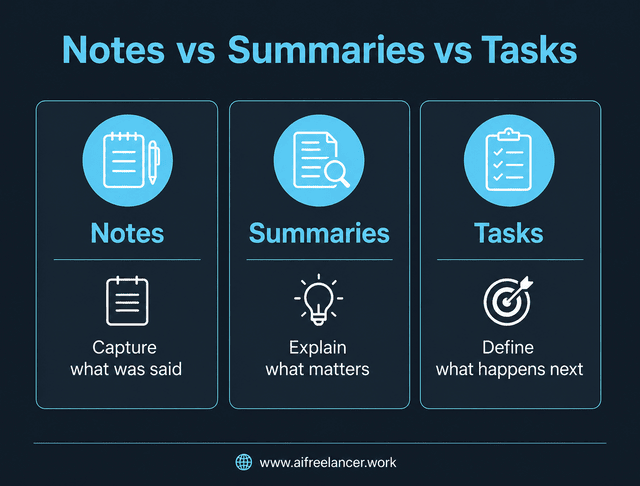
Freelancers get into trouble when they use one document for three different jobs. A simple comparison makes the difference clearer.
| Layer | Purpose | Example |
| Notes | Capture raw information | “Client says the intro feels too pushy.” |
| Summary | Explain what matters | “Client wants a warmer opening without weakening the sales goal.” |
| Task | Define the next action | “Revise the intro and CTA by Thursday.” |
Notes are for capture. Summaries are for meaning. Tasks are for action.
Once you see the difference, your client call notes become easier to process. You stop asking, “What did we talk about?” and start asking, “What changed, what matters, and what happens next?”
A Simple Meeting Notes Action Items Workflow Freelancers Can Use
You do not need a complicated productivity system. You need a repeatable path from conversation to action.
Use this three-step workflow after client calls, discovery sessions, interviews, coaching sessions, or project updates.
Step 1: Capture
Write down what was said. Do not worry about the perfect structure during the call. Capture client comments, questions, examples, concerns, decisions, deadlines, and possible follow-up points.
Step 2: Summarize
After the call, turn the raw notes into meaning. If you struggle with turning messy notes into clear takeaways, the summary stage is often where the biggest improvement happens. Identify the main points, key takeaways, decisions made, and anything that needs clarification.
Step 3: Act
Turn confirmed decisions into action items. Each task should include the work, owner, deadline, context, and expected output.
Capture can happen during the call. Summarizing and assigning tasks should usually happen after, when you can think clearly.
This process works because it slows you down at the right point. You do not turn every note into a task. You turn the right notes into summaries, then the right summaries into tasks.
Asana’s Anatomy of Work research has reported that knowledge workers spend 60% of their time on “work about work,” such as coordination, meetings, status chasing, and searching for information. For freelancers, better note processing is one way to reduce that invisible admin load. It also works well alongside repeatable processes that reduce admin work because both approaches reduce the amount of time spent managing work instead of doing it.
Here is a simple template you can reuse after a call:
| Field | What to write |
| Meeting note | The raw comment, request, question, or decision |
| What it means | The short interpretation or key takeaway |
| Decision made | What was clearly agreed, if anything |
| Action item | The specific next step |
| Owner | Who is responsible |
| Deadline | When it should be done |
| Expected output | What does finished look like |
This template works because it does not force every note to become a task. It gives each piece of information a place.
Examples of Meeting Notes Action Items for Freelancers and Consultants
Examples make the difference easier to see because real notes are rarely clean. They often include mixed signals, vague preferences, and half-formed ideas.
Client Revision Call
Raw note:
“Client says the newsletter intro feels pushy, but they still want more replies from warm leads.”
Summary:
“Client wants the newsletter to sound less aggressive while keeping the response goal.”
Task:
“Revise the newsletter intro and CTA so the message feels more educational but still invites replies by Thursday.”
This works because the task does not blindly follow “less pushy.” It keeps the business goal attached.
Discovery Call
Raw note:
“Prospect says they have three offers, but people keep asking what they actually do.”
Summary:
“Prospect needs clearer positioning before creating more content.”
Task:
“Draft three positioning angles for the offer and send by Monday.”
This is useful for the Authority Builder audience because it turns a messy business problem into a clear step in the content strategy.
Coaching Session
Raw note:
“Client keeps delaying LinkedIn posts because they are unsure what to say, then edits every post for an hour.”
Summary:
“Client needs a simple repeatable content structure to reduce hesitation.”
Task:
“Create a three-post weekly LinkedIn template before the next session.”
This turns a pattern into a support tool. The action item is not “post more.” It is “build the structure that makes posting easier.”
Research Interview
Raw note:
“Interviewee says most users open the first onboarding email, but they stop paying attention after that.”
Summary:
“Current onboarding sequence may lose attention after email one.”
Task:
“Review open and click data for onboarding emails two to five.”
This prevents you from jumping to a rewrite before checking the evidence.
Bad vs Better Action Item
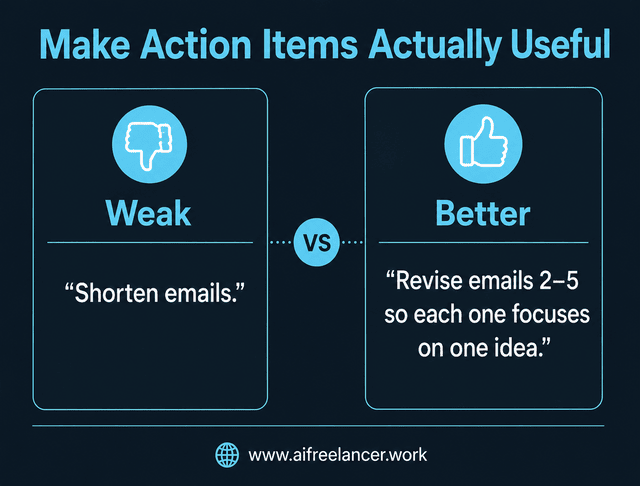
Bad:
“Client said emails are too long. Shorten emails.”
Better:
“Client wants each onboarding email to focus on one idea, starting with emails two to five.”
The bad version sounds productive, but it is too broad. The better version gives you a starting point, a scope, and a clearer reason for the change.
What Makes an Action Item Actually Useful?
A weak action item creates more work because it forces future-you to reinterpret the meeting.
“Fix homepage” is not an action item. It is a vague reminder, not a usable task.
A useful action item needs:
- Task
- Owner
- Deadline
- Context
- Expected output
Weak:
“Fix homepage.”
Better:
“Rewrite homepage hero section to emphasize bookkeeping services for small business owners by Friday.”
The better version works because it tells you what to change, where to change it, who the audience is, and when it is due.
For freelancers, this matters because unclear tasks create unpaid admin. You end up sending extra clarification emails, rereading notes, reopening transcripts, or guessing what the client meant.
A strong action item should pass the “tomorrow test.” If you open it tomorrow, will you know exactly what to do?
If not, it is not finished yet.
When a Meeting Note Should Not Become an Action Item
Not every note deserves a place on your task list. Some notes are useful because they give context, not because they require action.
A meeting note should usually stay as a note when it is:
- A loose idea
- An unresolved question
- A future possibility
- A client comment that needs confirmation
For example, “Maybe we should turn this into a webinar later” is not automatically a task. It may belong under future ideas unless the client clearly says, “Please outline the webinar by Friday.”
That distinction protects your scope, your time, and your energy.
How AI Can Help Organize Notes Without Replacing Your Judgment
AI can help you process messy meeting notes faster, but it should not become the final authority on client intent.
You can use AI to separate raw notes, decisions, and follow-up tasks. You can also ask it to identify unclear points that need confirmation.
A useful prompt might be:
“Turn these raw meeting notes into: 1) a five-sentence summary, 2) decisions made, 3) action items with owner, deadline, context, and expected output. Do not make decisions that were not clearly agreed upon.”
AI may make your notes look cleaner than they really are. Clean formatting can create false confidence.
For example, AI might turn a vague note into:
“Update emails.”
A better human-checked action item would be:
“Revise onboarding emails two to five so each one focuses on one idea. Confirm scope with the client before rewriting.”
Before you send a follow-up or start the work, check whether the action items match what the client actually approved.
Use AI as a sorting assistant, not as a decision-maker.
Final Thoughts
Meeting notes action items are not just a documentation problem. They are a workflow problem.
Most freelancers think notes should lead directly to tasks. That is why follow-up feels messy. The better path is:
Capture → Meaning → Action
This framework is really about moving from discussion to execution without losing important details along the way.
Capture the raw notes. Summarize what matters. Then create tasks that are clear enough to act on later.
When you separate those layers, you stop losing decisions inside long notes. You also reduce follow-up confusion, protect your mental energy, and make client work easier to manage.
For more practical writing systems, AI workflows, and books for freelancers who want to work with more structure, visit my Amazon Author page.
Frequently Asked Questions About Meeting Notes Action Items
Meeting notes action items are the specific tasks that come from a meeting. They usually include what needs to be done, who owns it, when it is due, and what the finished output should look like.
For freelancers, action items often come from client calls, revision meetings, discovery sessions, interviews, or project updates.
Meeting notes capture what was said during a conversation. Action items define what needs to happen after the conversation.
A note might say, “Client wants the article to sound more practical.” An action item would say, “Add two client examples to the article draft by Friday.”
Meeting notes are a raw capture. They may include quotes, questions, ideas, and comments. Meeting summaries explain the key takeaways, decisions, and priorities from the meeting.
A summary is not just a shorter version of the notes. It explains what matters.
Start by reviewing your notes and highlighting decisions, requests, deadlines, and unclear points. Then write a summary of what matters. After that, turn confirmed decisions into tasks with an owner, deadline, context, and expected output.
The simple path is:
Capture the notes.
Summarize the meaning.
Create the action items.
No. Some notes are context. Some are questions. Some are ideas for later. Only confirmed decisions or necessary follow-ups should be converted into tasks.
Summaries help separate confirmed decisions from ideas, questions, and context.
Sources
- Harvard Business Review: Stop the Meeting Madness
- Microsoft WorkLab: Will AI Fix Work?
- Asana: Why Work About Work Is Bad

Florence De Borja is a freelance writer, content strategist, and author with 14+ years of writing experience and a 15-year background in IT and software development. She creates clear, practical content on AI, SaaS, business, digital marketing, real estate, and wellness, with a focus on helping freelancers use AI to work calmer and scale smarter. On her blog, AI Freelancer, she shares systems, workflows, and AI-powered strategies for building a sustainable solo business.

