
You sit down to finish a draft, but your brain is already tired. The client’s revision is waiting. Your notes are scattered. The blank page looks heavier than it should. So you ask AI to help, and within seconds, the paragraph looks cleaner. But something feels wrong. The draft is smoother, yet it no longer sounds like you. That is why learning how to use AI without losing your writing voice matters if you want faster writing without turning your work into polished sameness.
This is not a small concern anymore. Pew Research Center reported that 34% of U.S. adults had used ChatGPT as of 2025, roughly double the share from 2023. AI writing tools are no longer unusual; they are becoming part of everyday writing, editing, and content workflows. The real question is not whether writers should use AI. The better question is how to use it without letting the tool sand off the thinking, rhythm, and judgment that make your writing worth reading.
For freelance writers, consultants, coaches, and self-publishers, this matters even more. Your writing voice is part of your value. It is how clients recognize your judgment, how readers trust your ideas, and how your work avoids sounding like every other AI-assisted draft online.
Everything I’ve shared here—and more—is in my book, available on Amazon. Click the link if you’re ready to take the next step.
Why Writers Search for How to Use AI Without Losing Their Writing Voice
You are probably not searching this topic because you hate AI. You are searching because you have already seen what can happen when AI “improves” a draft too aggressively.
The sentence gets cleaner, but the edge disappears. The explanation becomes more formal, but less useful. The example gets replaced with a broad statement. The paragraph sounds professional, but it could have been written by anyone.
That fear is especially real for writers who are already overloaded. A mid-career freelance writer may need AI to speed up research, outlining, and revisions. A structure-seeking writer may want a repeatable AI writing workflow instead of chaotic drafting. If you need a broader system for handling client work, drafts, and revisions, start with a calmer AI writing workflow for freelance projects before trying to automate every part of the process. A consultant or coach may need help turning messy expertise into consistent thought-leadership content. A self-publisher may want to finish chapters faster without producing generic filler.
The common intent is simple: writers want AI to reduce friction without handing over the parts of writing that make their work recognizable.
The Real Intent Behind “How to Use AI Without Losing Your Writing Voice”
When someone searches for how to use AI without losing their writing voice, they are usually looking for reassurance and a method.
They want to know when to use AI, when to avoid it, which prompts protect their style, and how to check whether the final draft still sounds like them. Instead of another generic list of AI tools, they need a practical system for using AI as a writing assistant, editor, and structure partner without handing over the entire decision-making process.
That distinction matters. AI can suggest a better order, flag unclear sections, or help refine a paragraph. But it should not decide what your strongest idea is, replace your examples with vague advice, or rewrite your work into a voice you would never use.
What “Writing Voice” Actually Means Before AI Touches the Draft
A polished draft is not always a better draft. Sometimes it is just a quieter version of what you meant to say.
Your writing voice is not just tone. It is not only whether your writing sounds friendly, formal, witty, warm, sharp, or conversational.
Voice includes your point of view, sentence rhythm, favorite examples, level of directness, humor, restraint, lived experience, judgment, vocabulary, and the way you explain complex ideas. It is the difference between a paragraph that merely communicates and a paragraph that sounds like it came from a specific person with a specific way of seeing the problem.
This is where many AI-assisted writing problems begin. A tool can copy surface-level tone, but it does not automatically understand why you chose a blunt sentence, a strange example, or a sharper-than-usual opinion. If you do not protect those choices, AI may smooth them away.
Voice Is Your Thinking Pattern, Not Just Your Word Choice
Word choice is how a sentence sounds. Voice is why the writer chose that angle, example, and level of directness in the first place.
A draft can sound polished and still lose the thinking that made it worth reading. That is why AI writing voice is not only about asking a tool to “make this sound like me.” It is about giving AI enough raw material, boundaries, and editing instructions so it can support your personal writing style instead of replacing it.
For example, a consultant might write:
“Most small businesses do not have a content problem. They have a decision problem.”
That line has a point of view. It challenges a common assumption. If AI rewrites it as “Many small businesses struggle with content strategy,” the sentence becomes safer, but weaker. The wording may be cleaner, but the thinking is diluted.
The Biggest Mistake: Letting AI Write Before You Think
The fastest way to lose your writing voice is to let AI make the first major decisions.
When AI creates the first draft from a vague prompt, it chooses the structure, angle, examples, rhythm, level of detail, and conclusion. That may feel efficient, but it also means the draft begins with the kind of safe, common pattern AI tends to produce instead of your actual thinking.
This is why AI-first writing often sounds oddly familiar. The introduction is smooth. The subheadings are logical. The advice is reasonable. But the draft has no friction, no surprise, no lived observation, and no sentence that makes the reader stop and think, “That’s exactly it.”
A 2025 MIT Media Lab preprint on AI-assisted essay writing found that participants who used an LLM showed more homogeneous patterns in wording and topic choices compared with other groups. In simpler terms, the AI-assisted essays tended to look more alike in wording and topic treatment. The study was limited, but it supports a practical concern many writers already feel: when AI leads the writing process, the output can become more similar and less individually owned.
Why “Improve This” Usually Makes Writing Sound Generic
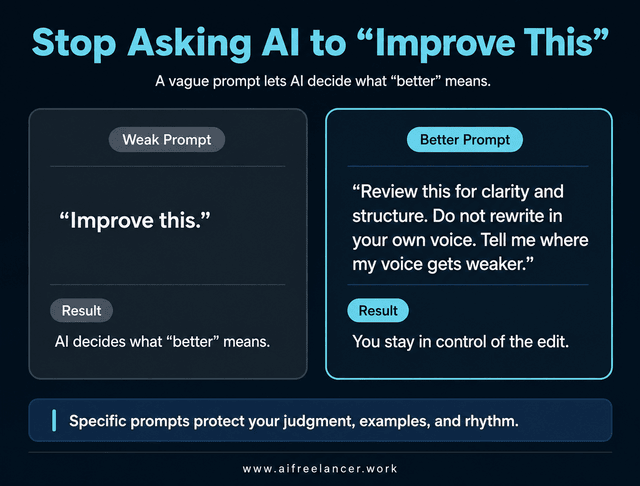
The prompt “Improve this” looks harmless, but it gives AI too much control. It invites the tool to decide what better means. Better may become smoother, more formal, more neutral, or more conventional.
Original rough line:
“Most small businesses do not have a content problem. They have a decision problem. They keep asking what to post because they have not decided what they want to be known for.”
AI-polished but weaker version:
“Many small businesses struggle with content strategy because they lack clarity around their brand positioning and messaging goals.”
Better edited version:
“Most small businesses do not have a content problem. They have a decision problem. They keep asking what to post because they have not decided what buyers should remember.”
The AI-polished version is not terrible. It is clear enough. But it loses the directness of the original. It also replaces plain, memorable language with broad marketing phrasing.
The better edited version keeps the original argument, rhythm, and punch. It only sharpens the final sentence. That is the goal when you write with AI without sounding generic: improve clarity without deleting the human judgment behind the line.
Better Prompting Starts With Clear Editing Boundaries
Instead of asking AI to improve everything, give it a narrower job.
Try this:
“Review this draft for clarity and structure. Do not rewrite in your own voice. Tell me where the message is unclear and where my voice gets weaker.”
AI becomes a reviewer, not a ghostwriter. It can point out weak areas, but you still decide what to change.
Google’s guidance on AI-generated content recommends focusing on accuracy, quality, and usefulness, especially when automation is involved. The same guidance makes clear that AI use itself is not the issue. The issue is whether the final content helps people or exists mainly to manipulate search rankings.
In writing terms, the danger is not the tool itself. The danger is letting the tool make decisions you have not made yet.
The Voice-Safe Workflow: Think First, Draft First, Then Use AI
A tired writer does not need a more complicated system. You need a simple order of operations that keeps your ideas in charge. This is also where templates you can reuse across drafts can help, because they reduce repeated decisions without forcing every article, proposal, or chapter to sound the same.
A safer AI writing workflow starts before the prompt. It starts with your own thinking.
You do not need a perfect first draft. You need enough raw material for AI to respond to your ideas instead of inventing the message for you.
Use this process:
- Think first.
- Capture messy ideas.
- Draft in your own words.
- Ask AI for structure feedback.
- Revise manually.
- Ask AI to flag generic sections.
- Tighten sentence-level clarity.
- Run a final voice check.
This workflow works because AI enters after your judgment is already visible on the page. It can organize, question, and refine. It does not get to decide the entire argument before you have said anything.
How to Use AI Without Losing Your Writing Voice in the Drafting Stage
The drafting stage is where many writers accidentally give away too much control. They ask AI for a full article, chapter, post, or email before they have captured their own angle.
A self-publisher, for example, may struggle to start a chapter about burnout. If they ask AI to draft from scratch, the result may open with broad lines about modern life being busy and stressful. It may be organized, but it could belong in any book.
A better workflow starts with messy notes like these:
- “Burnout does not always feel dramatic. Sometimes it looks like opening the laptop and feeling annoyed before anything happens.”
- “The problem is not laziness. There are too many unfinished decisions.”
- “A simple system should remove decisions, not add another productivity ritual.”
Those notes are not polished, but they carry a voice. They include a specific observation, a clear opinion, and a teaching angle. AI can now organize the material into a chapter outline without replacing the author’s core message.
That is the difference between using AI for drafting support and letting AI write the draft for you.
Use AI to Organize, Not Replace, Your First Thoughts
Once your raw ideas are on the page, AI can help you build structure.
Use a prompt like this:
“Organize these notes into a clear outline. Keep my phrasing where possible. Do not add generic advice. Flag gaps instead of filling them automatically.”
This works well for freelance writing workflow, book planning, blog drafting, and AI-assisted writing because it keeps your material at the center. AI is not being asked to invent your message. It is being asked to arrange it.
Once your ideas are on the page, editing is where AI becomes most useful.
How to Use AI Without Losing Your Writing Voice During Editing
Editing is where AI can save time, but it is also where a strong paragraph can quietly become weaker.
AI can help you find unclear sections, identify repetition, tighten bloated paragraphs, flag generic claims, suggest stronger transitions, check whether examples support the point, and ask questions a human editor would ask.
A large randomized field experiment involving 6,000 workers found that access to generative AI tools changed some work patterns, including reducing time spent on email among users. That supports the productivity appeal of AI, but the lesson for writers is more specific: speed is useful only when it does not weaken the quality or ownership of the final work.
Ask AI for a Diagnosis Before Rewriting
Before asking AI to edit, ask it to diagnose.
Use this:
“Before editing, tell me the three biggest weaknesses in this draft. Do not rewrite yet.”
Then review the response carefully.
Accept feedback about unclear logic. Be careful with suggestions that make the tone smoother but less direct. Reject edits that remove specific examples or soften the central opinion. Ask follow-up questions before allowing AI to rewrite any paragraph.
Use Voice-Safe Editing Prompts
Voice-safe prompts tell AI what to protect, not only what to fix.
Useful prompts include:
- “Tighten this paragraph without changing my tone.”
- “Point out where the draft starts sounding generic.”
- “Suggest edits, but explain why each one improves clarity.”
- “Keep my examples and point of view intact.”
- “Do not add clichés, corporate language, or broad motivational claims.”
These prompts help you spot when AI is trying to over-polish the draft. If AI suggests replacing a direct sentence with a softer one, ask whether the edit improves clarity or simply makes the line safer. Safer is not always better.
Once the core workflow is clear, the next step is applying it to the kind of writing you actually do. A freelancer, consultant, and self-publisher may use the same principle, but the risk looks different in each case.
How to Use AI Without Losing Your Writing Voice for Clients
Freelance writers face a special challenge. The goal may be to preserve your own style, maintain the client’s brand voice, or match a publication’s tone. This matters even more when client communication affects your income, such as when you need to speed up proposal writing without sounding rushed while still sounding thoughtful, specific, and credible.
That is why client work needs a voice profile before AI touches the draft.
A useful client voice profile includes:
- Audience
- Tone
- Preferred vocabulary
- Banned phrases
- Sample paragraphs
- Level of formality
- Formatting preferences
- Examples of approved work
Here is the risk. A freelance writer uses AI to clean up a client’s article. The first AI edit removes the client’s casual explanations and replaces them with polished corporate language. The article becomes smoother, but it no longer matches the client’s usual emails, posts, or website copy.
The better approach is to give AI the client’s voice profile first, then ask it to flag tone drift instead of rewriting the whole piece.
Use this prompt:
“Compare this draft with the client voice profile. List where it matches and where it drifts. Do not rewrite unless I ask.”
This protects the client’s voice, brand voice, and content refinement. It also reduces the chance that AI will make every client sound like the same polished company blog.
How Consultants and Coaches Can Use AI Without Sounding Generic
Consultants and coaches often do not lack ideas. They lack time, structure, and consistency.
The risk is different from client work. A consultant is not only trying to sound clear. They are trying to keep the hard-earned angle that makes their advice useful.
A coach records a five-minute voice note after a client call. The raw note includes a sharp line:
“Most people do not need more motivation. They need fewer open loops.”
A weak AI draft might turn that into:
“Many people benefit from better productivity systems and clearer priorities.”
The second version is accurate, but forgettable. It removes the tension and directness that made the first line useful.
The stronger workflow keeps the original line as the core idea. AI can help build the post around it, suggest examples, organize the argument, or create a LinkedIn outline.
Try this prompt:
“Turn these notes into a LinkedIn post outline. Preserve my main argument. Do not make the tone overly inspirational or generic.”
This approach works because the consultant still supplies the insight. AI helps shape the delivery.
How Self-Publishers Can Keep Their Author Voice While Using AI
Self-publishers can use AI for chapter planning, structure, research organization, revision support, consistency checks, reader questions, transitions, and outline development.
But full-draft generation can become risky if the author has not supplied enough raw material. AI can fill pages quickly, but fast pages are not always strong pages. A chapter can be grammatically clean and still feel empty.
A self-publisher might ask AI to review Chapter 3 and identify where the explanation repeats Chapter 2. That is useful. But asking AI to write the entire chapter from a one-line prompt often creates filler that sounds organized but has no author fingerprint.
A better use of AI is to review a chapter for flow, missing explanations, repeated points, and unclear transitions. The author should still decide which examples stay, which opinions need sharpening, and which passages sound most like their natural teaching style.
For book writing, the safest rule is simple: let AI help organize the book, but do not let it replace the author’s reason for writing it.
No matter which type of writing you do, the warning signs are often the same. AI-flattened writing usually looks clean before it feels wrong.
Signs AI Is Flattening Your Writing Voice
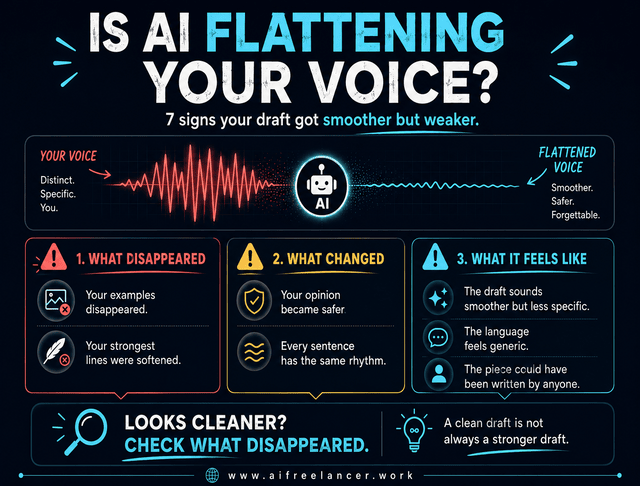
Sometimes AI damage is easy to miss because the draft looks better at first glance. It reads smoothly. The grammar is clean. The transitions are neat. But the writing feels less specific, less memorable, and less like you.
Watch for these signs:
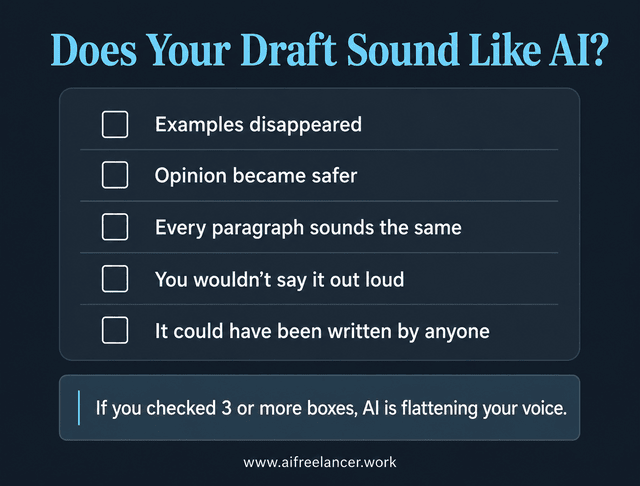
- The draft sounds smoother but less specific.
- Your examples disappeared.
- Your opinion became safer.
- Every sentence has the same rhythm.
- The language sounds like generic LinkedIn advice.
- The draft explains the obvious.
- The conclusion feels motivational but empty.
- You would not say the sentence out loud.
- Your strongest lines were softened.
- The piece could have been written by anyone.
The goal is not to reject every AI edit. The goal is to notice when AI has improved the surface while weakening the substance.
What to Do When AI Makes Your Writing Sound Like AI
When your draft starts sounding too generic, do not throw it away. Rebuild the voice deliberately.
Use this recovery process:
- Restore your original examples.
- Add back your strongest opinion.
- Replace generic claims with specific observations.
- Vary sentence rhythm.
- Read the piece aloud.
- Remove phrases you would never naturally use.
Here is a simple example.
Generic AI sentence:
“Creating content consistently is essential for building a strong online presence.”
Sharper human revision:
“Consistency matters, but not because the algorithm needs another post. It matters because your audience needs repeated proof that you understand the problem.”
The second version is stronger because it adds a point of view. It rejects a common assumption. It gives the sentence a reason to exist.
AI Prompts That Protect Your Writing Voice
Prompt lists can become useless when they are dumped without context. The better question is not only what to ask AI. It is when to use the prompt and what to watch for afterward.
Prompt for Preserving Tone
Use this prompt when the draft is messy but already sounds like you:
“Edit this for clarity while preserving my tone, sentence rhythm, and point of view. Do not make it sound more formal than the original.”
Watch for AI making the piece too polished, too formal, or too neutral. If the revised version sounds like a corporate blog, ask AI to show what it changed and restore your direct phrasing.
Prompt for Finding Generic AI Language
Use this prompt when the draft looks clean but feels dull:
“Identify any sentences that sound generic, over-polished, or AI-written. Explain why they feel generic before suggesting changes.”
Watch for vague feedback like “make this more engaging.” Ask AI to identify the exact sentence and explain the problem.
Prompt for Strengthening Originality
Use this prompt when the draft is accurate but forgettable:
“Find places where I can add a sharper opinion, specific example, personal observation, or stronger explanation.”
Watch for AI inventing examples. Add your own real observations instead.
Prompt for Client or Brand Voice
Use this prompt when writing for a client, publication, brand, or recurring content series:
“Compare this draft against the voice profile below. Flag tone drift, vocabulary mismatch, and sections that do not sound aligned.”
Watch for AI rewriting instead of comparing. Keep the task focused on analysis first.
Common Mistakes to Avoid When Using AI for Writing
AI mistakes are not always dramatic. Sometimes they look like small shortcuts that weaken the draft one sentence at a time.
Avoid these mistakes:
- asking AI to write the full draft too early
- accepting polished output without reviewing it
- removing all personality for clarity
- letting AI add unsupported claims
- using the same prompt for every writing task
- skipping the final read-aloud pass, which is where you catch sentences you would never actually say
- confusing “cleaner” with “better.”
Each mistake has a consequence. AI may remove the sentence that carries the strongest opinion, replace useful examples with vague explanations, or make the article sound more professional but less memorable. Some suggestions might introduce claims that sound plausible but still need checking, and other edits may cause every paragraph to follow the same rhythm.
The final read-aloud pass matters because your ear catches what your eyes miss. If you would never say the sentence that way, it probably does not belong in the final draft. The same principle applies to client communication: AI can help you reply to clients faster without feeling pressured, but the message still needs to sound calm, clear, and like it came from you.
Final Thoughts
Learning how to use AI without losing your writing voice starts with a simple rule: let AI make the next draft easier, but do not let it make the final draft anonymous.
Use AI for structure, clarity, and revision support. Keep the judgment.
That is the difference between a draft that is merely cleaner and a draft that still sounds like it belongs to you.
The goal is not to prove you wrote every sentence alone. The goal is to make sure the final piece still carries your judgment.
For deeper systems on writing, content creation, and AI-assisted workflows, visit my Amazon Author page and explore my books.
Frequently Asked Questions About How to Use AI Without Losing Your Writing Voice
AI can imitate the visible patterns in your writing, especially if you provide strong examples. It may be noticed that you use short sentences, direct openings, or practical examples. That does not mean it understands your judgment.
For example, AI may copy a conversational tone but still remove the sentence that carries your main opinion. Use it for pattern recognition, then review the result yourself as part of your AI editing workflow.
No. Using AI for writing is not automatically bad. AI can help with outlines, clarity checks, editing, repurposing, and idea organization.
The problem starts when you let AI fill in thinking you have not done yet. If it creates the argument, examples, and conclusion before you have added your own perspective, the final draft may be efficient but forgettable.
Start by giving AI your original notes, approved writing samples, voice rules, banned phrases, and specific editing instructions. Ask it to protect your sentence rhythm, directness, examples, and point of view.
Then check the output manually. If AI turns “This is a decision problem” into “This reflects a lack of strategic clarity,” restore the sharper version. That is how you make AI writing sound like you instead of letting it drift into generic phrasing.
Usually, the safer approach is to write the rough first draft yourself, even if it is messy. Then use AI for structure, clarity, repetition checks, and revision support.
If AI creates the first draft, it also chooses the angle, examples, and rhythm before your own thinking appears on the page. That does not mean every AI-assisted first draft is useless, but it does mean you will need heavier editing to make the piece sound like you.
Give AI narrower instructions. Do not ask it to “improve this” without boundaries. Ask it to flag generic sections, protect your examples, keep your tone, and explain every suggested change.
After that, read the draft aloud. Your ear will catch lines that look fine on screen but sound nothing like the way you explain ideas in real life. That final review helps you write with AI without sounding generic.
Sources
- Pew Research Center. “34% of U.S. adults have used ChatGPT, about double the share in 2023.”
https://www.pewresearch.org/short-reads/2025/06/25/34-of-us-adults-have-used-chatgpt-about-double-the-share-in-2023/ - MIT Media Lab / arXiv. “Your Brain on ChatGPT: Accumulation of Cognitive Debt when Using an AI Assistant for Essay Writing Task.”
https://arxiv.org/abs/2506.08872 - National Bureau of Economic Research / arXiv. “The Cybernetic Teammate: A Field Experiment on Generative AI Reshaping Teamwork and Expertise.”
https://arxiv.org/abs/2504.11436
- Google Search Central. “Google Search’s guidance about AI-generated content.” https://developers.google.com/search/docs/fundamentals/using-gen-ai-content

Florence De Borja is a freelance writer, content strategist, and author with 14+ years of writing experience and a 15-year background in IT and software development. She creates clear, practical content on AI, SaaS, business, digital marketing, real estate, and wellness, with a focus on helping freelancers use AI to work calmer and scale smarter. On her blog, AI Freelancer, she shares systems, workflows, and AI-powered strategies for building a sustainable solo business.

