

You know that strange moment after a call ends?
The screen goes quiet. The transcript is sitting there. Your notes look useful at first glance. Then you realize the client mentioned three possible ideas, one missing link, a vague deadline, and a revision request that sounded simple during the call but now feels like a small puzzle.
That is exactly why you need a meeting notes template that does more than record what happened.
For freelancers, consultants, coaches, and solo founders, the real problem is not always the meeting itself. It is the cleanup after the meeting. You have to figure out what was decided, what needs action, what needs client input, and what should be saved for later.
A good meeting notes template should help you leave the call with decisions sorted, action items clear, and your next task already visible.
This is not just a personal annoyance. Meeting cleanup eats into the same focus you need for paid client work. Microsoft’s 2023 Work Trend Index found that inefficient meetings were the number one productivity disruptor, and 55% of workers said next steps at the end of meetings were unclear. If that sounds familiar, your notes are probably not the problem. Your system is.
Everything I’ve shared here—and more—is in my book, available on Amazon. Click the link if you’re ready to take the next step.
Quick Meeting Notes Template You Can Use Right Away
Sometimes you do not need a complicated template. You just need a simple structure that stops your notes from turning into another pile of “I’ll deal with this later.”
Use this quick version after a normal client call, project check-in, coaching session, or content planning meeting.
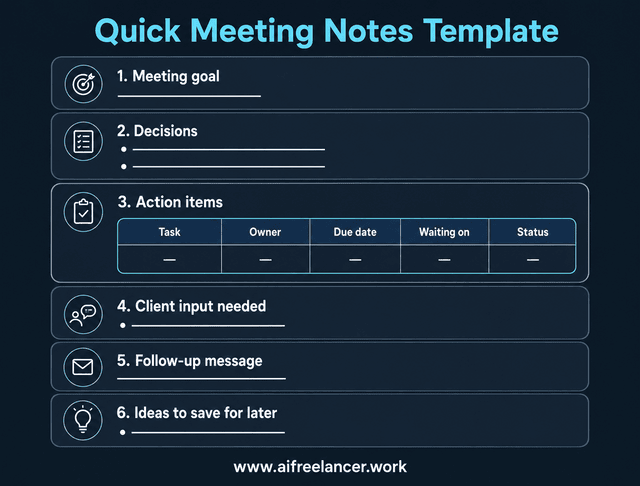
A decision is not the same as a task. A brainstorming idea is not the same as a deadline. Client input is not the same as your responsibility.
Here is what that looks like after a real revision call.
Meeting goal: Confirm blog revision direction
Decisions:
- Keep the outline, but make the intro more direct.
- Add one client example if the source link is available.
Action items:
| Task | Owner | Due date | Waiting on | Status |
| Rewrite the intro with a sharper pain point | Writer | Thursday | None | Active |
| Add client campaign example | Writer | Friday | Client source link | Waiting |
| Confirm final approval deadline | Writer | Today | Client reply | Active |
Client input needed:
- Campaign source link
- Approval deadline
Follow-up message to send:
- Confirm the revised intro, source link, and approval date.
Ideas to save for later:
- Turn the pricing objection into a LinkedIn post.
Why Most Meeting Notes Do Not Turn Into Action
Meeting notes often look productive. They have timestamps, bullets, names, and maybe even a neat summary. But when you sit down to work, you still have to ask:
- What did we actually decide?
- Who is doing what?
- What is waiting for the client?
- What was only an idea?
- What needs to happen today?
That is where most notes fail. They capture discussion, but they do not create direction.
When meetings already take a big slice of the workday, unclear notes make the drain worse. Atlassian reported that professionals spend 21% of their working time in meetings, and respondents believed at least a quarter of that meeting time was wasted. If your notes do not produce useful next steps, the meeting keeps taking time even after it ends.
Notes Are Not the Same as Next Steps
Meeting notes capture what happened, while next steps clarify what needs to happen. You need both, but they should not be mixed.
For example, this is a note:
“The client said the intro feels too formal.”
This is the next step:
“Revise the intro to sound more conversational and send the updated version by Thursday.”
The first one gives context. The second one gives direction. If you only keep the first version, you still have to translate it into work later. That is where after-call admin starts to pile up.
If this part often feels messy, it helps to separate notes, summaries, and tasks before you move anything into your actual workflow.
Messy Notes Create Hidden Follow-up Work
Messy notes do not always look messy at first. Sometimes they look detailed. That is the trap.
You may have a full transcript, but still need to reread it to find the one source link the client promised to send. You may have a long summary, but still need to confirm whether a piece of feedback was approved or just casually mentioned.
This is especially draining for overloaded writers and consultants. You already have client work waiting. The last thing you need is to spend another 30 minutes decoding what the meeting meant.
A better system helps you avoid chasing the same clarification twice.
Meeting Notes Template vs Meeting Minutes Template: Quick Difference
Before we build the full system, let’s clear up one common mix-up.
Meeting minutes are usually more formal. They may serve as an official record for board meetings, team meetings, compliance discussions, or decisions that need to be documented carefully.
Meeting notes are more flexible because they can capture the things solo workers actually need: feedback, approvals, missing files, source links, deadline changes, and follow-up promises.
When Meeting Minutes Make Sense
Meeting minutes make sense when the record itself matters.
Use meeting minutes for:
- Board meetings
- Official team records
- Compliance-related meetings
- Formal approvals
- Meetings where motions, votes, or official decisions must be documented
Meeting minutes usually focus on accuracy, attendees, agenda items, motions, decisions, and records.
When Flexible Meeting Notes Work Better
Flexible meeting notes work better when the goal is action.
Use meeting notes for:
- Client calls
- Content planning
- Coaching sessions
- Discovery calls
- Revision calls
- Project check-ins
These notes should help you send the follow-up, update your task list, and stop rereading the transcript later.
What a Strong Meeting Notes System Should Include
A useful meeting notes system does not reward you for writing more. It helps you find the few details that change the work.
Think of this as the part of your notes that prevents future-you from asking, “Wait, what did we agree on again?”
This matters because meeting cleanup can easily become “work about work.” Asana’s Anatomy of Work research says 60% of a person’s time at work is spent on coordination and work about work, not skilled work. That includes the follow-up messages, status checks, and clarification loops that happen when notes do not point to action.
The sections below help keep your notes useful instead of becoming another admin pile.
How the Meeting Notes Template Starts With the Goal
Every useful meeting notes template starts with the meeting goal. This gives the notes a clear anchor.
Examples:
- Clarify homepage revisions
- Plan July content topics
- Review client feedback on the draft
- Confirm launch email sequence
- Prepare for the next coaching session
Without a goal, your notes can become a pile of disconnected comments. With a goal, it is easier to decide what matters and what does not.
Where Key Decisions Fit in Your Meeting Notes Template
Decisions should have their own section. This prevents you from treating every comment as a task.
For example, if a client says, “Let’s go with the shorter landing page,” that is a decision. It should not be buried under general discussion notes.
A simple decision entry can look like this:
- Decision: Use the shorter landing page structure
- Approved by: Client
- Notes: Keep the pricing section, but remove the long feature comparison
This gives you something to refer back to if the project gets fuzzy later.
The Action Item Block Every Meeting Notes Template Needs
The action item block is where your notes become useful. Each action item should include:
- Task
- Owner
- Due date
- Status
- Dependency
- Confirmation needed
Avoid vague tasks like:
“Update draft.”
Use specific tasks like:
“Revise the intro to focus on client pain points by Friday.”
That one sentence tells you what to do, where to focus, and when it is due.
Follow-up Tasks, Owners, and Deadlines
This is where you separate client input from your actual task.
For example, “add campaign example” sounds like your task. But if the client still needs to send the campaign link, the real next step is different.
Your table should make that visible.
| Task | Owner | Due date | Priority | Dependency | Confirmation needed | Next system |
| Add campaign example to draft | Writer | Friday | High | Client source link | Yes | Google Doc task |
| Send campaign link | Client | Wednesday | High | None | No | Follow-up email |
| Confirm final approval date | Writer | Today | Medium | Client availability | Yes |
This keeps you from blaming yourself for work that is actually waiting on someone else.
Meeting Notes Template With Action Items You Can Copy
Use the quick version for simple calls. Use this fuller version when the meeting affects deadlines, client approvals, deliverables, or multiple next steps.
Example: Messy Meeting Notes Turned Into Action Items
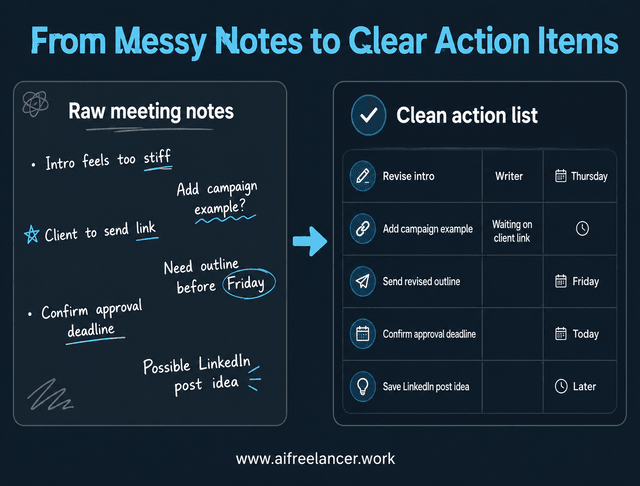
Templates are helpful, but the real test is what happens when the notes are messy.
Because real client calls rarely sound like a tidy checklist. They sound more like this:
Intro feels too stiff, make it sound more like us. The pricing item from the sales call may be useful, but I’m not sure. Use the last campaign example? Client said they’ll send the link, maybe tomorrow. Need outline before Friday? Ask about approval because Ana is off next week. Possible LinkedIn post from this.
That is not bad information. It is just not ready for action yet.
Raw Meeting Notes From a Client Call
Here is the messy version again:
Intro feels too stiff, make it sound more like us. Pricing thing from sales call might be useful, but not sure. Use the last campaign example? Client said they’ll send the link, maybe tomorrow. Need outline before Friday? Ask about approval because Ana is off next week. Possible LinkedIn post from this.
This has several different types of information mixed:
- Revision feedback
- Possible supporting example
- Missing source link
- Unclear deadline
- Approval concern
- Future content idea
If you treat all of it as one task, your brain has to keep sorting it in the background.
Clean Action List With Owner, Deadline, and Next Step
Now turn that messy note into action items:
| Task | Owner | Due date | Dependency | Status |
| Revise the intro to sound more conversational | Writer | Thursday | None | Active |
| Add one example from the previous campaign | Writer | Friday | Client must send the source link | Waiting |
| Send revised outline | Writer | Friday | Approval deadline confirmation | Active |
| Confirm the approval deadline because Ana is off next week | Writer | Today | Client reply | Active |
| Save the LinkedIn post idea for later | Writer | None | None | Idea, not an active task |
Now the work is easier to see. The “pricing thing” is not automatically a task. The campaign example depends on the client. The LinkedIn post idea belongs in “later,” not in the active project list.
Follow-up Message You Can Send After the Meeting
Here is a simple follow-up message based on the cleaned notes:
Hi [Name], thanks for the call. Here are the next steps I have for today:
- I’ll revise the intro so it sounds more conversational.
- I’ll send the revised outline by Friday.
- I’ll add the previous campaign example once you send the source link.
- I’ll also confirm the approval deadline since Ana will be off next week.
I also noted the LinkedIn post idea and will keep that separate from the current draft tasks for now.
Thanks again.
This message does two things. It confirms the work and protects you from guessing later.
How to Turn Meeting Notes Into Action Items Automatically
The word “automatically” can be tricky.
It does not mean you should let AI send unchecked notes to a client. Please do not turn your follow-up process into a robot with a clipboard and too much confidence.
It means using a repeatable system, so you are not rebuilding the action list from scratch after every call.
Use AI to sort the notes. Use your judgment to confirm the work.
Capture the Transcript, Rough Notes, or Messy Bullets
You do not need perfect notes to start. You only need enough context for AI or your own system to extract structure.
Your source material can come from:
- Zoom transcripts
- Google Meet notes
- Notion notes
- Google Docs notes
- Handwritten notes
- Rough bullets after the call
- A call summary from an AI meeting assistant
The cleaner your notes are, the easier this gets. But the system should still work when your notes are rough.
If the transcript is long, start by asking AI to turn messy call notes into a short working summary before you build the action list.
Sort Notes Into Decisions, Tasks, Questions, and Ideas
Before you create action items, sort the notes into four buckets:
- Decisions
- Tasks
- Questions
- Ideas
A decision tells you what direction is approved. A task tells you what someone has to do next. A question means the work is not ready yet. An idea belongs somewhere else, not inside today’s deadline list.
Use AI to Create Action Items With Owners and Deadlines
Here is a prompt you can use:
“Turn these meeting notes into a clear action list. Separate decisions, action items, owners, deadlines, follow-up messages, and questions to clarify. Do not invent missing deadlines or owners. Mark anything unclear as ‘needs confirmation.’”
That last part matters. AI can be helpful, but it can also sound very sure about details that were never said. Asking it not to invent owners or deadlines gives you a safer first draft.
Use Different Prompts for Different Meeting Outcomes
Different meetings create different kinds of mess. Use the prompt that matches the output you need.
For messy client call notes:
“Extract only confirmed tasks from these notes. Separate client tasks from my tasks. Mark anything vague as ‘needs confirmation.’ Keep ideas in a separate ‘save for later’ section.”
To write the follow-up email:
“Write a short follow-up message confirming the decisions, deadlines, and items waiting on the client. Keep the tone warm, clear, and not robotic.”
For content planning calls:
“Separate content ideas, approved topics, source links needed, publishing deadlines, and questions to clarify. Do not turn brainstorming ideas into active tasks unless they were clearly approved.”
These prompts help you avoid the most common problem with meeting notes: everything sounds important, but not everything is actionable.
Create a Repeatable Meeting-To-Action Workflow
If you want this to feel automatic, do not rebuild the process every time.
Create a simple chain you can reuse after every call:
Call transcript or rough notes
↓
AI prompt
↓
Action table
↓
Follow-up email
↓
Task system
The workflow can be simple:
- Save your preferred prompt.
- Paste the transcript or rough notes after each call.
- Ask AI to sort decisions, tasks, client input, questions, and ideas.
- Review the action list.
- Send the follow-up message.
- Move confirmed tasks into your task system.
That is the “automatic” part. You are not removing your judgment. You are removing the repeated sorting work. If this becomes a weekly bottleneck, a lightweight automation system can help you repeat the same cleanup process without rebuilding it each time.
Review the Action List Before Sending It
AI can miss context. Casual ideas can turn into fake tasks. The wrong owner may get assigned. A deadline may appear even when the notes are unclear.
Before sending the follow-up, check for:
- Vague verbs
- Missing owners
- Unrealistic deadlines
- Ideas listed as active tasks
- Client input accidentally listed as your task
- Anything that sounds too robotic or too confident
This review step protects accuracy, client trust, and your voice.
Know When Meeting Cleanup Is Done
Meeting cleanup is done when your notes no longer need decoding. Before you close the file, check that:
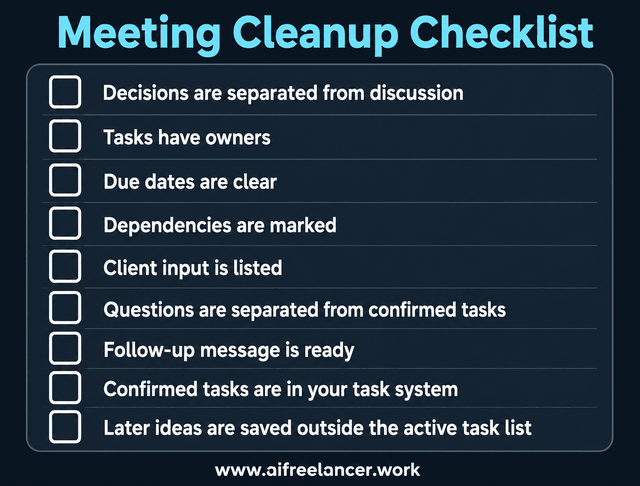
If all of that is done, you should not need to reread the transcript just to remember what happens next.
You can move confirmed tasks into Notion, Trello, Asana, ClickUp, Google Tasks, a spreadsheet, or a simple checklist. Whether you use Notion or a plain checklist, the important part is that the task is no longer buried inside a transcript.
Meeting Notes Examples for Different Workflows
A strong template should flex with your work.
A freelance writer does not need the same notes as a founder on a sales call. A coach does not need the same notes as someone planning a content calendar.
Here is how the same system can work across different call types.
Freelance Writer Revision Call Example
Revision calls can create messy notes fast because clients often describe feelings before they describe tasks.
They may say:
- “Make it punchier.”
- “Less formal.”
- “More like us.”
- “Can we add that example from the campaign?”
Your job is to turn those comments into clear revision tasks.
Mini output example:
- Revise the intro to sound more direct.
- Remove formal phrases the client disliked.
- Wait for the source link before adding the campaign example.
- Confirm approval deadline before final edit.
This helps you avoid rewriting the whole piece when the actual request is more specific.
Consultant or Coach Session Example
Consulting and coaching calls often mix insight, emotion, strategy, and next steps.
Your notes should separate what the client realized from what they agreed to do.
Mini output example:
- Client will test the new offer language with two prospects before the next session.
- Coach will send the worksheet by Wednesday.
- Client is unsure about the pricing story, so save it as a content idea, not an active task.
- Review what happened during the next call.
This keeps the session useful after the call ends.
Founder Discovery Call Example
Discovery calls create two kinds of notes: sales notes and action notes.
Do not mix them.
Sales notes help you understand the prospect. Action notes tell you what to do next.
Mini output example:
- Send proposal by Friday.
- Include two package options because the prospect is unsure about the scope.
- Note budget concern for follow-up.
- Save objections for sales page messaging.
- Confirm whether the founder wants implementation support or strategy only.
That separation helps you write a sharper follow-up without losing useful sales insight.
Content Planning Call Example
Content planning calls can quickly become idea soup.
A good meeting notes template helps you separate approved topics from “maybe later” ideas.
Mini output example:
- Approved topic: AI workflow for freelancers.
- Needs research: meeting fatigue statistics.
- Waiting on client: internal case study link.
- Later idea: repurpose into LinkedIn carousel.
- Confirm whether the article needs a downloadable checklist or just an in-post template.
This keeps the content plan clean and prevents one call from creating twenty unfinished tabs in your brain.
Common Mistakes When Using a Meeting Notes Template
A template helps, but only if you use it to make decisions clearer.
These are the mistakes that turn useful notes back into clutter.
Treating Brainstorms as Fake Deadlines
Not every idea needs action. Sometimes a client says, “This could be a LinkedIn post later,” and your tired brain turns that into another task. Suddenly, your to-do list is full of ideas nobody actually approved.
Keep “save for later” ideas out of the active task list.
Your future self will be grateful. Maybe even suspiciously grateful.
Forgetting the Owner
A task without an owner usually becomes the follow-up you have to chase later. Even if you work solo, you still need to mark whether the next step belongs to you, the client, or someone else.
This matters when a task depends on:
- Client input
- Source links
- Files
- Approval
- Internal feedback
- Access to a tool or document
If the client needs to send the source link, that is not your task yet. Your task is to follow up or wait.
Skipping the Follow-up Message
The follow-up message is where your notes become shared understanding.
You may understand the next steps perfectly. The client may not. Or worse, they may remember the call differently two days later.
A short follow-up reduces confusion before it starts. It does not have to be long. It only needs to confirm:
- What was decided
- What you will do
- What the client needs to send
- What happens next
When the same questions keep coming back after every call, the issue may not be the meeting itself. You may need a clearer handoff so you can reduce the back-and-forth after meetings.
Final Thoughts
Your notes should not create another pile to process later.
A good meeting notes template helps you leave the call with decisions sorted, client inputs marked, and your next task already clear. It gives you a simple way to turn messy calls into action items without rereading the transcript three times or sending five clarification messages.
For freelancers, consultants, coaches, and solo founders, the win is not better notes. The win is cleaner action after every call.
If you are building a calmer writing or content workflow, my books can help you create better systems for drafting, organizing, and using AI. You can find them on my Amazon Author page.
Frequently Asked Questions About Meeting Notes Template
A meeting notes template should include the meeting goal, key decisions, action items, owners, due dates, client input needed, questions to clarify, and a follow-up message. For client work, the most important fields are usually owner, deadline, and waiting on. These sections help you separate your tasks from client responsibilities.
Meeting minutes are usually more formal and may serve as an official record of a meeting. They often include attendees, agenda items, decisions, motions, and formal approvals. Meeting notes are more flexible. They are usually better for client calls, coaching sessions, revision calls, and project check-ins because they focus on context, decisions, client input, and next steps.
To turn meeting notes into action items, review the notes and identify confirmed tasks. Then assign an owner, add a due date, mark any dependencies, and remove vague wording. If something is unclear, mark it as “needs confirmation” instead of pretending it is ready.
Yes, AI can help extract decisions, tasks, deadlines, and follow-up messages from meeting notes or transcripts. AI works best when the notes clearly show who agreed to do what. If the transcript is vague, ask AI to mark unclear items instead of guessing. You should still review the output before sending it to a client.
The best format for meeting action items is a simple table with task, owner, due date, priority, dependency, and status. This makes the action list easy to scan and easier to move into your task system. If you work with clients, add a “waiting on” or “client input needed” column so you can separate your tasks from their responsibilities.

Florence De Borja is a freelance writer, content strategist, and author with 14+ years of writing experience and a 15-year background in IT and software development. She creates clear, practical content on AI, SaaS, business, digital marketing, real estate, and wellness, with a focus on helping freelancers use AI to work calmer and scale smarter. On her blog, AI Freelancer, she shares systems, workflows, and AI-powered strategies for building a sustainable solo business.

