
You finish a 20-minute client call and think, “That was short. Why do I feel wiped out?”
Then you look at your notes.
One comment needs to be revised. One decision was mentioned but not confirmed. One action item is hiding somewhere in the middle of the conversation. You need to send a recap, update your task list, and somehow return to the draft you were working on before the call.
The call may be over, but the work it created is still sitting in your head.
That is meeting fatigue.
Meeting fatigue is not just feeling tired after talking. It is the drain that happens when meetings create too many unresolved notes, decisions, follow-ups, and context switches. Even short calls can feel exhausting when the real work begins after the call ends.
For freelancers, consultants, founders, coaches, and creators, this matters because meetings rarely stay inside the meeting. They spill into your writing time, planning time, admin time, and recovery time.
Everything I’ve shared here—and more—is in my book, available on Amazon. Click the link if you’re ready to take the next step.
What Meeting Fatigue Really Feels Like
Meeting fatigue is not always the dramatic “I cannot attend one more call today” feeling. Sometimes it is quieter.
You close the meeting tab, but your brain stays there. You reread your notes and still do not know what matters. You open your draft again, but the rhythm is gone. You know you should write the follow-up email now, but you are not sure where to start.
That is why this kind of drain can feel confusing. The call may have been polite, useful, and short. Still, you feel scattered afterward.
Common signs include:
- Mental exhaustion
- Difficulty focusing
- Reduced motivation
- Trouble returning to focused work
- Avoiding follow-up tasks because the next step is unclear
Microsoft’s research on brain activity found that back-to-back virtual meetings increase stress, while short breaks between meetings help people focus and engage better. The finding matters because many professionals do not just attend meetings. They are expected to recover quickly, switch tasks, and keep producing.
Why Meeting Fatigue Doesn’t Always Come From the Meeting
The meeting itself is only part of the load.
The bigger problem is often what the meeting leaves behind. Unfinished decisions. Half-captured notes. Follow-up messages. New tasks. Unclear owners. A vague “let’s circle back” that becomes another meeting later.
Your brain keeps processing those loose ends even after the call ends.
For a freelance writer, this might look like remembering that a client disliked a section, but not knowing exactly which sentence triggered the feedback. For a consultant, it might mean turning a strategy discussion into a clean action plan. For a founder, it might mean leaving a sales call with three promises and no written next step.
The meeting ends. The mental tab stays open.
The Hidden Cost of Meeting Fatigue Starts After the Call
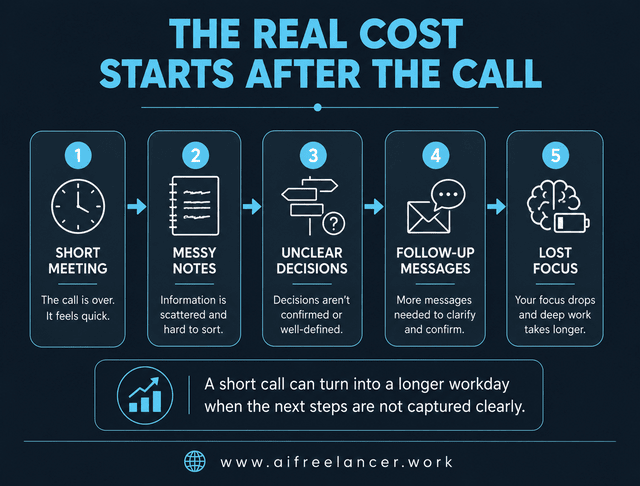
The most draining part of a meeting is not always the talking. It is the transition from conversation to execution.
After the call, you still have to figure out what happened. You sort notes, clarify decisions, write follow-ups, create tasks, and shift back into focused work. That shift is expensive because your brain has to move from listening mode to decision mode to production mode.
Sometimes that work includes updating project boards, rewriting task briefs, checking what you promised, confirming deadlines, and turning client feedback into revision notes. None of these tasks looks huge on its own. Together, they can eat the focus you were trying to protect.
This is how a short meeting turns into a longer workday.
You remember a client comment but not the exact request. You know a recap is needed, but your notes are scattered. A quick strategy call becomes 45 minutes of recap writing. A short call interrupts a writing block and ruins momentum.
For busy professionals, that hidden work adds up. A 30-minute meeting can easily become an hour of recovery, clarification, and admin.
The problem is not always “too many meetings.” Sometimes the real problem is too many meetings that do not end cleanly. When the same confusion keeps repeating, you may need a simple system that removes the repetitive parts of your freelance workflow instead of another productivity hack.
How Meeting Fatigue Creates Cognitive Overload
Cognitive overload happens when your brain has too much to hold, sort, and decide at the same time.
Meetings create this when information comes in faster than you can organize it. You hear feedback, decisions, questions, ideas, deadlines, and side comments in one stream. If you do not have a system to separate them, everything lands in the same messy pile.
That is why you can finish a meeting and still feel behind.
A client says the intro feels “too soft,” asks for a stronger CTA, mentions a new source, and changes the deadline. None of those are hard alone. Together, they force you to decide what to revise first, what to confirm, and what to document.
You reread notes and still do not know what matters. You sent three follow-up messages because no one confirmed the deadline. You delay the next task because the meeting created more decisions than answers.
Research published in the journal Work & Stress explored the meeting-to-work transition and found that meeting quality affects the need for recovery after workplace meetings. In plain English, bad or unclear meetings do not stay inside the calendar block. They can follow you into the rest of the workday.
Why Meeting Fatigue Hits Knowledge Workers Hardest
This problem hits knowledge workers hard because their work depends on focus, memory, interpretation, and decisions.
If you are doing physical work, a meeting may interrupt your schedule. If you are doing writing, strategy, coaching, design, consulting, or planning, a meeting interrupts the thread you need to keep going.
For freelance writers, meetings often turn into client feedback, revisions, briefs, content decisions, and deadline changes. One unclear comment can affect the entire draft.
For consultants and coaches, calls often contain insights, objections, goals, and next steps. The value of the call depends on how clearly those ideas are captured afterward.
For founders, meetings can involve sales, team updates, customer concerns, product decisions, and follow-up promises. A vague meeting can create real business risk.
For creators, project discussions can become captions, case studies, scripts, content angles, and client updates. The ideas are useful, but only if they are organized before they disappear.
Microsoft’s 2023 Work Trend Index found that inefficient meetings were the top productivity disruptor, and 68% of people said they did not have enough uninterrupted focus time during the workday. That is exactly why meeting overload feels so heavy for people whose work needs quiet concentration.
When Meeting Fatigue Turns Notes Into Another Project
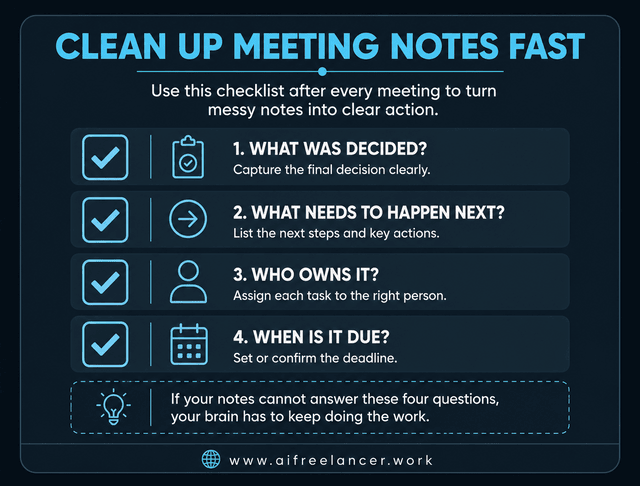
Messy notes are not harmless. They become another task.
A comment in the call becomes a revision request, but nobody wrote clearly. A “quick alignment” call creates three separate task threads. A deadline is mentioned casually, then has to be confirmed later.
This is how meeting notes become work instead of support.
The problem is not that you took notes. The problem is that your notes did not separate what matters from what was merely said. If this keeps happening, it helps to separate raw notes from useful summaries and actual tasks before the meeting turns into another admin pile.
Meeting notes should help you answer four things quickly:
- What was decided?
- What needs to happen next?
- Who owns it?
- When is it due?
If your notes cannot answer those questions, your brain has to keep doing the work manually. That is where meeting exhaustion becomes post-meeting overload.
Reducing Meeting Fatigue Without Attending Fewer Meetings
Most advice about meeting fatigue starts with “have fewer meetings.”
That is useful, but not always realistic.
Freelancers still need client calls. Consultants still need discovery sessions. Coaches still need client conversations. Founders still need sales calls and team updates.
So the better question is not always, “How do I remove every meeting?”
It is, “How do I make sure the meeting does not follow me around afterward?”
Bad Meeting Recovery Habits That Make Overload Worse
This drain gets worse when the call ends, but the work has no place to go.
Many professionals finish a call and immediately jump into another task. It feels efficient, but it often means the meeting stays unresolved in the background.
Other habits make the drain worse:
- Rereading messy notes
- Jumping straight into another task
- Relying on memory
- Rewriting the same recap from scratch
- Letting action items sit in chat threads
These habits create extra noise because nothing gets closed. Your brain keeps asking, “What did they mean by that?” or “Did I promise to send something?”
Build a Simple Capture-to-Action Workflow for Meeting Fatigue
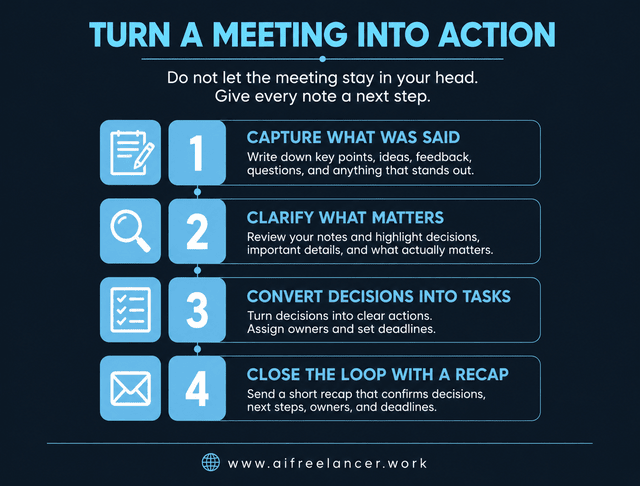
A post-meeting workflow does not need to be complicated. It just needs to help you close the loop before your brain starts juggling everything.
Use a simple capture-to-action system:
- Capture what was said
- Clarify what matters
- Convert decisions into tasks
- Close the loop with a short recap
This works because it separates raw information from actual action.
Your first job is not to make beautiful notes. Your first job is to capture enough to avoid losing meaning. Then you clarify the important pieces. After that, you convert decisions into tasks. Finally, you send a short recap so everyone knows what happens next.
For example, your raw notes might say:
“Client wants intro stronger, add source, send Friday?”
That note still leaves work for later. A clearer version would look like this:
- Decision: Intro needs a stronger pain-point hook.
- Task: Add the new source to section 2.
- Deadline: Confirm whether the final draft is due Friday.
For a writer, that recap might confirm the revised angle, deadline, and client feedback. For a consultant, it might summarize the agreed next steps. For a founder, it might turn a scattered call into three clear priorities.
The goal is simple: stop using memory as your project management system. Once you have a repeatable process, it becomes easier to turn every conversation into a clear next step instead of letting the call linger in your head.
Protect Your Recovery Time Between Meetings
Meeting fatigue is harder to manage when every call is pressed against another task.
You need transition time. Not a two-hour break. Just enough space to close the loop before you move on.
A 10-minute buffer after a meeting can help you:
- Clean up notes
- Mark decisions
- Pull out action items
- Send a short recap
- Decide what to do next
This is especially useful if your work requires focus. A writer cannot always jump from a client call straight into drafting a careful introduction. A coach may need time to turn session insights into next steps. A founder may need to decide which follow-ups matter now and which can wait.
Without a buffer, your brain has to carry the meeting into the next task. With a buffer, the meeting has somewhere to land. Over time, this also helps you cut down the extra clarification calls that happen when decisions are not captured the first time.
Final Thoughts
Meeting fatigue is not always a sign that you hate meetings. Sometimes it means your meetings are creating too many loose ends.
Most people blame the call itself. But the real drain often comes from the unresolved work waiting after the call: the messy notes, unclear decisions, scattered tasks, and follow-ups you still have to process.
The goal is not to love meetings. It is to stop carrying them around in your head afterward.
For more practical systems on writing, AI workflows, and protecting your energy as a freelancer, visit my Amazon Author page and check out my books.
Frequently Asked Questions About Meeting Fatigue
Meeting fatigue after short calls is often caused by unresolved work after the meeting. Even a brief call can leave behind loose decisions and new tasks. The meeting may be short, but the mental processing continues afterward.
To reduce it, spend a few minutes after the call turning loose notes into clear decisions, tasks, and deadlines.
You can feel tired after meetings even when you do not talk much because listening still requires attention, interpretation, and decision-making. In virtual meetings, you may also deal with screen fatigue and the pressure to stay visibly engaged.
A simple way to recover is to write down the next action before opening another task.
You can recover from meeting fatigue faster by adding a short buffer after each call. Use that time to clean up notes, identify action items, confirm decisions, and write a quick recap.
Even 10 minutes can help if you use it to process the meeting instead of jumping straight into another tab.
Yes, better meeting notes can reduce meeting fatigue because they lower the amount of information you have to remember. Clear notes help you separate decisions, action items, deadlines, and follow-ups.
The best notes are not the longest notes. They are the notes that make the next step obvious.
You can prevent meeting overload by questioning whether a meeting is needed, setting a clear agenda, limiting attendees, using asynchronous updates when possible, and protecting focus time.
Start by asking one question before every call: what should be clearer when this meeting ends?
Sources
- Microsoft WorkLab: Research Proves Your Brain Needs Breaks
- National Library of Medicine: Recovery after workplace meetings
- Microsoft WorkLab: Will AI Fix Work?

Florence De Borja is a freelance writer, content strategist, and author with 14+ years of writing experience and a 15-year background in IT and software development. She creates clear, practical content on AI, SaaS, business, digital marketing, real estate, and wellness, with a focus on helping freelancers use AI to work calmer and scale smarter. On her blog, AI Freelancer, she shares systems, workflows, and AI-powered strategies for building a sustainable solo business.