You open a client project to start work, but first you have to find the latest brief, check a Slack message, reopen the client’s comments, confirm the deadline in your calendar, and remember whether that revision was actually approved. Ten minutes later, you still haven’t started the work. AI project management for freelancers can reduce that friction, but only if AI has one reliable version of the project to work from.
That is where a single source of truth becomes useful. A single source of truth is one place that reflects the current state of a project. It does not have to contain every email, document, conversation, and file. It needs enough current information to answer the questions that matter: What has been agreed? What is finished? What happens next? What is waiting? What changed? Without that structure, AI can simply become another place where fragmented information gets summarized, copied, and potentially misunderstood.
The cost of fragmentation is not imaginary. The American Psychological Association notes that the mental blocks created by switching between tasks can consume as much as 40% of productive time. For freelancers moving between several clients, each with different briefs, files, deadlines, and communication channels, that switching cost can become part of the workday without ever appearing on an invoice. Reducing that friction starts before you write an AI prompt. It starts with giving every client project one place that reflects what is current.
If repetitive admin is part of the problem, it also helps to build simple automations around work you already repeat instead of adding automation everywhere at once.
Everything I’ve shared here—and more—is in my book, available on Amazon. Click the link if you’re ready to take the next step.
AI Project Management for Freelancers Needs One Reliable Project Record
Having more project management tools does not necessarily give you more control. If you still have to search three or four places to understand what is happening, the system is making you do the integration work yourself.
Microsoft’s 2025 Work Trend Index research found that, among the 20% of Microsoft 365 users receiving the highest volume of workplace pings, meetings, emails, and chats amounted to about 275 interruptions a day, with pings arriving roughly every two minutes during core work hours. Microsoft based the finding on aggregated and anonymized Microsoft 365 productivity signals. Freelancers may work differently from employees in Microsoft’s dataset, but the underlying problem is familiar: every interruption makes it harder to hold the current state of a project in your head.
Why Scattered Client Information Creates Invisible Work
The obvious work is writing the article, designing the page, editing the video, or finishing the client’s deliverable. The invisible work is everything you do before you can confidently continue: searching an old email, checking several apps, reopening the brief, figuring out which draft is current, remembering what the client approved, and finding the next action.
When you have several active clients, switching projects may require reconstructing the project before you can resume it. A simple client project management system can save more time than adding another productivity app.
A Single Source of Truth Is Not Another Project Management Tool
You do not need to move your entire freelance business into one platform. Your email can remain your communication channel. Google Drive can remain your file storage. Your calendar can hold scheduled commitments. Slack can remain where certain client conversations happen.
The project record works alongside those tools and gives you one place to keep the current status. It could live in a Notion page, ClickUp project, Asana board, Google Doc, database, or another project hub you already use.
It also should not become an archive of everything that ever happened. You do not need every email, research note, old draft, or casual client comment in it. Capture information when it affects scope, status, deadlines, decisions, or next actions.
Keep the history in your tools. Keep the current truth in your project record.
Slack’s 2024 Workforce Index found that 75% of knowledge workers reported using more apps than they had five years earlier. Slack based the finding on a survey of 10,045 desk workers across six countries. More apps can add useful capabilities, but they also create more places where project information can end up.
Can You Tell What’s Happening Without Searching?
Try a simple test. If a client asked for the exact status of a project right now, could you answer from one place without searching through your inbox or message history?
You should be able to answer four questions:
- What is finished?
- What happens next?
- What is waiting on someone or something?
- If two tools show different instructions or deadlines, which one is correct?
If those answers require detective work, your client project tracking system is not yet functioning as a reliable source of truth.
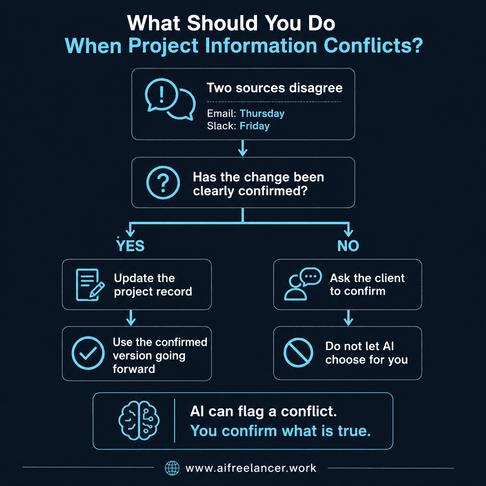
When two sources conflict, do not let AI resolve the contradiction for you. Confirm the latest instruction with the client, then update the project record so it becomes the version you trust going forward.
Build AI Project Management for Freelancers Around the Project Record
Once you decide where the current project information lives, the next question is what belongs there. You do not need an elaborate dashboard. You need enough context to understand the project and make the next decision.
Start With the Project Goal, Scope, and Deliverables
Begin with information that should remain relatively stable unless you and the client deliberately change it: the project goal, agreed scope, deliverables, key requirements, deadline or milestones, and the main client contact.
This gives both you and AI a baseline. For example, if AI knows the client commissioned four blog posts due by August 30, it can interpret the project differently from one involving a single 2,000-word article due tomorrow.
It helps to think of the project record in three layers. The first is stable context, such as the goal, scope, and deliverables. The second is current status, such as Done, Next, Blocked, and the active deadline. The third is decisions and open issues, such as approved changes, unresolved questions, and the current working file. That makes it easier to see what should stay relatively fixed and what needs regular updating.
Track Project Status With Done, Next, and Blocked
For day-to-day project status, you do not need dozens of fields. Use three:
- Done: What has been completed?
- Next: What are you working on next?
- Blocked: What cannot move forward, and what is needed?
This gives you a compact status snapshot. Suppose you switch from Client A to Client B after two days. Instead of reopening old messages to remember where you stopped, you see:
- Done: Research and outline approved.
- Next: Draft sections one through three.
- Blocked: Waiting for product pricing from the client.
You can begin working almost immediately. If you want to turn this into a repeatable client-facing habit, use a three-part progress update clients can scan quickly.
Record Client Decisions Instead of Relying on Message History
A client decision buried in an email thread may be technically recorded, but it is not necessarily useful project context. Keep a small decision log.
For example:
August 12: Client approved Version B of the homepage structure. Version A is no longer active.
Include the date, the decision, who confirmed it, and a link to the original conversation when necessary. This becomes especially important when information conflicts.
Imagine the original brief says the project is due Thursday. Two days later, the client moves it to Friday in Slack. Your calendar still says Thursday. AI should not be expected to decide which source wins. Confirm the change, then update the project record to Friday so the outdated date no longer competes with the current one.
Deadlines are not the only place this happens. Scope changes can create the same problem. If a client casually asks for another deliverable in chat, record the request if it matters, but do not silently change the agreed scope until the change is confirmed. That keeps a request from becoming an obligation simply because it appeared in a message.
AI can summarize a project, but it cannot reliably decide which version of a scattered project is true.
Link Files Instead of Turning the Dashboard Into File Storage
Your project hub does not need copies of every file. Link to the current draft, source material, approved assets, and shared client folder. Label the latest working document clearly.
Older versions can stay where they already live. The project record simply identifies the version you are actually using.
Give Every Client Project One Clear Next Action
“In progress” tells you almost nothing. Replace vague project statuses with a concrete action.
Instead of:
Website project: In progress
Use:
Revise homepage draft using comments received August 15.
That gives you something concrete to pick up the next time you open the project.
Where AI Project Management for Freelancers Actually Saves Time
AI becomes useful after your project information is organized. Its best role is often reducing the repetitive reading, summarizing, checking, and writing surrounding the work.
How AI Project Management for Freelancers Handles Status Updates
Give AI the current project record and ask for a summary containing the current status, completed work, priorities, open questions, and approaching deadlines. The quality of that summary depends heavily on its context.
Outdated instructions, obsolete drafts, and unclear ownership can all produce a polished summary that is still wrong. Review the result before acting on deadlines, commitments, or approvals.
This also reflects broader guidance on generative AI risk. The National Institute of Standards and Technology’s Generative AI Profile treats generative AI output as something that needs risk controls and human checks, not something you should assume is correct.
AI is not necessary for every project-management action, either. If you only need to change a deadline, mark a task complete, add a confirmed decision, or link the latest draft, doing it manually is often faster. AI is more useful when it has to summarize several pieces of information, compare projects, spot gaps, or turn project notes into something you can use.
Turn the Project Record Into Client Updates
Client updates are one of the easiest places to save time. If your project record already contains Done, Next, and Blocked, you do not have to reconstruct the week before writing an update.
You can prompt AI:
Turn this project record into a concise client update. Include what is done, what happens next, and anything blocking progress. Do not add facts that are not in the record.
You still review the message before sending it, but AI handles the repetitive drafting. For an overloaded freelancer, that is often more useful than generating another project plan.
Find Missing Decisions and Unresolved Client Questions
AI can also review the record and look for unanswered client questions, pending approvals, unclear ownership, conflicting dates, and missing information.
Let it flag those gaps. You decide what needs clarification and what belongs in the project record afterward.
Let AI Prepare Your Weekly Project Review
AI becomes even more useful when you have multiple client projects. At the end of the week, provide your current project records and ask which projects moved forward, stalled, have deadlines approaching, need a client response, or have no clear next action.
Use two levels. Keep the details inside each client project, and keep the cross-client view limited to what helps you choose what needs attention next. That smaller view can show the client, deadline, current status, blocker, and next action without becoming another database to maintain.
The weekly review should leave each active project with one clear next action, any needed client follow-up, and any deadline or blocker that needs attention. For longer engagements, you can also give clients a predictable weekly view of progress instead of rebuilding a report whenever someone asks for an update.
Keep AI Project Management for Freelancers Simple Enough to Use
A project management system only helps if you still use it during your busiest week. If three clients send revisions at once and your system requires 20 minutes of administration after every change, you will eventually stop maintaining it.
Don’t Create Another Tool Just to Create a Source of Truth
Start with something you already open regularly. Ask whether you can find it quickly, update it quickly, link to supporting files, give the information to AI when needed, and realistically maintain it when deadlines pile up.
If you dislike dashboards, start with one document. It can contain only Scope, Deadline, Done, Next, Blocked, Decisions, and Next Action. You can add complexity later if the work genuinely requires it.
Reduce Project Management Tool Overload
Do not add another platform unless your current setup cannot support a reliable project record. If the tools you already use can hold current status, decisions, deadlines, and next actions in one dependable place, adding software may create more maintenance.
More features are not automatically better. What matters is whether you can find and maintain the current status of the work without hunting for it. If your toolset keeps growing, a smaller stack built around the steps you actually use can reduce the maintenance burden.
Keep AI Project Management for Freelancers Current
A single source of truth stops being useful when nobody trusts it. Use one maintenance rule:
When something changes what happens next, update the project record.
A stale record can cause problems because you may rely on information that is no longer correct. This is also why the Last updated field matters. If you open a project record and see that it has not been touched in two weeks, verify it before using it as AI context or relying on it for a client update.
AI can suggest summaries, next actions, missing information, and client update drafts. You should confirm deadlines, scope changes, client commitments, approvals, and final status. Do not let an AI system independently promise a delivery date or decide that the client approved something when the record does not clearly support it.
Protect Client Information When Using AI
Accuracy is not the only guardrail. The information you give AI also has to be appropriate to share.
Client confidentiality does not disappear because a workflow is convenient. Before putting project information into an AI service, check your client agreement, the sensitivity of the material, and the service’s current privacy and data-handling terms.
Be particularly careful with proprietary documents, personal data, confidential business information, and anything your contract restricts from being shared with third-party services. You also do not need to upload an entire client document if the task only requires a short project-status summary. Give the AI only the information it needs for the task, and if you do not have permission to share sensitive client information with an AI system, don’t.
A Simple Single-Source-of-Truth Workflow
You can build the basic system without migrating your entire freelance business.
Step 1: Choose One Project Hub
Choose the place that will contain the current project record. Use a tool you already trust and regularly open.
Step 2: Create the Same Structure for Every Client
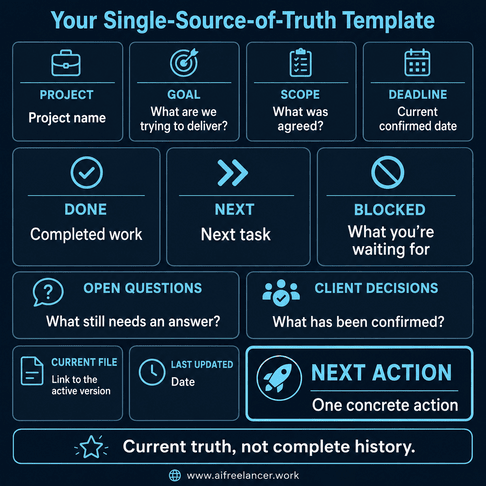
A reusable project template could contain:
- Project
- Goal
- Scope
- Deadline
- Current status
- Done
- Next
- Blocked
- Open questions
- Client decisions
- Current files
- Next action
- Last updated
Consistency matters more than sophistication. If every client project uses roughly the same structure, you spend less time deciding where information belongs.
Step 3: Move Current Truth, Not Your Entire History
Do not spend a weekend copying old email threads into Notion. Start with active projects.
Extract only what you need to finish the work correctly: current scope, current deadline, current files, outstanding decisions, blockers, and next actions.
Step 4: Use the Project Record as AI Context
Once the record is current, use it as context when asking AI to summarize status, prepare client updates, identify gaps, suggest next actions, or review deadlines.
For AI project management for freelancers, cleaner context matters more than giving the model every message or file connected with a project.
Step 5: Build Updates Into the Work You Already Do
Do not create a separate “maintain project system” chore. Update the record while closing a task, processing feedback, confirming a decision, finishing a deliverable, or sending an update.
What This Looks Like in a Real Freelance Project
The system is simple in theory. Its value becomes clearer when several sources disagree.
Consider a freelance writer working on a 2,000-word client article. The brief came through email. Research links are bookmarked. The client left comments in Google Docs. A deadline changed in Slack. The original date is still sitting in the calendar.
Everything exists, but there is no single current view of the project.
Before: Project Information Scattered Across Five Places
The original email says Thursday. Slack says Friday. Google Docs contains new revision comments. The research folder has two draft versions. The calendar still shows the old deadline.
Giving AI access to more of those sources does not necessarily solve the problem. It may simply expose AI to multiple versions of reality. The freelancer first needs to confirm that Friday is the new deadline and update the working record.
After: One Project Record AI Can Actually Work From
The current record might say:
- Status: First draft completed. Revision in progress.
- Done: Research, outline, first draft.
- Next: Incorporate comments on sections two and four.
- Blocked: Waiting for client confirmation of the case-study statistic.
- Deadline: Friday, August 21.
- Next action: Revise section two while waiting for the statistic.
Now you can ask:
Review this project record. Summarize the current status, identify the next action, list anything waiting on the client, and flag any missing or conflicting information. Do not assume facts that are not stated.
Instead of asking AI to reconstruct the project, you are asking it to work from information you have already verified.
When a Single Source of Truth Is Working
A good system should make project management feel quieter, not more elaborate. In practical terms, you should spend less time searching, checking, and rebuilding context.
You should be able to:
- determine project status in under a minute
- identify the next action without searching messages
- see outstanding client decisions
- locate the current working file
- prepare a client update without reconstructing the week
- see which active project needs your attention next
The system should reduce remembering, not give you more things to remember.
What Is a Single Source of Truth in Project Management?
A single source of truth is one reliable project record containing the latest information needed to understand status and make decisions. It does not mean every project file and conversation must live in one app. For freelancers, it can be a simple project page with scope, deadlines, current status, decisions, blockers, files, and next actions.
How Can AI Be Used in Project Management?
For freelancers, AI is most useful for work that involves reading and synthesis: summarizing progress, drafting client updates, finding unanswered questions, pulling out action items, checking deadlines, and reviewing several active projects. You still need to verify anything that affects a client commitment or approval.
Can AI Manage a Project by Itself?
Not reliably. A freelancer still has to decide what was actually approved, whether a new request changes scope, which deadline is current, and what commitment can safely be made to the client. AI can help process the information, but those decisions still need human judgment.
How Do Freelancers Manage Multiple Projects at Once?
Keep one current record for each client project and a smaller cross-client view for deciding what needs attention first. The detailed record holds the project context, while the cross-client view can be limited to deadlines, blockers, status, and next actions.
What Is the Best Project Management Tool for Freelancers?
Choose the tool you can keep current when client work gets busy. A simple Google Doc may work better than a feature-heavy platform if you actually maintain it, while Notion, Asana, ClickUp, Trello, or another tool may make sense when you need more structure. The system matters more than the brand of software.
Final Thoughts
AI project management for freelancers works best when AI has reliable project context instead of a pile of disconnected messages, drafts, and deadlines. A current project record gives both you and AI a clearer basis for summaries, client updates, next actions, and weekly reviews.
Use AI to support the system, not become another system you have to manage.
If you want more practical ways to use AI while building calmer, repeatable freelance workflows, browse my books on my Amazon Author page.
Sources
- American Psychological Association — Multitasking: Switching Costs — https://www.apa.org/topics/research/multitasking
- Microsoft — Breaking Down the Infinite Workday — https://www.microsoft.com/en-us/worklab/work-trend-index/breaking-down-infinite-workday
- Slack — Despite AI Enthusiasm, Workforce Index Reveals Workers Aren’t Unlocking AI’s Full Potential — https://slack.com/blog/news/the-workforce-index-june-2024
- NIST — Artificial Intelligence Risk Management Framework: Generative Artificial Intelligence Profile — https://www.nist.gov/publications/artificial-intelligence-risk-management-framework-generative-artificial-intelligence

Florence De Borja is a freelance writer, content strategist, and author with 14+ years of writing experience and a 15-year background in IT and software development. She creates clear, practical content on AI, SaaS, business, digital marketing, real estate, and wellness, with a focus on helping freelancers use AI to work calmer and scale smarter. On her blog, AI Freelancer, she shares systems, workflows, and AI-powered strategies for building a sustainable solo business.