You opened a task manager to get organized. Then came a time tracker, calendar app, messaging platform, AI assistant, invoicing software, cloud storage, and perhaps an automation tool to connect everything. Your freelance productivity tools were supposed to save time, but now part of your workday is spent managing the tools meant to manage your work.
The answer is not automatically to delete half your apps. A better approach is to reduce overlap, cut unnecessary handoffs, and give every tool a clear job. When your workflow is simple enough that you know where work lives and what happens next, you stop thinking about the tools so much.
Everything I’ve shared here—and more—is in my book, available on Amazon. Click the link if you’re ready to take the next step.
Why Freelance Productivity Tools Start Creating More Work
A productivity app rarely looks like a problem when you add it. It solves something specific: missed deadlines, messy files, forgotten invoices, scattered notes. The trouble appears later, when several individually useful apps start competing for the same pieces of your work. That is when a productivity stack stops supporting the workflow and starts becoming another workflow to manage.
When Freelance Productivity Tools Become Tool Overload
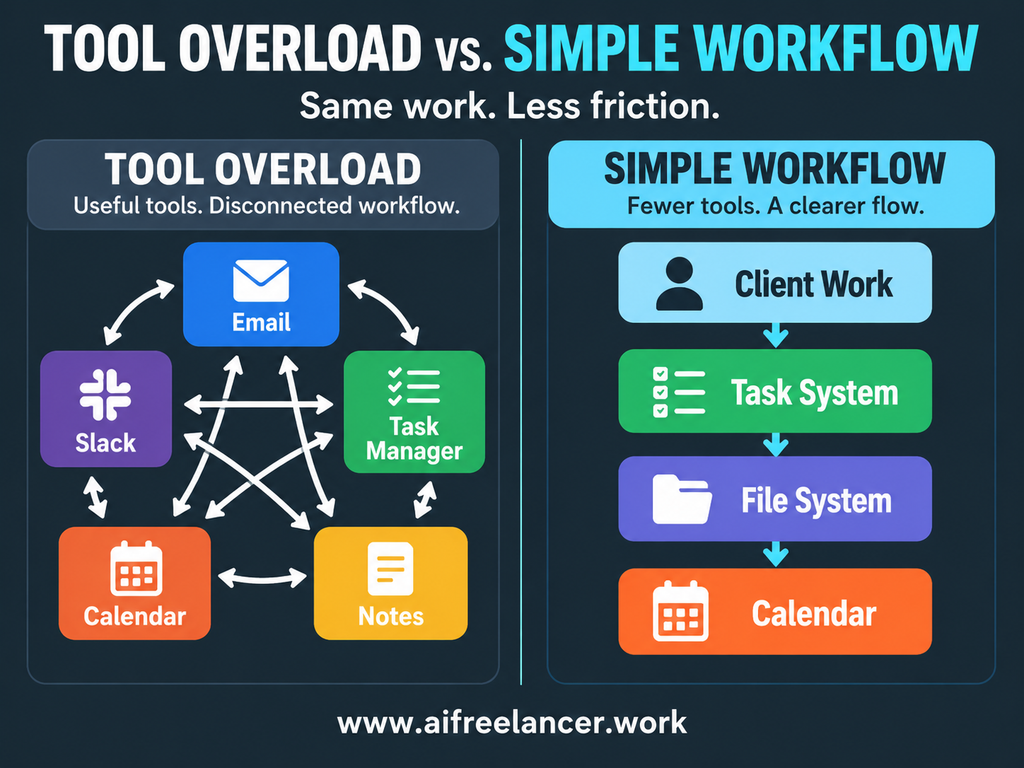
Tool overload is not about reaching some forbidden number of apps. It starts when managing the tools takes more time or mental effort than they save.
You may have crossed that line if you regularly:
- check several places for the same information
- copy deadlines and tasks between apps
- switch tools during one simple job
- pay for apps you rarely open
- keep two tools that perform almost the same function
- wonder where you stored the latest version of something
Consider a freelance writer who receives a deadline through email, adds it to a task manager, and then checks Slack in case the client changed anything. Email, task managers, and Slack can all be useful, but the freelancer now has to keep track of the same work across several places. This is one reason productivity tools can make freelance work harder instead of easier when the underlying workflow is fragmented.
Context Switching Makes Simple Work Feel Heavier
Once several tools compete for the same work, attention becomes part of the cost. You are writing in Google Docs when Slack pings. You answer the message, open the task manager to update the project, check email because the client mentioned an attachment, and then return to the draft. The actual interruption may take only a few minutes, but your brain still has to get back into what you were doing.
Research from Asana’s Work Innovation Lab found that workers lost 57 minutes a day switching between collaboration tools, plus another 30 minutes deciding which technology to use for a task.
Microsoft’s 2025 Work Trend Index found an even broader attention problem. Its Microsoft 365 telemetry showed employees being interrupted by meetings, emails, or chats about every two minutes during core work hours.
Freelancers may have more control over their setup than employees do, but that makes simplifying it even more important. You choose many of the systems demanding your attention.
Audit Freelance Productivity Tools Around the Work You Actually Do
It is tempting to solve tool overload by opening your subscriptions page and cancelling whatever looks unnecessary. That can save money, but it does not necessarily fix the workflow.
Start somewhere else: audit the work first. Audit the tools second. A useful distinction from the AI Freelancer approach to workflow automation is that a tool is something you use, while a workflow is the order in which the work gets done. If that order is unclear, adding another app usually gives you another step to manage rather than fixing the underlying problem.
Start With Your Freelance Workflow, Not Your App List
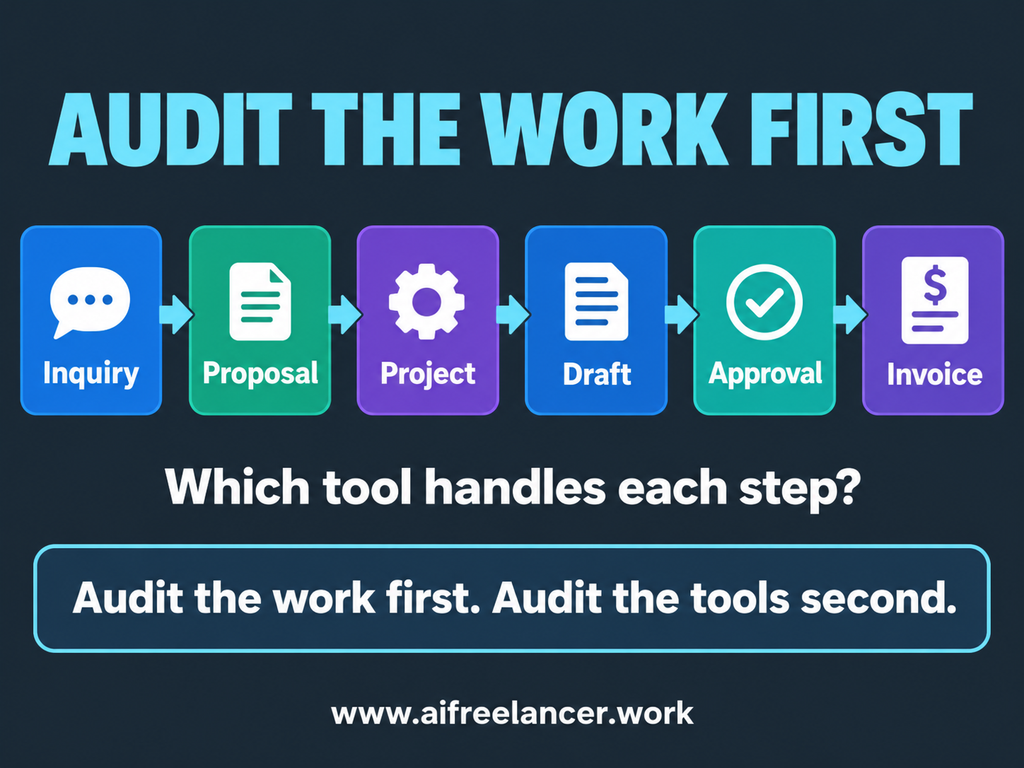
Write down how a normal project actually moves through your business. For a freelance writer, it might look like this:
Inquiry → proposal → project → research → draft → client approval → invoice
A designer, consultant, developer, or other freelancer will have different steps, but the idea is the same. Now identify the tools that touch each stage. You might discover that a client inquiry starts in Gmail, becomes a task in Todoist, gets documented in Notion, moves into Google Drive during production, returns to email for approval, and finally enters accounting software for payment.
That map tells you far more than a list of subscriptions ever will. It also answers one common search question: What are the best productivity tools for freelancers?
There is no universal combination. The best productivity tools are the ones that solve the recurring jobs in your workflow without adding unnecessary admin. If you are deciding which categories belong in your setup, start with workflow tools that fit the way freelance writers actually work. Those jobs often include project management, scheduling, communication, file storage, time tracking, invoicing, and automation.
Which Freelance Productivity Tools Have a Clear Job?
Once you can see the workflow, look at each tool and ask a few plain questions:
- What exact problem does this solve?
- How often do I use it?
- Does another tool already do the same job?
- What would actually happen if I stopped using it?
A calendar has a clear job if it tells you where your time is committed. An invoicing system has a clear job if it tracks what clients owe you. A task manager has a clear job if it is the place you trust to tell you what needs doing.
Trouble starts when the answer becomes fuzzy. Maybe you use both Notion and Todoist for tasks because each has features you like. That can work, but if every important task must be copied into both, you have created a recurring administrative job.
A tool should solve a problem you actually have. On AI Freelancer, I use a similar rule when evaluating AI tools: choose around the bottleneck in the workflow rather than around popularity. If client approvals are slowing projects down, adding another writing app does not address the problem. If invoicing takes five minutes a month, building an elaborate automation for it may create more work than it removes.
Remove Overlap, Duplicate Data, and Unused Tools
The easiest place to simplify is usually duplication. A deadline might live in email, Slack, a calendar, and a task manager. Client notes may be split between Google Docs and Notion, while tasks are duplicated in two project-management apps and working files are scattered across a desktop, Google Drive, and Dropbox.
You do not have to force everything into one giant app. Decide which copy matters and use that as the main version.
Unused software deserves the same scrutiny. If you pay every month for an app you open twice, ask whether it solves a real problem or whether you are keeping it because you might need it someday.
Constantly chasing the newest productivity app can also become expensive. Switching has a learning cost, and migrating data can create more work than the new tool saves. Sometimes the boring tool you already understand is the productive choice.
Make Freelance Productivity Tools Work as One System
Removing unused software helps, but a leaner subscription list does not guarantee a smoother workday. The tools that remain still need to work together. The goal is to reach a point where you do not have to stop in the middle of a project and ask, “Where did I put that?”
Give Every Piece of Information One Home
For each important question in your business, decide where each type of information should live. Your task manager might tell you what you need to do next, while your calendar tracks time-sensitive commitments. Final client files can live in one primary file system, approvals in a defined communication record, and invoice status in your invoicing or accounting software.
Your apps can still overlap technically. Google Calendar and a task manager may both display deadlines, for example. What matters is knowing which one you trust if there is ever a conflict.
Microsoft’s research found that 62% of respondents struggled with spending too much time searching for information during the workday.
A freelancer cannot eliminate every search, but deciding where information belongs makes searching less necessary in the first place.
Reduce Handoffs Between Freelance Productivity Tools
The next place to look is the handoff between tools. Suppose a new client completes an inquiry form. You receive an email, create a project task, enter the deadline, create a client folder, add a calendar reminder, and later create an invoice.
Ask one question:
Which of these steps genuinely requires you?
Some do. You may need to read the request, decide whether the client is a fit, set the scope, or confirm the deadline. Others are mechanical. Creating a standard folder or recurring project checklist does not require much judgment.
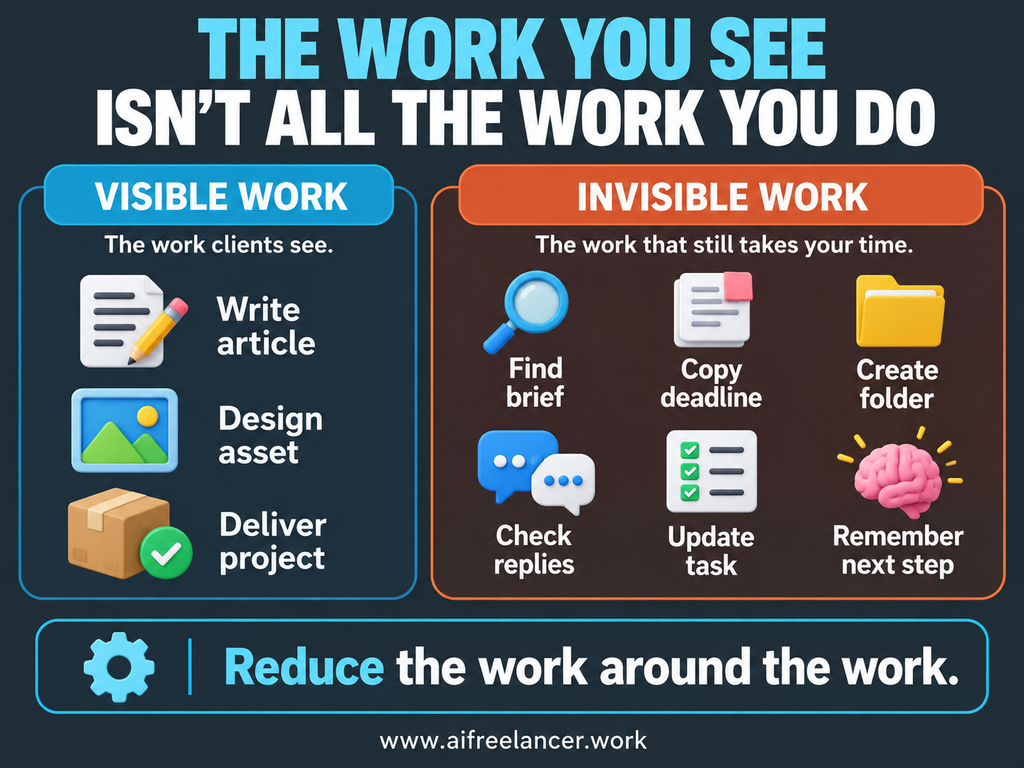
This is where a lot of freelance work hides. Writing the article, designing the asset, or completing the client project is the visible work. Around it sits the invisible work: finding the brief, copying details into another app, creating folders, checking whether someone replied, remembering what happens next, and rebuilding context after an interruption. AI Freelancer’s guide to AI agents makes the same distinction: these small actions rarely look significant by themselves, but together they add friction throughout the day.
Every manual transfer between tools adds another opportunity to forget something, enter it incorrectly, or postpone it because you are busy.
Automate Repetitive Work, Not Every Decision
Automation becomes useful after the workflow is clear. Automating a messy system simply makes the mess move faster.
Good candidates for workflow automation include:
- recurring project templates
- invoice reminders
- routine task creation
- organizing form submissions
- filing standard information
- summarizing meeting or project notes
- drafting routine status updates
The principle is simple: let tools handle repeatable admin so you can focus on the work that needs your judgment.
That does not mean every freelance process needs AI or an elaborate automation platform. A recurring template can eliminate repetitive work. So can an email filter, calendar rule, or simple integration.
The same principle applies when AI enters the workflow. AI should support the process you already understand rather than become the process itself. You still decide the angle, handle exceptions, review client-facing work, and make the final call. The technology is most useful when it takes repetitive steps out of that sequence.
If AI is becoming a larger part of your stack, it helps to decide how many tools your freelance workflow actually needs before adding another subscription. That keeps AI from creating another layer of overlap and gives each tool a specific reason to stay. This is also where the idea behind Better with a Bot becomes useful. AI delivers more value when it takes routine admin and repetitive decisions off your plate, rather than becoming another dashboard you feel obligated to check.
Choose Freelance Productivity Tools by the Work They Remove
When you choose productivity software, the useful question is what changes in your work after you start using it. A tool with dozens of features can still be a poor choice if it creates more setup, checking, troubleshooting, and decision-making than the problem warrants.
Keep What Saves Time and Mental Effort
Judge a tool by what changes after you start using it. Does it save time, remove repetitive tasks, prevent mistakes, make work easier to find, or simplify client collaboration?
Then compare that value with what the tool asks from you. Setup, notifications, manual data entry, troubleshooting, subscription fees, and regular upkeep all count.
A time tracker, for example, has an obvious purpose. If you bill fixed-fee projects and never use the resulting data, manually starting and stopping that timer may be creating more work than value.
The same principle applies to a project-management tool. Suppose you already manage deadlines and client deliverables reliably in a simple task app, but you are paying for a more advanced project platform because it has dashboards, automations, and reporting features you rarely use. If the extra tool requires duplicate task entry and regular upkeep without improving delivery, it may be adding complexity rather than productivity.
A working system also does not need replacing simply because something newer looks better. Learning new software and rebuilding routines take time, so the benefit should be clear before you switch.
Build a Reliable Freelance Setup With Less Friction
You do not need an arbitrary target such as three apps, five apps, or ten apps. Your work determines the setup.
Most freelance businesses need some way to handle communication, tasks and projects, files and content, calendars and scheduling, invoicing and money, plus automation or AI where it genuinely helps. One tool may handle several jobs. Another freelancer may prefer separate specialized apps. Either setup can work, but a lean workflow stack that covers the essentials gives you a useful starting point without adding tools simply to fill every possible category.
A useful test is simple:
Does this setup let work move from inquiry to completion and payment without making me manually babysit every step?
That is a far better measure of productivity than the size of your app folder.
What Are the Best Productivity Tools for Freelancers?
The best productivity tools for freelancers depend on the work they need to manage. Most freelancers need tools for tasks or projects, communication, files, scheduling, invoicing, and sometimes time tracking or automation. Choose by the problem solved rather than by the number of features available.
Do Productivity Tools Really Make You More Productive?
They can, but only when they remove enough work to justify the setup and upkeep. A productivity tool that creates extra data entry, notifications, duplicate information, or frequent switching can actually make a workflow harder to manage.
How Do Freelancers Stay Organized?
Freelancers stay organized more easily when each type of information has a clear home. Keep tasks in one trusted task system, files in a defined location, deadlines in a reliable calendar or project system, and financial records in your invoicing or accounting tool. Consistency matters more than having an elaborate setup.
Is Time Tracking Necessary for Freelancers?
Not every freelancer needs time tracking. It is especially useful when you bill hourly, estimate projects using past data, or want to understand where your workday goes. If you charge fixed fees and never use the data, manual time tracking may add unnecessary admin.
Can Freelancers Use Free Productivity Tools?
Yes. Free versions of task managers, calendars, cloud storage, communication tools, and other productivity software may be enough for a solo freelancer. Pay for a tool when the paid feature solves a recurring problem or saves enough time to justify the cost, not simply because the upgraded version offers more features.
Sources
- Asana. (2026, April 5). Don’t let your digital tools sabotage the employee experience. Asana
- Microsoft. (2023, May 9). Will AI fix work? 2023 Work Trend Index annual report. Microsoft WorkLab.
- Microsoft. (2025, April 23). 2025: The year the Frontier Firm is born. Microsoft WorkLab.
Final Thoughts
Freelance productivity tools should make your business easier to run, not give you another business system to manage. If you are spending too much time checking apps, copying information, updating duplicate tasks, and deciding where things belong, the answer may be simplification rather than another download.
Start with the work. Give every tool a clear job, remove unnecessary duplication, decide where important information lives, reduce manual handoffs, and automate repeatable admin when it makes sense. You are trying to create enough space to do the work clients actually pay you for.
That idea goes beyond productivity apps. In Better with a Bot, I explore how AI can take on more of the repetitive support work around freelancing while you stay in control of the decisions, creativity, and client work that still need you.
Explore Better with a Bot and my other books on my Amazon Author page.

Florence De Borja is a freelance writer, content strategist, and author with 14+ years of writing experience and a 15-year background in IT and software development. She creates clear, practical content on AI, SaaS, business, digital marketing, real estate, and wellness, with a focus on helping freelancers use AI to work calmer and scale smarter. On her blog, AI Freelancer, she shares systems, workflows, and AI-powered strategies for building a sustainable solo business.