
You’re using AI, but your writing still takes just as long—sometimes longer. Drafts come out quickly, but they don’t quite land. You end up rewriting sections that sounded polished at first, fixing structure after the fact, and second-guessing decisions mid-draft. The time you expected to save gets pulled into revision loops, and the process starts to feel heavier, not lighter. The problem isn’t the tool. It’s the AI writing workflow behind it.
According to McKinsey & Company, generative AI can improve productivity in certain tasks by up to 40%, but that gain depends heavily on how the work is structured—not just the technology itself. If your process is loose, AI doesn’t compensate for it. It produces something that looks usable, which is worse, because you only realize the problem halfway through.
This is where most writers get stuck. They’re not dealing with bad writing—they’re dealing with misaligned drafts. You can feel it when a paragraph reads smoothly but doesn’t move the piece forward. That usually traces back to a workflow problem, not a wording issue.
Everything I’ve shared here—and more—is in my book, available on Amazon. Click the link if you’re ready to take the next step.
Why Your AI Writing Workflow Still Feels Broken
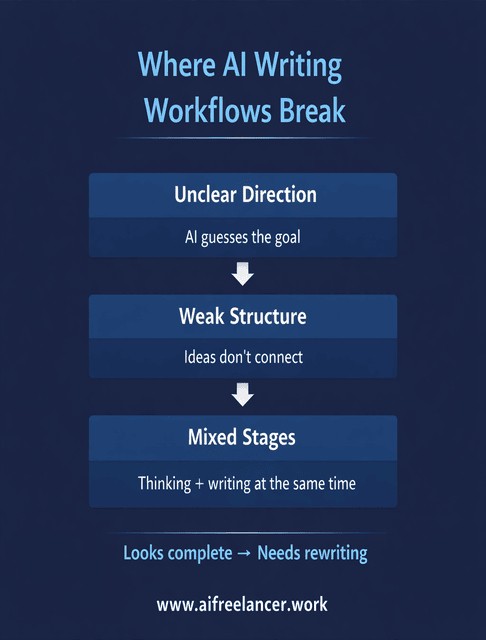
You sit down to write, open your AI tool, and start prompting. It feels productive for the first few minutes. Then you hit a point where the draft doesn’t quite connect, and you start adjusting sections, rewriting transitions, or reshaping the argument. That friction didn’t start in the draft. It started earlier, when the direction and structure were still unclear.
AI Writing Workflow Failures Start Before Drafting
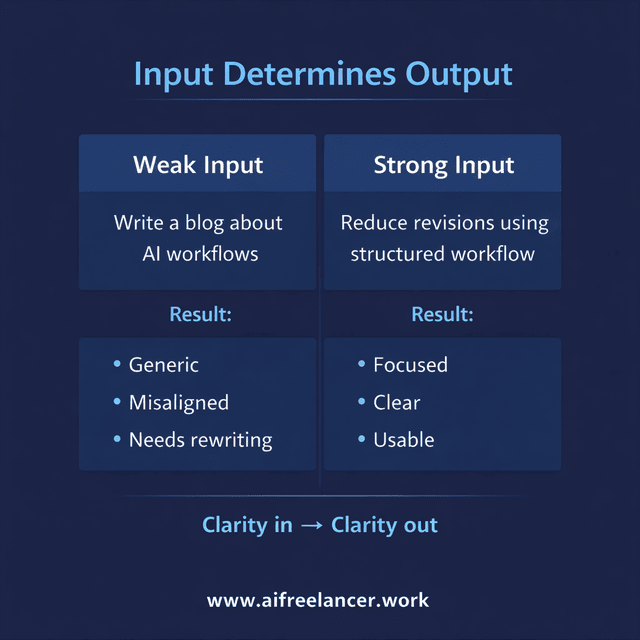
A common pattern looks like this: you prompt AI with something like “write a blog about AI workflows for freelancers,” and the output comes back clean, readable, and slightly off. It covers the topic, but not the point you actually wanted to make. Now you’re not editing—you’re steering.
Here’s the difference more concretely:
- Weak input: “Write a blog about AI writing workflows.”
- Stronger input: “Show freelance writers how to reduce revision time by separating structure and drafting in an AI writing workflow. Include one bad prompt and one improved version.”
In the first case, AI has to decide everything—angle, audience, structure, and depth. In the second, those decisions are already made, so the output aligns more closely with your intent.
Most breakdowns happen at the input stage. The brief describes the topic, but not the outcome, so AI fills the gaps with safe assumptions. Constraints like audience level, intent, and tone remain vague, so the draft feels complete but lacks direction. By the time you notice the issue, you’re already inside the draft, trying to fix something structural with sentence-level edits.
Research from the National Bureau of Economic Research shows that professionals using AI complete tasks faster when they begin with clear constraints and direction. When that clarity is missing, output quality drops and revision time increases, which cancels out the speed advantage.
The Hidden Cost of Inconsistent Content Processes
If your workflow changes every time, you’re not just writing—you’re rebuilding the process on the fly. One project starts with research, another starts with drafting, and another starts with scattered notes. Each time, you’re deciding how to work before you actually begin.
Here’s how that usually plays out in real work:
- You begin drafting, then stop because the angle isn’t clear
- You switch to outlining, but now you’re restructuring content that already exists
- You edit early sections before confirming whether the overall direction works
That stop-start pattern slows everything down. Instead of moving through a sequence, you’re jumping between stages. The result isn’t just lost time—it’s accumulated friction that carries into every new piece.
The AI Writing Workflow as a Decision System (Not Steps)
Most writing advice breaks the process into steps: research, outline, draft, edit. That’s useful, but it doesn’t explain why drafts fail. The issue isn’t the steps themselves—it’s the decisions inside those steps. When those decisions are unclear, the workflow becomes unstable.
A Layered AI Writing Workflow Instead of Linear Steps
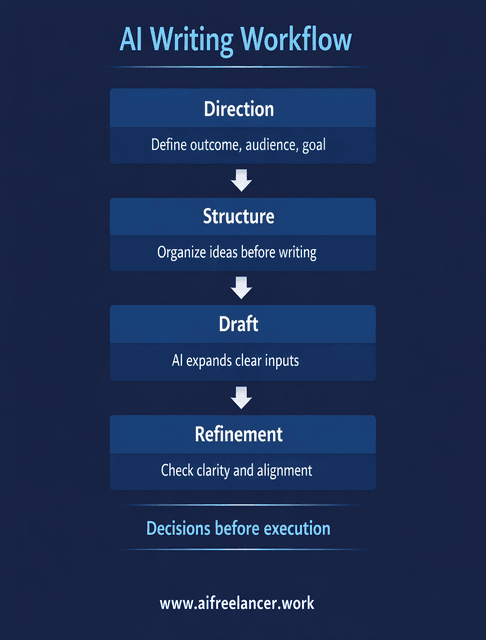
A more reliable approach separates thinking from execution. Before anything is written, you define what the piece needs to do, how it should be structured, and where AI fits into the process.
Direction decisions come first. You define the outcome, the audience, and what success looks like. For example, instead of starting with a prompt, you write a one-line brief: “Help mid-career freelance writers reduce revision time by improving their AI writing workflow.” That line becomes the filter for everything that follows.
Structure decisions follow. You lock the flow before drafting:
- Problem: Why AI workflows feel broken
- Breakdown: Where things fail
- System: Decision-based workflow
- Application: Customization and real use
Each section now has a job. Drafting becomes execution, not exploration.
Draft decisions determine how AI is used. Instead of prompting for full sections, you give it constrained inputs tied to the structure. AI expands what’s already clear instead of inventing direction.
Refinement decisions come last. At this stage, you check whether each section supports the outcome. If it doesn’t, you cut it—even if the writing itself is strong. This is where many unnecessary revisions disappear.
Where Most Workflows Break (And Why It Leads to Rewriting)
Rewriting usually starts when these stages are mixed. You ask AI to think and write at the same time, which produces content that feels complete but lacks direction. Structure is tested after paragraphs exist, which makes changes harder to implement. Editing begins at the sentence level before the argument is validated.
A typical example is rewriting an introduction multiple times. The wording changes, but the issue remains because the angle was never clear. Until that’s fixed, every version feels slightly off.
How to Customize Your AI Writing Workflow for Your Workload
A structured workflow only works if it fits how you actually work. If it doesn’t match your workload, energy, or content type, it breaks down under pressure. Instead of treating customization as an add-on, it helps to think of it as adjusting one system across three conditions: volume, energy, and format.
AI Writing Workflow for High-Volume Content Production
When you’re producing content at scale, the biggest drain isn’t writing—it’s setup. Rebuilding structure and direction for every piece slows everything down, even if drafting itself is fast.
A practical adjustment is to standardize your starting point. For example, if most of your blog posts follow a similar flow, you reuse that structure and change only the specifics. Planning can also be batched. Instead of outlining one article at a time, you define direction and structure for several pieces in one session, then move into drafting later.
AI becomes more useful in this setup because it works within a fixed frame. It expands sections that already have a defined role, which reduces variation across drafts and makes output more predictable.
Adapting Your Writing Process to Reduce Burnout
Burnout often shows up as hesitation at the start of a session. You know what needs to be done, but the process feels heavier than it should. This usually comes from too many decisions happening at once.
Separating tasks helps reduce that load. Planning and structuring require focus, while expansion and formatting are lighter. Keeping those tasks separate prevents mental overload during drafting.
A simple version of this looks like:
- Session 1: define structure and key points
- Session 2: expand those points using AI
- Session 3: refine and edit
On lower-energy days, working on refinement instead of drafting keeps progress moving without forcing new ideas. Research indexed in the National Library of Medicine shows that when task demands exceed working memory capacity, performance is impaired.
Adjusting Your Workflow for Different Content Types
Different formats require different emphasis, and this is where many workflows break under real use. Instead of forcing one process across everything, you shift the weight of each stage depending on the format.
For a blog post, structure carries most of the workload because fixing it later is expensive. For an email, direction matters more because there’s less space to recover if the message drifts. Social content benefits from fast iteration, where ideas are drafted, refined, and shortened quickly.
Client work adds another constraint. A draft can be well-written but still miss the brief. In that case, alignment matters more than style. Adjusting the workflow based on format keeps the process efficient without adding extra steps.
Build an AI Writing Workflow That Holds Up Under Real Work
A workflow that works once isn’t enough. It has to hold up when you’re busy, tired, or working under deadlines. This final step is less about improving the workflow and more about making sure it remains usable under pressure.
Fix the Brief Before Using AI
A clear brief reduces interpretation. A vague one increases rewriting.
You can see the difference immediately. If the instruction is “write about AI workflows,” the output will drift. If the brief defines the outcome, audience, and constraints, the draft has direction from the start. Even a short line like “help freelance writers reduce revisions by improving workflow structure” changes the result.
At this stage, the role of the brief isn’t to explain the idea again—it’s to anchor the workflow before execution begins. When that anchor is clear, the rest of the process becomes easier to manage.
Keep Your Voice While Using AI Tools
The concern about sounding generic usually comes from relying too heavily on generation. When AI produces large sections from open prompts, tone becomes inconsistent.
Using AI to expand structured inputs keeps control where it matters. Instead of regenerating entire sections, guided rewriting allows you to adjust specific parts without losing coherence. Tone is handled during refinement, where you can evaluate consistency across the piece.
Maintaining control over key sections—like introductions and transitions—helps preserve your voice without slowing the process.
Create a Repeatable AI Writing Workflow You Can Rely On
A reliable workflow is one you can follow even when you’re under pressure. That means having a clear sequence and simple checks at each stage.
For example:
- Direction is done when the outcome and audience are clear
- Structure is done when each section has a defined role
- Draft is done when all sections are expanded, not perfected
- Refinement is done when every section supports the goal
This final layer is what turns a good workflow into a stable one. It doesn’t change how you write—it makes the process easier to repeat.
Final Thoughts
A strong AI writing workflow doesn’t remove effort—it removes unnecessary friction. When direction is clear, structure is defined, and decisions are separated from execution, drafts improve, and revisions shrink. The process becomes more predictable, which is what actually saves time.
If you want to build workflows like this into your daily writing process, check out my Amazon Author page. That’s where I break down the exact systems, frameworks, and practical methods I use to write faster, reduce revisions, and stay consistent without burning out.
Frequently Asked Questions About AI Working Workflow
An AI writing workflow is a structured system that defines how AI is used at each stage of the writing process—from planning and outlining to drafting and refinement. Instead of relying on AI to generate full pieces, the workflow guides how inputs are created and expanded. This helps maintain clarity, consistency, and control across the entire process.
Start by defining the outcome, audience, and structure before using AI, so the direction is clear from the beginning. Then decide where AI supports the process, such as expanding outlines or refining sections, while keeping key decisions in your control. Finish with a structured refinement stage that checks alignment, clarity, and usefulness.
Yes, AI can significantly improve productivity, but only when used within a clear, structured workflow. Research from McKinsey & Company shows that productivity gains depend on how tasks are organized and executed. Without that structure, AI often speeds up drafting but increases revision time.
Yes, AI can significantly improve productivity, but only when used within a clear, structured workflow. Research from McKinsey & Company shows that productivity gains depend on how tasks are organized and executed. Without that structure, AI often speeds up drafting but increases revision time.
The best AI workflow is one that is repeatable, adaptable, and aligned with how you actually work. It should reduce the number of decisions you make during drafting while keeping structure and direction consistent. A good workflow also adjusts based on workload, content type, and energy levels, making it sustainable over time.

Florence De Borja is a freelance writer, content strategist, and author with 14+ years of writing experience and a 15-year background in IT and software development. She creates clear, practical content on AI, SaaS, business, digital marketing, real estate, and wellness, with a focus on helping freelancers use AI to work calmer and scale smarter. On her blog, AI Freelancer, she shares systems, workflows, and AI-powered strategies for building a sustainable solo business.

