The best AI apps are supposed to save you time. Yet it is surprisingly easy to end up with ChatGPT in one tab, a research app in another, three browser extensions, an automation platform you barely remember how to use, and several monthly subscriptions quietly charging your card. Instead of making work easier, your productivity stack becomes another thing you have to manage.
For freelancers already juggling client deadlines, research, editing, admin, and marketing, that defeats the point. You do not need an AI app for every task. You need a small number of tools that remove enough work to justify their place in your day.
Research suggests that AI can create meaningful productivity gains when it is matched to suitable work. A 2025 field experiment involving 7,137 knowledge workers found that employees who actually used an integrated generative AI tool spent about two fewer hours on email each week during the latter half of the experiment. That is the kind of result worth chasing: fewer hours spent working, not more software to maintain.
So instead of asking, “What else can I add?” ask, “What is taking up my time now?” A useful AI stack starts with subtraction, not another shopping list of tools. Remove unnecessary steps first, then decide whether software can make what remains easier.
Everything I’ve shared here—and more—is in my book, available on Amazon. Click the link if you’re ready to take the next step.
Best AI Apps Start With the Work You Want to Simplify
A shiny new AI tool can look useful simply because its demo is impressive. Then you subscribe, use it twice, and go back to your old workflow because the tool never solved a problem you regularly had. Start with the work instead.
A tool is something you use. A workflow is the order in which the work gets done. That distinction matters because adding a better tool to a messy workflow can leave you with the same underlying problem, only with another app attached to it. If repeated setup is the real problem, turn those repeated steps into a simple system before adding more software.
Identify the Tasks That Eat the Most Time
Look at an ordinary week rather than an ideal one. Where are you repeatedly losing time or mental energy?
For a freelance writer, that may mean researching unfamiliar topics, turning messy notes into an outline, drafting repetitive sections, revising for clarity or tone, summarizing source material, repurposing an article into social content, answering routine emails, or copying information between apps.
Prioritize tasks that happen frequently, take too long, or leave you mentally drained. A task that consumes 30 minutes four times a week is a better AI candidate than something you do for ten minutes once a month.
That task-by-task approach also matches what researchers have found about AI productivity. Harvard Business School researchers studying 758 consultants found that, for tasks within AI’s capabilities, participants using GPT-4 completed work more than 25% faster, achieved over 40% higher human-rated performance, and completed over 12% more tasks. The same research warned that AI performance varies by task, so the bottleneck should come before the tool.
Choose the Best AI Apps for Jobs You Actually Repeat
Once you know where the friction is, match the problem to the tool. If blank-page time slows you down, you may need a strong general AI assistant. If research is swallowing hours, you may need better web research. If you repeatedly transfer the same information from one app to another, automation may deserve a place.
For every AI app you are considering, ask, “Which recurring task will become easier if I keep this?” If the answer is vague, the tool probably does not belong in your core stack.
Treat AI apps as working tools, not gadgets to collect. A useful app should produce usable work with less effort, fit into what you already do, and require a reasonable amount of checking. The smartest-looking app is not necessarily the one that improves your workday.
Build a Simple AI Stack Around Three Core Jobs
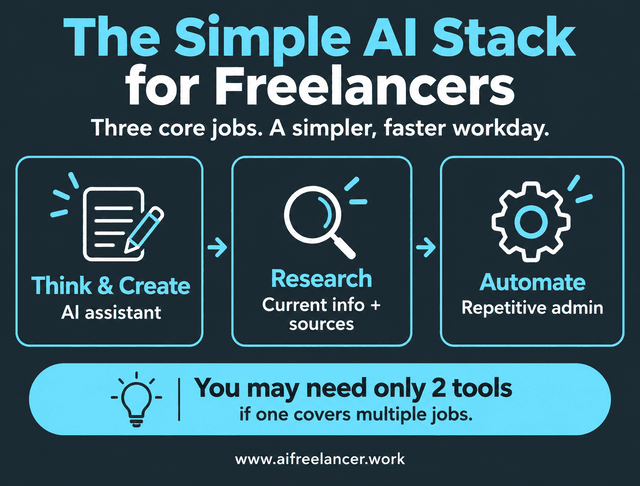
Most freelancers do not need 15 AI subscriptions. Start by covering three broad jobs: thinking and content work, research, and repetitive processes. The aim is a lean workflow that covers the work you actually repeat rather than a stack built around every feature you might someday use.
One AI Assistant for Thinking, Writing, and Editing
A general-purpose AI assistant should do most of the heavy lifting in a small stack. For many freelancers, ChatGPT can cover brainstorming, outlining, drafting, rewriting, summarizing, analyzing files, and repurposing content. OpenAI also supports web search and deeper research with citations, which means the same platform can sometimes handle work that would otherwise require a separate research subscription.
In my own freelance writing workflow, I use ChatGPT early in the process for outlining and drafting, then manually edit the work before running final quality checks. That setup works because AI handles the parts that benefit from speed, while the final judgment, voice, and polish stay human.
Claude and Gemini are also capable general assistants, and the right choice depends partly on your workflow. Pick one as your default workspace and learn what it does well before adding another.
If one assistant already handles ideation, outlines, drafts, revisions, summaries, and routine client communication well, you probably do not need separate AI apps for each of those jobs.
One Research Tool for Current Information
Research-heavy freelancers have a different problem. A good writing assistant is not enough if your work depends on current information, verifiable sources, competitor research, or factual claims that need checking.
This is where Perplexity can earn a place in a small stack. Its Research mode searches and evaluates multiple sources before producing a synthesized report.
ChatGPT also offers Search and Deep Research capabilities that can gather current web information and provide citations. If those features already meet your needs, a separate research app may not add enough value to justify another subscription.
For my own client work, especially on topics that depend on current or authoritative sources, research is part of the writing process rather than a separate afterthought. That makes source quality and verification more important to me than simply getting a fast answer.
A freelancer producing heavily sourced health, finance, technology, or legal content may get enough additional value from a dedicated research tool to justify it. Someone who researches occasionally may not.
One Automation Tool for Repetitive Work
Automation becomes valuable when a task is predictable enough that you are tired of doing it by hand. Zapier, for example, connects apps through trigger-and-action workflows and can combine traditional automation with AI steps where AI is useful.
A freelancer might use automation to add completed client forms to a project tracker, save email attachments to the right folder, create tasks from new project information, or move approved content into another stage of a workflow.
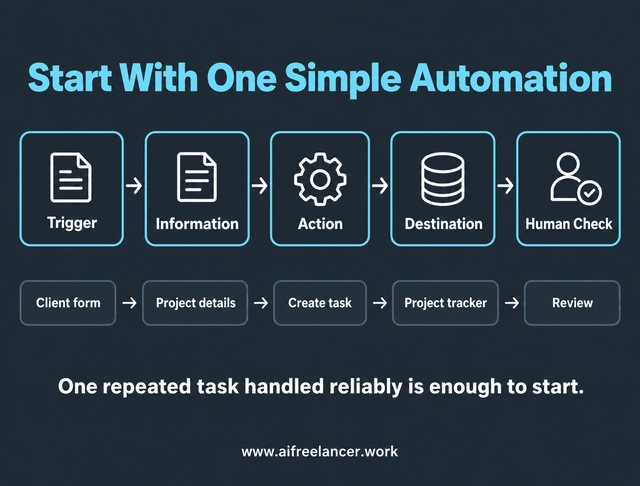
If you are new to automation, keep the first version deliberately small. A minimum viable automation only needs a trigger, the information it needs, an action, a destination, and a human check where mistakes matter. You can build around one repeated task before connecting more steps. You do not need a six-app chain to prove that a workflow is automated. One repeated task handled reliably is enough to start.
By contrast, you probably do not need to automate a task you perform twice a year. Building and troubleshooting the automation could take longer than doing the task manually. Complex setups also become fragile when real client inputs start changing, which is where heavily connected workflows often begin to break down.
When the Best AI Apps Can Cover More Than One Job
A simple stack becomes especially useful when one app can take responsibility for several related tasks. Imagine a freelance writer working on a 2,000-word client article. Perplexity handles source discovery and helps surface current reports. ChatGPT turns the research into an outline, drafts sections, tightens awkward passages, and repurposes the finished article into a LinkedIn post. Zapier saves the approved file to the right folder and updates the project tracker after delivery.
The workflow might look like this:
Perplexity for research → ChatGPT for outline and draft → human edit → client delivery → Zapier for admin
Each tool has a clear job, while ChatGPT still covers several related parts of the writing process.
Which Best AI Apps Deserve a Place in Your Stack?
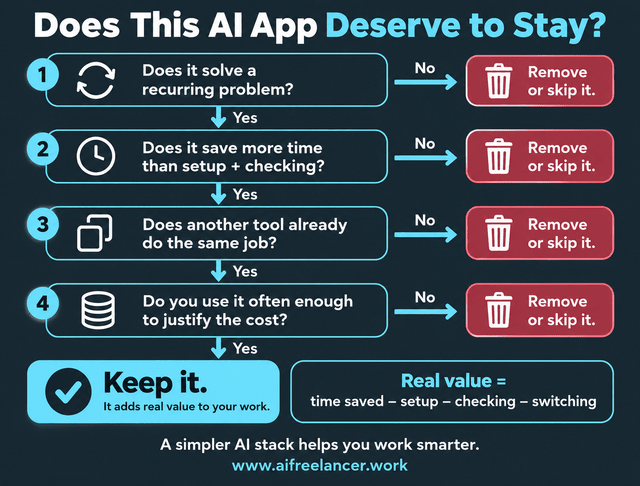
Choosing a promising tool is easy. Keeping it is where the judgment starts. The real test is whether the app continues to save enough time or effort to justify staying in your setup.
Measure Time Saved, Not Features
Feature lists encourage you to compare software with other software. Your real comparison should be between the tool and your previous way of working.
A simple test is:
Real value = time saved − setup − checking − switching
Also consider whether the tool is reliable, how much correction its output requires, how often you use it, and whether the subscription cost makes sense. An app that gives you something quickly but requires extensive fact-checking or rewriting may not be saving as much time as it first appears.
That personal benchmark matters because AI does not create the same gains for everyone. A Stanford study of 5,172 customer-support agents found that generative AI increased productivity by 15% on average, but the gains were much larger for less experienced workers and smaller for the most experienced. Your own gains can differ too, so judge an app against your work rather than someone else’s productivity claims.
Watch for Overlapping Tools
Tool overlap usually starts innocently. One app is better at rewriting. Another has stronger research. A third has a clever summarizer. Before long, several subscriptions are doing slightly different versions of the same job.
Overlap is not automatically wasteful, but make each tool prove its value. Suppose you pay for both ChatGPT and Claude and use both mainly for drafting and editing. For one week, route all of that work through only one of them. If the quality, speed, and revision time barely change, you may not need both. If one consistently handles long documents or a specific type of revision well enough to save real time, then the overlap may be justified.
The same principle applies to AI search engines, note takers, image generators, project management assistants, and productivity apps.
Best AI Apps May Already Be in Your Stack
Before adding something new, check whether a tool you already use can handle the job well enough. AI platforms change quickly, and functions that once required separate products increasingly appear inside broader assistants.
If the difference between an existing tool and a new one is minor, the extra subscription, interface, and learning curve may not be worth it. Sometimes the best upgrade is simply learning the tools you already use more deeply.
Once you stop adding tools by default, the next priority is making the tools you keep easier to use day after day.
The Best AI Apps Should Save Time Without Making Work Harder
A productivity system fails when maintaining it becomes part of the workload. Freelancers already have enough moving pieces without turning AI into another miniature business operation.
Fewer Tools Mean Fewer Decisions
Context switching can happen inside your AI workflow too. Which chatbot should you open? Where did you run that research? Which tool did you use for that prompt last time?
Each decision is small, but together they add noise to the workday. A smaller stack makes it easier to build consistent habits around the tools you keep.
Know When Your Stack Is Finished
Your stack is probably complete when:
- your main recurring problems are covered
- each tool has a clear job
- switching between apps is minimal
- the stack saves more time than it takes to manage
- new apps mostly repeat capabilities you already have
A finished stack does not mean you will never change another tool. It means new software has to solve a problem that your current setup genuinely cannot.
What Is the Best AI App?
For most freelancers, a strong general assistant is the best place to start. ChatGPT, Claude, and Gemini can all handle several common jobs, including brainstorming, drafting, editing, and summarizing. The best choice is the one that fits your actual workflow and saves you enough time to keep using it.
What Are the Best AI Apps for Work?
A simple freelance stack usually starts with one general AI assistant. Add a research tool if you regularly need current, sourced information, and add automation only when repetitive admin is taking enough time to justify it.
What Is the Best Free AI App?
Start with the free version of a strong general assistant and test it on work you actually do. If it handles your recurring tasks well, there may be no reason to upgrade immediately. Free tiers and limits change often, so judge the tool by whether it gets in your way during real work.
Is There an AI App Better Than ChatGPT?
Yes, for some jobs. A specialist research app may be better for source-heavy work, and another assistant may suit long documents or a specific software ecosystem better. That does not mean you need to switch. It means another app is worth considering only when it solves a problem ChatGPT does not solve well enough for you.
How Many AI Apps Does a Freelancer Really Need?
For many freelancers, two or three well-chosen apps are enough. Start with one strong general assistant, then add another tool only when a repeated problem remains unsolved. A bigger stack is useful only if each extra app saves enough time to justify the added complexity.
Sources
- Brynjolfsson, E., Li, D., & Raymond, L. R. (2023). Generative AI at work. Stanford Graduate School of Business. GSB Preserve
- Dillon, E. W., Jaffe, S., Immorlica, N., & Stanton, C. T. (2025). Shifting work patterns with generative AI (Working Paper No. 33795). National Bureau of Economic Research. NBER
- Harvard Business School AI Institute. (2023, September 21). Navigating the jagged technological frontier. Harvard Business School AI Institute
- OpenAI. (2026, April 10). ChatGPT for research. OpenAI Academy.
- OpenAI. (2026, April 10). Writing with ChatGPT. OpenAI Academy.
- Perplexity. (2026, October 20). What is Research mode?. Perplexity Help Center.
- Zapier. (2026, September 8). What is Zapier?. Zapier Help Center.
Final Thoughts
The best AI apps are not the largest collection you can afford or the newest products everyone is talking about. They are the tools that consistently give you time back without creating more work around them.
A useful stack should become so familiar that you do not have to stop and think about it. You know what each app is for, when to use it, and why it deserves to stay. Once your recurring problems are covered, the next new AI launch can stay optional instead of becoming another thing you feel pressured to test.
If you want more practical approaches to using AI without letting technology take over your workflow, explore my books on freelancing, writing, AI, and sustainable productivity on my Amazon Author page.

Florence De Borja is a freelance writer, content strategist, and author with 14+ years of writing experience and a 15-year background in IT and software development. She creates clear, practical content on AI, SaaS, business, digital marketing, real estate, and wellness, with a focus on helping freelancers use AI to work calmer and scale smarter. On her blog, AI Freelancer, she shares systems, workflows, and AI-powered strategies for building a sustainable solo business.