You sit down to work and immediately feel behind. A client revision still needs attention. An invoice has not been sent. Slack notifications keep appearing in the corner of your screen. Somewhere inside your inbox is an approval you forgot to respond to yesterday. You open your writing draft, then switch to email “for one minute,” and twenty minutes disappear. This is why so many professionals search for how to automate tasks with AI before the workday even properly begins.
The problem is rarely the amount of work alone. The real problem is that incoming requests, reminders, revisions, approvals, and follow-ups all arrive mixed, forcing your brain to manually sort everything throughout the day.
For freelancers, consultants, and overloaded knowledge workers, AI becomes far more useful when it acts like a routing system instead of just another content generator. Instead of helping you create more output, it helps organize incoming work before it turns into chaos. That distinction matters more than most people realize.
According to Asana’s Anatomy of Work research, knowledge workers spend 60% of their time on “work about work” rather than skilled work itself. That includes coordination, status updates, chasing approvals, duplicative work, and switching between tools. For a freelance writer, that “work about work” often looks like reopening emails, tracking approvals, checking Slack, rebuilding task lists, and manually sorting requests throughout the day. The issue is not simply workload. The issue is fragmented workflow management.
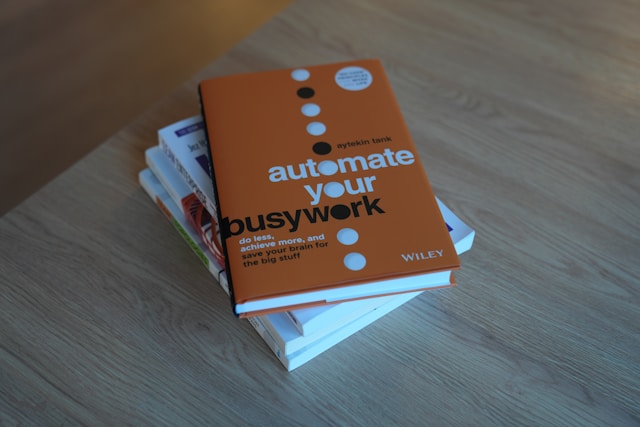
Everything I’ve shared here—and more—is in my book, available on Amazon. Click the link if you’re ready to take the next step.
Why How to Automate Tasks With AI Is Really About Reducing Overload
Most people think task automation is about doing more work faster. In reality, many professionals are exhausted because every request, revision, reminder, and unfinished task keeps competing for attention at the same time.
A writing project rarely arrives as one clean task. Instead, it appears as revision comments inside email threads, Slack follow-ups, overdue approvals, research links, scheduling requests, and reminders buried in notes apps. When all of that enters the same mental bucket, your brain keeps reopening unfinished loops throughout the day.
What Actually Counts as a Task in an AI Workflow
Many people only think of tasks as checklist items, but incoming work often arrives disguised as communication. A client saying, “Can we adjust the introduction before publishing?” is a task. An email asking, “Can you review this by Friday?” is a task. A Slack message saying, “Waiting on approval from legal,” is also a task.
This matters because AI cannot organize work correctly if the workflow itself does not identify what should become actionable. For freelancers and creators, hidden tasks often include proposal follow-ups, revision requests, invoice reminders, content approvals, publishing deadlines, research notes, strategic decisions, and waiting items. The more incoming work stays trapped inside communication tools, the harder it becomes to focus.
Why Most Task Systems Collapse Under Constant Input
Most to-do systems fail because they force unrelated work into the same space. A revision request sits beside grocery reminders. Research notes appear next to invoices. Scheduling messages compete with writing deadlines. Everything looks equally urgent, which often leads to constant mental task switching throughout the day.
That creates constant decision fatigue because your brain keeps asking what matters right now, what can wait, what was forgotten, and what still needs follow-up. Research around interruptions and attention residue has consistently shown that switching between tasks drains focus and cognitive performance.
According to Harvard Business Review research on workplace interruptions, repeated interruptions increase cognitive fatigue and reduce the quality of concentration over time. The hidden cost is not just lost time. It is lost mental continuity.
Why Open Loops Keep Pulling Your Attention Back
Open loops are unfinished responsibilities your brain keeps revisiting automatically. You reopen the same inbox multiple times even when nothing has changed, because your mind is still tracking unresolved work in the background. Unfinished approvals stay mentally active while you are trying to write, and interrupted deep work feels exhausting even when the interruption itself only lasted a few minutes.
The more fragmented your workload becomes, the more your attention gets divided across unfinished responsibilities. Instead of protecting focus, your workday starts training your brain to constantly scan for missing tasks and unresolved follow-ups.
How to Automate Tasks With AI Using Workflow Lanes
When invoices, client revisions, scheduling requests, and deep work all live in the same list, your brain keeps treating everything as equally urgent. Workflow lanes solve this by giving incoming work a destination before it starts interrupting everything else.
Workflow lanes are categories that separate different types of work inside a structured freelance operating system. Instead of storing everything together, AI automatically routes work into categories such as Deep Work, Admin, Waiting, Communication, and Later. That separation changes how work feels psychologically because a revision request no longer sits beside invoice reminders, scheduling messages no longer interrupt writing sessions, and approvals move into a waiting lane instead of living inside memory.
Build Separate Lanes for Deep Work, Admin, and Waiting Tasks
Deep work suffers when reactive work stays visible all day. If you are writing an article while simultaneously seeing unpaid invoices, follow-up reminders, scheduling requests, and revision notifications, your brain keeps partially attending to unfinished work in the background.
Workflow lanes reduce that pressure by separating work by execution type instead of forcing everything into one overwhelming list. Article writing stays inside Deep Work. Invoices move into Admin. Approvals move into Waiting. Scheduling stays inside Communication. The goal is not perfection. The goal is to make incoming work easier to process without constantly reshuffling priorities throughout the day.
How AI Routing Rules Automatically Categorize Incoming Work
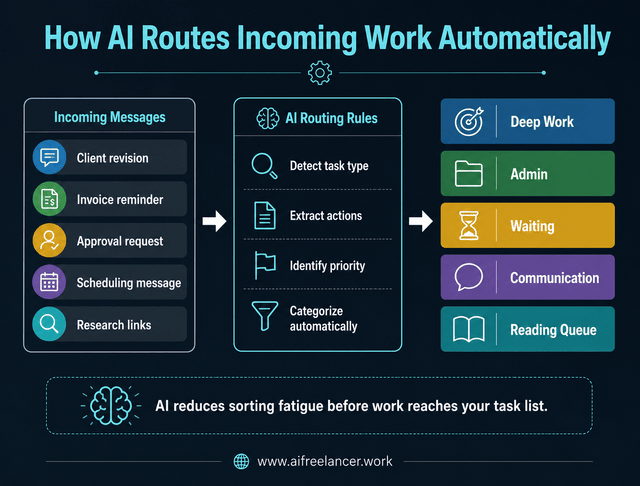
Routing rules are simple instructions that tell AI where work belongs. For example, invoices move into Admin, client revisions move into Deep Work, approvals move into Waiting, scheduling requests move into Communication, and research links move into a Reading Queue.
Instead of manually processing every incoming message, AI organizes work automatically based on predefined logic. That creates less fragmentation and fewer interruptions because tasks arrive pre-organized before they compete for attention. If your setup requires five different tools just to move one client revision into a task list, the system is probably too complicated. Good automation should quietly reduce friction instead of adding more maintenance work to your day.
How AI Turns Inbox Messages Into Actionable Tasks
Most people do not need another productivity app. They need a way to stop reopening the same messages, reminders, revisions, and unfinished requests all day long.
Inbox-to-task processing means turning messages into organized next actions instead of leaving work trapped inside inboxes and Slack threads. That process helps reduce mental clutter because unfinished work no longer stays buried inside communication tools.
Use Inbox-to-Task Processing Instead of Reopening Messages Repeatedly
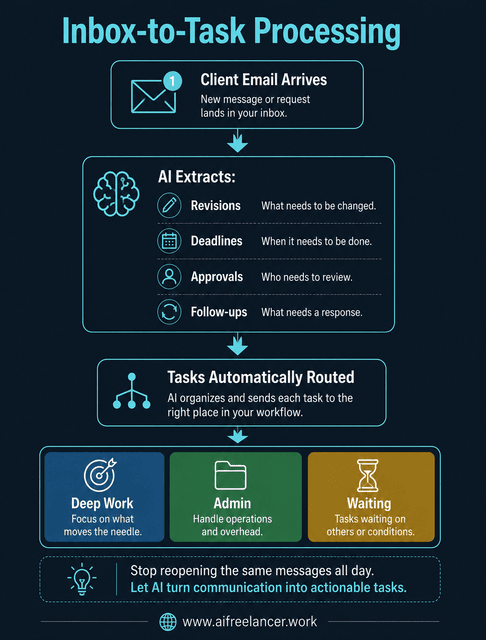
A client feedback email often contains revision requests, deadlines, unanswered questions, approvals, and follow-ups all inside one message. Without structure, you keep reopening the same thread repeatedly because your brain is trying to remember unfinished details.
AI can extract those elements automatically and convert them into organized tasks. Revision comments become checklist items. Deadlines become reminders. Approvals move into Waiting. Research links move into a Reading Queue.
For example, imagine this client email arrives:
“Can you revise the intro, send the invoice, and wait for approval from Jane before publishing?”
A properly configured AI workflow could automatically separate that message into:
- Revise intro → Deep Work
- Send invoice → Admin
- Wait for Jane’s approval → Waiting
That prevents one email from becoming a mentally tracked open loop all day long.
A simple workflow may look like this:
| Step | Action |
| Email arrives | AI scans the message |
| AI extracts tasks | Deadlines, approvals, and revisions identified |
| Automation platform triggers | Zapier or Make sends data |
| Task manager organizes work | Tasks routed into workflow lanes |
| User reviews output | Human verifies priorities |
In this type of setup, the AI assistant identifies the work, the automation platform moves it, and the task manager stores it in the correct workflow lane.
Why AI-Assisted Organization Works Better Than Massive To-Do Lists
Large task lists create visual pressure because everything appears unfinished simultaneously. That pressure increases when unrelated work gets mixed.
A revision request beside a scheduling message beside an invoice reminder forces your brain to constantly reevaluate priorities. AI-assisted organization reduces that friction by separating focused work, admin, waiting items, and communication into different operational lanes. Instead of staring at one overwhelming list, you process one category of work at a time. That makes execution feel calmer and easier to sustain.
Examples of Repetitive Work AI Can Organize Automatically
AI workflow automation works especially well for repetitive organizational tasks such as:
- client revisions
- invoice reminders
- scheduling requests
- proposal follow-ups
- publishing deadlines
- content approvals
- research collection
- recurring admin work
These tasks often consume far more mental energy than people realize because they repeatedly interrupt focused work.
How to Set Up Your AI Task Automation System
Automation only works when AI knows where work should go. Before building workflows, you need clear routing logic. Otherwise, automation simply creates more noise.
Choose the Inputs Your AI Should Process
Most incoming work comes from a few predictable places:
- Slack
- client documents
- meeting notes
- project management systems
- content calendars
Start small. Many freelance writers begin by automating revision emails, client approvals, and invoice reminders because those tasks create repeated interruptions throughout the week. Trying to automate every platform immediately often creates unnecessary complexity.
You also do not need a complicated software stack to begin. A simple setup can already reduce manual sorting significantly. Many professionals start with:
- an AI assistant for summarization and categorization
- a task manager such as Notion, Trello, or ClickUp
- an automation platform like Zapier or Make
- email or Slack integrations
- a lightweight project management workflow
The goal is not building a massive automation infrastructure. The goal is to reduce repetitive organizational work.
Create Simple Routing Rules for Each Task Type
The best AI workflows are usually the simplest ones.
Examples include:
- If a message requires client approval, send it to Waiting.
- If it takes less than 10 minutes, send it to Admin.
- If it affects deliverable quality, send it to Deep Work.
- If it depends on someone else, send it to Follow-Up.
- If it contains a deadline, flag it for Priority Review.
The purpose is not to automate judgment completely. The purpose is to reduce repetitive sorting.
A simple routing table can make workflows easier to maintain:
| Incoming Task | AI Action | Workflow Lane |
| Client revision request | Extract revision items | Deep Work |
| Invoice reminder | Create a reminder task | Admin |
| Waiting for approval | Flag dependency | Waiting |
| Research links | Save for later review | Reading Queue |
| Scheduling request | Add follow-up reminder | Communication |
You can also create a simple AI sorting prompt, such as:
“Read this email. Extract actionable tasks, deadlines, approvals, follow-ups, and suggested workflow lanes.”
That single instruction can already reduce significant manual processing.
Create Rules That Prioritize Work Without Constant Decision-Making
Prioritization becomes easier when AI separates urgent work, waiting items, low-focus admin work, and high-focus execution tasks.
For example, revision deadlines can surface before low-priority admin tasks. Approvals stop cluttering active writing queues. Research tasks move into separate reading sessions instead of interrupting focused work.
According to McKinsey research on knowledge-worker productivity, knowledge workers spend roughly half their time interacting, coordinating, and managing communication rather than performing focused execution work.
For freelancers, that often means checking inboxes repeatedly, tracking approvals manually, rebuilding task lists, and switching constantly between client communication and actual production work. The more incoming work gets organized automatically, the easier it becomes to protect deep work.
Test the System Before You Trust It Fully
AI workflows still require human oversight. Before relying on automation fully, test the system using real tasks and messages.
Watch for mistakes like incorrectly prioritizing low-value requests, treating brainstorming notes as urgent tasks, misclassifying approvals, or duplicating reminders unnecessarily. The best AI systems evolve gradually through small adjustments.
How to Automate Tasks With AI Without Creating More Complexity
Some automation systems become harder to manage than the work itself. Too many triggers, notifications, integrations, and rules can create new forms of workflow clutter.
The goal is not to automate every decision. The goal is to simplify incoming work.
Start With Repetitive Decisions Instead of Full Automation
The safest starting point is repetitive organizational work, such as:
- sorting emails
- routing revisions
- tagging invoices
- categorizing follow-ups
These decisions are predictable and easier for AI to process accurately. That creates meaningful relief without building a complicated automation system.
A good starting point is automating low-risk sorting work first. Do not begin by automating sensitive client decisions or strategic judgment calls. Start with tasks that already follow predictable patterns.
What Not to Automate With AI
Some tasks still require human judgment.
A useful rule is:
- Automate the capture
- Assist in the decision
- Never automate the final judgment
AI can sort revision requests, summarize meetings, categorize deadlines, and identify follow-ups. It can assist decision-making by surfacing priorities or identifying missing approvals.
However, it should not decide article direction, especially when writers are still learning building structure before drafting, instead of relying entirely on generated output. Good workflows protect human judgment instead of replacing it. That distinction matters for both quality and trust.
Why Over-Automation Often Creates More Workflow Friction
Poorly designed automation often creates:
- Duplicate tasks
- Unnecessary notifications
- Workflow confusion
- Maintenance overhead
Eventually, the automation system itself becomes another thing to manage. That is why simpler routing systems usually work better long term. The best workflows reduce interruptions quietly instead of creating more operational complexity.
A Simple Daily AI Workflow That Keeps Work Organized Automatically
The most effective AI workflows are often the simplest ones.
Small routing rules applied consistently can remove hours of mental clutter without turning your workflow into an automation project that needs constant maintenance.
What an AI-Assisted Workday Looks Like in Practice
A simple AI-assisted workflow might look like this:
Morning:
- AI extracts deadlines from overnight emails
- Revision requests move into Deep Work
- Invoice reminders move into Admin
- Missing approvals move into Waiting
During the day:
- Focused work stays separated from communication
- Scheduling requests stop interrupting writing sessions
- Research links move into the Reading Queue automatically
End of day:
- Unfinished approvals remain visible in Waiting
- Follow-ups stay categorized instead of being scattered across inboxes
The workflow becomes calmer because your brain no longer has to manually track every moving part.
Before and After: Manual Task Sorting vs AI Routing
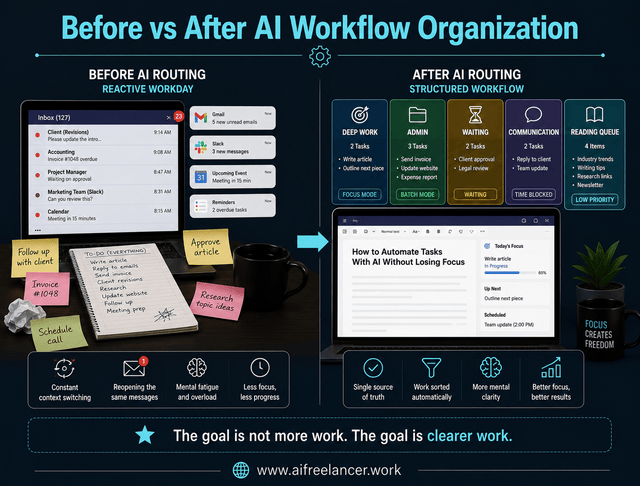
Before automation, many professionals manually scan inboxes, reopen Slack repeatedly, mentally track approvals, and constantly switch between admin work and deep work.
After routing rules are in place, revisions arrive pre-sorted, admin stays separated, approvals move automatically into Waiting, and incoming work becomes easier to process consistently. The goal is not to do more work simultaneously. The real win is no longer needing to re-sort the same unfinished work every time you open your inbox.
How to Review and Adjust Your AI Workflow Weekly
Even strong workflows need occasional adjustment.
Review whether tasks landed in the correct lanes, which items still require manual sorting, whether notifications became excessive, and which routing rules created confusion. Small weekly adjustments keep the workflow maintainable during busy periods.
What tasks should you automate with AI first?
Start with repetitive organizational tasks such as sorting emails, categorizing revisions, routing approvals, scheduling reminders, and tracking follow-ups.
For example, a freelance writer might automatically route invoice reminders into Admin while moving client revisions into Deep Work. These repetitive tasks are predictable and easier to automate safely without risking important strategic decisions.
Do not start by automating client-sensitive decisions. Begin with low-risk sorting tasks that already follow consistent patterns.
Can AI organize tasks automatically?
Yes. AI can automatically categorize incoming work using routing rules, workflow lanes, and inbox-to-task processing systems.
For example, AI can identify deadlines inside email threads, detect approval dependencies inside Slack conversations, and convert meeting notes into actionable follow-ups instead of leaving them buried in communication tools.
What is the best AI workflow for freelancers?
The best AI workflow for freelancers usually separates work into distinct categories such as deep work, admin tasks, waiting items, communication, and lower-priority tasks that can be handled later. Instead of keeping everything inside one overwhelming task list, this structure helps freelancers process similar types of work together.
For example, client revisions and writing projects stay inside deep work, invoices and scheduling stay inside admin, while approvals and dependencies move into a waiting category until another person responds. This separation reduces context switching because reactive tasks stop interrupting focused execution throughout the day.
How do AI routing rules work?
AI routing rules are instructions that tell AI where different types of incoming work should go. Instead of manually sorting every request yourself, the system automatically categorizes tasks based on predefined logic.
For example, client revision requests may be routed into a Deep Work category, approvals may move into Waiting, invoices may go into Admin, while scheduling requests may be grouped under Communication. These rules reduce repetitive sorting decisions because work gets organized before it reaches your active task list, making it easier to focus on one type of work at a time.
Can AI reduce context switching?
AI can reduce context switching by organizing incoming work before it reaches your active workflow.
Instead of manually scanning inboxes, reopening Slack messages, and mentally tracking approvals, categorized workflows help professionals process one type of work at a time. That makes focused execution easier to maintain during busy periods.
Sources
- Leroy, S., & Glomb, T. M. (2020, June 30). A plan for managing (constant) interruptions at work. Harvard Business Review.
- McKinsey & Company. (2010, September 1). Boosting the productivity of knowledge workers. McKinsey Quarterly.
- Talbert, M. (2026, April 17). How work about work gets in the way of real work. Asana.
Final Thoughts
Learning how to automate tasks with AI is not really about becoming faster at everything. It is about reducing the constant mental effort required to organize incoming work manually.
The biggest productivity gains often come from fewer interruptions, fewer open loops, less context switching, better separation between deep work and reactive work, and clearer visibility into what actually needs attention.
AI works best when it functions as a routing system, an organizational layer, and an inbox-to-task processor instead of another source of digital clutter. The real win is not having AI do your thinking. The real win is no longer needing to reprocess the same unfinished work every time you check your inbox, Slack, or task list.
If you want more practical systems for AI-assisted writing workflows, productivity frameworks, and overload reduction strategies for freelancers, explore the books on my Amazon Author page.

Florence De Borja is a freelance writer, content strategist, and author with 14+ years of writing experience and a 15-year background in IT and software development. She creates clear, practical content on AI, SaaS, business, digital marketing, real estate, and wellness, with a focus on helping freelancers use AI to work calmer and scale smarter. On her blog, AI Freelancer, she shares systems, workflows, and AI-powered strategies for building a sustainable solo business.