If you are trying to figure out how to manage too many tasks, the problem often starts before the work even begins. You sit down ready to focus, but a client revision still needs attention, Slack notifications keep appearing, an invoice remains unsent, and someone is still waiting for approval on a proposal.
You open your writing document, switch to email “for one minute,” and suddenly, twenty minutes disappear. The issue is usually not laziness or poor discipline. The real problem is that too many unfinished responsibilities are competing for your attention at the same time.
Most overloaded professionals are not struggling because they lack a productivity app. They are struggling because writing, admin work, communication, approvals, and follow-ups all sit beside each other throughout the day, forcing the brain to repeatedly change gears.
That constant switching creates friction. The American Psychological Association notes that multitasking and task switching reduce efficiency because the brain needs time to shift mental gears between activities
Researchers at the University of California, Irvine, also found that after interruptions, workers can take more than 20 minutes to fully return to their original task. That explains why small interruptions often create larger productivity losses than people expect.
Task routing solves that problem differently. Instead of asking:
“What should I do first?”
Task routing asks:
“What kind of work is this?”
A work state simply means the kind of attention a task needs. Some tasks require deep focus. Others require replies, approvals, waiting, admin work, or decision-making. That small shift changes how work gets organized, how focus gets protected, and how overloaded days become easier to manage.
Everything I’ve shared here—and more—is in my book, available on Amazon. Click the link if you’re ready to take the next step.
Why How to Manage Too Many Tasks Advice Often Fails
Most productivity advice treats overload like a prioritization problem, but overloaded workflows usually break down because unrelated work keeps interrupting other work.
You are trying to write while monitoring Slack. You are editing content while remembering an unpaid invoice. You are researching while waiting for a client’s approval. Even when the workload itself is manageable, the constant interruptions make work feel heavier than it actually is.
Why Prioritizing Everything Creates More Friction
Traditional productivity advice usually says:
- Prioritize tasks
- Rank urgency
- Work on the most important item first
That sounds logical until every task starts feeling important. A revision request feels urgent because a client is waiting. An invoice feels urgent because payment depends on it. A proposal follow-up feels urgent because it affects future revenue. Email feels urgent because unread messages create pressure.
Eventually, the task list stops functioning as a decision tool and becomes a source of mental noise. Instead of finishing work, many people spend the day reshuffling priorities, checking messages, and reopening unfinished tasks repeatedly.
This is one reason overloaded professionals often feel busy without feeling clear.
The Hidden Mental Cost of Keeping Every Task in One List
One giant task list forces unrelated responsibilities into the same mental space. A research task sits beside an invoice reminder. A creative project sits beside admin follow-ups. A blocked approval sits beside active execution work. The brain keeps scanning all of them simultaneously.
Part of your attention stays attached to unfinished work even while you are trying to focus elsewhere. You may be editing a document while mentally remembering a client approval, a follow-up email, a pending payment, or a Slack notification you have not answered yet.
That low-level mental pressure accumulates throughout the day. The issue is not only the amount of work. The issue is how often unfinished work keeps reopening in your head.
Why Traditional To-Do Lists Struggle Structurally
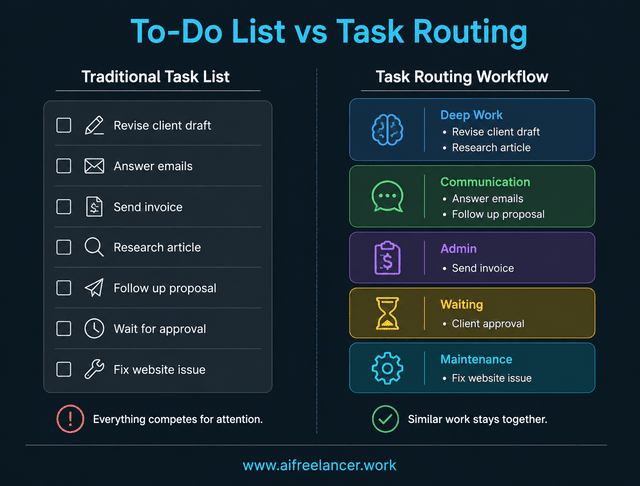
Traditional to-do lists usually treat every task the same way, even though different responsibilities require completely different types of attention. One of the biggest challenges is keeping task organization manageable when every unfinished responsibility sits in the same system.
Writing requires uninterrupted focus. Invoicing requires accuracy and attention to detail. Approvals require waiting. Communication expands endlessly if left open all day. Yet most systems throw everything into one long list.
A client revision, Slack notification, invoice reminder, proposal follow-up, and research task all end up beside each other. The list becomes crowded with tasks that should not even be sitting in the same workspace at the same time.
This is where task routing becomes useful. Instead of treating every task equally, work gets separated by the type of attention it actually requires.
What Is Task Routing and How to Manage Too Many Tasks More Clearly
Task routing changes how work gets organized before prioritization even starts. Instead of manually ranking every task against every other task, work first gets separated into workflow lanes. That reduces unnecessary switching between unrelated responsibilities.
A Simple Routing System for Managing Too Many Tasks
Task routing means assigning work to a category based on its work state.
For example:
- Revisions go into Deep Work
- Approvals waiting on another person go into Waiting
- Invoices go into Admin
- Replies go into Communication
This creates separation between focused execution, coordination, admin maintenance, blocked tasks, and reactive communication. The goal is not perfect organization. The goal is to prevent unrelated tasks from interrupting each other throughout the day.
The Core Workflow Lanes That Organize Different Work States
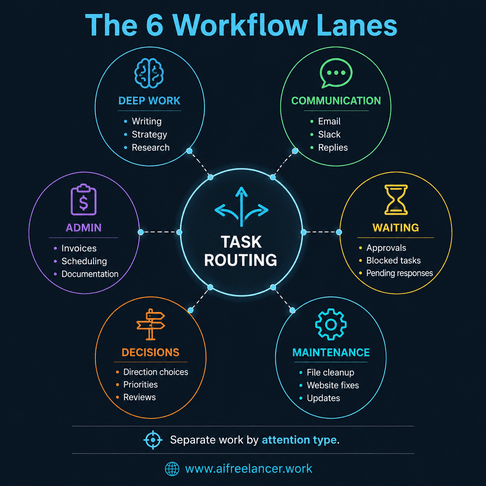
Most overloaded professionals only need a few simple workflow lanes:
- Deep Work
- Admin
- Communication
- Waiting
- Decisions
- Maintenance
Deep Work includes writing, research, strategy, and creative execution. This lane should contain work that benefits from uninterrupted concentration. Admin includes invoices, scheduling, updates, documentation, and operational tasks that keep the business functioning but do not require high creative energy.
Communication includes email, Slack, client replies, and follow-ups. If communication stays open continuously, it often expands to fill the entire day. Waiting includes approvals, blocked items, pending responses, and anything that cannot move forward yet because another person still needs to respond.
Decisions include unresolved choices that require judgment before work can continue. For example, approving a direction, selecting between options, or deciding which project moves forward next. Maintenance includes website fixes, file organization, software updates, and recurring operational upkeep.
Each lane groups similar work together. Writing and invoicing use different cognitive processes, while strategy work and reactive communication pull attention in opposite directions.
When those responsibilities stay separated, it becomes easier to stay inside one type of work long enough to actually finish something. You can complete the draft first, then answer messages in one block instead of checking them every few minutes.
Routing Rules That Make Task Organization Easier
Simple routing rules make overloaded workflows easier to manage.
For example:
- If it requires uninterrupted focus → Deep Work
- If it depends on another person → Waiting
- If it needs a reply → Communication
- If it keeps operations moving → Admin
- If it blocks progress because a choice still needs to be made → Decision
This is where task routing differs from traditional prioritization.
Prioritization asks:
“What matters most?”
Routing asks:
“Where does this belong first?”
That distinction reduces decision fatigue because you stop comparing completely different types of work against each other.
A Before-and-After Example for Overloaded Workdays
A traditional overloaded task list might look like this:
- Revise client draft
- Answer emails
- Send invoice
- Wait for approval
- Research article
- Fix website issue
- Follow up on the proposal
- Update content calendar
Everything sits together in one crowded list. Now compare that to a routed workflow.
Deep Work:
- Revise client draft
- Research article
Communication:
- Answer emails
- Follow up on the proposal
Admin:
- Send invoice
- Update content calendar
Waiting:
- Client approval
Maintenance:
- Fix website issue
The workload did not shrink, but the tasks stopped mentally interrupting each other. Instead of scanning every unfinished item repeatedly, you can focus on the lane directly in front of you.
How to Manage Too Many Tasks Without Constant Context Switching
The real productivity drain is often not the amount of work itself. It is repeatedly shifting between different types of work.
Why Deep Work Keeps Losing to Admin Tasks
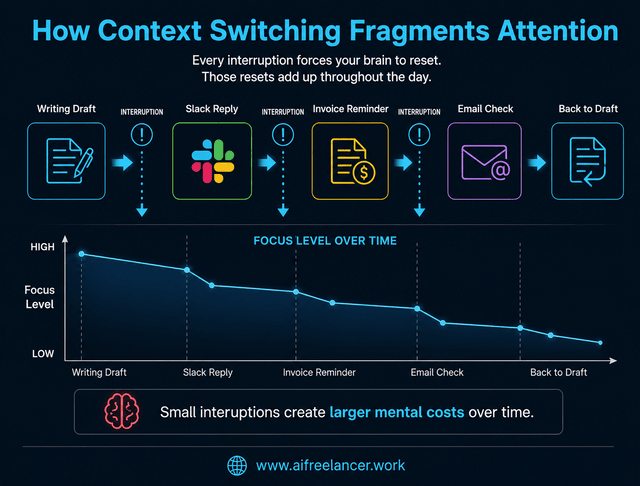
Focused work is fragile because a single interruption can break concentration and force the brain to restart. This happens constantly in overloaded workflows:
- Opening email during writing
- Replying to Slack during research
- Stopping strategy work to send invoices
- Checking notifications while editing
Small interruptions feel harmless individually, but together they fragment attention throughout the day. Harvard Business Review has also reported that excessive collaboration and communication overload can consume a large portion of the workweek, leaving less time for focused execution.
This is why many professionals feel mentally exhausted even after completing relatively small amounts of meaningful work.
How Routing Protects Focus Blocks
Task routing protects focus by grouping similar work. Instead of bouncing continuously between communication and execution, similar tasks get handled in batches.
For example:
- Finish writing before opening Slack
- Answer communication during a designated block
- Review Waiting items once or twice daily
- Keep approvals outside the active work queue
That separation matters because the brain no longer needs to shift between unrelated responsibilities repeatedly. A blocked approval no longer sits beside the draft you can actually finish today, and email stops interrupting writing every few minutes.
How to Manage Too Many Tasks With a Daily Routing System
Most people do not need a complicated productivity framework. They need a simple operating rhythm that reduces overload consistently.
A Simple Daily Workflow for Task Routing
A lightweight routing workflow often works better than complex productivity systems. Many overloaded professionals perform better with lightweight operational systems that reduce friction instead of adding more maintenance overhead.
Morning:
- Capture incoming work
- Route tasks immediately
- Identify the primary workflow lane for the day
- Schedule the first Deep Work block before opening communication channels if possible
Midday:
- Work from one lane at a time
- Avoid mixing communication with deep work
- Batch shallow tasks together
- Review Communication only during designated intervals
End of Day:
- Move blocked items into Waiting
- Close completed tasks
- Review active lanes for tomorrow
- Clear loose notes and unfinished reminders before ending the day
The goal is not to control every minute. The goal is to prevent unrelated work from interrupting focused execution all day long.
How to Choose What to Work on After Routing
Routing simplifies prioritization because decisions happen inside smaller groups. Instead of choosing between twenty unrelated tasks, you choose within the active lane only. That usually means handling Deep Work before reactive communication and avoiding unnecessary lane switching.
For example:
- Finish a writing block before opening Slack
- Process communication together instead of continuously
- Review Waiting items during scheduled check-ins
- Avoid reopening blocked tasks throughout the day
This reduces constant mental scanning throughout the day because inactive work stays separated from work you can actually complete now.
Build Workflow Lanes Before You Add More Productivity Tools
Many overloaded professionals keep switching apps:
- Notion
- Trello
- ClickUp
- Asana
- Todoist
But the underlying workflow often stays unchanged.
The same overloaded task list simply moves into another tool. This is why productivity systems frequently feel exciting at first but eventually collapse under clutter. The issue is usually not the software. The issue is that unfinished work still lacks a clear separation.
Tools become more useful only after tasks already have clear destinations. Otherwise, the app simply becomes another crowded place filled with unfinished reminders, scattered notes, and mixed priorities. This becomes even more important when building structured AI-assisted workflows that support execution instead of adding more operational clutter.
Do not automate reminders until you know which tasks are active, blocked, or waiting for someone else. Otherwise, automation simply creates more notifications on top of an already overloaded workflow.
Common Mistakes That Make Task Systems Fail
Many task systems fail because managing the system becomes harder than managing the work itself.
Creating Too Many Workflow Lanes
Over-categorizing creates maintenance overhead.
If every task needs complicated tagging and sorting, the system eventually becomes another source of friction. Most people only need a few clear work states.
A simple starting structure often works best, especially when using simple task routing categories to separate active work from blocked or reactive responsibilities.
- Deep Work
- Communication
- Admin
- Waiting
Additional lanes should only exist if they reduce confusion instead of increasing it.
Treating Every Task as Active Work
Waiting items should not stay mentally active all day. Yet many professionals repeatedly reopen pending approvals, blocked tasks, and unanswered follow-ups. That creates constant mental pressure without actual progress.
Checking for approvals every few minutes does not move the work forward. It only keeps unfinished work mentally present.
Instead:
- Move blocked tasks into Waiting
- Review Waiting at scheduled times
- Keep inactive work out of the active execution queue
That way, unfinished approvals stop interrupting the work you can actually complete today.
Using Automation on Top of Disorganized Work
Automation does not automatically reduce overload.
If the workflow itself stays cluttered, automation can simply increase the amount of noise entering the system.
Many professionals automate notifications, reminders, workflows, and integrations without first deciding where unfinished work should actually live. The goal is not endless optimization. The goal is to know where work belongs.
When Task Routing Works Best for Overloaded Professionals
Task routing becomes more valuable as responsibilities become more fragmented.
Freelancers often juggle client work, revisions, invoices, outreach, and communication on the same day. Founders move between strategy, operations, hiring, and constant decision-making. Creators balance production, promotion, publishing, and audience communication simultaneously.
That constant switching creates invisible fatigue because every responsibility pulls attention in a different direction. Task routing helps separate execution, coordination, maintenance, approvals, and communication. That way, planning time stops getting interrupted by inbox checking, and focused work no longer competes directly with blocked tasks or operational reminders.
What is the best way to manage too many tasks?
The best approach is to separate tasks before they all demand attention at once. Task routing helps by placing work into workflow lanes like Deep Work, Admin, Communication, and Waiting, so unrelated responsibilities stop interrupting each other throughout the day.
Why do I feel overwhelmed even with a to-do list?
Many to-do lists mix unrelated work types. Creative work, admin work, approvals, and communication all compete for attention simultaneously, which creates mental overload. Task routing reduces that pressure by separating active work, blocked work, and communication into different workflow lanes.
How do you organize tasks effectively?
Organize tasks by work state first. Separate focused work from communication, admin, and blocked tasks before prioritizing individual items. This reduces unnecessary switching between unrelated responsibilities throughout the day.
Is task routing the same as prioritizing tasks?
No. Prioritization decides what matters most. Task routing decides where work belongs first. Routing reduces overload before prioritization even starts.
What causes context switching at work?
Context switching happens when people repeatedly move between different types of work, such as writing, emailing, researching, invoicing, and messaging, throughout the same work session.
Sources
- American Psychological Association. (2006, March 20). Multitasking: Switching costs.
- Cross, R., Benson, M., Kostal, J., & Milnor, R. J. (2021, September 7). Collaboration overload is sinking productivity. Harvard Business Review.
- Mark, G., Gudith, D., & Klocke, U. (2008). The cost of interrupted work: More speed and stress. Proceedings of the SIGCHI Conference on Human Factors in Computing Systems, 107–110. Association for Computing Machinery.
Final Thoughts
Learning how to manage too many tasks becomes easier when work stops competing inside one overloaded list.
Task routing works because it separates different responsibilities before prioritization begins. Deep work stops competing directly with invoices, approvals, messages, and admin reminders.
The workload may still exist, but the day feels different. You can finish the draft before checking Slack. You can batch communication instead of reacting continuously. You can move blocked approvals into Waiting instead of reopening them every hour.
Clear workflow lanes make it easier to start work without scanning every unfinished task again.
If you want more practical frameworks for AI workflows, writing systems, productivity structure, and calmer execution, visit my Amazon Author Page for books designed for overloaded freelancers, creators, and professionals.

Florence De Borja is a freelance writer, content strategist, and author with 14+ years of writing experience and a 15-year background in IT and software development. She creates clear, practical content on AI, SaaS, business, digital marketing, real estate, and wellness, with a focus on helping freelancers use AI to work calmer and scale smarter. On her blog, AI Freelancer, she shares systems, workflows, and AI-powered strategies for building a sustainable solo business.