If you have ever opened a long email thread and immediately felt mentally exhausted, you already understand why more professionals now summarize email threads with AI instead of manually digging through endless replies. The problem is probably not the number of emails. The real problem is the amount of thinking hidden inside them. A single thread can contain revisions, approvals, deadlines, conflicting feedback, missing files, and casual comments that quietly become action items later. By the time you finish rereading everything, your energy is already drained before the actual work even begins.
The goal is not simply to shorten emails. The real value comes from turning scattered conversations into a task-ready work brief that clearly shows what changed, what was approved, and what still needs attention.
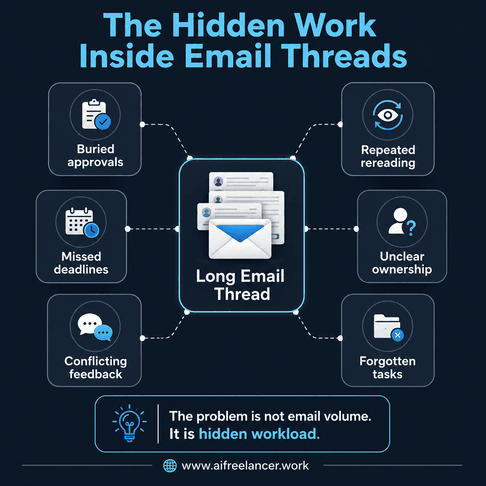
This matters more than most people realize because email overload rarely stays inside the inbox. It spills into missed revisions, delayed approvals, duplicated work, and forgotten follow-ups. Research from the Harvard Business Review found that knowledge workers switch between apps and websites nearly 1,200 times per day, contributing to lost focus and reduced productivity.
Long email chains make that worse because people constantly jump between inboxes, documents, project boards, and chat tools, trying to reconnect scattered information. Instead of leaving conversations buried inside email, AI summaries help turn them into something easier to review and act on. This becomes much easier when you focus on building a workflow-first inbox system instead of treating email as passive storage.
Everything I’ve shared here—and more—is in my book, available on Amazon. Click the link if you’re ready to take the next step.
Why Summarize Email Threads With AI in the First Place
Most long email threads do not become difficult because people are careless. They become difficult because information gets fragmented over time. One stakeholder replies to an earlier message, another changes the deadline halfway through the conversation, and someone casually approves a revision near the bottom of the thread without clearly identifying it as final approval. By the end of the exchange, important details are scattered across multiple replies.
That creates extra work most professionals never account for. You are no longer simply reading emails. You are trying to identify ownership, track revisions, confirm approvals, and figure out which version of the conversation still matters. For overloaded freelancers and founders, this becomes expensive very quickly because buried approvals create duplicated work, unclear requests create unnecessary follow-ups, and missed revisions delay delivery timelines.
According to Microsoft and LinkedIn’s 2024 Work Trend Index, 75% of knowledge workers already use AI at work in some capacity, with many relying on it to process repetitive communication and information-heavy tasks faster.
The biggest advantage is reducing the amount of manual sorting required every time you reopen a thread. Instead of piecing together details from 25 scattered replies, AI can extract:
- decisions
- deadlines
- unresolved questions
- assigned responsibilities
- next actions
That gives you a clearer picture of what actually needs attention before work stalls or details get missed. The next challenge is turning those summaries into something useful inside your daily workflow instead of letting them remain as another layer of information sitting in your inbox.
How to Summarize Email Threads With AI Into Actionable Workflows
One of the biggest mistakes people make with AI email summaries is treating them like simple TL;DR generators. A useful summary should help you move work forward, not just reduce reading time. If the output does not clearly explain what was approved, what still needs revision, who owns the next step, and what deadline matters, you will still end up reopening the thread repeatedly.
A simple workflow works surprisingly well for most professionals. Start by pasting the full thread into your AI tool after removing repeated signatures, disclaimers, or irrelevant footer text. Then ask AI to extract:
- key decisions
- action items
- unresolved questions
- deadlines
- next steps
After that, review the output before acting on it and move the results into your task system or project board.
This process works especially well for:
- client revision threads
- approval chains
- onboarding discussions
- stakeholder feedback
- scope clarification emails
- project update conversations
The biggest benefit is not automation alone. The benefit is turning conversations into usable task lists instead of leaving important details buried inside email chains. Research published by MIT Sloan Management Review found that workers using AI within structured workflows completed some tasks significantly faster while maintaining quality.
That matters because AI performs better when paired with a repeatable process. Many freelancers see better results after building structured AI systems for freelance work instead of relying on disconnected prompts. A clear prompt, a review step, and a consistent workflow reduce the chances of missing important details hidden inside long conversations.
A Proprietary Prompt to Summarize Client Email Threads
Most people ask AI to “summarize this email.” That usually produces vague output that still requires rereading the thread later. A stronger approach is giving AI a structured prompt that forces the summary into a workflow-ready format.
Try using this prompt:
Analyze this email thread and convert it into a work brief.
Extract:
- key decisions
- action items
- unresolved questions
- deadlines
- assigned responsibilities
- scope changes
- approvals
- missing information
Then provide:
- a summary
- the next recommended action
- any risks, blockers, or unclear instructions
Keep the output concise, structured, and easy to move into a task manager.
This works especially well for revision-heavy client threads where approvals, edits, and deadlines are spread across multiple replies. Instead of producing a generic summary, the AI becomes more useful as a workflow assistant that organizes communication into something immediately actionable.
Real Example of AI Email Summarization in Action
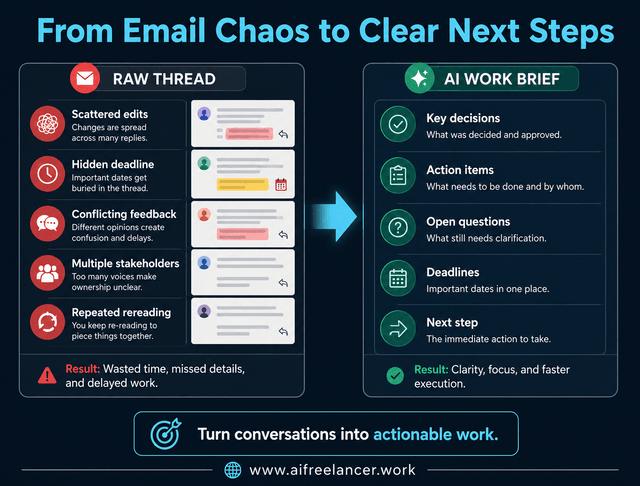
Imagine a client revision thread involving four stakeholders. One person wants shorter headlines, another approves the existing draft, and a project manager casually mentions a Friday deadline halfway through the conversation. Near the bottom of the thread, another stakeholder asks for additional SEO edits before publication.
Without structure, the next step becomes unclear. You reopen the thread repeatedly, trying to confirm which feedback matters most, whether the original version was approved, whether the SEO edits are mandatory, and who is responsible for the next revision. The conversation slowly becomes frustrating because all the information exists, but none of it is organized clearly.
Now compare that with an AI-generated work brief.
Summary:
Client requested revisions to headlines and additional SEO optimization before final approval.
Key Decisions:
- Headlines should be shortened
- Existing draft structure remains approved
- SEO edits should be included before submission
Action Items:
- Rewrite H2 headlines
- Add SEO refinements
- Deliver updated draft by Friday
Open Questions:
- Confirm final word count preference
- Verify whether SEO edits require additional review
Next Step:
Revise the article and submit the updated version for final approval.
The difference becomes obvious immediately. Instead of scanning the thread again to figure out what changed, you already know what matters. Tasks move directly into your workflow, important approvals become easier to track, and less time gets wasted trying to interpret conversations repeatedly.
This is also why AI summaries are especially useful during high-friction communication situations where details change frequently across multiple replies.
Best Times to Use AI to Summarize Email Threads
Not every email requires AI assistance. Short conversations with one clear request usually do not need summarization. The biggest gains occur when communication becomes layered, fragmented, or repetitive over time, as in the revision example above, where multiple stakeholders gradually changed the direction of the conversation.
AI summaries save the most time during:
- client revision threads
- scope-change discussions
- long approval trails
- multi-person feedback chains
- overnight email catchups
- project handoff conversations
- missed-deadline follow-ups
These situations often create extra rereading because conversations evolve gradually. A casual comment early in the thread can later become a major decision, while important deadlines may appear only briefly with little emphasis.
Manual review still matters in situations involving:
- legal or financial details
- emotionally charged conversations
- nuanced client negotiations
- sensitive approvals
- unclear scope discussions
AI can flatten disagreement, miss emotional tone, or misinterpret implied approvals. For example, a client casually saying “we can probably add that later” does not necessarily mean the project scope officially changed. That is why AI productivity workflows work best when humans remain responsible for interpretation and final decisions.
Summarize Email Threads With AI Without Losing Context
AI email summaries are only useful if the output remains trustworthy. One of the most common mistakes is over-trusting summaries without verifying them against the original thread. AI can occasionally treat suggestions as final decisions, overlook unresolved concerns, or simplify conversations too aggressively.
Before acting on a summary, verify:
- deadlines
- ownership
- unresolved questions
- conflicting feedback
- anything tied to money, approvals, or scope
This matters because communication often contains nuance that AI cannot fully interpret on its own. A technically accurate summary can still miss the broader meaning behind a conversation. For freelancers handling client relationships, accuracy is not only about extracting information correctly. It is also about understanding tone, expectations, and implied concerns before taking action.
Turn Email Threads Into a Repeatable Workflow
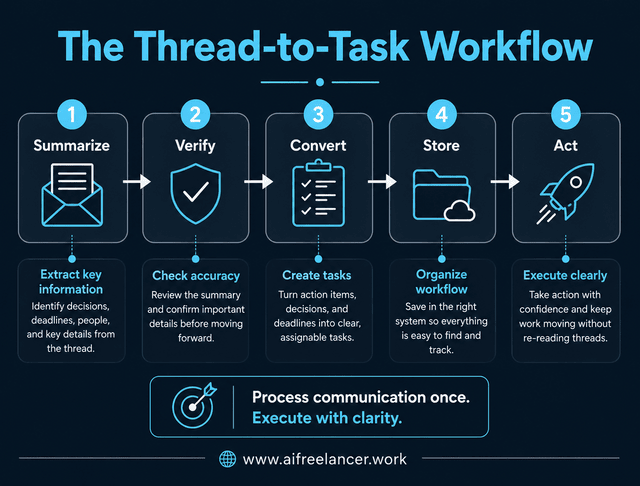
Many professionals unintentionally use their inbox as temporary memory storage. They tell themselves they will remember a revision request later or assume they can quickly find the approval email again when needed. Over time, that creates constant rereading because important information never leaves the inbox and enters a proper workflow system.
A more sustainable approach is turning communication into structured workflow steps. Some freelancers combine this with a lightweight communication structure for client replies to reduce unnecessary back-and-forth across long email threads.
- Summarize
- Verify
- Convert
- Store
- Act
This thread-to-task process creates more clarity because conversations stop functioning as cluttered archives and start functioning as actionable work inputs. Instead of reopening the same thread repeatedly, tasks move directly into:
- project boards
- task managers
- content workflows
- revision queues
- approval pipelines
This matters more than Inbox Zero. A clean inbox does not automatically create clarity if approvals, deadlines, and responsibilities remain scattered across conversations. What matters is whether communication has been processed into something useful that helps work move forward with less confusion.
Can AI summarize long email threads accurately?
Yes, AI can summarize long email threads effectively when the conversation is relatively clear and structured. However, human review is still important because AI may miss nuance, emotional tone, or unresolved concerns hidden deeper in the exchange.
What is the best AI tool for summarizing email threads?
The best tool depends on your workflow. Many professionals use ChatGPT, Gmail AI features, or dedicated AI email assistants integrated into productivity platforms. For freelancers and consultants, the best option is usually the tool that fits naturally into their existing workflow instead of forcing them into another complex system.
Can AI extract action items from emails?
Yes. Modern AI tools can identify: decisions, deadlines, responsibilities, unresolved questions, and next steps. This is especially useful for project management, client revisions, approvals, and team collaboration because it turns scattered communication into something easier to execute.
Is it safe to paste email threads into AI tools?
That depends on the sensitivity of the information and the platform’s privacy policies. Avoid sharing confidential legal, financial, or sensitive client information unless you understand how the platform handles storage, privacy, and data security.
How do freelancers use AI for email management?
Freelancers often use AI to summarize revision threads, organize client feedback, extract requests, create task lists, and reduce repeated rereading. This helps manage communication faster while making project coordination easier across multiple active clients.
Sources
- Microsoft & LinkedIn. (2024, May 8). AI at work is here. Now comes the hard part: 2024 Work Trend Index annual report. Microsoft WorkLab.
- Murty, R. N., Dadlani, S., & Das, R. B. (2022, August 29). How much time and energy do we waste toggling between applications?. Harvard Business Review.
- Somers, M. (2023, October 19). How generative AI can boost highly skilled workers’ productivity. MIT Sloan School of Management.
Final Thoughts
Long email threads become exhausting because they force you to reconnect fragmented details spread across multiple replies. Buried deadlines, scattered approvals, and evolving feedback create extra work that slows execution and increases mistakes. Many freelancers improve client communication by reducing response delays without rushing replies through clearer workflows and better task visibility. That is why more professionals now summarize email threads with AI as part of a larger workflow system instead of treating AI as a simple shortcut tool.
The goal is not simply to read faster. The goal is to turn conversations into clearer responsibilities, usable work briefs, and practical next actions that help work move forward without unnecessary confusion. When communication becomes structured, execution becomes easier because less energy is wasted trying to untangle conversations repeatedly.
If you want more practical books about AI workflows, writing systems, and productivity for freelancers and overloaded professionals, explore my Amazon Author page.

Florence De Borja is a freelance writer, content strategist, and author with 14+ years of writing experience and a 15-year background in IT and software development. She creates clear, practical content on AI, SaaS, business, digital marketing, real estate, and wellness, with a focus on helping freelancers use AI to work calmer and scale smarter. On her blog, AI Freelancer, she shares systems, workflows, and AI-powered strategies for building a sustainable solo business.