

If you write for a living, you’re always juggling three things at once: getting work in on time, keeping the standard high, and not burning out in the process. AI can seem like a magic fix, but in practice, it often feels messy—too many tools, similar features, and a lot of hype to sort through. This guide shows you where AI writing platforms actually belong in a real-world writing workflow.
You’ll see where they help most—sharpening grammar and style, scaling content creation, speeding up research, making better use of data, organizing projects, and protecting your focus. Along the way, you’ll notice bold phrases like AI writing assistants or AI blog writing tools; those are natural anchor points to deeper tutorials and reviews if you want to zoom in on any part of the system.
And this isn’t just theory: a joint 2024 Work Trend Index from Microsoft and LinkedIn reports that 75% of knowledge workers now use AI at work and say it saves time, boosts creativity, and helps them focus on their most important tasks. A global McKinsey survey the same year found that 65% of organizations regularly use generative AI in at least one business function—nearly double the share from just 10 months earlier.
Over years of testing different AI tools across real client projects, I’ve seen which platforms quietly support writers and which ones add noise.
What you’ll learn
- How to use AI to clean up grammar, style, and tone without losing your voice
- When it makes sense to lean on AI for outlines, drafts, and repurposing content
- How AI can speed up research and help you work with complex sources and data
- Ways to plug AI into your project management so client work feels more manageable
- How to pair AI tools with time and focus habits so you can sustain your writing workload
You don’t have to use everything. But understanding the landscape lets you choose the right few tools that genuinely support your work, rather than adding more noise.
Everything I’ve shared here—and more—is in my book, available on Amazon. Click the link if you’re ready to level up.
Popular AI Writing Platforms Writers Use Today
Before diving deeper into workflows, it helps to understand the platforms that appear most often in the AI writing landscape. Different tools specialize in different parts of the writing process.
Here’s a quick overview of widely used AI writing platforms:
| Platform | Best For |
|---|---|
| ChatGPT | Research, drafting, brainstorming |
| Jasper | Marketing content and blog generation |
| Writesonic | Fast article drafts and landing page copy |
| Copy.ai | Marketing copy and short-form content |
| Grammarly | Grammar correction and tone suggestions |
| ProWritingAid | Deep editing reports and style feedback |
| Surfer AI | SEO-optimized blog writing |
| Frase | Research summaries and SEO content briefs |
| Rytr | Budget-friendly AI writing |
Most writers don’t use all of these. A typical workflow might combine one AI writing assistant, one content generation platform, and one research or SEO tool.
The rest of this guide explains where each type of platform fits inside a practical writing workflow.
AI Writing Platforms for Better Grammar, Style, and Voice
The easiest place to start with AI is quality control. Grammar slips, clunky sentences, and uneven tone don’t just look unprofessional—they slow you down in revisions.
Modern AI writing assistants sit inside your browser or editor and quietly check your work as you type. They flag typos, suggest smoother phrasing, and highlight overly long or unclear sentences. When you stack this kind of always-on feedback across hundreds of pages a month, you save hours you’d normally spend on manual cleanup.
Choosing the Best AI Writing Assistant
If you’ve ever bounced between tools like Grammarly and ProWritingAid, you’ve already done an informal best writing assistant comparison. Some platforms prioritize real-time suggestions and simplicity; others give you in-depth reports on pacing, repetition, and readability. The key is to pick one assistant you’ll actually use every day, then learn its strengths and blind spots instead of spreading your attention across five different dashboards.
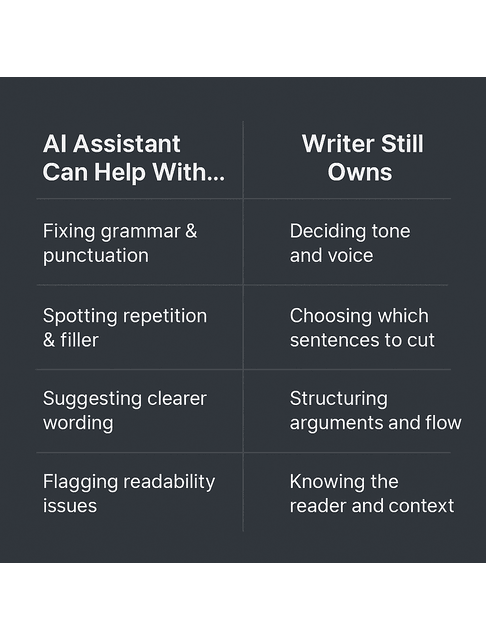
Working this way changes your experience of writing in AI. Instead of handing over the whole draft and hoping the machine “fixes” it, you stay in control: you draft as usual, then use AI to surface issues and options you might not see when you’re tired or too close to the text. Accept what fits, reject what doesn’t, and treat suggestions as input for your judgment—not commands.
Beyond surface-level corrections, the best tools treat AI grammar and writing style as more than a few green squiggles on the screen. They flag subject–verb agreement problems, messy clauses, and punctuation that doesn’t quite fit, while also calling out your habits—filler adverbs, go-to phrases, and sudden shifts in formality. The more you work with that feedback, the more you start spotting those patterns on your own and fixing them earlier in each draft.
AI Writing Platforms for Tone and Readability
This is also where general AI tools for tone and readability come in. Many platforms estimate reading level, flag jargon, and tell you whether your piece sounds formal, neutral, or conversational. That matters when you’re switching between a B2B white paper and a casual blog—both clients will complain, just for opposite reasons, if the voice is off.
Used with intention, these assistants really do improve writing with AI, not by replacing your voice, but by catching mechanical issues quickly, nudging you toward clearer structure, and giving you fast feedback on how your words land. Instead of spending your best energy hunting for missing commas, you can spend it on structure, argument, and story.
AI Writing Platforms for Scalable Content Creation
Once you trust AI to help with quality, the next frontier is speed: how do you create more (or bigger) pieces without turning into a content mill?
This is where AI content creation platforms come in. Instead of only reacting to text you’ve already written, they help you brainstorm angles, build outlines, and even draft sections from prompts and briefs. Done well, they act like a junior writer who’s fast but needs strong direction.
Designing Automated Content Creation Workflows
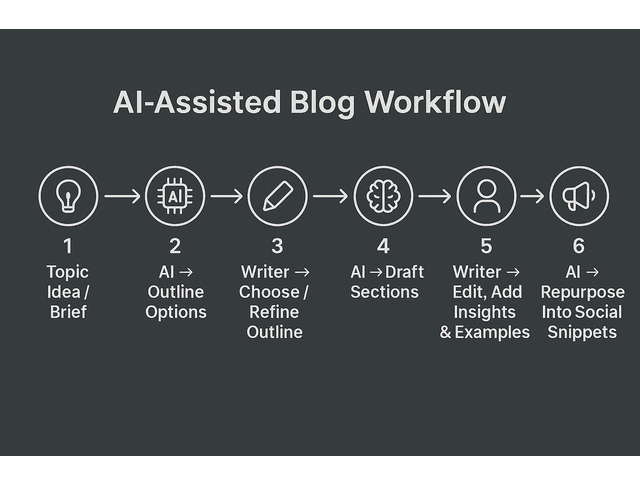
Good automated content creation workflows usually start with a clear brief: audience, goal, key points, constraints. You feed that into the platform, generate a few outline options, and then choose or refine the one that actually fits the assignment. From there, you can have the tool draft sections for you to edit, cut, and reorganize.
Tools positioned as AI writing tools for content creation—such as Jasper or Writesonic—are especially useful for repetitive formats like product descriptions, list posts, intro variations, and email sequences. You don’t need to reinvent the wheel every time; you need to make sure it’s pointing in the right direction.
AI Blog Writing Tools for Bloggers and Content Marketers
Bloggers and content marketers often rely heavily on AI blog writing tools. A typical flow might look like this: use AI to expand a topic idea into a list of subtopics, choose the ones that map to real search intent, generate a skeletal outline, then draft a scrappy first pass that you revise into something you’re proud to ship. You’re still responsible for the insights, examples, and voice; the platform moves you past the blank page faster. That lines up with industry data: an Orbit Media study summarized by Backlinko found that 95% of bloggers now use AI at least sometimes, and 66% use it specifically to generate ideas for their content.
All of this is changing the future of blogging. Instead of measuring output purely by how many words you can personally type, you’ll increasingly be measured by how well you design systems: content briefs, topic clusters, repurposing workflows, and QA processes that keep AI-assisted content accurate and on-brand.
Social Media Content with AI
The same logic applies to social channels. Repurposing long-form content into social media content with AI means you can take one strong article and spin out multiple posts, carousels, ideas for threads, or video scripts. You ask the model for variations on a hook, or for ways to tailor a message to LinkedIn vs. Instagram, then you keep the versions that sound most like you.
If you want to go further, AI social media content creation tools can help you test headlines and CTAs, suggest post timing, or analyze which topics and tones perform best over time. A SurveyMonkey study, for example, found that over 90% of marketers using AI rely on it to generate content faster, more than 80% to uncover insights, and around 90% to speed up decision-making. AI can’t decide your positioning—that’s on you—but it can give you fast feedback on how your experiments are landing.
Research and Data: Building Stronger Arguments with Less Friction
High-quality writing rests on good inputs. But deep research and data work can quietly consume whole days if you’re not careful.
Modern AI research assistants help by taming the chaos. You can drop in long articles, reports, or transcripts and get structured summaries, key points, and follow-up questions in return. Instead of skimming 20 sources end to end, you can quickly identify which three deserve a full read and what to look for in each.
When you’re working with academic or technical material, pairing this approach with Google Scholar and Semantic Scholar is powerful. You find relevant papers with traditional search tools, then use AI to translate dense abstracts and methodology sections into plain language. That doesn’t replace close reading, but it does reduce the time you spend decoding jargon to see if something is relevant.
Beyond summarization, dedicated AI research tools can cluster documents by theme, tag recurring concepts, and help you spot gaps in your sources. That’s especially useful when you’re writing long-form content, reports, or book chapters where you need a clear view of the whole landscape, not just a handful of quotes.
Data-Driven Writing with AI
This naturally leads to data-driven writing. Instead of guessing what matters to readers, you can look at search trends, performance metrics, or industry data and use those numbers to choose angles and prioritize topics. AI helps by extracting patterns from large datasets that would take you hours to assemble by hand.
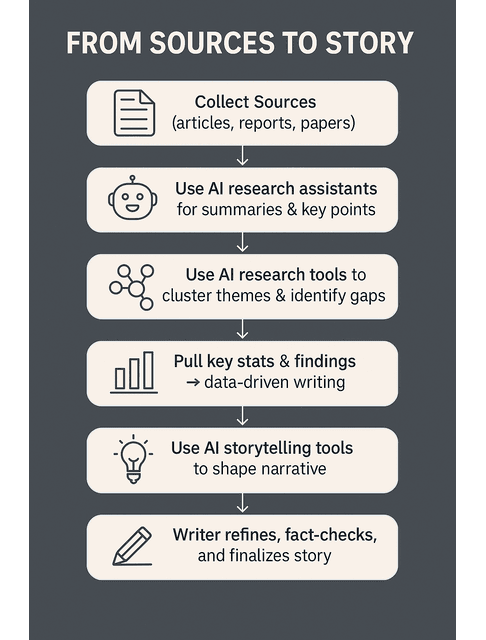
Of course, numbers are only useful if you can explain them. That’s where incorporating data into your pieces becomes a skill in its own right. AI can help you turn raw figures into plain-language explanations, suggest comparisons (“that’s like filling two Olympic pools every day”), or draft a chart description that actually makes sense.
Story still matters. Tools positioned as AI storytelling tools bridge the gap between data and narrative: they suggest structures, arcs, and metaphors that help you frame a finding as a before-and-after, a journey, or a decision your reader has to make. You still choose which story to tell; the platform gives you more ways to tell it clearly.
Managing Projects with AI-Enhanced Workflows
Even with great ideas and research, a messy workflow can sink your week. AI becomes much more valuable when it sits inside tools that keep your work visible and on track.
For many writers, this starts with efficient task management in tools like Trello or Asana. Instead of juggling assignments in your inbox, you break them into cards or tasks—brief, outline, draft, revision, delivery—and let simple automations move things along as you tick them off. Some AI integrations can even suggest task breakdowns based on the description you paste in.
Notion AI for Writers as an All-in-One Hub
If you prefer an all-in-one workspace, Notion AI for writers can be a game-changer. You can house briefs, research, drafts, client notes, and deadlines in one database, then use AI to summarize calls, generate checklists from a client email, or turn a messy brain dump into a cleaner outline. The content still depends on you; the structure gets a boost.
As your workload grows, comparing AI project management tools for writers becomes more strategic. You might reach for Trello when you want a simple visual board, use Asana to keep shared client projects moving, and rely on Notion as your long-term home for notes and content libraries. AI won’t organize your work for you. Still, it can make the boring parts easier—things like updating tasks, jotting quick status notes, and gathering the details you need before you start writing.
An AI-Enhanced Workflow in Practice
Imagine you’re handling three blog retainers, one book project, and a sprinkling of one-off sales pages. With a basic AI-enhanced setup, new client emails turn directly into tasks, your briefs live in linked pages, and the system generates weekly review prompts for you. Instead of spending Monday morning figuring out what’s on your plate, you open your board and start working through it.
A well-designed system here saves you from a lot of invisible stress: less hunting for files, fewer dropped balls, and more time in actual writing mode instead of constant re-orientation.
Time, Focus, and Sustainable Productivity
The last piece of the puzzle is your time and energy. You can have the best tools in the world and still feel fried if you carve your day into 100 microtasks.
Start by looking honestly at time management for writers. That might mean blocking a few deep-work sessions each week for drafting, reserving lighter tasks (like formatting or inbox cleanup) for lower-energy times, and using timers or planners to protect your focus from endless context switching. AI slots into this by shortening certain tasks, but you still have to decide when those tasks happen.
AI Tools for Writing Focus
Attention tools help you defend those blocks. Platforms that fall under AI tools for writing focus—like RescueTime, Focus@Will, and similar apps—track where your time actually goes, nudge you away from distractions, and help you experiment with environments (sound, session length, break timing) where you write best. The patterns you see in those reports can be more valuable than any single feature inside a writing app.
When you zoom out, you’re really building a system of AI writing productivity tools. Assistants handle grammar and style. Content platforms help with ideation and drafting. Research tools tame the reading pile. Project management keeps everything moving. Focus and time tools protect your attention. None of them can replace your judgment or imagination. Still, together they lower the cost of consistently doing your best work. Survey data summarized by sites like SEO.com shows that more than half of AI users say these tools improve content quality, increase creativity, and save time—evidence that the right setup can boost both output and satisfaction.
The goal isn’t to become a robot who never rests. It’s about using AI as a protective layer between you and burnout, so you can keep saying yes to good projects without sacrificing your health or your standards.
Final Thoughts
AI writing platforms work best when they quietly remove friction from the work you already do. They catch errors you miss, help you move from idea to draft faster, organize research, and make it easier to manage multiple clients and deadlines.
You don’t need to master every tool or chase every new launch. Start with one pressure point—editing, research, or project organization—and test a single AI solution. As it proves useful, you can gradually add other tools and build a workflow that supports your writing instead of complicating it.
The real value isn’t simply using AI. It’s creating a writing life where quality, consistency, and your well-being can coexist. Used thoughtfully, these platforms help you protect that balance while continuing to produce the work you want to be known for.
If you want to go deeper into practical AI writing workflows, explore the guides and books on my Amazon Author page.
FAQs About AI Writing Platforms
AI writing tools and platforms are apps that use artificial intelligence to help with tasks like drafting, editing, summarizing, and optimizing text. They can suggest wording, fix grammar, generate outlines, or produce first drafts based on your prompts.
Yes—if you use them strategically. They’re especially helpful for repetitive tasks (blogs, emails, product pages), speeding up research, and tightening drafts. At the same time, you stay in charge of ideas, structure, and final edits.
It is, as long as you treat AI as an assistant, not an author. Use it for brainstorming, rough drafts, and polishing, then rewrite, fact-check, and personalize the output to reflect your expertise and voice.
You can, but you usually shouldn’t. Fully automated content tends to be generic or error-prone; the best results come when AI handles the heavy lifting, and you add nuance, original insight, and careful editing.
Google doesn’t penalize content just because you used AI to help create it. What really matters is whether your content actually helps readers, stays accurate, brings something original, and delivers real value—regardless of the tools you used to make it.

Florence De Borja is a freelance writer, content strategist, and author with 14+ years of writing experience and a 15-year background in IT and software development. She creates clear, practical content on AI, SaaS, business, digital marketing, real estate, and wellness, with a focus on helping freelancers use AI to work calmer and scale smarter. On her blog, AI Freelancer, she shares systems, workflows, and AI-powered strategies for building a sustainable solo business.


Pingback: AI Content Creation: Revolutionizing Content Creation Platforms - The AI Freelancer
Pingback: Automated Content Creation: Jasper vs. Writesonic - The AI Freelancer
Pingback: Data-Driven Writing: Analyzing Trends and Insights with AI - The AI Freelancer
Pingback: Efficient Task Management for Writers: Trello and Asana - The AI Freelancer
Pingback: Notion AI for Writers: Streamline Ideas, Drafts, and Deadlines - The AI Freelancer
Pingback: Time Management for Writers: Boost Productivity with AI Tools - The AI Freelancer
Pingback: Improve Writing with AI: From Tone to Readability Enhancements - The AI Freelancer
Pingback: AI Writing Tools for Content Creation: Jasper and Writesonic - The AI Freelancer
Pingback: AI Blog Writing Tools: Plan, Write, Edit Better - The AI Freelancer
Pingback: AI Research Tools: Optimize Your Research and Write Smarter - The AI Freelancer
Pingback: AI Storytelling Tools: Turning Data into Compelling Stories - The AI Freelancer
Pingback: AI Writing Productivity Tools for Freelance Writers - The AI Freelancer