
A client message lands while you’re deep in a draft: “Just checking where we are on this.” It looks harmless, but your focus is gone. Now you are not writing. You are explaining, reassuring, checking your timeline, and trying not to sound annoyed. This is why learning how to manage client expectations matters for freelancers. It is not just a client communication skill. It helps you protect your time, reduce unnecessary check-ins, and stop small requests from quietly turning into extra unpaid work.
Most freelancers do not lose control of projects because they are careless. They lose control because too many expectations stay unstated. The client assumes one thing. You assume another. Then a simple message becomes a long explanation.
This article gives you one repeatable system you can use when clients message you: Received, Timeline, Scope.
Here is the simple rule: use Received when the client needs acknowledgment, Timeline when the client needs to know when something will happen, and Scope when the client is adding, changing, or expanding the work.
Everything I’ve shared here—and more—is in my book, available on Amazon. Click the link if you’re ready to take the next step.
How to Manage Client Expectations Before Problems Start
Most client problems begin before a deadline slips, before a revision gets messy, and before a client asks for “just one more thing.” They begin when the next step is unclear.
Why Unclear Expectations Create Pressure
Clients often chase because they do not know what happens next. They wonder whether you received their note, when you will review it, whether it affects the timeline, or whether the request is included. When those questions are unanswered, they fill the gap with follow-up messages.
That creates pressure for you. You may stop mid-draft to reply. You may over-explain because you do not want to sound rude. You may say yes too quickly because you want to keep the client happy.
There is also a quieter emotional cost. You may feel guilty for not replying right away, even when the message is not urgent. You may worry that a firm answer will make you sound difficult. You may soften every boundary until the client cannot tell where the project agreement ends and extra work begins.
This is where expectation management becomes a workflow issue, not just a people-skill issue. A 2023 field experiment published in the Journal of Occupational Health found that reducing notification-caused interruptions improved performance and reduced strain. For freelancers who rely on deep focus, fewer avoidable interruptions can make a real difference.
Microsoft’s Work Trend Index also found that employees using Microsoft 365 are interrupted every two minutes on average by a meeting, email, or notification. That kind of pattern shows why client messages need a default response pattern. Without it, messages can quietly take over the day.
What Does How to Manage Client Expectations Really Mean?
To manage client expectations means to create a shared understanding around what will happen, when it will happen, what is included, and what needs a separate decision.
That includes expectations around timelines, deliverables, response windows, revision limits, feedback deadlines, and project scope. You are not trying to control clients. You are removing guesswork.
There is also a difference between managing expectations and setting boundaries. Managing expectations tells the client what to expect. Setting boundaries tells the client what you can and cannot do. Both matter, especially if you tend to overcommit, over-explain, or reply too quickly. If this is a recurring problem, it helps to create clear client limits before the project gets stressful.
Managing client expectations is also easier when project details are clear early. Project Management Institute explains that expectations can be shaped through clear words, actions, project management processes, and deliverables. For freelancers, that means your timeline, scope, revision rules, and update rhythm should not live only in your head.
A Simple Framework for How to Manage Client Expectations
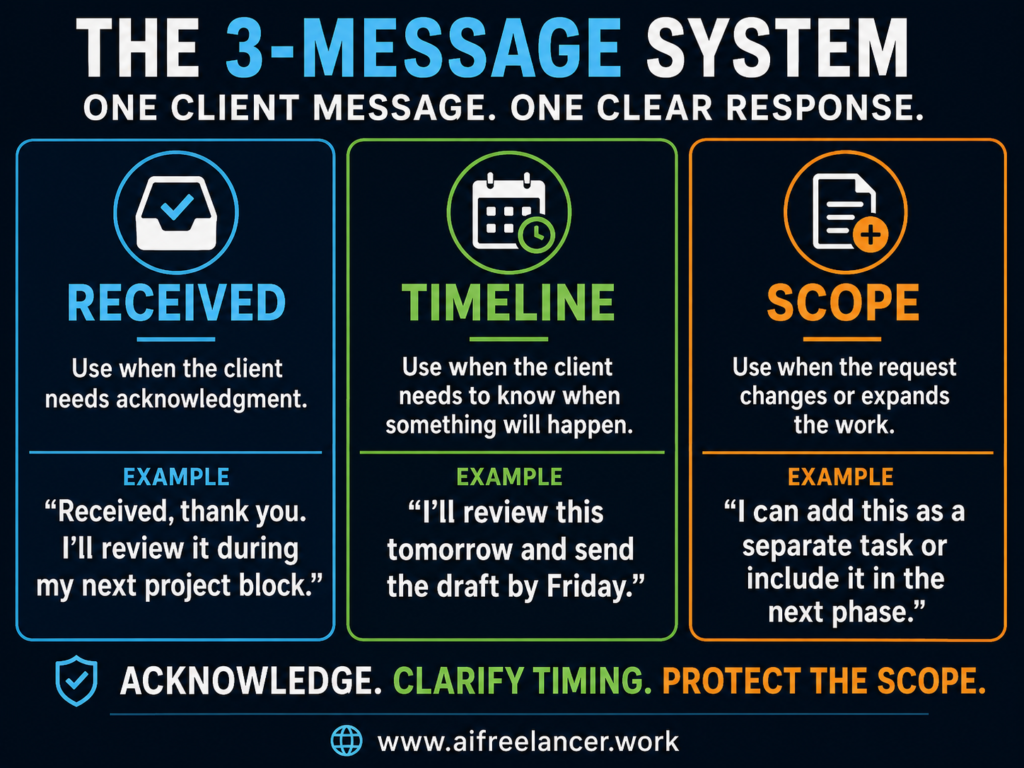
You do not need dozens of email templates. You need one repeatable communication pattern.
Most client messages fall into one of three categories. The client wants to know whether you received something. The client wants to know when something will happen. Or the client is adding, changing, or expanding the work.
The 3-Message System works because each message answers one type of uncertainty.
The Received Message Acknowledges Without Overcommitting
The Received message acknowledges the client without forcing you to interrupt your workflow. It confirms that you saw the message, file, comment, or request.
A weak response would be: “I’ll check this now.”
That sounds helpful, but it creates a problem if you do not actually have time to check it now. You have turned acknowledgment into an instant commitment.
A better response would be: “Received, thank you. I have this on my end and will review it during my next project block.”
A Received message also helps you reply faster without pressure because you are acknowledging the client without promising immediate action.
A Received message is enough when the client only needs confirmation. For example, if they send a source link, attach brand notes, or leave a comment in Google Docs, you do not need to analyze it immediately. You only need to let them know it has not disappeared into a void.
But acknowledgment is not enough when the message changes the project. If the client sends five new sources after the article is already drafted, that is not just a Received moment. It may need Timeline or Scope too.
For example: “Received, thank you. Since these sources came in after drafting started, I’ll review them tomorrow and let you know if they affect the current timeline or scope.”
The Timeline Message Tells Clients When to Expect Movement
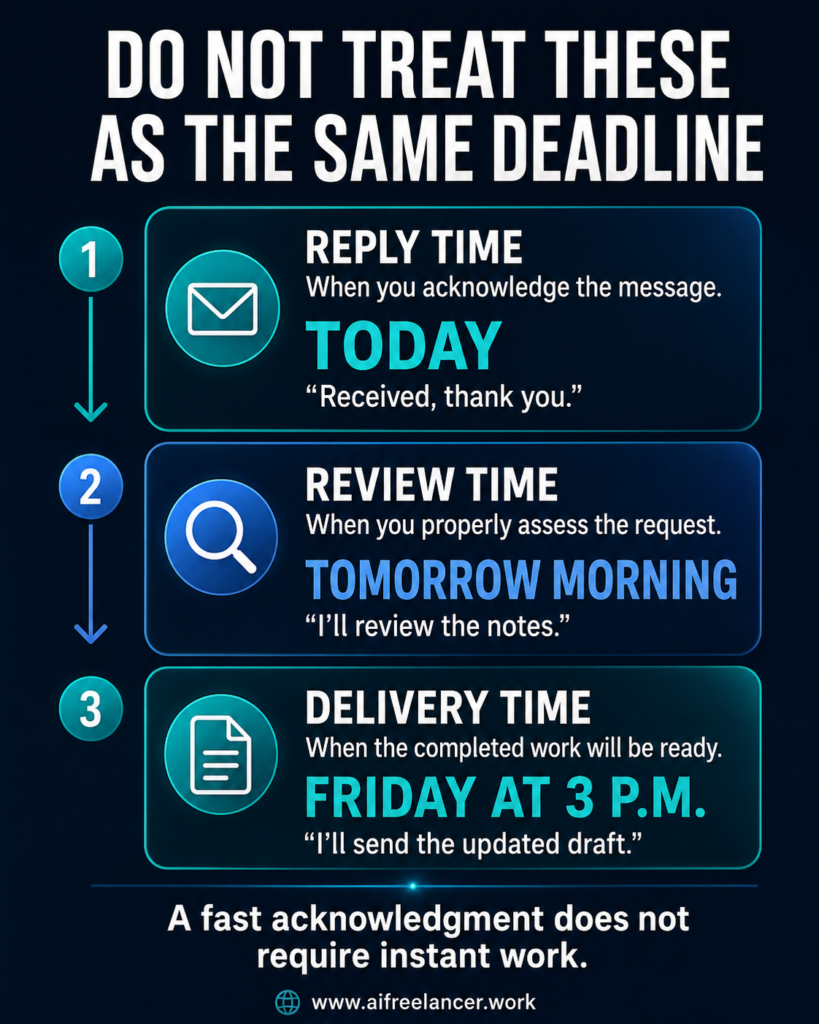
The Timeline message tells the client when to expect movement. This matters because “soon” means different things to different people. To you, it may mean Friday. To the client, it may mean this afternoon.
A weak response would be: “I’ll send it soon.”
A better response would be: “I’ll review this tomorrow morning and send the updated draft by Friday at 3 p.m.”
The Timeline message works best when you separate reply time, review time, and delivery time. Reply time means when you can answer. Review time means when you can properly check the request. Delivery time means when the work will be ready.
That distinction prevents unnecessary status requests.
Instead of saying, “I’ll get back to you,” say: “I can reply today to confirm receipt, review the notes tomorrow morning, and send the updated draft by Friday.”
The Scope Message Stops Quick Favors From Becoming Unpaid Work
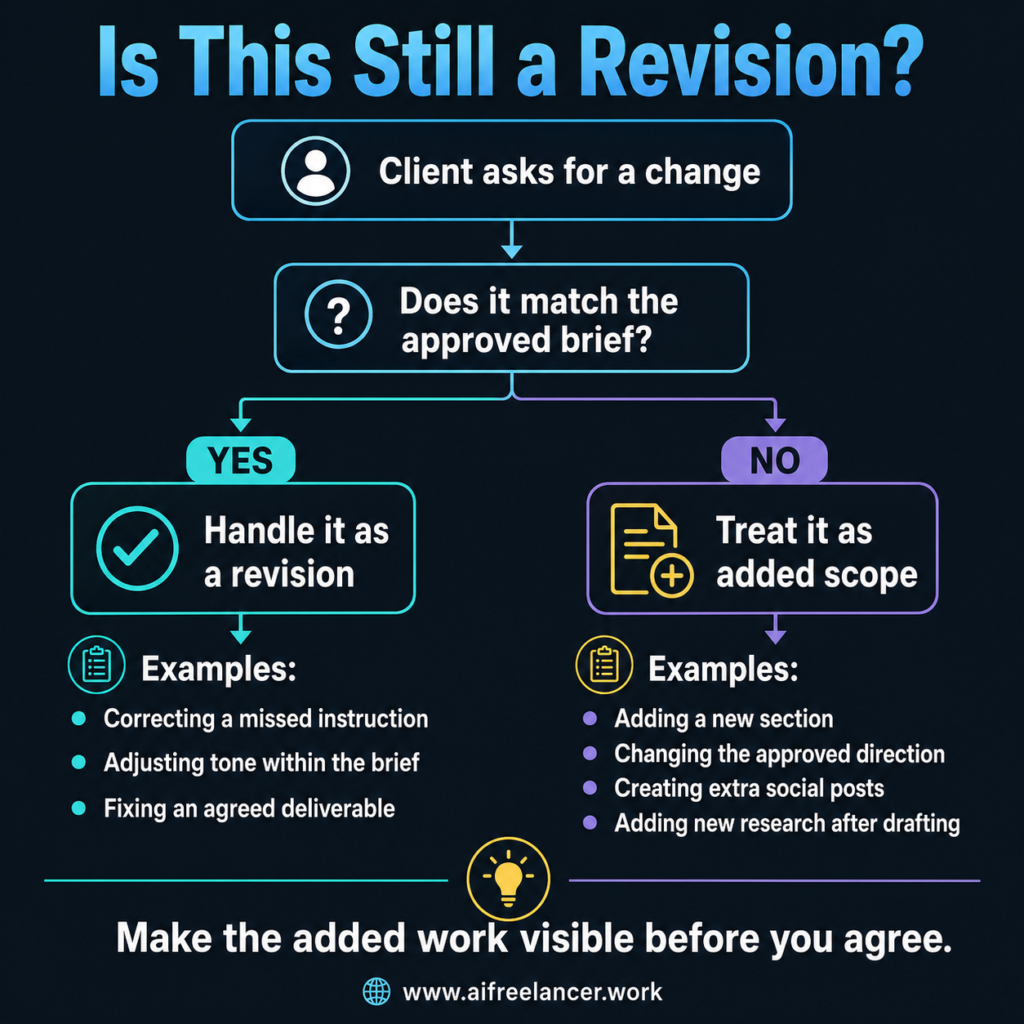
The Scope message stops “quick favors” from becoming unpaid work. This is the message you use when the client adds a new section, changes the direction, asks for extra revisions, or says something “should be quick.”
A weak response would be: “Sure, no problem.”
A better response would be: “I can add this. Since it is outside the original scope, I can either include it as an added task with an adjusted timeline or save it for the next phase.”
That kind of reply is clear without sounding cold. It does not accuse the client of overstepping. It simply makes the work visible.
For writers, this distinction matters because not every edit is a revision. Correcting a missed instruction is a revision. Rewriting the article around a new angle after approval is new work. Adjusting tone within the agreed brief may be a revision. Adding five LinkedIn posts after a blog project is an add-on.
You can say: “This looks like a new deliverable rather than a revision to the current draft. I can quote it separately or add it to the next content batch.”
When Client Expectations Break Down
The system matters most when a reply could easily turn into a rushed yes.
When Clients Ask for Just One More Thing
One common situation is the “just one more thing” request. The client may not be trying to take advantage of you. They may simply not realize that the request changes the workload. Your job is to slow the moment down before you agree.
You can say: “Happy to look at this. Before I add it, I want to clarify that this is outside the original deliverable. I can send a quick estimate or include it in the next phase.”
When Deadlines Suddenly Become Urgent
Another common situation is sudden urgency. A client may have a launch date, meeting, campaign deadline, or internal pressure you did not know about. Urgency happens, but it still needs structure.
Instead of saying, “I’ll try my best,” say: “I can prioritize this, but the fastest realistic delivery is Thursday afternoon. If you need something sooner, I can send a shorter version first and complete the full version after.”
That gives the client options without forcing you to promise the impossible.
When Clients Keep Asking for Updates
A third situation is repeated update requests. Treat repeated check-ins as a signal to set the next update point.
For longer projects, a simple status update system can help clients see what is done, what is next, and what is blocked without sending repeated check-ins.
You can say: “Here’s where things stand: the draft is in progress, and the next update will be on Friday by 2 p.m. You do not need to send anything before then unless your priorities change.”
That message does more than answer the question. It gives the client a clear next-check-in point.
When Client Feedback Comes in Late
Another situation is late feedback. A client may delay comments for a week, then still expect the original delivery date for the next version. This is where the conversation should focus on timing, not guilt.
You can say: “Received, thank you. Since feedback came in after the agreed review window, I can start the next round tomorrow and send the updated draft by Monday. If you need it sooner, I can adjust the schedule for a rush turnaround.”
This keeps the project moving without pretending the delay had no effect.
How to Manage Client Expectations in Your Daily Workflow
The best client communication system is the one you do not have to reinvent every time.
Set Expectations During Onboarding
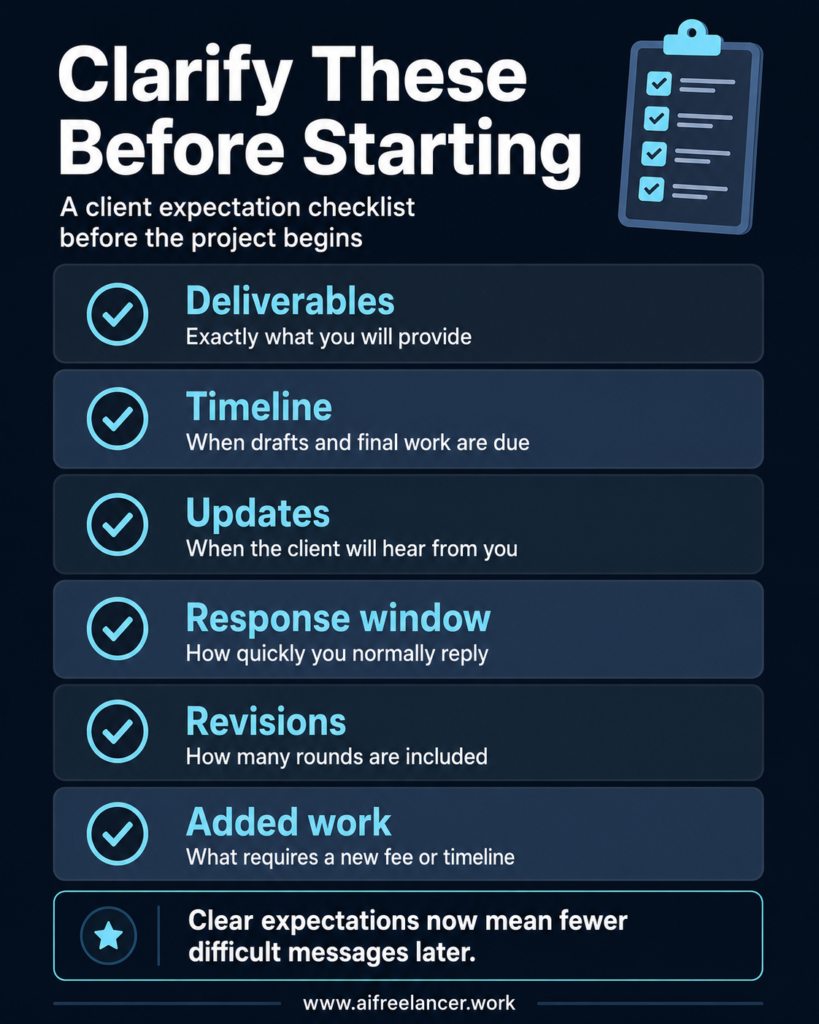
Start during onboarding. Your kickoff message should explain what you will deliver, when the client can expect updates, how revisions work, what counts as an added request, and how quickly you usually respond.
Upwork’s client communication guidance also emphasizes setting expectations around working hours, response times, turnaround times, and preferred communication channels before problems begin.
A simple onboarding line can say: “I usually reply within one business day. For this project, I’ll send the first draft on Wednesday and will flag any questions before then if something affects the timeline.”
A stronger onboarding note can also include revision and feedback rules.
For example: “This project includes one revision round based on the approved brief. Please send consolidated feedback within three business days of receiving the draft. If feedback comes in later, I’ll adjust the next delivery date based on my current schedule.”
That one paragraph tells the client what to expect, what counts as a revision, and what happens if feedback is late. It reduces confusion before the project becomes stressful.
Turn the 3-Message System Into Reusable Templates
You can also turn the 3-Message System into reusable templates. Create email, Slack, Upwork, and Google Docs versions. Save these templates where you actually communicate: Gmail drafts, Slack saved replies, Upwork messages, Google Docs comments, or your project notes. A template you cannot find quickly will not help when a client message arrives during a busy work block.
Once those templates are working consistently, you can go a step further by combining them with simple freelance automation. Automating routine reminders, status updates, and recurring admin tasks reduces manual work while keeping your communication consistent.
Use AI Without Letting It Make Client Decisions
When you are irritated, tired, or tempted to send a long explanation, AI can help you slow down. Use it to draft a calm first version, then check the reply against the actual project agreement before sending.
Try this prompt:
“Draft a calm, professional client reply. Acknowledge the request, clarify the next timeline, and avoid overpromising. Keep it warm, direct, and brief.”
Do not let AI make pricing decisions, promise deadlines, handle sensitive client concerns, or decide whether something is in scope. AI can draft the words. You still own the judgment.
Build a Client Communication Playbook
Save the replies that actually reduced client nudges. If clients keep asking when they will receive updates, improve your onboarding message. If they keep asking for extra work, strengthen your scope language. If they keep asking what counts as a revision, clarify your revision policy earlier.
These saved replies become your client communication playbook.
What Does It Mean to Manage Client Expectations?
To manage client expectations means to clearly explain what will happen, when it will happen, what is included, and what the client needs to do. For freelancers, this usually covers timelines, deliverables, response windows, revisions, feedback deadlines, and project scope.
In practical terms, it means the client should not have to guess when they will hear from you or whether a request is part of the original agreement.
How Do You Manage Client Expectations Without Sounding Rude?
Use clear, neutral language. Acknowledge the request, explain the timeline or scope, and give the client a next step. You do not need to over-apologize. A simple line like “I can help with this, but it falls outside the original scope” is professional when paired with options.
The key is to avoid sounding defensive. You are not scolding the client. You are clarifying how the work will be handled.
How Often Should You Update Clients During a Project?
It depends on the length and complexity of the project. For short projects, a confirmation message and delivery update may be enough. For longer projects, weekly or milestone-based updates work better. The key is to tell the client when they will hear from you before they feel the need to chase.
For example, a freelance writer working on a blog package might send a kickoff confirmation, a midpoint note if research affects direction, and a delivery update when the draft is ready.
What Should You Say When a Client Asks for Extra Work?
Clarify whether the request is included in the original agreement. If it is extra, explain the effect on fee, timeline, or deliverables. You can say: “This looks like an additional request rather than a revision. I can include it with an adjusted timeline or quote it separately.”
For writers, extra work may include new sections, extra social posts, new keyword research, additional interviews, added source review, or a major direction change after the draft is complete.
Can AI Help Manage Client Communication?
Yes. AI can help draft replies, shorten over-explained messages, and create reusable client communication templates. It is especially useful when you are tired, annoyed, or tempted to reply too quickly.
A useful AI-assisted workflow is to draft with AI, then edit for accuracy, tone, timeline, and scope. The message should still sound like you and reflect what you can actually deliver.
Sources
- Kirk, D. (2000). Managing expectations. PM Network, 14(8), 59–62. Project Management Institute.
- Microsoft. (2025, June 17). Breaking down the infinite workday. Microsoft WorkLab. Microsoft
- Moorhead, C. (n.d.). Build better client relationships: 10 communication strategies for freelancers. Upwork.
- Ohly, S., & Bastin, L. (2023). Effects of task interruptions caused by notifications from communication applications on strain and performance. Journal of Occupational Health, 65(1), e12408.
Final Thoughts
Learning how to manage client expectations is not about becoming stricter, colder, or less helpful. It is about making your communication clear enough that clients do not have to guess, chase, or push for answers.
Use Received when the client needs acknowledgment. Use Timeline when the client needs to know when something will happen. Use Scope when the client is adding, changing, or expanding work.
After a few projects, you stop wondering how to respond. You start recognizing the type of message in front of you. Does the client need acknowledgment? A timeline? A scope discussion? That is when the system becomes a habit instead of another communication technique.
If this system helped you see client communication as a workflow instead of another daily stressor, browse my books on my Amazon Author page for more practical systems on writing faster, using AI thoughtfully, and building a calmer freelance business.

Florence De Borja is a freelance writer, content strategist, and author with 14+ years of writing experience and a 15-year background in IT and software development. She creates clear, practical content on AI, SaaS, business, digital marketing, real estate, and wellness, with a focus on helping freelancers use AI to work calmer and scale smarter. On her blog, AI Freelancer, she shares systems, workflows, and AI-powered strategies for building a sustainable solo business.