
You are halfway through focused client work when a message appears: “Can you make a few quick changes and send this tomorrow?” The request looks small, but your mind immediately starts checking the brief, workload, files, deadline, and tone of your reply. Learning how to improve client communication is not only about answering faster. It is about giving clients clarity without allowing every new message to take control of your workday.
Client communication covers everything from onboarding to feedback, but this guide focuses on one daily problem: responding promptly without letting messages derail the work clients hired you to complete.
You do not always need to provide a complete answer immediately. A short first reply can tell the client what happens next while giving you time to review the request properly.
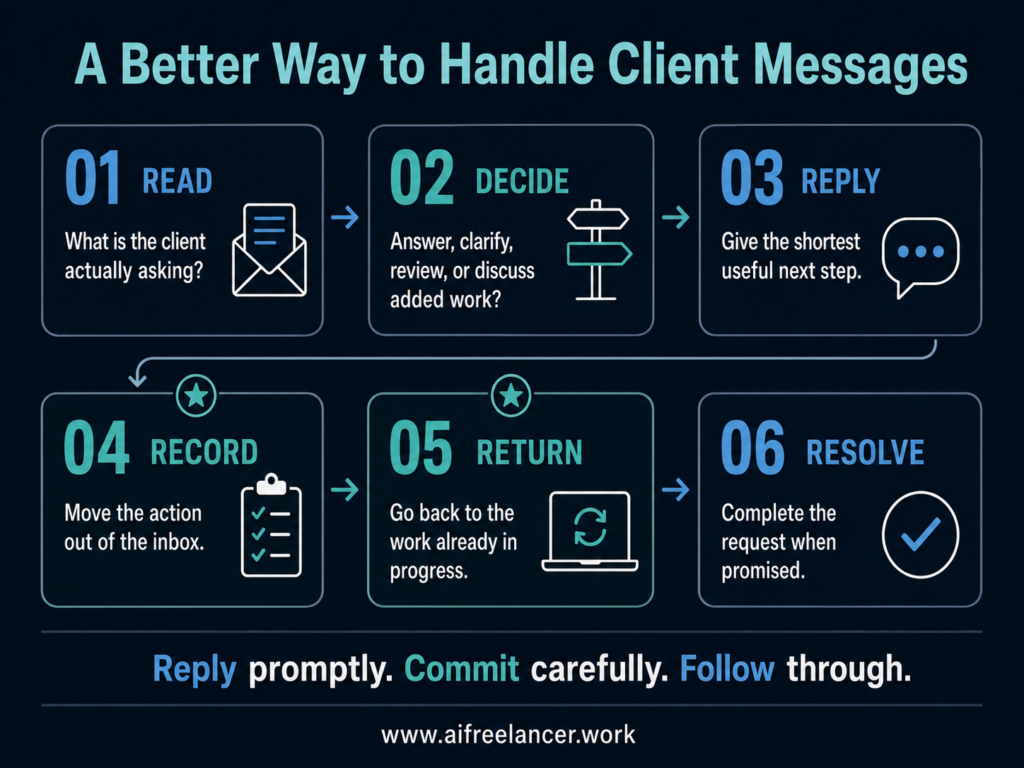
The process is simple:
- Read the message.
- Decide what it requires.
- Send the minimum complete reply.
- Record any resulting action.
- Return to focused work.
- Resolve the request when promised.
Everything I’ve shared here—and more—is in my book, available on Amazon. Click the link if you’re ready to take the next step.
Why Client Messages Take More Time Than They Should
A short message can interrupt for far more than the few seconds it takes to read. It creates a new decision while you are still mentally holding the details of another task.
Why Simple Client Messages Take So Long to Answer
The problem is rarely your typing speed. The message may contain several requests, and you are trying to determine what the client expects before you accidentally promise something you cannot deliver.
You may need to check whether the request fits the approved brief, whether it creates another task, and whether the suggested deadline is realistic. At the same time, you may be wondering whether a brief reply will sound dismissive or whether you need more information before you can respond accurately.
Researcher Sophie Leroy calls this attention residue. Her work found that when people switch tasks, part of their attention can remain focused on the previous task, especially when it was left unfinished. That residue can reduce performance on the next task.
A University of California, Irvine, study of 40 information workers also found that spending more time on email was associated with lower self-rated productivity and higher physiological stress.
This is why a two-line client message can affect the work that follows. You are not merely reading words. You are carrying an unresolved decision back into the project.
Instant Availability Creates an Expectation You May Not Be Able to Maintain
The obvious solution is to answer every message immediately. That can create a different problem.
When you regularly reply within minutes, clients may begin treating that speed as your normal service level. Evening replies can make your working hours unclear, while weekend replies can quietly turn optional availability into expected availability.
Microsoft’s 2025 Work Trend Index found that workers using Microsoft 365 were interrupted by a meeting, email, or notification about every two minutes during the working day. When activity outside normal hours was included, the average reached 275 interruptions per day.
Freelancers may not work inside the same corporate environment, but the pressure is familiar. Reliability does not require permanent availability. It requires a reply schedule that clients understand and that you can maintain consistently.
Rushed Answers Create Avoidable Commitments
A fast reply can save a minute now and create hours of difficulty later. The problem begins when reassurance turns into agreement before you understand the request.
You might agree to a delivery date without checking your workload, say “no problem” before reviewing what the change involves, or assume that new research is part of an ordinary revision. You may later discover that the request needs more time, additional information, or a revised fee.
Waiting until you have completed everything is not the answer either. Silence leaves the client wondering whether you received the message, understood the request, or plan to respond. It may also trigger unnecessary follow-ups.
The solution is to acknowledge the message without pretending the request has already been reviewed.
Separate the First Reply From the Finished Work
The pressure often comes from treating “respond” and “resolve” as the same instruction. They are different jobs, and separating them can make client response time much easier to manage.
What Response Time and Resolution Time Mean
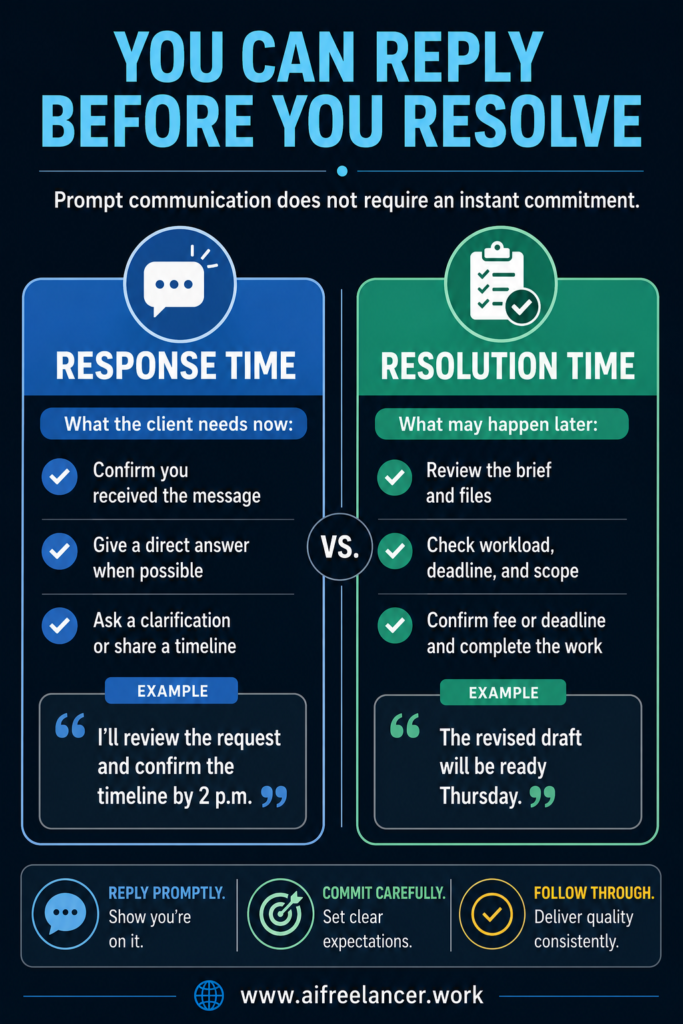
Response time is how long it takes you to send the first useful reply. That reply may confirm receipt, answer a simple question, ask for missing information, or explain when you will provide a complete answer.
Resolution time is how long it takes to finish the requested work or provide the complete decision. Resolution may require research, file review, client approval, schedule changes, or a revised quote.
Some messages can be answered and closed immediately:
Yes, the second headline is clearer. I’ll use it in the final draft.
Other messages need a first reply before you can provide the full answer:
Thanks for sending the requested changes. I need to compare them with the approved outline before confirming the revised delivery date. I’ll update you by tomorrow afternoon.
The second reply gives the client a clear next step without forcing you to make an uninformed promise.
Use a Minimum Complete Reply
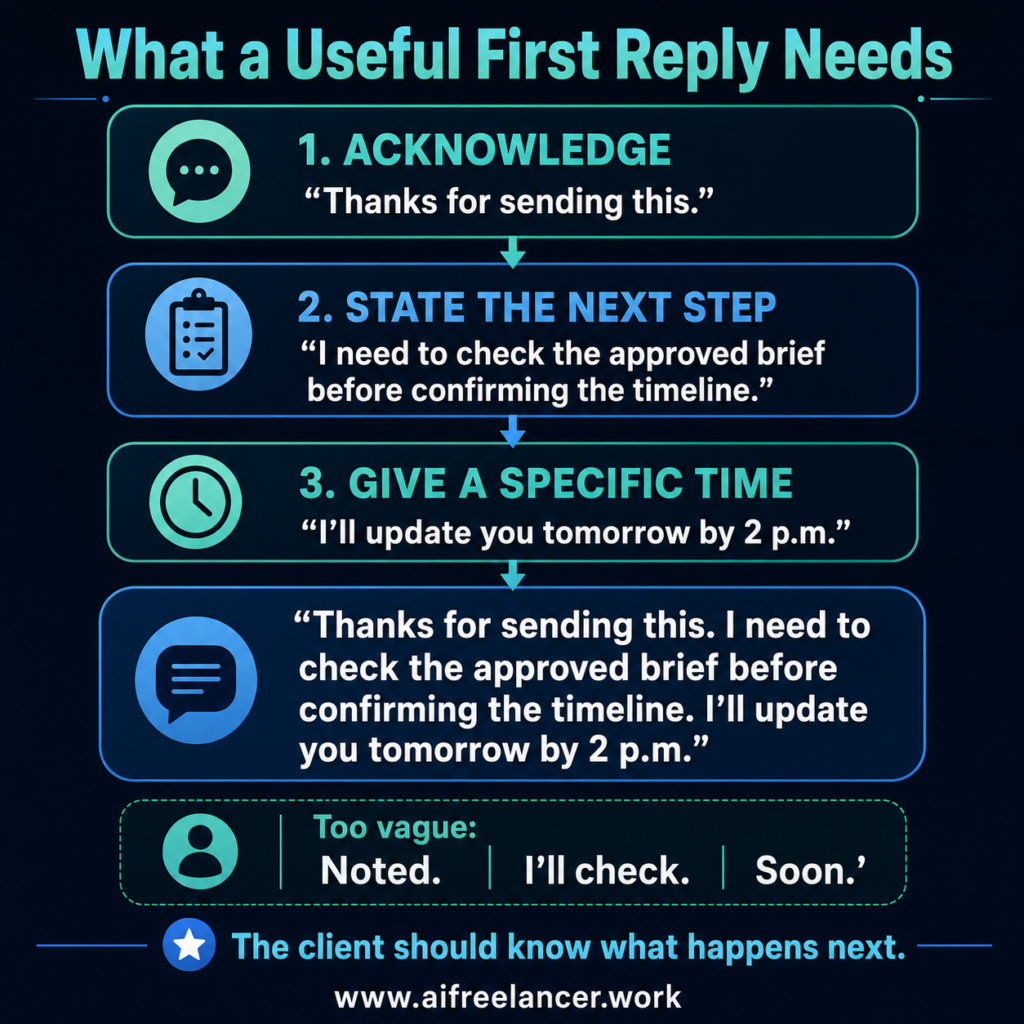
The minimum complete reply is the shortest message that gives the client enough information to understand what happens next. It is not a rigid script.
A useful first reply may acknowledge the message, answer what you already know, ask for missing information, state what you will do next, or give a time for the full answer. The exact combination depends on the request.
For example:
Thanks for sending this. I need to check the approved brief before confirming the timeline. I’ll update you tomorrow by 2 p.m.
Compare that with:
Noted.
“Noted” confirms that you saw the message, but it leaves several questions unanswered. The client still does not know whether you agree, need clarification, plan to act, or will provide another response.
The same problem appears in replies such as “Sure,” “I’ll check,” “No problem,” “I’ll get to it,” and “Soon.” Your message does not need to explain every detail, but it should tell the client what happens next.
Clients often need immediate clarity about the next step, not immediate completion of the work.
How to Improve Client Communication With a Six-Step Workflow
An inbox is a communication channel, not a project-management system. When you treat every message as an instruction to switch tasks, the newest request starts controlling your workload.
Use this six-step workflow:
Read → Decide → Reply → Record → Return → Resolve
These steps are flexible. A straightforward question may move from Read to Reply to Resolve immediately. Record and Return becomes necessary when the message creates work that belongs later in your schedule.
Read: Identify the Actual Request
Clients do not always package their messages into neat, separate instructions. One sentence may contain feedback, a new task, and an implied deadline.
Consider this message:
Can you add the approved client testimonial and send the final version this afternoon?
The request appears simple, but you may still need to confirm which testimonial was approved, where it belongs, and whether the requested delivery time fits the current schedule.
Before responding, identify what the client said, what result they want, what work the request creates, what must be checked, and what could go wrong if you answer too quickly.
Translate the message into an internal action:
Confirm the approved testimonial, add it to the correct section, and check whether afternoon delivery is realistic.
That sentence is more useful than leaving the original message open and rereading it several times.
Decide What the Message Actually Requires
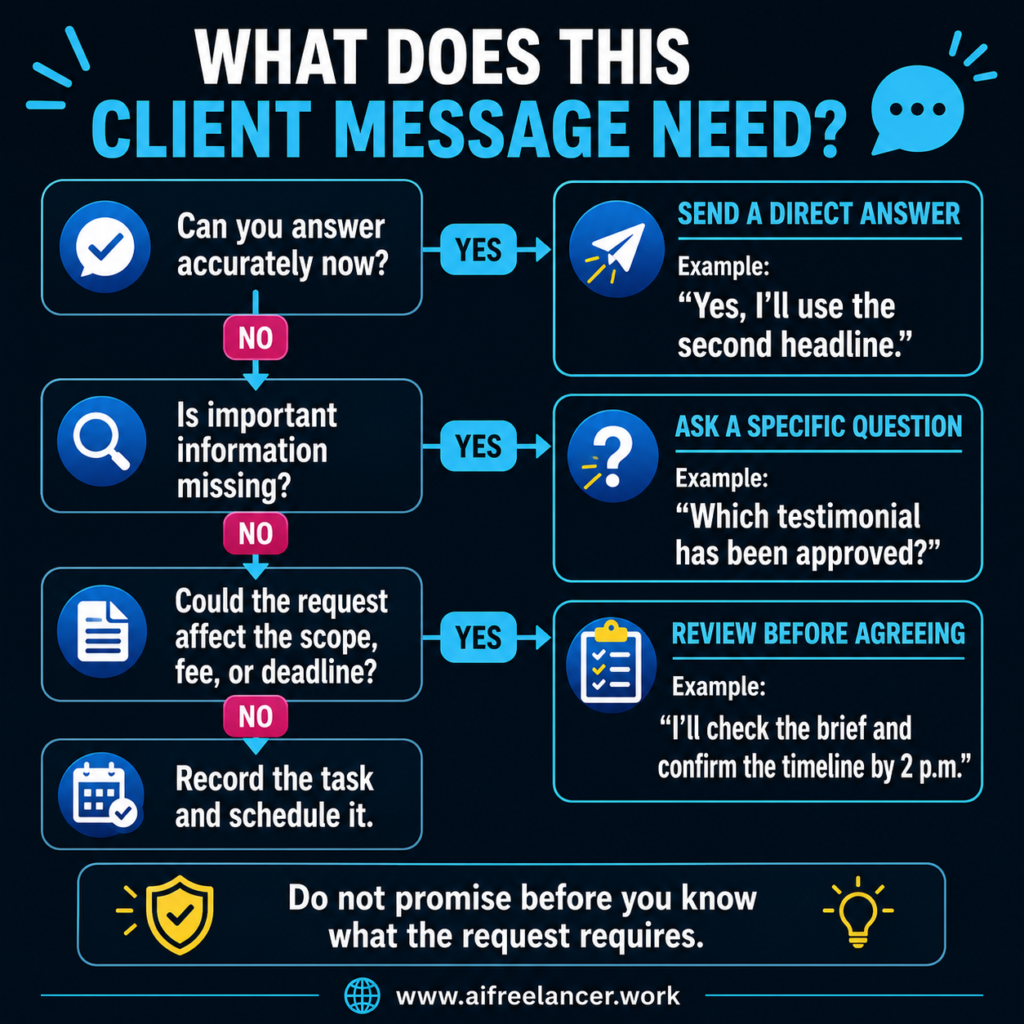
The quality of your reply depends on the decision you make before writing it. You need to determine whether the client requires an answer, clarification, review, a timeline, or a discussion about added work.
Use these questions:
- Can I answer accurately without reviewing anything else?
- Is important information missing?
- Does the message create a task?
- Does the request match the approved brief?
- Could it affect the fee, deadline, deliverables, or direction?
- Is the request blocking agreed work?
- Does the client need a full answer now or only a clear next step?
A minor wording request may be recent but not urgent. A missing approval that prevents you from completing today’s deliverable may be both urgent and important.
Once you understand the request, place the resulting work where it belongs. It may require immediate attention because the project cannot continue without your answer, or it may belong later in today’s schedule. You may also need to wait for approval, adjust your workload, or decline the request.
Ask for clarification when the answer could materially change the deliverable or cause significant rework. When the risk is low, and the approved brief supports one reasonable interpretation, you can state your assumption:
I’ll use the approved brand tone and the second headline unless you prefer otherwise.
Choose the Right First Reply
Once you know what the message requires, choose the reply that addresses the client’s immediate concern. Do not force a direct answer when the responsible answer is that you need to check.
Your first reply may be a direct answer, a clarification question, confirmation that the message was received, a timeframe for the full answer, or a pause before accepting possible added work.
The same principle applies across freelance services.
A designer might write:
I’ve received the request for an additional mobile layout. I’ll check the approved deliverables and confirm the timeline tomorrow morning.
A developer might write:
I’ve logged the issue. I need to confirm whether this is a bug within the current build or a new feature request before giving you an implementation date.
Both messages are prompt and useful. Neither freelancer has made a promise before checking the work involved.
Record: Turn the Message Into a Visible Action
A polished reply does not protect you from forgetting the task it created. The client believes the request is being handled, but the action may still be buried in your inbox.
The inbox should never become the task list. Record the client, required action, promised response or delivery time, and any missing information in whatever system you already use.
| Client | Required action | Due | Waiting for |
| Client A | Review the requested evidence | Tuesday, 2 p.m. | Approved source list |
| Client B | Replace the final headline | Today, 4 p.m. | Nothing |
| Client C | Assess the extra landing page | Wednesday, noon | Client approval |
You can use a spreadsheet, notebook, task manager, calendar, project board, or shared document. The tool matters less than moving the action out of the inbox.
That does not mean email is the enemy. It means commitments need a more reliable home.
Return: Go Back to the Task You Deliberately Chose
Recording the task removes the need to keep rehearsing it mentally, which makes it easier to resume the work you paused.
After recording the action, return to the task you deliberately prioritized. Handle the new request according to its place in the workload and reopen the original message when the scheduled work begins.
Before checking messages, leave yourself a clear return point:
Next: verify the third source and replace the outdated statistic.
Or:
Resume at the second paragraph and finish the comparison.
This small note reduces the effort required to reconstruct what you were doing before the interruption. A reliable system for keeping client tasks visible without carrying them mentally can make this step easier.
Resolve: Complete the Answer or Action When Promised
The first reply creates trust only when you follow through. A quick acknowledgment followed by a missed update is worse than a slightly slower reply you can support.
When completing the request, review the original message and recorded action, finish the promised work, confirm any decisions, and communicate changes before the deadline.
For example:
I’ve updated the introduction and replaced the outdated statistic. The revised draft is attached. No further action is needed unless you would like me to review the two headline options again.
See the Six Steps in an Illustrative Book Project
Consider this illustrative 30,000-word nonfiction book scenario. The client asks the writer to strengthen an approved chapter introduction, add two recent statistics, and return the revision the next day.
A first reply may be:
Thanks for sending the changes. I’ll review the introduction request and check the additional research required. I’ll confirm the delivery date by 2 p.m. today.
After checking the work, the follow-up may be:
I can revise the introduction within the current revision round. Finding and adding two new statistics requires additional research. I can include them with the revised fee and Thursday delivery, or I can complete the introduction revision by tomorrow as originally scheduled.
The writer does not confirm the revised deadline until the client chooses an option and the decision is recorded.
Build a Communication Schedule That Protects Focus
The six-step workflow helps when a message arrives. A communication schedule reduces how often messages interrupt you in the first place.
Choose Message-Checking Times That Match Your Workload
You do not need to keep every platform open all day to provide effective client communication. The more often clients need your answer before they can continue, the shorter your message-checking intervals may need to be. Work that requires uninterrupted writing, design, research, or development may need longer protected periods.
A freelancer with a few active clients might check messages at the beginning of the workday, after the main focus block, and before ending the day. When clients operate in different time zones, create one reasonable overlap window rather than rebuilding your schedule around every location.
Limit routine notifications and check messages at natural stopping points. Clients also send fewer status questions when progress is visible. After a call, a clear meeting follow-up email can confirm what was decided and what happens next.
Set Clear Reply Expectations
Your process will keep breaking if every client expects a different reply time, sends instructions through a different channel, and uses a different definition of urgent.
State Your Normal Response Window
Tell clients when you review messages and when they can expect a first reply. You can state this in your proposal, contract, welcome email, project brief, or shared project document.
For example:
I review project messages twice each business day and provide a first reply within one working day.
A first reply may answer the question or state what you need to review and when the client will hear back. It does not mean every new task will be completed within one working day.
Choose One Primary Communication Channel
Scattered client communication creates duplicate work. Choose one primary channel for project communication and one location for approved briefs and deliverables. Confirm important decisions in writing when they occur elsewhere.
Email works well for approvals and deadlines. Document comments work well for specific revisions. A project platform can hold tasks and due dates. When a discussion happens during a call or chat, send a short written summary afterward.
Define What Counts as Urgent
“ASAP” does not automatically make a request urgent. A message may need faster attention when work cannot continue without the answer, a live launch is affected, an existing deadline is at risk, or the client must approve something before the next stage.
Define the urgent channel, the hours when urgent support is available, and whether same-day or out-of-hours support costs extra.
How Fast Should a Freelancer Respond to Client Messages?
There is no universal client response time that suits every project. Ask whether the client is unable to continue without your answer, whether you can answer accurately now, and whether faster support is included in the service.
Direct clients can agree on their own reply standards. Freelance marketplaces may also measure responsiveness through platform-specific rules.
Upwork currently advises freelancers to aim for a reply within two hours when possible and, at a minimum, within 24 hours. It also allows freelancers and active clients to agree in writing on their own communication expectations
Fiverr uses the percentage of first replies sent within 24 hours when calculating the response rate. Its system tracks the first response to a new client message, although Fiverr also advises freelancers to continue the conversation until it concludes.
These are platform-specific expectations, not rules for every direct client.
Use a Response Guide Instead of One Rule
| Message type | First reply | What to check |
| New inquiry | Same working day when possible | Brief details and platform rules |
| Routine question or missing information | Within the agreed window | Whether you can answer now or need client input |
| Project blocker | As soon as practical during stated support hours | Whether work genuinely cannot continue |
| Revision or possible added work | Acknowledge promptly | Feedback, scope, fee, timing, and approval |
| Outside-hours message | Next business window | Whether faster support was agreed |
Practical Client Message Templates
Templates reduce the time required to write routine replies, but they cannot replace the Read and Decide steps. Choose the wording only after you understand what the message requires.
When You Can Answer Immediately
Weak reply:
Noted, thanks.
Improved reply:
Yes, the second headline is clearer. I’ll use it in the final version.
The improved reply closes the question instead of creating another exchange.
When You Need Time to Review the Request
Weak reply:
I’ll look at it.
Improved reply:
Thanks for sending the revised notes. I’ll compare them with the approved outline and confirm any timeline changes by 2 p.m. tomorrow.
The client knows the message was received, what you will check, and when the next answer will arrive.
When Important Information Is Missing
Weak reply:
Can you send more information?
Improved reply:
Before I draft the case-study section, could you send the final campaign results and confirm which customer quote has been approved? I can complete the introduction while waiting.
A designer could use the same principle:
Before I revise the homepage, could you confirm whether the new call to action replaces the approved version or should appear as an additional section?
Specific clarification questions are easier to answer and reduce unnecessary back-and-forth.
Repair a Missed or Rushed Reply
A good communication process does not make you perfect. Messages will occasionally be missed, and you may sometimes agree before checking what the request involves.
Correct a Missed Message Quickly
Acknowledge what happened and provide a realistic next step:
I missed your earlier message and should have confirmed it sooner. I’ve now reviewed the request and can send the completed revision by Thursday at 3 p.m.
A short, direct apology shows accountability without shifting the focus to your explanation.
Correct an Accidental Promise Before the Work Expands
A rushed “yes” does not become safer because you are embarrassed to correct it. Explain what became clear during the review and present practical options.
I initially said I could add the case study. After reviewing the request, I can see that it requires an additional interview and new research. I can add it with a revised fee and delivery date, or we can replace one of the examples already included.
You are replacing an uninformed promise with accurate options. A clear process for preventing scope creep without losing the client can help you make the added work visible before you proceed.
Redirect Scattered Messages Into One Place
When a client sends instructions through several channels, you may miss a change or follow an outdated version.
I’ve received the messages sent through email and chat. To prevent any instructions from being missed, please place the remaining feedback in the shared document. I’ll review the complete list and respond by tomorrow afternoon.
Repeated refusal to use the agreed channel may be a relationship problem rather than an organizational problem.
Check Whether the Response System Is Helping
Observe your messages for one week. Repeated follow-ups usually mean the next step or reply time is unclear. Replies that take too long may mean you are overexplaining. Forgotten requests point to weak task recording, while constant switching often means you are treating the newest message as the highest priority.
The aim is fewer forgotten actions, fewer rushed promises, and an easier return to focused work. When recurring administration keeps causing the same breakdowns, a simpler freelance workflow can reduce what you must remember manually.
How Can I Improve Client Communication?
Set clear reply expectations, ask specific questions, confirm next steps, and follow through when promised. Use the Read, Decide, Reply, Record, Return, and Resolve process for incoming messages. Simple questions may need only a direct reply, while complex requests may require review and a recorded follow-up task.
How Quickly Should You Respond to a Client?
Respond within the timeframe agreed with the client. Genuine blockers may need faster attention, while routine questions can wait for your normal message window. Freelance marketplaces may set their own response rules, so check the official guidance for the platform you use.
How Do You Avoid Miscommunication With Clients?
Confirm what you understand, keep final instructions in one agreed location, summarize decisions made during calls or chats, and state the next action clearly. When a request is ambiguous, ask a specific question instead of assuming what the client means.
What Should I Say When I Need More Time to Respond?
Confirm that you received the message, explain what you need to review, and give a specific time for your full answer. For example: “Thanks for sending this. I need to check the approved brief before confirming the delivery date. I’ll update you tomorrow by 2 p.m.”
How Do You Deal With Unclear Client Instructions?
Ask a question that identifies the exact decision you need. Instead of saying, “Can you clarify?” ask whether the request replaces the approved version, adds another deliverable, or changes the deadline. When the risk is low, you can state your assumption and allow the client to correct it.
Sources
- Fiverr. (n.d.). Everything you need to know about response time and rate. Fiverr Help Center.
- Leroy, S. (2009). Why is it so hard to do my work? The challenge of attention residue when switching between work tasks. Organizational Behavior and Human Decision Processes, 109(2), 168–181. https://doi.org/10.1016/j.obhdp.2009.04.002 ScienceDirect
- Mark, G., Iqbal, S. T., Czerwinski, M., Johns, P., Sano, A., & Lutchyn, Y. (2016). Email duration, batching and self-interruption: Patterns of email use on productivity and stress. Proceedings of the 2016 CHI Conference on Human Factors in Computing Systems, 1717–1728. Association for Computing Machinery.
- Microsoft. (2025, April 23). 2025: The year the Frontier Firm is born. Microsoft WorkLab. Microsoft
- Upwork. (n.d.). How to stay responsive to clients on Upwork. Upwork Help.
Final Thoughts
Learning how to improve client communication does not mean staying online all day.
The next time a client asks for “a few quick changes,” you do not have to choose between silence and an instant yes. Tell them what you need to check, say when you will confirm the answer, and return to the work already in progress.
A small change in how you handle that first reply can protect both the client relationship and the quality of your work.
For more practical guidance on freelance writing, AI-assisted workflows, and building a sustainable independent career, explore my books on my Amazon Author page.

Florence De Borja is a freelance writer, content strategist, and author with 14+ years of writing experience and a 15-year background in IT and software development. She creates clear, practical content on AI, SaaS, business, digital marketing, real estate, and wellness, with a focus on helping freelancers use AI to work calmer and scale smarter. On her blog, AI Freelancer, she shares systems, workflows, and AI-powered strategies for building a sustainable solo business.