
You open a blank document, ready to write. Then the hidden work begins. You have to decide the angle, structure, hook, examples, CTA, tone, and whether the first paragraph sounds right. By the time you finally start drafting, your brain has already spent half its energy rebuilding the same process you used last week.
That is why writing workflow templates matters. For writers who are tired of starting from zero, a reusable writing system can turn scattered decisions into a calmer process. Instead of forcing your brain to figure out every step again, you create a repeatable path from idea to finished draft.
The goal is not to make writing robotic. The goal is to stop wasting creative energy on setup work that can be systematized. When you pair templates with AI draft bots, saved prompts, content briefs, outline structures, and editing checklists, you can draft faster without handing over your voice.
Everything I’ve shared here—and more—is in my book, available on Amazon. Click the link if you’re ready to take the next step.
Writing Workflow Templates: What They Are and Why Writers Need Them
Most writers do not lose time because they cannot write. They lose time because they keep rebuilding the same invisible setup work before every draft. A writing workflow template is a reusable process that helps a writer move from idea to finished draft. It usually includes a content brief, outline structure, drafting instructions, editing checklist, and repurposing steps. Unlike a basic document template, it not only shapes the final format. It guides the thinking before, during, and after drafting.
This matters because modern writing work is rarely just writing. You may also be researching, organizing notes, checking search intent, planning examples, editing for voice, formatting for publication, and turning the finished piece into social content. Asana’s research on work about work found that people can spend around 60% of their time on “work about work” instead of skilled work. For writers, that “work about work” often shows up as searching through notes, rebuilding outlines, rewriting unclear sections, and deciding what to do next.
A repeatable writing process reduces that friction. Without a template, you have to decide the hook, angle, structure, examples, CTA, and editing criteria every time. A template turns those decisions into fields you fill in before drafting. That does not lower the quality. It protects quality because your energy goes where it matters: insight, examples, judgment, clarity, and voice.
Why a Repeatable Writing Process Reduces Decision Fatigue
Blank pages feel heavy because they carry too many decisions at once. You are not only writing the first sentence. You are deciding what kind of article this is, who it is for, what promise it makes, how deep it should go, what examples it needs, and where the reader should go next.
A reusable writing system removes some of those open loops. Instead of asking, “What should I do now?” you follow a known path. For example, a simple writing process template might ask:
- Who is the reader?
- What problem are they trying to solve?
- What is the search intent?
- What is the main promise of the article?
- What examples or proof should support the point?
- What should the reader do after reading?
Those questions do not write the article for you. They prepare your brain to write with less resistance.
How Templates Help Writers Draft Faster Without Lowering Quality
A good template does not make every draft sound the same. It gives each draft a stronger starting point. Think of it like a kitchen setup. A chef can still create different meals, but the prep station stays organized. The knives, pans, ingredients, and workflow are not reinvented every time.
Writing works the same way. Your topics, examples, arguments, and voice can change. The process can stay stable. A writing workflow template helps you separate the work:
- First, clarify the idea.
- Then, shape the structure.
- Then, draft.
- Then, edit.
- Then, repurpose or publish.
That order matters because many writers slow themselves down by drafting, editing, researching, and second-guessing at the same time.
Where Chaotic Writing Systems Usually Break Down
A messy writing process usually breaks down in the same places. The brief is unclear, so the draft wanders. The outline is weak, so the sections feel disconnected. The research sits in different tabs, so useful examples get lost. The tone is undefined, so the draft sounds flat. The editing stage has no checklist, so every sentence feels negotiable.
This is why templates are not just productivity tools. They are quality-control tools. When your process is visible, you can fix it. When it stays in your head, every draft depends on memory, mood, and energy.
Template vs Prompt vs Draft Bot: What Writers Should Know
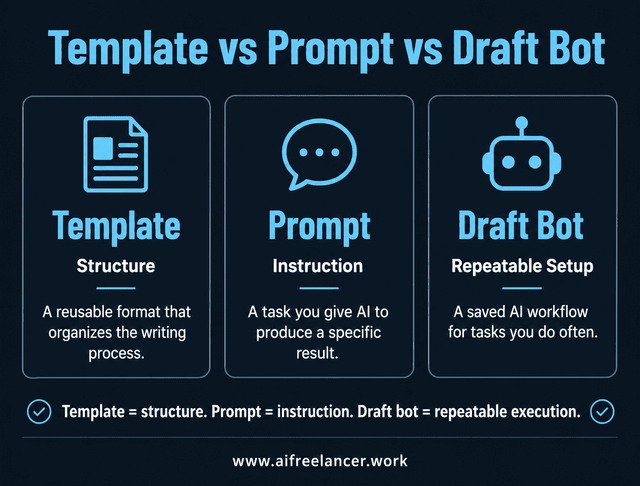
Writers often mix up templates, prompts, and draft bots. The difference matters because each one solves a different problem. A template is the structure. A prompt is the instruction. A draft bot is a reusable AI setup that applies the structure and instructions repeatedly.
A draft bot does not need to be a complicated tool. It can be as simple as one saved prompt, a custom GPT, project instruction, or a repeatable AI setup for client writing work you run every time you create a similar draft. A template gives you structure. A prompt tells AI what task to perform. A draft bot is useful when the same writing task happens often enough that it deserves its own repeatable system.
For example, if you write blog posts often, you might create a blog content brief template. Then you might create a prompt that asks AI to turn the brief into an outline. Then you might save a draft bot instruction that uses your brief, outline, sources, tone rules, and CTA style to produce a structured first draft. The template keeps the process stable. The prompt gives the task. The draft bot makes the process reusable.
How Writing Workflow Templates Save Time Before Drafting Starts
The biggest time savings often happen before the first paragraph is written. That sounds counterintuitive because most people think writing speed comes from typing faster. It usually does not. Writing speed improves when the writer has fewer unresolved decisions before drafting begins.
Microsoft’s 2023 Work Trend Index found that 62% of surveyed workers said they struggled with too much time spent searching for information during the workday. Writers feel this directly. A scattered research process can turn a simple article into a browser-tab maze.
A workflow template helps you gather and organize the raw material before you draft, so the article does not depend on memory. Instead of deciding the audience, angle, examples, and CTA from scratch, the writer fills in the fields and starts with a clearer path.
Build an Idea Capture System for Raw Thoughts
Ideas rarely arrive in perfect outline form. They show up as rough notes, client comments, article angles, voice memos, screenshots, quotes, or half-formed observations. An idea capture system gives those fragments one place to land.
This can be a simple document, spreadsheet, Notion board, Google Doc, or notes app. The tool matters less than the habit. What matters is that the raw material does not disappear before you can use it. Your idea bank can include pain points, reader questions, possible titles, examples, objections, source links, social post ideas, and phrases you want to reuse later.
Use Writing Workflow Templates to Remove Guesswork
A content brief is one of the most useful writing workflow templates because it removes the guesswork before drafting. This is the starter version of your input template: short enough to use quickly, but structured enough to keep the draft focused.
A simple content brief can include:
- Target reader
- Search intent
- Primary keyword
- Secondary keywords
- Main pain point
- Article promise
- Angle
- Examples
- Source notes
- Internal links
- CTA
- Tone notes
This is especially useful for SEO content, blog posts, newsletter articles, and client work. Instead of letting the draft discover its own direction halfway through, the brief gives the draft a job before you write.
Turn Recurring Writing Decisions Into Reusable Fields
Every writer has recurring decisions. The opening needs a clear angle. The context has to be deep enough without slowing the reader down. Examples need to appear at the right moments. Transitions have to connect one section to the next. The ending should feel complete instead of abrupt.
A template turns those recurring decisions into fields. Instead of asking, “How should I start?” your template asks, “What pain point opens this piece?” Instead of asking, “What should the CTA say?” your template asks, “What next step fits the reader’s problem?” A field like “name the reader’s pain point” does more work than a vague instruction like “write intro.”
Start With a Minimum Viable Writing System
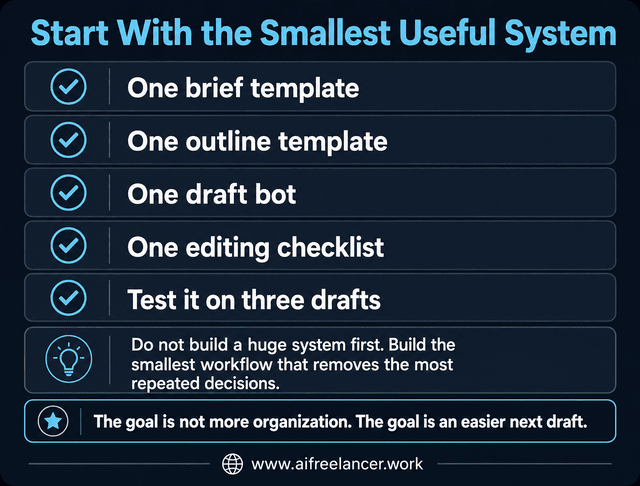
You do not need a complicated content production system to get results. A simple system is better than a perfect one you never use. Start with the smallest reusable workflow that removes the most friction.
Start with one brief template, one outline template, one draft bot, and one editing checklist. Then test the system on three drafts before adding anything else. This prevents the system from becoming another form of procrastination. Some writers spend more time designing workflows than using them. The goal is to open the next draft with the reader, angle, structure, and CTA already decided.
Use One Brief Template
Start with a short brief that captures the audience, topic, search intent, keyword, angle, source notes, and CTA. This gives every draft a clear direction before you start writing.
Use One Outline Template
Create a reusable outline structure that fits your most common content type. For a blog post, that might include the hook, problem, definition, steps, examples, mistakes, conclusion, and FAQs.
Use One Draft Bot
Build one saved AI prompt that turns the completed brief and outline into a structured first draft. It should help you move from structured input to a workable version without inventing facts or ignoring your source notes.
Use One Editing Checklist
Create a short checklist for clarity, flow, voice, paragraph length, redundancy, and CTA strength. This keeps editing from becoming endless sentence polishing.
Improve the System After Three Uses
Use the system three times before changing it. After three drafts, you will know what actually helps and what only looks useful. Remove unused fields. Add missing ones. Save strong examples. Keep the system lean.
After that starter version works, you can expand it into a fuller system.
How to Build Writing Workflow Templates From Your Existing Process
Before you ask AI to follow your process, you need to know what your process actually is. The easiest way to build writing workflow templates is not to invent a brand-new system. It is to reverse-engineer what already works.
Look at your strongest drafts. Study how they were built. You are looking for repeatable patterns you can turn into a rough-draft-first process that keeps writing moving instead of a system that slows you down with too many rules.
Audit Your Last Three Strong Drafts
Choose three pieces of writing that worked well. They can be blog posts, client articles, newsletters, book sections, LinkedIn posts, or lead magnets. Look for patterns:
- How did the piece open?
- What pain point did it address?
- How did the argument unfold?
- Where did examples appear?
- How did transitions work?
- What made the ending feel complete?
You are not copying the content. You are identifying the structure behind it.
Identify the Steps You Repeat Every Time
Most writers already have a process, even if it feels messy. You might start with research, then jot down points, then write a rough outline, then draft, then edit, then format, then create social posts.
Write those steps down. Then ask which ones belong in a repeatable workflow. This is where a chaotic process becomes visible.
Remove Steps That Slow the Workflow Without Improving the Draft
Not every habit deserves a place in your system. Over-researching can delay the draft. Rewriting too early can kill momentum. Switching between tools can scatter attention. Editing while drafting can turn one paragraph into a 40-minute problem.
The American Psychological Association explains that switching between tasks creates mental costs, especially when the tasks are complex. Writing is complex enough on its own. A workflow should reduce unnecessary switching, not add more of it.
Turn Your Best Process Into a Simple Writing Process Template
Once you see your repeatable steps, turn them into a template. Your first version does not need to be polished. It only needs to be usable. A simple writing process template might look like this:
- Capture the idea.
- Fill out the brief.
- Build the outline.
- Add source notes.
- Draft section by section.
- Edit for clarity and voice.
- Check the CTA.
- Repurpose the strongest ideas.
That is enough to start.
The Core Parts of a Reusable Writing System
Once you have audited your process, you do not need to build every template at once. Start with the parts that remove the most repeated decisions from your writing day.
A reusable writing system does not need many moving parts. It needs the right ones. Use The Reuse Loop:
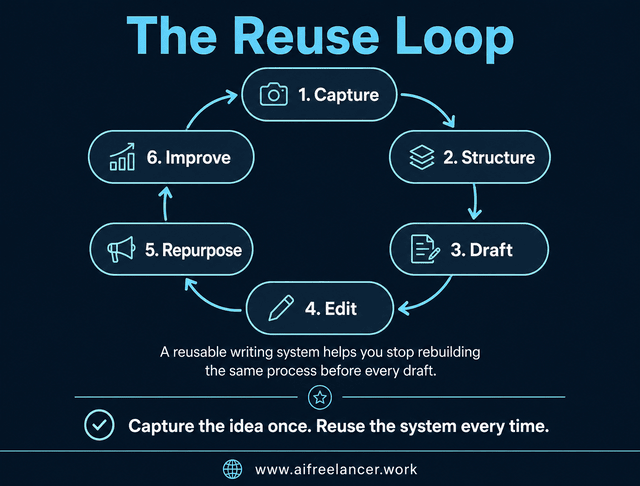
This loop keeps the process simple. You collect the raw material, shape the structure, produce the first draft, improve the writing, reuse the strongest ideas, and refine the system after using it.
You do not need to use every field below. Treat these as building blocks and keep only the ones that make your next draft easier.
Input Template: Collect the Raw Material
If the content brief is the starter version, the input template is the fuller version for repeat projects. It captures what the draft needs before writing begins.
Useful fields include:
- Target reader
- Reader pain point
- Search intent
- Primary keyword
- Secondary keywords
- Article goal
- Main angle
- Source notes
- Examples
- Internal links
- CTA
- Tone notes
- Banned phrases
- Final output format
This template prevents the draft from depending on scattered notes or vague memories.
Outline Template: Shape the Argument Before Drafting
The outline template gives the article its path. Useful fields include:
- Working title
- Hook angle
- Reader problem
- Promise of the article
- Main sections
- Supporting points
- Examples or proof
- Objections to answer
- Practical steps
- Final Thoughts direction
- CTA
This helps you see whether the piece makes sense before you spend time drafting it.
Draft Bot: Generate a Structured First Version
At this stage, the draft bot applies the structure you already built. Useful fields include:
- Role
- Task
- Audience
- Source material
- Outline
- Tone rules
- Voice samples
- Formatting rules
- Do-not-use phrases
- Output requirements
A request like “write a blog post about AI writing” gives the draft bot too much room to produce a polished but empty draft. A request built from a brief, outline, source notes, and voice rules gives it a smaller target and a clearer job.
Editing Checklist: Protect Clarity and Voice
An editing checklist keeps revision focused. Useful questions include:
- Does the intro name the pain point clearly?
- Does each section move the article forward?
- Are there too many one-sentence paragraphs?
- Are claims supported?
- Does the draft sound like the writer?
- Are transitions smooth?
- Is the CTA specific?
- Are repeated ideas removed?
This helps you edit the draft as a whole instead of treating every sentence like a separate emergency.
Repurposing Template: Turn One Draft Into Multiple Assets
A finished article can become more than one piece of content. Useful fields include:
- Main idea
- Best quote
- Pain point
- Practical tip
- Contrarian angle
- CTA
- Social post version
- Email version
- Carousel version
- Short-form video script
This is where a content workflow template saves even more time. One strong article can become multiple smaller assets without starting from scratch.
Turning Writing Workflow Templates Into AI Draft Bots
The next step is using AI without letting the output become flat or interchangeable.
Templates organize the process. Draft bots help execute parts of it. Once the template is clear, the draft bot applies that structure repeatedly. It can help outline, draft, edit, or repurpose content when the writer provides a clear goal, audience, source material, and rules.
McKinsey has reported that current generative AI and other technologies could automate work activities that take up 60% to 70% of employees’ time. For writers, the best use of that potential is not handing over judgment. It is systematizing repeatable drafting support while keeping control of the idea, accuracy, and final direction.
Writing Workflow Templates Become Stronger When Paired With Prompts
A template tells you what information the draft needs. A prompt tells AI what to do with that information. Together, they create a reusable AI writing workflow.
For example, your template may contain the audience, keyword, outline, source notes, and CTA. Your prompt tells the draft bot to use only that material, follow the outline, preserve the tone, avoid unsupported claims, and produce a clear first draft.
Add Role, Goal, Audience, Source Material, and Output Rules
A strong draft bot instruction should include:
- Role: What should AI act as?
- Goal: What should the output accomplish?
- Audience: Who is the piece for?
- Source material: What information should it use?
- Structure: What outline should it follow?
- Tone rules: How should it sound?
- Constraints: What should it avoid?
- Output format: What should the final response look like?
This is the difference between handing AI a blank assignment and giving it a defined lane.
A Simple Draft Bot Instruction You Can Reuse
You can start with a prompt like this:
You are helping me draft a piece of content using my writing workflow template. Use the audience, search intent, outline, source notes, tone rules, and CTA below. Follow the structure closely. Do not add unsupported claims. Keep the writing clear, practical, and natural. Preserve my voice based on the examples provided.
Then add the reusable fields:
- Role
- Goal
- Audience
- Search intent
- Source material
- Outline
- Voice rules
- Banned phrases
- Output format
- Editing instructions
The prompt is not magic. It is simply a way to make your writing process easier to repeat.
Before and After: From Vague Prompt to Usable Workflow Instruction
A vague prompt might look like this:
“Write a blog post about AI writing.”
That gives the tool a topic, but not enough context. It does not know the reader, the purpose, the angle, the evidence, the structure, the tone, or what the finished piece should help the reader do.
A better workflow instruction looks like this:
“Write a blog post for freelance writers who want to use AI without losing their voice. Open with the fear of sounding interchangeable. Explain why a content brief, outline, voice guide, and editing checklist help keep the writer in control. Use a calm, practical tone. Include one concrete workflow example and end with a CTA to the Amazon Author page.”
The second version is still simple, but it gives the draft bot a real job. It turns a vague topic into a usable writing direction.
Use Templates to Keep AI Drafts Consistent
AI often produces flat drafts when the instructions are vague. A defined template gives it boundaries. It knows the reader, the purpose, the structure, the examples, and the tone rules. This is why a draft bot works better when it is connected to a content brief and outline instead of a one-line command.
Nielsen Norman Group has written about AI as a shift in how people interact with tools, but the writer still has to guide the work. That is the right mindset for writers. Let the draft bot help with structure and speed, but keep human judgment in charge.
When Not to Let AI Draft Bots Lead
AI draft bots are useful for structure, first-pass drafting, repurposing, outlining, and editing prompts. They are less reliable when the work depends on personal experience, sensitive claims, original judgment, or final factual accuracy.
The draft bot should not lead when the piece needs a personal story that only you can tell. Keep your final opinion in your hands. Use separate fact-checking instead of treating AI as the only source of truth. Make sure it does not invent examples, sources, or statistics. If a sentence sounds polished but weakens the point, revise it yourself. A draft bot should support the process. It should not become the writer.
Example: A Simple AI Writing Workflow for Repeat Blog Posts
A reusable system becomes easier to understand when you see it in motion. Here is a simple AI writing workflow for repeat blog posts:
- Capture the idea.
- Fill out the content brief.
- Generate the outline.
- Review the argument.
- Run the draft bot.
- Edit for voice and clarity.
- Optimize for search intent.
- Repurpose into smaller content assets.
This workflow works because every step has a job. You are not asking AI to “write something good.” You are giving it a path.
Blog Post Workflow
A freelance writer uses the same content brief and outline structure for three recurring client blog posts. The topic changes, but the system keeps the setup work consistent.
The brief captures the target reader, search intent, keyword, angle, source notes, and CTA. The outline organizes the argument. The draft bot creates a first version. The writer edits for accuracy, flow, and client requirements. The system removes the repeated setup work.
Worked Example: A Blog Post Brief Filled In
Here is what one filled-in workflow could look like before drafting.
Topic: How freelancers can use AI without losing their voice
Audience: Mid-career freelance writers who use AI but worry their drafts sound interchangeable
Search intent: Learn a repeatable process for using AI while keeping human judgment and style
Primary keyword: AI writing workflow
Angle: AI should support the writer’s structure, not replace the writer’s judgment
Reader pain point: The writer wants to save time but does not want every draft to sound like generic AI content
Main promise: Show a simple process for using briefs, voice rules, examples, and editing passes to keep AI-assisted drafts personal and useful
Source notes: Include research on work fragmentation, time spent searching for information, and human oversight in AI workflows
CTA: Visit the Amazon Author page for books and resources on smarter writing systems
Draft bot instruction: Use the brief and outline to create a practical first draft with a calm, direct tone. Do not add unsupported claims. Preserve the writer’s voice using the sample paragraphs and banned phrases provided.
This example shows the real value of the system. The writer is not starting with a blank document or a vague AI prompt. The thinking has already been shaped before the draft begins.
Social Post Workflow
A solo creator turns one article section into a LinkedIn post, one practical tip, and one short caption without opening a blank document each time.
The repurposing template asks for the main idea, audience pain point, takeaway, CTA, and tone. The draft bot creates options. The creator chooses the strongest version and edits it. This is how reusable writing templates support consistency without forcing every post to sound identical.
Client Content Workflow
A writer handling monthly client content saves the intake questions, structure, voice notes, and CTA rules so each new assignment starts with a ready-made path. The same kind of workflow can also help you turn client requirements into faster proposal drafts when you need to respond without rebuilding the entire proposal process.
Instead of asking the same questions from scratch every month, the workflow already knows what to collect. The writer still adapts the content to the client’s goals, but the process no longer depends on memory.
Why Some Writing Systems Become Another Abandoned Template
Some templates fail because they create more work instead of less. A writing system should make the next step clearer. If it makes the writer feel trapped, confused, or over-managed, it will be abandoned.
Making the Template Too Rigid
A rigid template forces every draft into the same shape, even when the topic needs a different structure. Some articles need fewer sections. A client post may need a different tone. Certain ideas also need more depth than others.
A useful template gives direction without removing judgment.
Making the Template Too Vague
A vague template does not reduce decisions because the writer still has to figure out what each section means. A field that says “write intro” is not very helpful. A field that says “name the reader’s pain point, show the cost of the problem, and introduce the system as the solution” gives clearer direction.
Specific fields reduce friction.
Asking AI to Draft Before the Idea Is Clear
AI works better when the writer gives it a clear angle, audience, structure, and source material. A vague idea will usually lead to a vague draft. A weak outline can make the draft wander. Missing sources may also push the output to fill gaps with unsupported claims.
The draft bot can help execute the process. It should not be responsible for inventing the strategy.
Forgetting to Include Voice Rules
A writing system should preserve the writer’s voice, not flatten it. Voice rules work best when paired with examples, source notes, banned phrases, and final human editing. Otherwise, AI may produce polished sentences that sound like everyone else.
How to Keep Your Writing Workflow Templates Useful After the First Week
The best templates are not static documents. They become clearer, shorter, and more useful with repeated use. A template is only valuable if you keep using it. That means it has to fit the way you actually write, not the way you wish you wrote.
Track Where You Still Get Stuck
Pay attention to where the workflow slows down. Do you get stuck filling out the brief? Building the outline? Turning notes into sections? Editing the intro? Repurposing the article?
The stuck point tells you where the template needs improvement.
Remove Unused Template Fields
Fields nobody uses create clutter. If a section does not improve the draft, remove it. A shorter template that gets used is better than a detailed one that creates resistance.
Add Examples When AI Output Gets Vague
If the draft bot produces vague output, add examples. Save strong intros, transitions, CTAs, section openings, and final paragraphs. Over time, these examples become part of your voice guide.
Save Strong Outputs as Future Samples
Every strong draft can improve your system. Save a paragraph that works. Keep a structure that works. If a CTA feels natural, save it too.
This creates a small library of writing samples your future prompts can reference.
Review Your Writing Workflow Templates After Every Three to Five Uses
Do not revise the system after every single draft. That can become its own distraction. Review it after three to five uses. By then, you will see patterns. You will know what helps, what slows you down, and what needs to change.
Measure Whether the System Is Actually Working
A writing system should make the work easier to start, finish, and reuse. If it only looks organized but does not change the writing experience, it needs revision.
After three to five uses, ask:
- Did the draft start faster?
- Did the outline need fewer rewrites?
- Did editing take less time?
- Did the draft stay closer to the intended voice?
- Did repurposing become easier?
- Which field did I ignore every time?
- Which step still felt unclear?
These questions keep the system honest. The goal is not to maintain a template for its own sake. The goal is to make writing feel less scattered and more repeatable.
How to Use AI Draft Bots Without Flattening Your Voice
The biggest fear writers have about AI is not speed. It is sameness. Reusable systems and AI draft bots can make writing faster, but they can also make writing sound interchangeable if the writer gives up too much control. Your voice comes from your judgment, examples, lived experience, phrasing, opinions, rhythm, and editing standards.
A draft bot can help you produce the first version. It cannot care about the sentence the way you do. Writers can use AI draft bots without losing their voice by giving the bot examples, tone rules, banned phrases, source notes, and final human editing. The system should support the writer’s choices, not replace them.
Create a Voice Guide
A voice guide helps AI understand what your writing should sound like. Include tone, sentence style, rhythm, preferred words, banned phrases, and examples.
For example, you might write:
My writing uses clear, practical language. Hype has no place in the tone. Grounded examples matter more than inflated claims. Avoid phrases like “unlock your potential,” “supercharge your workflow,” or “game-changing.” The style should carry calm authority and direct explanations.
That kind of guidance gives the draft bot a better target.
Use Source Notes and Personal Examples
Specific examples make writing less interchangeable. Source notes give the draft factual grounding. Personal examples give it texture. Reader pain points give it relevance.
If your source notes say, “Microsoft found many workers struggle with too much time spent searching for information,” the article can connect that to the writer’s daily problem of digging through scattered research. That is stronger than saying, “AI improves productivity.”
Edit for Rhythm, Not Just Grammar
Grammar tools can catch errors. They cannot always protect rhythm. Read the draft for flow. Look at paragraph length. Listen for repetitive sentence patterns. Cut vague claims. Replace generic lines with sharper observations.
Editing is where the writer takes the draft back.
Final Thoughts
Writing feels heavier when every draft starts from zero. You are not only creating sentences. You are rebuilding the brief, the outline, the structure, the tone rules, the editing process, and the repurposing plan every time.
Writing workflow templates saves time because they turn repeated decisions into a reusable process. AI draft bots can make that process faster, but the writer still controls the thinking, judgment, voice, and final edit.
Start small. Build one brief template, one outline template, one draft bot, and one editing checklist. Use them three times. Improve what actually helps. Remove what does not.
The point is not to write like a machine. The point is to stop making your brain carry a process that could live in a template. For freelance writers and service providers, the same principle also supports healthier client communication habits because clear systems make expectations easier to explain.
For more practical writing guides, visit my Amazon Author page and explore the books that can help you build calmer, smarter writing systems.
Frequently Asked Questions About Writing Workflow Templates
A writing workflow template is a reusable structure that guides a piece of content from idea to final draft. It can include the content brief, outline, draft instructions, editing checklist, and repurposing steps.
Start by reviewing your strongest past drafts. Identify the steps you repeat, remove unnecessary friction, and turn the useful steps into a template you can reuse for future writing projects.
Yes. AI can help writers save time by organizing notes, creating outlines, drafting first versions, editing for clarity, and repurposing finished content. The writer still needs to guide the angle, sources, voice, and final judgment.
A writing template gives the structure. A prompt gives the instruction. A draft bot combines both into a reusable AI-assisted process that can follow the same writing workflow repeatedly.
Use a voice guide, provide writing samples, include banned phrases, add source notes, and edit the output for rhythm, clarity, and personality. AI can support the draft, but the writer should still control the final voice.
Sources
- Asana — Work about work
- Microsoft Work Trend Index — Will AI Fix Work?
- American Psychological Association — Multitasking and task switching
- McKinsey — The economic potential of generative AI
- Nielsen Norman Group — AI as a new UI paradigm

Florence De Borja is a freelance writer, content strategist, and author with 14+ years of writing experience and a 15-year background in IT and software development. She creates clear, practical content on AI, SaaS, business, digital marketing, real estate, and wellness, with a focus on helping freelancers use AI to work calmer and scale smarter. On her blog, AI Freelancer, she shares systems, workflows, and AI-powered strategies for building a sustainable solo business.

