
The meeting ends. Everyone says, “This was helpful.” You close the call, open your draft, and finally try to get back into writing.
Then the emails start.
“Just checking, are we changing the intro?”
“Can you resend the source link?”
“Did we agree to keep the original angle?”
“Who’s sending the screenshots?”
“Is Friday still the deadline?”
This is why a meeting follow-up email matters. Not because you need one more polite message in the thread, but because one unclear recap can turn a 30-minute call into an afternoon of admin.
If you are a freelance writer, consultant, coach, or client-facing creative, the cost is not just the email itself. It is the focus you lose every time you have to stop writing, reread notes, explain the same decision, or chase the same missing file.
Microsoft’s WorkLab research found that the average worker receives 117 emails and 153 Teams messages daily. For overloaded professionals, every unnecessary follow-up message adds friction to an already crowded day.
A good follow-up email does not recap every word from the meeting. It turns the conversation into decisions, action items, owners, deadlines, missing inputs, and next steps.
Everything I’ve shared here—and more—is in my book, available on Amazon. Click the link if you’re ready to take the next step.
Quick Answer: What Makes a Meeting Follow-Up Email Useful?
A useful meeting follow-up email tells everyone what was decided, what happens next, who owns each task, what is still missing, and where the important links or files are. The goal is not to summarize the entire call. The goal is to prevent the next “Just checking…” or “Can you clarify?” email.
That means your recap should do more than say thank you. It should make the meeting outcome easy to act on.
At a minimum, include:
- Confirmed decisions
- Action items
- Task owners
- Deadlines or expected timing
- Waiting-on items
- Useful links or attachments
- One clear next step
If your email answers the questions people would otherwise ask later, it has done its job.
A full template appears below, but first, it helps to understand why most meeting recaps produce more messages rather than fewer.
Why a Meeting Follow-Up Email Often Creates More Messages
Follow-up emails multiply when the meeting outcome is not sorted.
A weak recap does not reduce confusion. It simply moves the confusion from the meeting into the inbox.
The real problem is not always the follow-up email itself. The real problem is the unclear meeting outcome. Many calls end with conversation, not closure. Everyone remembers the discussion differently. One person remembers a suggestion as a decision. Another assumes the deadline is flexible. Someone else thinks the client still needs to approve the direction before work continues.
Atlassian found that more than a third of workers lose 40-plus hours a year because of unclear written communication. That is what vague meeting recaps create: extra work that could have been avoided.
That is how one meeting becomes five extra messages. It is also why freelancers need a simple way to cut repeat admin instead of treating every follow-up as a separate task.
Vague Recaps Leave People Guessing
A vague recap sounds polite, but it does not help anyone move forward.
Something like “Thanks for meeting today. I’ll send updates soon” may feel professional, but it leaves too much open. What updates? Which direction was approved? What changed? What is still needed from the client?
This can mean a freelance writer leaves the call thinking the blog angle was approved, only for the client to ask later whether the old outline is still in use. A consultant may remember the discussion clearly but still needs to confirm the actual decision. A coach may leave the session with a next step that felt obvious in the moment but fuzzy afterward.
Decisions and Action Items Get Mixed Together
A meeting can feel clear while everyone is talking. The problem shows up after the call, when people start acting on different versions of what they think happened.
Maybe the client said, “I like the second angle better.” Was that the final decision or just a preference? Maybe they said, “Let’s soften the tone.” Does that apply to the intro only, or the full draft?
Action items are just as easy to lose. During a client call, someone may mention source links, product screenshots, a publishing date, SME interview notes, and a case study example. If those details stay buried inside notes, they become hidden work.
A strong meeting recap email should separate confirmed decisions from loose comments and visible tasks from casual ideas.
Client Input Gets Buried Inside Messy Notes
Client meetings rarely produce clean information. They produce a mix of decisions, preferences, questions, examples, blockers, and casual ideas.
A client might approve the blog angle, mention a possible new section, ask for a softer tone, forget to send the source link, and casually say, “Maybe we can revisit the intro.” Those details do not belong in one messy paragraph.
Your follow-up email has to sort them.
Approved direction goes under decisions. Missing source links go under waiting on. “Maybe we can revisit the intro” should not be confirmed as a task unless the client actually approves it.
Outcome-Free Emails Reopen the Meeting
Some follow-up emails reopen the same conversation they were supposed to close.
This usually happens when the email summarizes topics instead of outcomes. The message says what was discussed, but not what was decided. Tasks may be mentioned, but ownership stays unclear. Background details take up space, while the next action is still missing.
A better email tells the client exactly what changed, what stayed the same, and what you still need before the draft can move.
What a Meeting Follow-Up Email Should Actually Do
A meeting follow-up email should make sure the client, writer, and reviewer are not carrying three different versions of the same call.
That distinction matters because clients, writers, and reviewers can leave the same call with different assumptions. For freelancers and consultants, that is the difference between moving the project forward and spending another hour clarifying what the call was supposed to settle.
Confirm Decisions Before They Become Confusion
The first job of the email is to state what was agreed on.
For client work, confirmed decisions might include the approved blog angle, final outline direction, accepted revision request, rejected idea, approved CTA, draft deadline, or next review date.
Instead of writing, “We discussed the blog direction,” write, “We confirmed that the blog will focus on reducing follow-up emails after meetings, with the main angle of clear outcomes leading to fewer messages.”
That tells the client exactly what you are using as the basis for the next draft.
Turn Next Steps After a Meeting Into Visible Tasks
A good meeting recap email should make the next steps easy to see.
This is where many follow-up emails fail. They hide tasks inside paragraphs. The reader has to scan the message to figure out what they need to do.
For a client meeting, next steps might include sending source links, approving the outline, providing product screenshots, reviewing the revised intro, confirming a quote, or uploading brand examples.
When those tasks are visible, the client does not have to ask what needs to happen next. The recap starts to move the meeting into real action instead of leaving every decision floating in the conversation.
Make One Clear Request From the Client
A follow-up email should not make the client guess what you need.
“Let me know your thoughts” is too broad. It invites a vague answer, or worse, no answer at all.
“Please send the two approved case study examples by Wednesday” is stronger because it tells the client exactly what to do and when to do it.
One clear request reduces unnecessary replies because the recipient does not have to decode the purpose of the message.
The Outcome-First Formula for a Better Meeting Follow-Up Email
A meeting follow-up email does not need to be long. It needs to be complete enough that the next step is obvious.
Use this formula before you send the email:
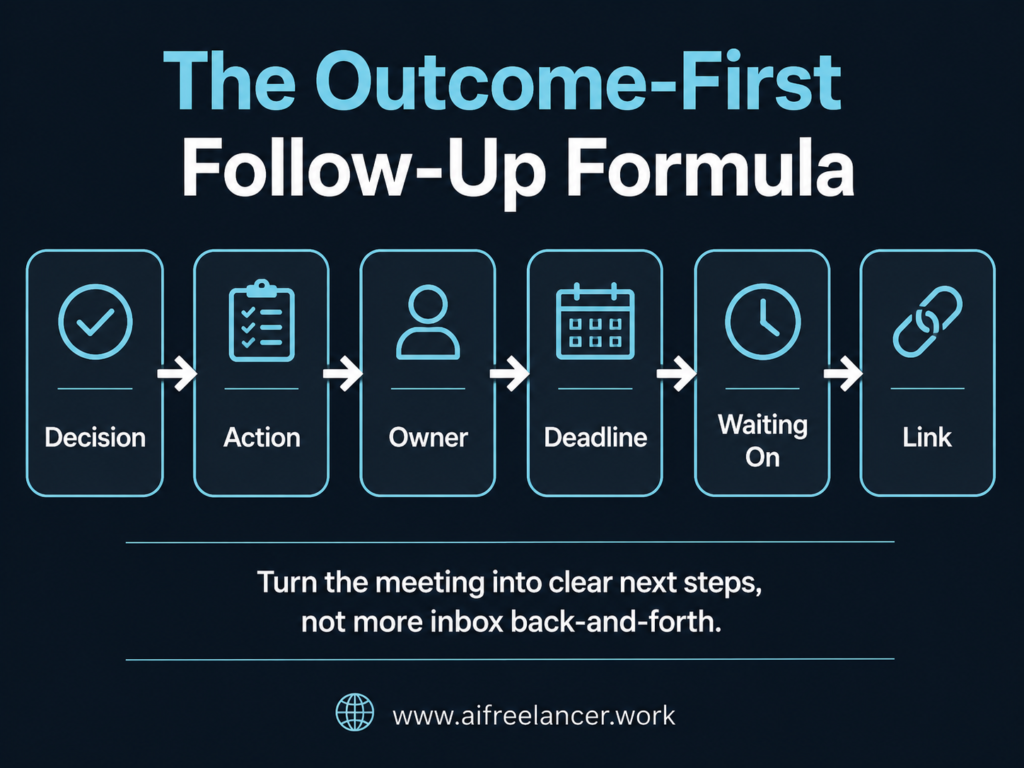
Decision
State what was confirmed during the meeting. Do not include every idea that came up. Only include what people agreed to use, change, approve, remove, or review. For example: “We confirmed that the article will target freelance writers who want fewer post-meeting clarification emails.”
Action
List what needs to happen next. Action items should be specific enough that someone can complete them without asking for another explanation. For example: “Revise the intro to focus on after-call admin instead of meeting fatigue.”
Owner
Name the person who is responsible for each task. Without an owner, “send examples” becomes everyone’s task and no one’s task. For example: “Writer: revise the intro. Client: Send the final CTA link.”
Deadline
Include due dates or expected timing. If there is no final deadline yet, use a softer but still useful time marker, such as “before the next review” or “before the draft is finalized.” Avoid vague phrases like “soon” or “later” when the task affects project movement.
Waiting On
Show what cannot move forward until someone provides input. This is especially useful for freelancers because many delays come from missing source links, files, approvals, examples, or stakeholder comments. For example: “Waiting on product screenshots and final CTA link before completing the examples section.”
Link or Attachment
Add the file, draft, recording, brief, proposal, or resource so no one has to ask for it later. It also saves you from stopping mid-draft just to dig through your sent folder.
Want the worksheet version? Download the Meeting Follow-Up Email Template Pack. It includes the expanded Outcome-First checklist, copy-and-paste email templates, and AI prompts for turning messy notes into a clear follow-up email.
Before and After: Weak vs Clear Meeting Follow-Up Email
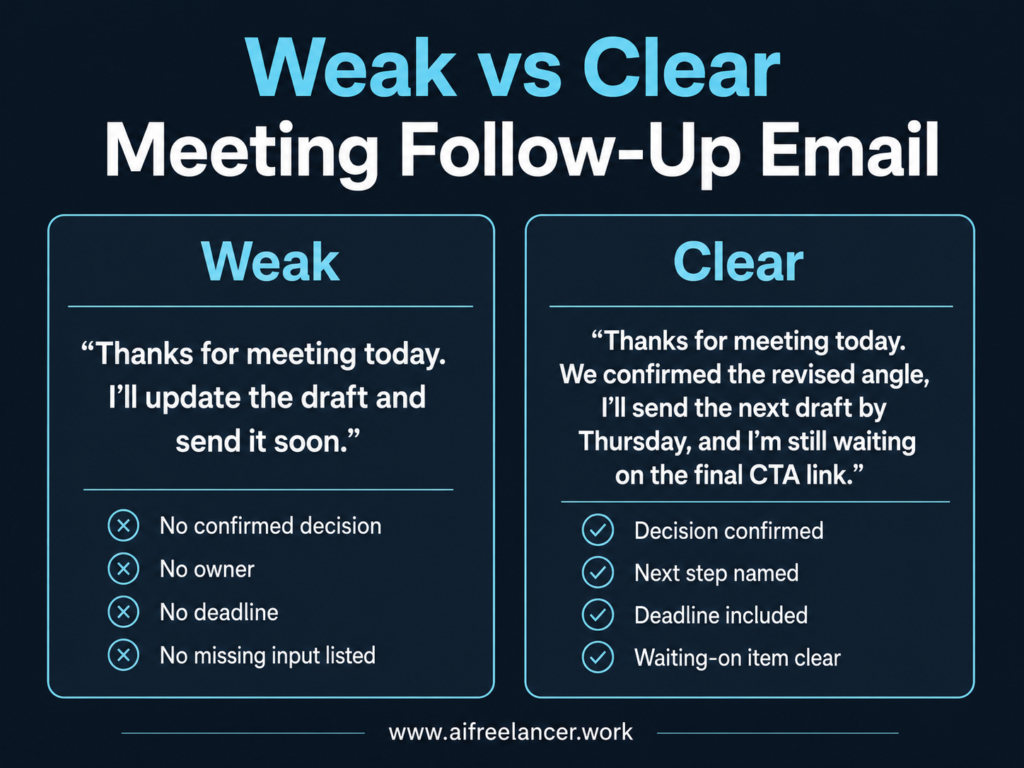
Once you know the parts, the difference between a vague recap and a useful one becomes easier to see. Sometimes, the easiest way to understand a better meeting recap email is to compare it with the kind that creates more work.
A weak follow-up email is not always rude or careless. It may sound perfectly professional. The problem is that it does not help the reader act.
Weak Meeting Follow-Up Email Example
Thanks for walking through the revisions today. I’ll update the draft and send the next version soon. This sounds fine at first. But it does not say which revisions were approved, which comments were only suggestions, what will stay unchanged, or when the next version is coming.
Clear Meeting Follow-Up Email Example
Thanks for walking through the revisions today. We confirmed that I’ll rewrite the intro, keep the original headline, remove the extra case study section, and send the revised draft by Thursday. I’m still waiting on the final founder quote before I update the closing section. This version does more than sound polite. It tells the client what will change, what will stay, when the revised draft is due, and what is still missing.
Why the Second Version Prevents More Replies
The clearer version answers the questions the client might otherwise send later. What did we decide? Who is doing what? When is it due? What is still missing?
When those answers are already in the email, the next reply is more likely to be useful. Instead of another clarification message, you may simply get the missing file, approval, or answer you need.
Meeting Follow-Up Email Template That Reduces Back-and-Forth
A meeting follow-up email template is useful because it gives you a repeatable structure instead of forcing you to rebuild the recap from scratch after every call.
The best template is not just a polite “thanks for meeting” message. It should help you confirm the outcome, show the next steps, name the owner, list what is still missing, and include the link or file people need.
Here is the basic structure:
- Confirmed decisions
- Next steps
- Owner
- Deadline
- Waiting on
- Useful links
- Next check-in
For a quick meeting, that may only take a few sentences. For a project call or revision call, you may need a more detailed version so the client knows exactly what changed, what stayed the same, and what you still need before the work can move forward.
Want the copy-and-paste versions?
Download the Meeting Follow-Up Email Template Pack. It includes templates for general meetings, client project calls, revision calls, blocked projects, and short meeting recaps, plus AI prompts you can use to turn messy notes into a clear follow-up email.
How AI Can Help Draft a Meeting Recap Email Faster
AI can speed up the first draft, but it should not decide what was confirmed. Use it to organize the notes, then review the output before sending anything to a client.
This matters because AI can make messy notes look clean even when the meaning is uncertain. It may turn a casual idea into a task, invent an owner, or assume a deadline that was never discussed.
Use AI as a sorting tool, not as the final authority.
A useful starter prompt is:
“Extract only confirmed decisions and action items from these meeting notes. Separate suggestions from approved tasks. Include owner, due date, and waiting-on items where available. If anything is unclear, mark it as unclear instead of guessing.”
That gives you a cleaner starting point for your meeting follow-up email, but you still need to check the names, dates, owners, files, and promises before sending it.
Want the full prompt set? Download the Meeting Follow-Up Email Template Pack. It includes copy-and-paste templates plus AI prompts for turning messy meeting notes into a clear follow-up email.
Common Meeting Follow-Up Email Mistakes That Create More Replies
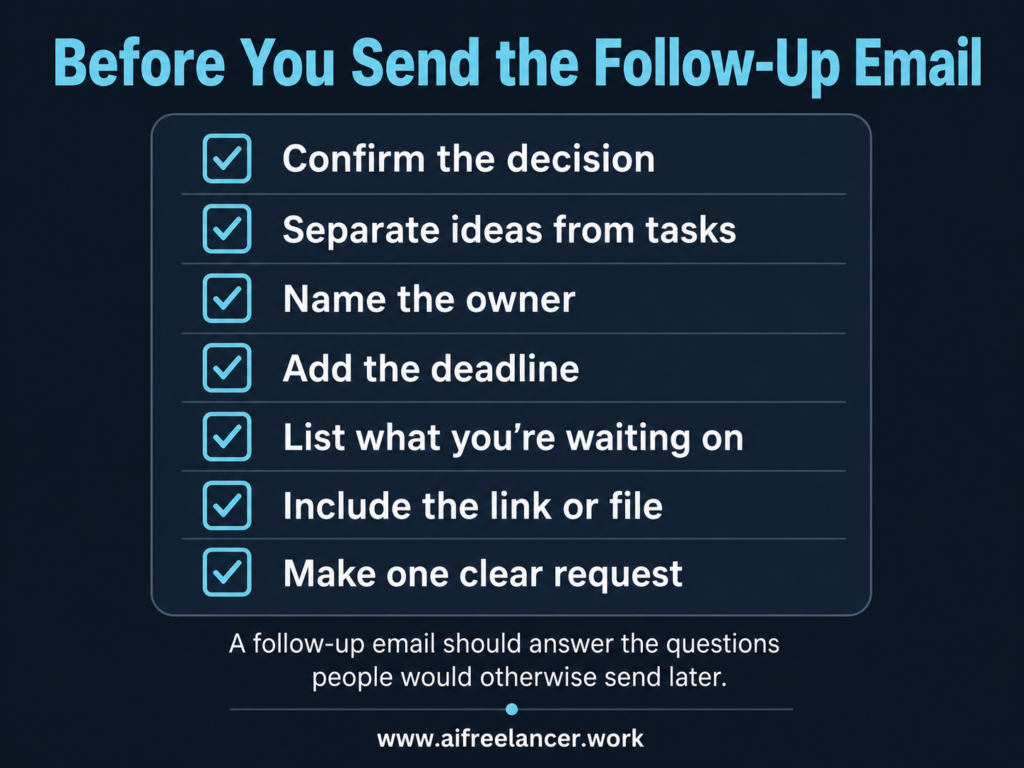
Before sending the email, check whether it still contains the things that usually trigger another reply: unclear ownership, missing links, vague deadlines, buried requests, or unconfirmed ideas.
Atlassian’s communication overload research found that the average worker spends 3 hours and 43 minutes a day communicating through email, messaging, video, or calls. It also found that 85% of employees send the same messages or information in multiple places at least weekly.
That is exactly what a better meeting recap should help you avoid.
Sending Raw Notes Instead of Clear Outcomes
A transcript is not the same as a useful recap.
Raw notes show what was said. A meeting summary email should show what matters now. If you send every detail, the reader has to do the sorting work. That often leads to more questions, not fewer.
Use raw notes for your own record. Send outcomes to the client.
Including Unconfirmed Ideas as Action Items
This is a common problem, especially when AI is involved.
A client might say, “Maybe we can add a founder quote later.” That is not automatically a task. It becomes a task only when someone confirms the quote is needed, who will provide it, and when it should be added.
Do not turn every idea into work. That is how scope creep sneaks into the inbox.
Leaving Owners and Deadlines Unclear
Vague language creates vague responsibility.
Weak phrases include:
- “I’ll update this soon.”
- “We’ll revisit the intro.”
- “The team will send examples.”
- “Let’s adjust the tone.”
Stronger versions look like this:
- “I’ll send the revised intro by Thursday.”
- “Please send the source links by Wednesday.”
- “The client will confirm the CTA before the final draft.”
- “We will keep the original headline unless the founder requests a change.”
The clearer version gives people something to act on.
Hiding the Real Request Inside a Long Paragraph
If you need the client to send a file, say that clearly.
Do not hide the request in the middle of a long recap. Busy clients skim. A clear request should be easy to find, especially when it affects the next step.
Try this:
“Please send the product screenshots by Wednesday so I can finish the examples section.”
That is better than three paragraphs of context ending with “Let me know if you can share those when convenient.”
Forgetting Links, Files, or Examples
Missing resources create avoidable follow-up emails.
If the meeting involved a draft, brief, folder, recording, proposal, style guide, source, or example, include the link. If the client needs to review something, make the link easy to find.
This is a small habit, but it removes one more reason for someone to reply with “Can you resend that?”
What Should a Meeting Follow-Up Email Include?
A meeting follow-up email should include confirmed decisions, action items, owners, deadlines, waiting-on items, useful links, and the next step. It should make the meeting outcome clear without repeating the full conversation. Think of it as a working recap, not a transcript. The reader should be able to scan it and know what to do next.
How Do You Write a Follow-Up Email After a Meeting?
Start by thanking the person briefly, then summarize the confirmed outcome. After that, list the next steps, name the owner for each task, include deadlines, and add any links or files the person needs. Keep the message focused. A good follow-up email after a meeting should help people act, not make them reread the whole conversation.
How Soon Should You Send a Follow-Up Email After a Meeting?
Send the follow-up email within 24 hours when possible. The fellow also recommends sending a meeting follow-up within 24 hours so the discussion is still fresh and people can act on their tasks without delay. If the meeting created urgent work, send it sooner. The longer you wait, the easier it is for people to forget details or start from the wrong assumption.
How Do You Politely Follow Up After a Meeting?
Be clear, warm, and specific. Thank the person for the meeting, confirm the decision, and state the next action without sounding demanding. For example: “Thanks for meeting today. We confirmed the new draft direction, and I’ll send the revised version by Friday. Please send the final CTA link by Wednesday so I can include it before delivery.”
What Is a Good Meeting Follow-Up Email Example?
Here is a simple example:
Hi [Name],
Thanks for meeting today. We confirmed that the article will focus on reducing follow-up emails after meetings by clarifying decisions, owners, and next steps.
I’ll revise the outline by Thursday. Please send the final CTA link and preferred source examples by Wednesday so I can include them in the draft.
Thanks,
[Name]
This works because it is short, but it still includes the decision, next step, deadline, and waiting-on items.
Sources
- Atlassian. (2022, March 1). New survey data: Why communication overload derails productivity (and how to fix it). Inside Atlassian.
- Fellow. (2025, October 21). How to write a meeting follow-up email (+ examples). Fellow Blog.
- Microsoft. (2025, June 17). Breaking down the infinite workday. Microsoft WorkLab.
- Sands, M. (2025, August 1). How to avoid “emotional overhead” at work (hint: emojis are 👍). Inside Atlassian.
Final Thoughts
A strong meeting follow-up email is not just a polite note after a call. It is the sorting step that prevents the call from becoming a second-inbox project.
Before you send the recap, separate the decision, the task, the owner, the missing input, and the link. That small habit helps prevent the client from asking whether the intro changed, whether the founder quote is still needed, or whether Friday is still the draft deadline. If you also need a lightweight way to keep projects moving between calls, a clear done-next-blocked update can help you show progress without creating another long email thread.
That is how you reduce “quick clarification” messages, buried client requests, and repeated back-and-forth after meetings. It also explains why even short calls can drain your writing energy when the outcome is not captured clearly.
If you want more practical systems for writing, productivity, and AI-supported freelance work, visit my Amazon Author page and check out my books for writers and independent professionals.

Florence De Borja is a freelance writer, content strategist, and author with 14+ years of writing experience and a 15-year background in IT and software development. She creates clear, practical content on AI, SaaS, business, digital marketing, real estate, and wellness, with a focus on helping freelancers use AI to work calmer and scale smarter. On her blog, AI Freelancer, she shares systems, workflows, and AI-powered strategies for building a sustainable solo business.