

If your day feels full but your output barely moves, you’re not alone. Most freelancers aren’t stuck because they lack skill—they’re stuck because their AI workflow for freelancers doesn’t exist yet. You sit down to write, check your inbox, clarify a brief, update a task list, and suddenly the day is gone. You worked all day, but the real work didn’t move forward.
An AI workflow for freelancers changes that completely, not by adding more tools, but by removing the invisible work that keeps interrupting your focus. When AI is built into how your work flows—not just added on top—it stops being another task and starts becoming real leverage.
AI doesn’t make you faster. It removes the work before the work.
A study from McKinsey & Company found that productivity gains from AI only show up when it’s integrated into workflows, not simply added as another tool. That distinction is what separates freelancers who feel faster from those who feel even more overwhelmed.
Everything I’ve shared here—and more—is in my book, available on Amazon. Click the link if you’re ready to take the next step.
Why Most Freelancers Need an AI Workflow for Freelancers
Most freelancers don’t realize the real source of their workload until they step back and examine how their day actually unfolds. The issue isn’t just volume—it’s how work is structured and handled from moment to moment.
The Real Reason You Feel Overworked (It’s Not the Work)
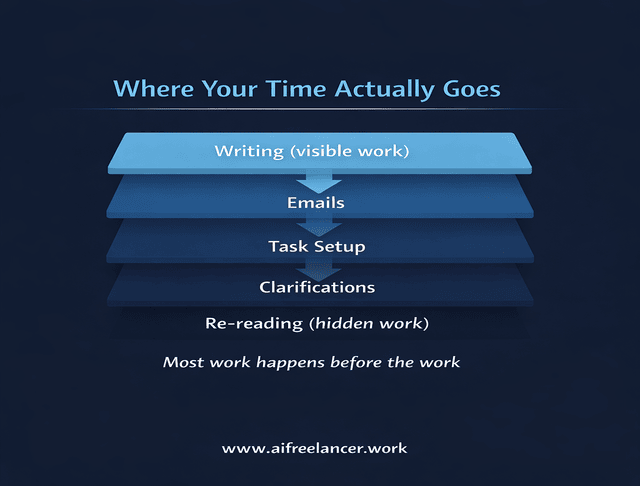
Most freelancers assume they are overwhelmed because they have too much work. In reality, the problem is rarely the work itself. It’s everything surrounding it—emails, clarifications, task switching, and constant small decisions that interrupt focus. These small interruptions accumulate and create a constant sense of pressure, which is exactly why freelancers feel overworked even when the tasks themselves aren’t difficult—something that becomes clearer when you look at why Inbox Zero doesn’t work for freelancers.
A typical day illustrates this clearly. You start with the intention to write, but a client email needs clarification. That leads to another message, then a task update, and before long, your attention is scattered across multiple small actions. By the time you return to writing, your mental momentum is gone.
Research from Harvard Business Review shows that frequent context switching reduces productivity and increases fatigue, because part of your attention remains stuck on the previous task. The issue isn’t effort or discipline—it’s the structure of how your work is handled.
Manual Glue Work Is Draining Your Time
A large portion of your day is spent on work that doesn’t feel like real work but is necessary to keep everything moving. This includes capturing information, clarifying vague instructions, converting messages into tasks, coordinating updates, and closing loops. These activities are essential, but they often go unnoticed—especially when you’re trying to understand why you feel busy but not productive as a freelancer.
For example, you might copy details from an email into your notes, then into a task manager, and finally into a draft. Each step seems small, but together they create friction and consume time. Over the course of a week, this “work between the work” adds up and drains your energy, especially when you do not have a reliable system for why your brain keeps reopening unfinished work throughout the day.
What most freelancers don’t see is how often this repeats. A single unclear email can trigger multiple follow-ups, task rewrites, and revisions. When multiplied across clients, this becomes a major source of lost time and mental fatigue.
Context Switching and Fragmentation Are Slowing You Down
Every time you switch between tasks, your brain has to reorient itself. Moving from writing to email, then to a task list, and back again forces you to rebuild your train of thought repeatedly. This constant reset makes even simple work feel more difficult.
According to the American Psychological Association, task switching creates a measurable cognitive cost that reduces efficiency and increases mental strain. This is why even short interruptions can make your work feel harder than it should.
In freelance work, this often shows up as slow starts. You open a document, hesitate, reread notes, and try to recall context. That delay is not a lack of skill—it’s the cost of fragmentation. If this pattern feels familiar, it connects directly to why tasks take so long when your workflow is filled with hidden interruptions.
What an AI Workflow for Freelancers Actually Looks Like
A workflow is easy to describe and much harder to run. The difference shows up the moment a client message lands in your inbox, and you have to decide whether it becomes progress or another interruption.
AI Workflow for Freelancers Starts With Subtraction, Not Tools
Most freelancers try to improve productivity by adding tools, but this often creates more complexity. Each new tool introduces another place to check, another system to maintain, and another layer of decisions. Over time, this creates more friction instead of reducing it.
Most freelancers do not need another tool. They need fewer places to check before they can start working. An effective AI workflow focuses on subtraction: removing repetitive actions, simplifying handoffs, and cutting the small setup tasks that keep work from moving forward.
Before implementing a workflow, your day may feel reactive and scattered. Afterward, it becomes more structured, with fewer decisions and clearer next steps. This is what makes the system sustainable over time.
The Core Workflow: From Inbox to Delivery
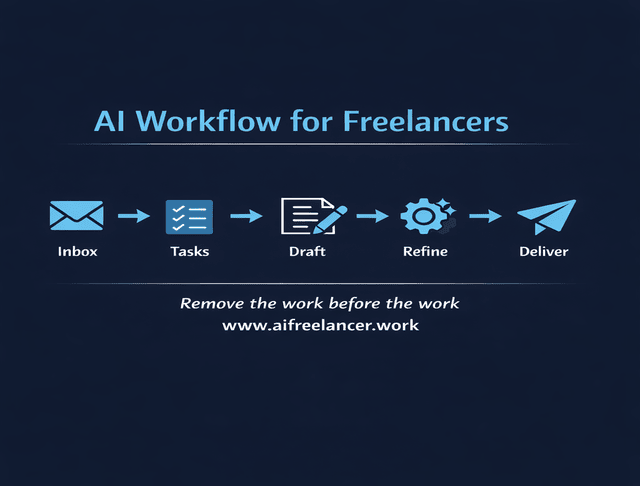
At its core, freelance work follows a predictable flow: inbox to tasks, tasks to draft, draft to refinement, and finally to delivery. The problem is that most freelancers handle these stages separately, without a consistent connection between them. This disconnect creates unnecessary delays and confusion, especially when you don’t have a repeatable workflow in place.
When these steps are unified into a single workflow, work moves forward without constant resets. Instead of jumping between tools and decisions, you move through a sequence that guides your focus naturally. This makes your workflow easier to follow and more efficient.
A complete workflow also reduces rework. When each stage feeds cleanly into the next, you avoid repeating steps or revisiting unclear instructions.
Where AI Fits Into Each Stage (Without Taking Control)
AI works best when it handles preparation rather than decision-making, which is exactly how freelancers use AI in real workflows. In the inbox, it can summarize long threads and highlight key points. In task management, it can extract clear actions from unstructured messages, and during drafting, it can provide structure and direction.
For example, a vague client request like “update the blog, improve SEO, and add examples” becomes much easier to act on when the setup work is done for you. Instead of rereading the message three times, guessing what matters most, and building a task list from scratch, you start with a cleaned-up version of the work in front of you.
That is where AI earns its place. It clears the path so you can make better decisions faster, instead of wasting energy on interpretation before the real work even begins.
What’s happening here is not just “using AI tools.” It’s closer to how AI agents work. Instead of prompting AI manually at every step, you define how a task should be handled once, and the system follows that instruction each time new input appears. If you’ve been wondering what an AI agent actually does, this is it in practice—it runs the workflow for you instead of making you rebuild it every time.
A Simple AI Workflow System You Can Start Today
You do not need a perfect system to get relief. You need one part of your day to stop breaking your focus every time you sit down to work.
Start With the Fastest Win: Inbox → Task Conversion
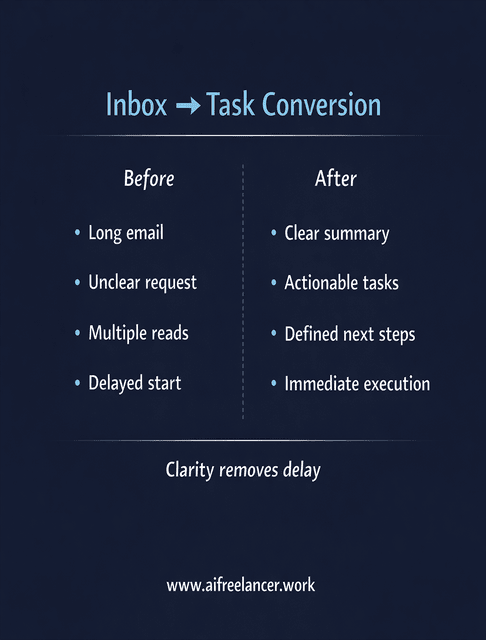
The easiest place to start is your inbox, because that’s where most hidden workload begins—and where you can start with a structured way to manage your inbox to turn messages into clear tasks. Instead of rereading messages and figuring out what to do each time, you convert them once into a clear summary and action list. This removes repeated effort and gives you clarity from the start.
For example, instead of scanning a long thread multiple times, you generate a summary and a list of tasks. This turns confusion into action immediately and reduces the time spent interpreting messages.
What makes this such a strong first move is that it solves a problem you already feel every day. You are not adding a new habit on top of your workload. You are removing one of the most common reasons work stalls in the first place.
The One-Task Automation Rule
To avoid overcomplicating your system, focus on one trigger and one output. For example, when a new email arrives, the only goal is to generate a summary and task list. This keeps your workflow simple and manageable.
Freelancers usually get into trouble when they try to automate five things at once and end up maintaining the automation instead of doing the work. One trigger and one output are enough to prove the workflow works before you build anything bigger.
How to Build an AI Workflow for Freelancers Step by Step
Once you understand the basics, the next step is building a system you can follow consistently. This is where your workflow becomes structured, repeatable, and reliable.
Step 1 — Fix Your Inbox Before Anything Else
Your inbox is where most decisions start, so organizing it reduces mental load immediately. A simple structure like Urgent, Client, and Later allows you to sort messages before reading them in detail. This prevents constant interruptions.
By grouping similar types of communication, you create clearer focus blocks and reduce the need to switch attention throughout the day.
Step 2 — Turn Messages Into Tasks Automatically
Instead of revisiting emails multiple times, convert them into tasks once. A short summary with clear action steps turns vague instructions into something actionable. This removes ambiguity and speeds up execution.
A good output looks like a clear list of tasks with defined actions. This ensures that nothing gets lost and that you can move directly into execution without reinterpreting the message.
Quick prompt you can use:
“Summarize this message into clear tasks. Keep each task actionable and specific. Flag anything unclear that needs confirmation.”
This keeps outputs consistent and reduces the need to rewrite AI responses.
Step 3 — AI Workflow for Freelancers Using Simple Task Routing
Not all tasks belong in the same category. Separating them into Now, Later, Admin, and Waiting removes the need to constantly decide what to do next. This simplifies your workflow and reduces decision fatigue.
This structure ensures that urgent work is handled first, while less critical tasks are organized without creating overload.
Step 4 — Use AI to Draft Faster Without Losing Your Voice
Starting from a blank page is one of the slowest parts of writing. AI can generate a structured draft based on your outline or notes, allowing you to begin with something instead of nothing. This reduces the friction of getting started.
You then refine the draft to match your voice, add examples, and improve clarity. This approach turns writing into editing, which is significantly faster and more efficient.
If you want more structured prompts and workflows like this, I break them down step by step in my books on my Amazon Author page.
Step 5 — Refine, Not Rewrite (The Revision-Resistant Approach)
Rewriting from scratch wastes time and energy. A better approach is to refine existing work by fixing logic first, then structure, and finally wording. This creates a more efficient revision process.
Following this sequence prevents unnecessary revisions and leads to cleaner, more consistent output.
A Complete AI Workflow for Freelancers (End-to-End Example)
Understanding individual steps is helpful, but seeing the full workflow in action makes everything clearer. This example shows how the system works from start to finish in a real freelance scenario.
AI Workflow for Freelancers Example: From Email to Delivery
Client message:
“Hey, can you take another pass at the blog? It needs better SEO, and the tools section feels thin. Also, not sure if we should keep that intro. We might need this by Friday, but I’ll confirm.”
Here’s what usually happens without a workflow. You read the message once, think you understand it, start working, then come back to it later and realize you missed something. You reread it, adjust your draft, then realize the deadline was unclear, and now you have to follow up. The work slows down before it even properly starts.
Now compare that with a structured workflow.
AI output:
- Revise blog post
- Improve the SEO section
- Expand the tools section
- Review intro
- Confirm deadline
What a weak output looks like:
- “update blog”
- “fix SEO”
That kind of output still forces you to think too much before starting.
Routing:
- Now: revise blog, improve SEO, expand tools
- Waiting: confirm deadline
Draft stage:
- AI generates structured revision
Human refinement checklist:
- Does this match the client’s tone?
- Are the examples specific enough?
- Is anything vague or repetitive?
You remove the guesswork that leads to revisions at the beginning, which is where most delays happen. You remove the guesswork at the beginning, which is where most delays happen. The work starts cleaner, moves faster, and requires fewer corrections later.
AI Workflow Templates You Can Use Immediately
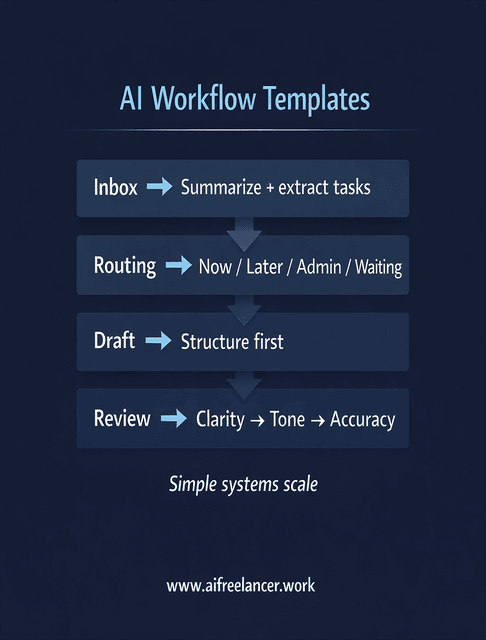
Most workflow advice breaks down when you try to apply it. The fastest way to make this system work is to start with templates you can reuse, so you are not rebuilding your process every time a new task comes in.
Inbox → Task Template
Use this every time a client message comes in. The goal is to remove interpretation before you start working, so you are not rereading the same message multiple times.
If you’re building your workflow, having a set of AI prompts for freelancers can save you time and keep outputs consistent.
Prompt:
“Summarize this message into clear tasks. Make each task specific and actionable. Flag anything unclear that needs confirmation.”
Expected Output Format:
- Task 1: [specific action]
- Task 2: [specific action]
- Task 3: [specific action]
- Clarification needed: [question]
If the output still feels vague, the problem is not the tool. It usually means the message itself lacks clarity, and you need to follow up before starting.
Task Routing Template
Once tasks are extracted, route them immediately so you do not have to decide what to do every time you look at your list.
- Now → deadline within 48 hours
- Later → flexible work
- Admin → low-focus tasks
- Waiting → blocked by client
This removes repeated decision-making and helps you move forward without hesitation.
Drafting Template
Use AI to build structure, not final wording. That keeps your voice intact while still removing the hardest part of writing.
Prompt:
“Create a structured draft based on these points. Keep the tone clear and practical. Do not finalize wording. Focus on structure and flow.”
This gives you something to work with, without locking you into generic phrasing.
Final Review Checklist
Before sending anything to a client, take a moment to review it with intention. This step protects quality and prevents avoidable revisions.
- Is the message clear without rereading?
- Does the tone match the client’s brand?
- Are there vague sections that need tightening?
- Would I question anything if I received this?
If you hesitate on any of these, the draft is not ready yet.
How to Scale This AI Workflow Across Multiple Clients
A workflow that works for one project can still break when you handle multiple clients at once. The real test of a system is whether it holds up when priorities compete, and deadlines overlap.
The key is not to create separate workflows for each client. It is to run all work through the same structure so your brain does not have to switch systems.
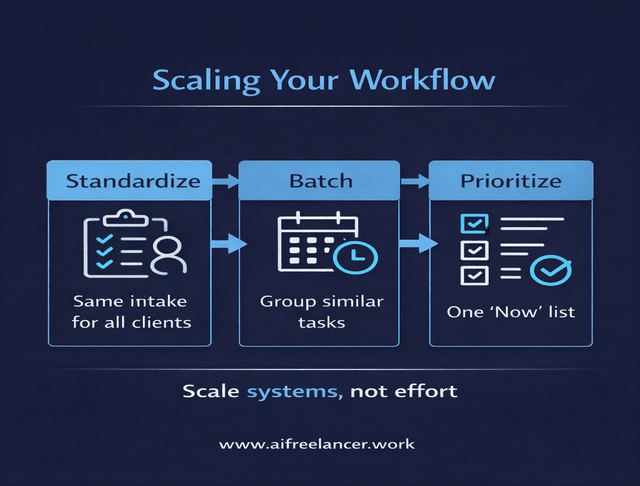
Start by standardizing your intake. Every client message, regardless of source, goes through the same inbox-to-task conversion. This ensures that no matter how different the projects are, the starting point is always consistent.
Next, batch similar stages of work. Instead of jumping between drafting, editing, and communication throughout the day, group them. For example, process inbox and task routing in one block, drafting in another, and refinement in a separate session. This reduces context switching across clients.
You also need clear visibility across projects. Your “Now” list should contain only the most urgent tasks across all clients, not separate lists per project. This forces prioritization and prevents overload.
Finally, protect your review stage. When you are working across multiple clients, mistakes are more likely to happen at the end of the process. A consistent review checklist becomes more important, not less.
Scaling is not about doing more at once. It comes from building systems that help you scale your freelance business with AI, so every piece of work moves through the same process without forcing you to rethink your approach.
Final Thoughts
A strong AI workflow for freelancers is not about speed alone. It is about reducing friction, simplifying decisions, and creating a system you can rely on every day. When your workflow is clear, your work feels lighter and more manageable.
You spend less time managing tasks and more time producing meaningful results. That shift is what allows you to grow without feeling constantly overwhelmed.
If you want to go deeper and build a system you can apply to real freelance work, explore my books on my Amazon Author page. I break down these workflows into step-by-step systems you can apply immediately, so you can spend less time managing work and more time doing it.
Frequently Asked Questions About AI Workflow for Freelancers
An AI workflow for freelancers is a structured way of turning messy inputs into clear, actionable work. Instead of starting from confusion, you begin with defined tasks, which makes execution faster and more consistent.
Freelancers can maintain their voice by using AI to handle structure and first drafts, then refining the output themselves. The goal is to speed up the beginning of the process without replacing the thinking behind the final result.
Tasks that follow clear patterns are the best candidates for automation. This includes summarizing emails, extracting action steps, and building draft structures. Tasks that require judgment or affect client relationships should remain manual.
Start with your inbox. Converting messages into clear summaries and task lists removes one of the biggest sources of friction and gives you a consistent starting point for every project.
Yes, but only when it is integrated into a workflow. According to McKinsey & Company, productivity gains come from structured integration rather than occasional use.

Florence De Borja is a freelance writer, content strategist, and author with 14+ years of writing experience and a 15-year background in IT and software development. She creates clear, practical content on AI, SaaS, business, digital marketing, real estate, and wellness, with a focus on helping freelancers use AI to work calmer and scale smarter. On her blog, AI Freelancer, she shares systems, workflows, and AI-powered strategies for building a sustainable solo business.

