

You already know AI could make your writing life easier—but right now it probably feels like another thing you’re supposed to “figure out” between deadlines. AI writing workflows change that. Instead of jumping between random tools and tabs, you build calm, predictable systems that do the heavy lifting. At the same time, you stay focused on voice, strategy, and client results.
This guide is for you—the mid-career freelance writer juggling multiple clients, long to-do lists, and a nervous system that doesn’t need more chaos. Together, we’ll walk through practical ways to make AI a quiet, reliable partner in your existing processes, rather than a shiny distraction that complicates everything.
You’re also not the only one figuring this out. According to Microsoft’s 2024 Work Trend Index, 75% of knowledge workers now use AI at work, and many say it helps them save time, focus on what matters most, and be more creative. The opportunity isn’t just to “use AI,” but to turn that casual use into clear, repeatable workflows that actually support your freelance business.
Everything I’ve shared here—and more—is in my book, available on Amazon. Click the link if you’re ready to level up.
AI Writing Workflows for Overloaded Freelance Writers
When you’re racing deadlines, juggling clients, and still staring at a blinking cursor at 10 p.m., “work harder” stops being an option. This section shows how AI writing workflows turn chaos into a predictable path from brief to finished draft—without asking you to become a full-time tech person.
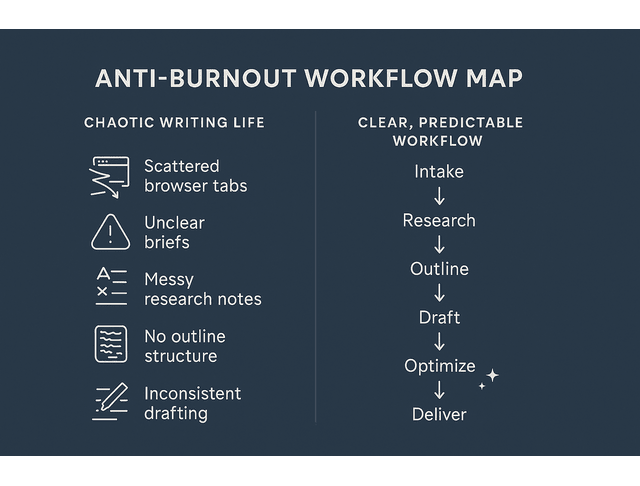
AI Writing Workflows as Your Anti-Burnout Safety Net
Most freelancers don’t burn out because of the writing itself. They burn out because of everything wrapped around it: unclear briefs, messy research, endless emails, and last-minute revisions. When every project feels like you’re starting from scratch, your brain never gets a break.
That’s where AI Writing Workflows as your anti-burnout safety net come in. This isn’t just a feeling. Research on freelancers and self-employed workers shows that many experience high levels of burnout, with emotional exhaustion emerging as a major risk factor in this kind of work. One 2024 study published in Behavioral Sciences highlighted how workload, blurred boundaries, and constant client demands can significantly increase burnout symptoms for freelancers and gig workers.
Instead of reinventing your process each time, you define a clear path:
- Intake → clarify brief and goals
- Research → collect and summarize the right sources
- Outline → structure the piece with clear H2s and H3s
- Draft → write in focused sprints
- Edit → polish grammar, style, and readability
- Optimize → handle SEO and formatting
- Deliver → send with confidence
AI tools plug into specific steps—research, outlining, drafting support, grammar checking, readability, SEO—so you can keep your energy for the parts only you can do.
Spot the Bottlenecks: Where Your Time and Focus Leak
Before you touch a new tool, you need to know where you’re actually bleeding time and focus.
Look at your last few projects and ask:
- Where do I stall—research, outlining, drafting, or editing?
- Which steps feel the most repetitive and draining?
- Where do I procrastinate because I “don’t feel ready” to start?
Maybe you’re drowning in open research tabs. Perhaps the blank page feels brutal every time. Maybe editing takes forever because you’re fixing the same grammar and style issues for every client.
These are your leverage points. This is where AI writing productivity and AI workflow automation can make a real difference—by turning vague, exhausting tasks into defined, supportable steps.
Studies on knowledge workers show that a surprising amount of time is lost to “work about work”—coordination, chasing information, switching between tools—instead of doing the work itself. Asana’s Anatomy of Work research found that people spend only about 27% of their time on skilled work, with the rest consumed by communication, searching, and administrative tasks.
Decide What to Automate, Delegate to AI, or Keep Human
You’re not trying to automate your talent. You’re trying to protect it.
A simple rule:
- Automate: Highly repetitive tasks with clear rules. Think: formatting headings, checking links, generating SEO meta descriptions, and running readability checks.
- Delegate to AI (with oversight): Research summaries, outline drafts, alternative headlines, first-pass FAQs, content ideas, and expansion of thin sections.
- Keep human: Nuanced arguments, sensitive topics, final voice decisions, client strategy, storytelling, lived experience.
When you design AI Writing Workflows, you get to choose: what do I never want to do manually again, and what do I always want to keep in my own hands?
Build Calm, Client-Friendly AI Writing Workflows Step by Step
You don’t need to blow up your process to get value from AI. Here, you’ll take the way you already work and quietly layer in support—so your workflows feel calmer, more organised, and impressive enough to show clients as part of your professional system. AI should sit within your existing process, not replace it, so the goal is to enhance what you already do well rather than starting from scratch.
Capture Your End-to-End Writing Process in Plain Language
Start by writing out your current process as if you’re onboarding a junior writer:
- Receive brief and clarify scope.
- Research topic and competitors.
- Outline article structure.
- Draft from top to bottom.
- Edit for clarity, style, and grammar.
- Optimize for SEO and formatting.
- Deliver and handle revisions.
This helps you see your writing system laid out clearly. From there, you can slowly shape it into a client-friendly, AI-powered workflow that you walk through in discovery calls to show how organized, efficient, and valuable you are.
Map Your Current Process and Insert AI Writing Workflows Where It Hurts
Now look at that map and layer in AI support.
Start using AI in the parts of your writing workflow that drain the most time, energy, and mental bandwidth.
Maybe you:
- Use AI research tools to summarize long reports and pull key stats.
- Ask an AI assistant to propose outline options based on your brief.
- Let a writing model generate starter paragraphs, transitions, or FAQ ideas.
- Run drafts through grammar and style checkers before your final pass.
- Use SEO tools to suggest internal links and refine headings.
This is where you choose simple AI tools for each stage of your process rather than chasing the latest trends. You match AI tools to your core services and packages, because tools should reflect how you actually earn money. Suppose 80% of your income comes from long-form content. In that case, your stack should support research, outlining, drafting, and SEO—not social media scheduling or video editing.
As you refine your system, remember that you don’t need twenty platforms or expensive stacks. Instead, build a lean stack that covers research, drafting, editing, and SEO. Then, quietly refine it behind the scenes. Over time, you’ll naturally tailor prompts, templates, and settings to your services and niches. Hence, you capture your voice and adjust AI outputs to match your tone. You’ll also use AI personalization to adapt content to specific audiences, and you’ll set up light templates, prompts, and checklists for consistency so you can automate the repetitive, draining pieces of your workflow.
Tool evaluation rubric
To make these decisions easier, create a simple rubric for evaluating AI tools for your writing needs. For each tool you test, look at:
- Fit with your core services (does it directly support blogs, emails, thought leadership, or whatever pays your bills?).
- Learning curve and usability (can you realistically use it during busy weeks?).
- Pricing and budget considerations (is it a subscription you can justify, or a credit-based model that spikes costs during heavy months?).
- Compatibility and integrations (does it work smoothly with Google Docs, Word, your CMS, or project management tools so you can maximize compatibility and ensure your AI tools work together?).
- Data and privacy (are you comfortable with how it handles client content?).
- Support and community (is there good documentation, responsive support, and an active user base you can learn from?).
You don’t need a perfect stack. You need a small, sustainable set of tools that score well enough on these factors and fit your business stage.
Example: AI Writing Workflow for a 1,500-Word SEO Blog Post
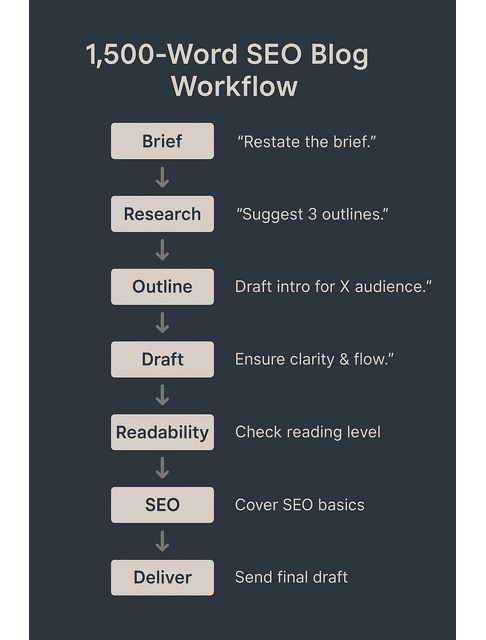
To make this more concrete, here’s a sample AI Writing Workflow you can follow for a standard SEO blog:
Intake & clarification
Paste the client brief into your AI assistant.
Prompt example:
“Here’s a client brief. Restate the goals, target audience, and constraints in plain language. Highlight any missing information I should clarify.”
Topic and angle selection
Use AI to generate unique content ideas and brainstorm variations.
Prompt example:
“Based on this brief and audience, suggest five possible angles and working titles for a 1,500-word blog. Aim for beginner-friendly, practical topics.”
Outline creation
Ask the AI to propose 2–3 outlines.
Prompt example:
“Using this chosen angle and working title, create three outline options with H2s and H3s, focusing on clear structure and logical flow.”
Choose one outline and manually adjust it to fit your voice and the client’s brand.
Research pass
Feed in 3–5 key sources (or paste sections) and use AI research tools to summarize.
Prompt example:
“Summarize the key points from these sources. Pull any strong stats or claims, and note where experts disagree.”
Drafting
Use AI to generate starter sections for tricky parts like the intro, transitions, or FAQs.
Prompt example:
“Using this outline and research summary, draft an introduction (150–200 words) that speaks to freelance writers who feel burned out and overwhelmed.”
You write or heavily edit every section to keep it in your voice.
Editing pass
Run the draft through your grammar and style tools to use AI grammar checkers to catch common errors quickly, clean up punctuation with AI-assisted editing, and scan for subject-verb agreement issues in seconds.
Use AI for grammar corrections and quick cleanups while staying in control of tone.
Readability and flow
Use readability tools (Hemingway-style, Slick Write) as part of understanding and improving readability scores and verifying your Flesch-Kincaid and Gunning Fog scores with AI.
Ask AI to suggest transitional phrases that keep readers moving and help you ensure a cohesive narrative flow from intro to CTA.
SEO optimization
Run a light optimization pass: confirm primary keyword in title, first paragraph, H2s, meta description, and a few subheadings.
Use AI SEO helpers to cover SEO optimization basics in your workflow and maximize SEO with AI content tools.
Final checks & delivery
Use a pre-delivery checklist (we’ll outline one later) to confirm everything’s ready.
Deliver the draft with a short note summarizing what you did and how it supports the client’s goals.
If you’re a visual thinker, you can sketch this as a simple left-to-right diagram: Brief → Research → Outline → Draft → Edit → SEO → Publish, with small “AI assist” icons above the steps where your tools plug in. That one graphic can become your internal reference—and something you show to clients when you explain how you work.
This example becomes your default AI Writing Workflow for blog content. You can tweak it for emails, landing pages, or thought-leadership pieces, but the skeleton stays the same.
Turn Client Briefs into Repeatable, Profitable AI Writing Workflows
The real power move is turning every new brief into a variation of the same reliable workflow, rather than treating it as a brand-new adventure.
Standard Process
For each service you sell—blog posts, thought-leadership articles, email sequences—define a standard process:
- Drop the client brief into your AI assistant and ask it to restate goals, audience, and constraints.
- Generate a research plan that includes questions, keywords, and potential angles.
- Ask for 2–3 outline variations and choose the one that fits your voice and the client’s goals.
- Use AI to create starter sections where you typically stall (intro, conclusion, transitions, FAQs).
- Run the full draft through your grammar, style, readability, and SEO workflows.
- Finalize and deliver with a short “what we did and why it matters” summary for the client.
To keep your skills sharp, make it normal to rely on top training resources and tutorials for AI writing tools. Sign up for online courses and webinars to deepen your AI skills and join community forums and support groups for AI-curious writers so you’re not figuring everything out alone.
Make It a Part of Your System
Treat your learning as part of your system: commit to staying up to date on the latest AI advancements in writing, industry news, and AI content trends, as part of continuous learning for your AI toolkit. Early on, you’ll be overcoming the initial learning curve with new tools, which will inevitably mean troubleshooting common technical issues with AI platforms. Make sure you know how to access support when your AI tools misbehave, and give yourself some grace as you adapt to AI workflows and overcome your own resistance. Over time, you’ll naturally build confidence as you integrate AI into your writing, and your workflows will feel like second nature.
Choose the Right AI Tools and Habits with AI Writing Workflows
The right tools are only powerful if your habits support them. This section shows you how to choose a lean stack that matches how you earn money—and build daily routines that make your AI Writing Workflows stick.
Match AI Tools to Your Core Services and Packages
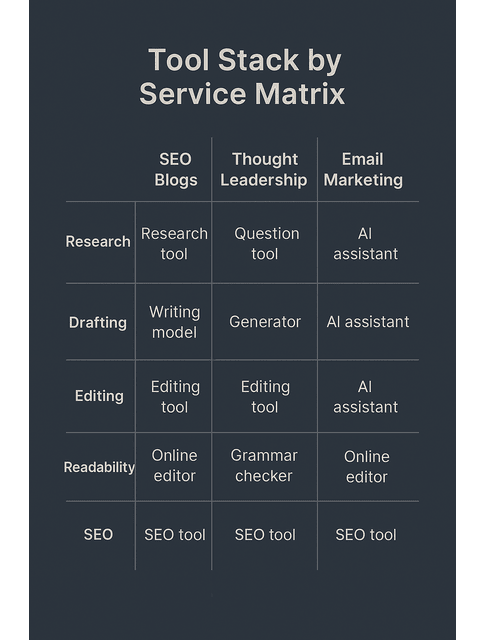
Your tech stack should follow your business model, not the other way around.
If you specialize in:
- SEO blog content → prioritize AI tools for research, keyword clustering, outlines, and SEO optimization.
- Thought-leadership ghostwriting → lean on tools that help with idea development, structuring complex arguments, and preserving tone.
- Email marketing → use tools that support personalization, segmentation, and testing subject lines and CTAs.
Your AI Writing Workflows become part of your pitch: you’re not just a writer; you’re a writer with tested systems that consistently deliver quality.
Set Up Light Templates, Prompts, and Checklists for Consistency
Once you know your best-selling services, you can build a quiet infrastructure around them:
- Reusable templates for briefs, outlines, and drafts
- Prompt libraries for intros, conclusions, FAQs, and meta descriptions
- Checklists that cover editing, readability, SEO, and client-specific preferences
Editing support with AI
As part of that, you might decide to:
- Use AI grammar checkers to catch common errors quickly and clean up punctuation with AI-assisted editing so you don’t waste time on basic fixes.
- Scan for subject-verb agreement issues in seconds and harness AI for grammar corrections and quick cleanups so you can stay focused on bigger edits.
- Rely on real-time error detection as you draft and take advantage of AI-powered contextual suggestions for more polished writing so you can elevate your writing style without adding hours of editing.
- Routinely analyze and enhance your tone and voice with AI feedback so you can maintain a consistent tone across multiple client projects and adapt your writing style to different audiences and niches without burning out.
Readability support
Alongside your editing checklist, bring readability into your system. You can use Hemingway-style tools to simplify complex sentences and rely on Slick Write and similar tools for fast readability checks as part of understanding and improving readability scores. Make it easy to check Flesch-Kincaid and Gunning Fog scores with AI, then simplify complex sentences for better readability and break down long paragraphs into reader-friendly chunks.
Style, terminology, and structure
When clarity matters—especially in SaaS, technical topics, or compliance-heavy niches—consistently apply plain language principles with AI suggestions, maintain terminology consistency with glossary and style tools, and focus on creating and using simple style guides for you and your clients. At the same time, you utilize glossary tools to keep technical terms aligned.
At the structural level, your templates should help you ensure a cohesive narrative flow from intro to CTA, use AI to help link ideas and sections smoothly, and master transitional phrases that keep readers moving through the piece.
Reusable assets you can plug into your workflows
To make this even more practical, build a few simple assets you can reuse:
Sample blog outline template
- H1: Working title (with primary keyword)
- H2: Hook + problem statement
- H2: Key concept or framework
- H3: Definition and why it matters
- H3: Common mistakes
- H2: Step-by-step process or tips
- H3: Step 1
- H3: Step 2
- H3: Step 3
- H2: Examples or case studies
- H2: Final thoughts + CTA
Sample pre-delivery checklist
Before you send a piece to a client, confirm:
- Grammar and punctuation: passed through AI checker; obvious issues fixed.
- Readability: checked with Hemingway-style tool; scores in target range.
- Style and tone: aligned with client style guide and brand voice.
- Terminology: consistent with glossary and previous content.
- SEO: primary keyword in title, first paragraph, H2/H3s where relevant; meta description written; internal link suggestions added.
- Structure: clear narrative flow, strong transitions, logical ordering.
- Formatting: headings, bullets, and spacing are clean and scannable.
Sample prompts for your library
- Outline prompt:
- “You are helping a freelance writer create a blog post outline. Topic: [TOPIC]. Audience: [AUDIENCE]. Goal: [GOAL]. Create three outline options with H2s and H3s, focusing on clarity and logical flow.”
- Tone check prompt:
- “Here is a draft paragraph. Make suggestions to adjust it to a [friendly, confident, calm] tone for [audience], without making it sound generic or salesy.”
- Readability prompt:
- “Rewrite this paragraph to be clearer and easier to read at a Flesch-Kincaid grade of around 7–8, while keeping the meaning and key details.”
These concrete pieces turn your AI writing productivity tools into a real, reusable system instead of a vague idea.
Example: Readability and Editing in Practice
Here’s a quick example of how you might use your tools plus judgment.
Original paragraph
“Given the multifaceted nature of AI-assisted writing platforms, freelancers frequently encounter a broad range of challenges that can cumulatively erode productivity and undermine the perceived quality of deliverables.”
A readability tool might flag this as dense, with a high Gunning Fog score. You could ask your AI assistant:
“Simplify this sentence for a general business audience, keeping the meaning but making it easier to read.”
Revised paragraph
“Because AI writing tools do so many things, freelancers often face several small challenges that slowly drain their productivity and hurt the quality of their work.”
You still review the suggestion to ensure it fits your voice and context. The tools help, but you decide what stays.
Turn Client Briefs into Repeatable, Profitable AI Writing Workflows
Once your templates and habits are in place, your life gets easier. The standard process from Section 2.3 becomes your default for every new project: you plug client briefs into your existing AI-powered research, outlining, drafting, and editing system instead of rebuilding from scratch.
This is where AI Writing Workflows stop being “extra work” and start acting like durable infrastructure for your income. Every time you reuse a prompt, template, or checklist, you’re reclaiming minutes that add up to hours—and those hours can either become more billable work or more rest.
From Draft to Delivery: Making AI Writing Workflows Sustainable
A workflow only matters if you can stick to it during your busiest weeks. In this section, you’ll learn how to roll out AI Writing Workflows gradually, track what’s working, and refine your system so it grows with your freelance business instead of fighting it.
Start Small: One Project, One New AI Workflow at a Time
You don’t need to rebuild your entire business in a week. Pick one recurring project type—say, a 1,500-word blog post—and run it through the example workflow in Section 2.2. You’ll move from research with AI summaries. Competitor scans through outlining, drafting with AI starter text for tricky sections, editing with grammar, style, and readability tools, and basic SEO checks before delivery, using the same structure every time.
For ideation at the top of that workflow, you can harness AI for generating unique content ideas and test top AI tools for generating blog ideas to see which fit your voice and niche. Mix in innovative brainstorming techniques with AI assistance and experiment with collaborative idea sessions with AI as your co-planner, so you’re never staring at a blank page.
Once the idea and angle feel solid, it’s easier to focus on drafting and outlining content with AI, step by step, so you can master content structure with AI support and organize content flow with AI assistance, rather than constantly rearranging sections.
Track Time Saved, Quality, and Client Feedback
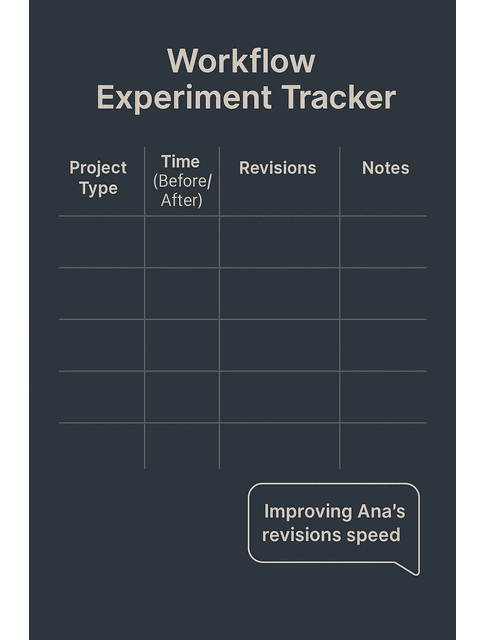
As you refine your workflows, treat them like experiments: what actually makes your business better?
When deadlines are tight, you can use automated draft generators to save time and then enhance initial drafts with AI tools before final edits. For deeper polish, you can fold in AI editing tools like Ginger and Autocrit for deeper revisions, and proofread with AI before your final human pass to catch lingering issues, using the grammar, style, and readability workflow you set up previously.
Meanwhile, keep an eye on measurable outcomes:
- Time per draft: Are you shaving off 20–30% without quality loss?
- Revision rounds: Are clients asking for fewer edits?
- Stress levels: Do you feel calmer starting and finishing projects?
- Results: Are clients seeing better engagement, rankings, or conversions?
Use this data to adjust your AI Writing Workflows instead of guessing.
Example
For example, imagine Ana, a freelance SaaS writer who used to spend 6 hours on a 1,500-word blog post—2 hours on research, 2 on drafting, and 2 on editing. After she builds a simple AI workflow like the one in Section 2.2, she tracks three projects and spots a clear pattern: she cuts research to 1 hour by using AI summaries, trims drafting to 90 minutes by leaning on AI starter text, and limits editing to about 1 hour because her tools catch most grammar and readability issues in a single pass. Her total time per article drops to roughly 3.5 hours, clients ask for fewer revisions, and she ends her day feeling less drained. That kind of concrete feedback shows her the workflow works and gives her the confidence to roll it out to more clients and raise her rates.
Evolve Your AI Writing Productivity System as Your Business Grows
As your business matures, so will your workflows.
Every serious content project should include SEO optimization basics in your workflow so you can maximize SEO with AI content tools rather than relying on guesswork. You can run competitor content analysis with AI research tools to see what’s working in your niche, then finalize content for publication with a simple AI-assisted checklist that keeps technical details under control.
Done right, you’ll consistently create compelling content with AI idea tools and prompts and optimize the writing process from idea to SEO. You’ll explore AI in content creation, from tools to practical techniques that match your style. You’ll naturally leverage AI for content structuring and outlining to streamline the path from draft to publication, with AI quietly supporting you in the background.
Over time, your stack and workflows will evolve—but you’ll always keep the same priorities: reduce friction, protect your focus, and deliver strong work without burning yourself out.
Final Thoughts
The goal of AI Writing Workflows isn’t to turn you into a content factory; it’s to give your nervous system a break. When you have clear, repeatable systems for research, drafting, editing, and SEO, you stop spending energy on chaos and start spending it on craft and strategy.
Start tiny: one service, one simple workflow, one or two tools. Refine that until it feels smooth. Then extend it to other offers. As your stack and habits mature, you’ll notice something important: you feel less scattered, you have more capacity for high-value projects, and you can grow your business without turning every week into a sprint.
That’s what a sustainable, AI-assisted freelance career looks like: more control, less exhaustion, and a writing practice that can actually last.
If you want a practical guide to AI writing workflows that reduce chaos, explore my books on Amazon. They show simple systems for research, drafting, editing, and SEO—so you can work with more control and less exhaustion. Visit my Amazon Author page to pick the guide that fits how you want to work next.
Frequently Asked Questions About AI Writing Workflows for Freelancers
AI writing workflows are step-by-step processes that combine your usual writing stages with specific AI tools that support each step. Instead of using AI at random, you decide when and how it helps so your work is faster, more consistent, and less stressful.
Not if you stay in charge. You protect your voice by feeding AI clear examples, using a simple style guide, and always editing outputs to match your tone. AI’s job is to remove friction, not to replace your perspective or personality.
You can do a lot with a small stack. The key is to choose simple AI tools for each stage rather than chasing every new app.
Start with one project type and one workflow. Map your process in plain language, then add AI to the worst pain points. As you get comfortable and build confidence as you integrate AI into your writing, extend the same pattern to other services.
Yes. When you can explain your AI-powered writing system, show how you improve quality and speed, and back it up with smoother delivery and better results, you move from “order taker” to strategic partner.

Florence De Borja is a freelance writer, content strategist, and author with 14+ years of writing experience and a 15-year background in IT and software development. She creates clear, practical content on AI, SaaS, business, digital marketing, real estate, and wellness, with a focus on helping freelancers use AI to work calmer and scale smarter. On her blog, AI Freelancer, she shares systems, workflows, and AI-powered strategies for building a sustainable solo business.


Pingback: Best Writing Tools for Authors: Top AI Picks - The AI Freelancer
Pingback: Best AI Writing Tools: Smarter Freelance Workflows - The AI Freelancer
Pingback: AI Tools for Writers: Match the Right Tool to Your Goals - The AI Freelancer
Pingback: Cheap AI Content Generators That Work - The AI Freelancer
Pingback: AI Writing Customization: A Freelancer’s Guide to Style - The AI Freelancer
Pingback: AI Content Personalization: A Guide for Freelance Writers - The AI Freelancer
Pingback: AI Writing Templates: Boost Freelance Writing Efficiency Fast - The AI Freelancer
Pingback: AI Writing Courses: Best Online Classes and Webinars - The AI Freelancer
Pingback: AI Writing Community: Connect, Learn, and Boost Your Workflow - The AI Freelancer
Pingback: AI Writing Tool Troubleshooting: Fix Common Issues Fast - The AI Freelancer
Pingback: AI Writing Tools: Build Confidence and Boost Your Skills - The AI Freelancer
Pingback: Grammar Mistakes for Freelance Writers: Fix Them Fast - The AI Freelancer